
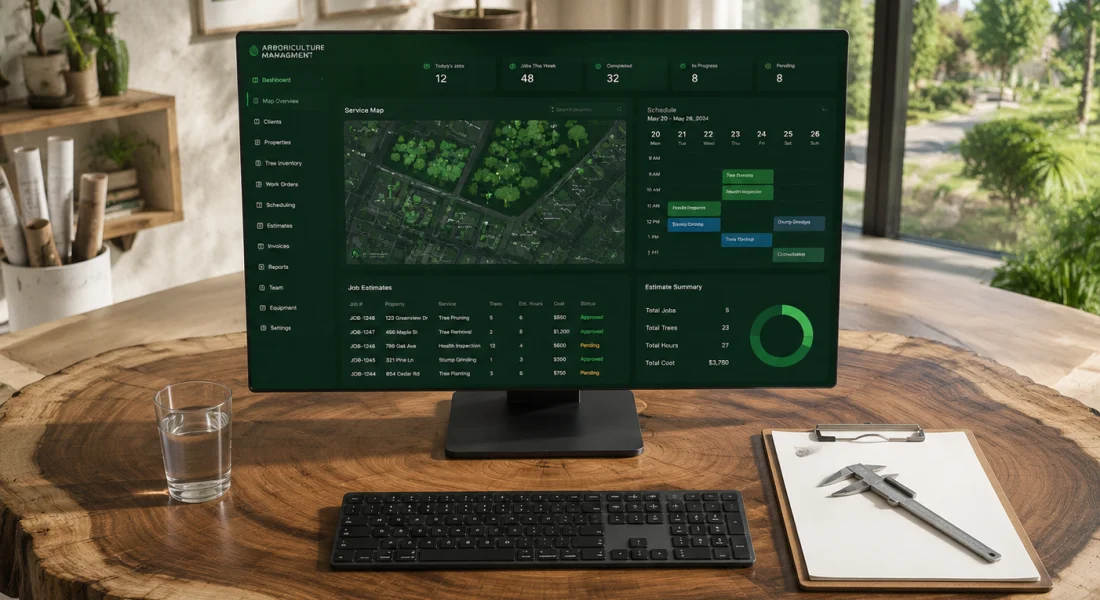
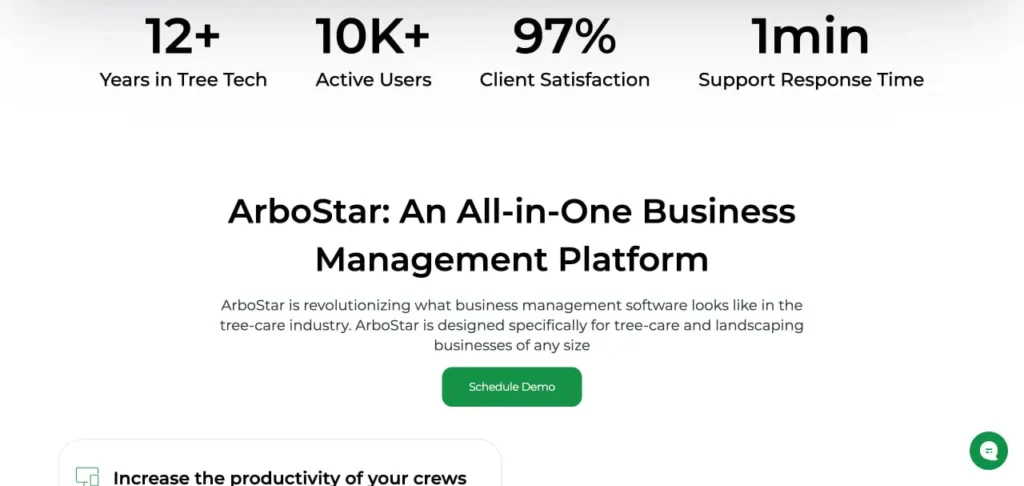
简要总结: ArboStar is a comprehensive business management platform built exclusively for tree service and arborist companies, offering scheduling, CRM, invoicing, GPS tracking, and tree-specific tools like GIS mapping and ISA compliance documentation. With pricing starting around $150–$200 per month depending on users and modules, it serves operations from solo arborists to enterprise-level companies managing 20+ crews. The platform earns a 4.8-star rating on Capterra with over 10,000 active users and provides 24/7 support, offline functionality, and industry-specific features competitors can’t replicate.
Running a tree service company means juggling estimates in the field, scheduling multi-day jobs, tracking crews across job sites, and keeping clients updated—all while dealing with unpredictable weather and urgent storm calls.
Generic field service software wasn’t built for that. It doesn’t know what a bucket truck is, can’t track individual trees, and has no clue about ISA standards or PHC protocols.
ArboStar claims to solve this by offering a platform built by arborists, for arborists. But does it actually deliver? And more importantly, is it worth the investment for your tree care operation?
This review breaks down everything: features, pricing, real-world usability, mobile capabilities, integrations, and how ArboStar stacks up against alternatives like Jobber, Arborgold, and SingleOps.
What Is ArboStar? Platform Overview
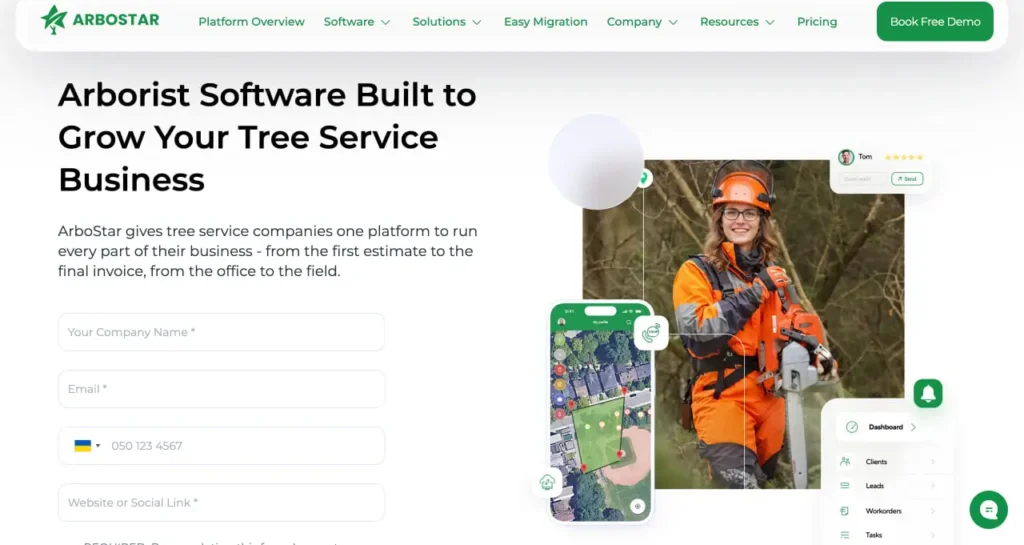
ArboStar is an all-in-one business management platform designed exclusively for tree care and arborist companies. According to the official website, it gives tree service businesses a single platform to manage every part of operations—from the first estimate to the final invoice, from the office to the field.
The platform has been in the tree tech space for over a decade, serving more than 10,000 active users worldwide. It covers scheduling, CRM, estimating, invoicing, GPS tracking, crew management, client communication, and payment processing.
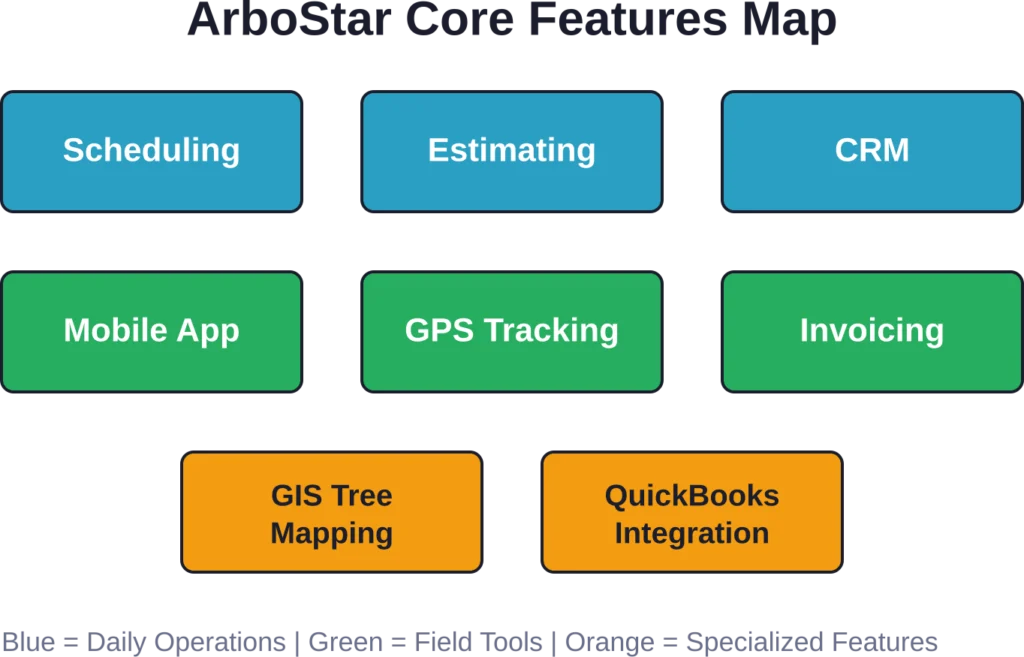
But here’s what sets ArboStar apart: tree-specific functionality. GIS-based tree mapping, per-tree health history, ISA-standard compliance documentation, and fleet management tools that generic platforms like Jobber simply don’t offer.
ArboStar positions itself for businesses of all sizes—solo arborists, small crews, and enterprise operations managing 20+ teams. The company provides 24/7 customer support via phone, email, and live chat, plus dedicated account managers during onboarding.
Process Geospatial Images Faster With FlyPix AI
Reviewing drone and satellite imagery manually can be slow, especially when working with large datasets. FlyPix AI helps automate image annotation, object detection, and classification, making geospatial analysis more efficient.
想要更快的图像分析?
FlyPix AI 可以提供帮助:
- 无人机图像分析
- 卫星图像处理
- object detection and monitoring
- 自定义人工智能模型训练
👉 试试 FlyPix AI to see how it can support your geospatial workflows.
核心功能详解
Let’s dig into what ArboStar actually offers—and where it shines compared to general field service tools.
Scheduling & Dispatch
Drag-and-drop calendar interface for assigning jobs to crews. Multi-day job support with equipment allocation (bucket trucks, chippers, stump grinders). Real-time updates sync between office staff and field teams.
The scheduling view shows crew availability, job status, and equipment conflicts at a glance. Dispatchers can reassign jobs on the fly when weather hits or emergencies pop up.
Tree-Specific Estimating
This is where ArboStar separates itself from Jobber or ServiceTitan. The estimating module lets you build detailed tree inventories—species, DBH, condition, recommended work scope—directly inside each quote.
Example: “Tree #1: White Oak, 24″ DBH, crown reduction per ANSI A300, $850.” That level of detail keeps bids professional and protects you if scope questions come up later.
Estimates sync to the customer portal where clients can review services, view photos, and approve with a digital signature—no back-and-forth emails or paper forms.
CRM & Lead Management
ArboStar’s CRM tracks every client interaction: calls, emails, estimates sent, jobs completed, invoices paid. Lead pipeline views show where each prospect sits in your sales process.
Automated follow-ups keep leads warm without manual effort. If a client doesn’t respond to an estimate in five days, the system can trigger a reminder email automatically.
Full job history lives under each client record, so when Mrs. Thompson calls about that oak you pruned two years ago, her entire account—notes, photos, past invoices—pulls up instantly.
Mobile App & Offline Functionality
ArboStar’s mobile app works on iOS and Android. Crews can clock in/out, view job details, update statuses, capture before/after photos, collect signatures, and create invoices—all from their phones.
Offline mode is a game-changer for tree work. Many job sites have weak cell coverage or none at all. The app caches job data locally, lets crews work offline, then syncs everything back when connectivity returns.
No more paper clipboards or “I’ll update that when I get back to the truck.” Real-time field updates mean the office always knows where crews are and what’s happening.
GPS Tracking & Fleet Management
Built-in GPS shows live crew locations on a map. Dispatchers can see which team is closest to an emergency call or verify arrival times without texting drivers.
Fleet management tools track vehicle maintenance schedules, fuel logs, and mileage. Useful for operations with multiple trucks and equipment trailers.
Invoicing & Payment Processing
Generate invoices directly from completed jobs with one click. Clients receive invoices via email with an embedded payment link.
Integrated payment processing accepts credit cards, ACH transfers, and digital wallets. Clients can pay online through the customer portal without calling the office or mailing checks.
Automated reminders for overdue invoices reduce collections headaches. According to the official terms, overdue invoices accrue late fees at 1.5% per month or the maximum rate permitted by law.
GIS Tree Mapping
This feature is ArboStar’s crown jewel for municipal contracts and large property management accounts. Map individual trees on satellite imagery, tag each with species, health status, treatment history, and GPS coordinates.
Urban forestry teams and consulting arborists rely on this for long-term tree inventories. Competitors like Jobber don’t have anything comparable.
QuickBooks Integration
Two-way sync with QuickBooks Online and QuickBooks Desktop. Invoices, payments, customers, and expenses flow automatically between systems.
This eliminates double-entry and keeps your books accurate without manual reconciliation. Many tree service owners cite this integration as a deciding factor when choosing ArboStar.
Pricing Structure
ArboStar doesn’t publish fixed pricing on its website. Pricing is custom-quoted based on your company size, number of users, and which modules you need.
Based on third-party analysis from Kore Komfort Solutions published in May 2026, According to third-party analysis, ArboStar pricing starts from around $250/mo with custom scaling by users and modules.
Here’s what that means in practice: a solo arborist or two-person crew might land closer to $150/month. A company running five crews with office staff could see quotes in the $300–$500 range. Enterprise operations with 20+ crews likely pay significantly more, though ArboStar offers volume discounts at higher seat counts.
According to the official terms and conditions, payment obligations are non-cancelable during the subscription term, fees paid are non-refundable, and quantities purchased cannot decrease below 80% of the initial number of users during the contract period. ArboStar can increase fees by up to 10% annually after the first year.
The lack of transparent pricing frustrates some buyers who prefer to compare costs upfront without a sales call. That said, custom pricing lets ArboStar tailor plans to specific business needs rather than forcing everyone into rigid tiers.
Real User Feedback & Ratings
ArboStar holds a high rating on Capterra with verified reviews, according to the Kore Komfort Solutions analysis. The platform reportedly maintains a 97% client satisfaction rate and serves over 10,000 active users globally.
Common praise in user feedback:
- Tree-specific features save time compared to generic tools
- Mobile app works reliably in the field, even offline
- Customer support is responsive and knowledgeable about tree care workflows
- QuickBooks integration eliminates double-entry bookkeeping
- Scheduling and dispatching streamline daily operations
Common complaints:
- Learning curve can be steep for less tech-savvy team members
- Interface feels dated compared to modern SaaS tools
- Custom pricing requires a sales conversation instead of instant signup
- Some features require configuration and training to unlock full value
One user review highlighted tracking progress toward growth goals, noting the platform enabled better visibility into business performance. Another mentioned the mobile app’s reliability for creating estimates and managing work orders in remote locations.
ArboStar vs. Competitors
How does ArboStar compare to other tree service and field service platforms?
ArboStar vs. Jobber
Jobber is a general home services platform popular with small tree care companies. It’s faster to set up and easier to learn than ArboSstar, with a clean, modern interface.
But Jobber lacks tree-specific tools. No GIS mapping, no per-tree inventory, no ISA compliance documentation, no fleet management. Jobber works fine for basic scheduling and invoicing, but it can’t handle the specialized workflows larger tree companies need.
According to the Kore Komfort Solutions comparison, Jobber fits 1–8 crew operations that prioritize ease of use over arborist-specific functionality. ArboStar fits companies that need professional tree inventories, detailed plant health records, or municipal contract compliance.
ArboStar vs. Arborgold
Arborgold has been a staple in the tree care industry for years, known for robust estimating and reporting. It offers strong tree-specific features and deep customization.
However, many users find Arborgold’s interface slower and more complex than ArboStar. The learning curve is steeper, and the software can feel clunky compared to modern cloud-based platforms.
ArboStar’s advantage: faster mobile performance, better offline functionality, and a more intuitive scheduling interface. Arborgold’s advantage: extremely detailed reporting and longer industry track record.
ArboStar vs. SingleOps
SingleOps is another tree care and landscaping platform with strong estimating and client communication tools. It’s mobile-web focused and offers good field functionality.
The platforms are similar in scope, but SingleOps caters more to diversified green industry businesses (lawn care, landscaping, tree care), while ArboStar focuses exclusively on arborists and tree services.
ArboStar’s GIS mapping and tree inventory tools are more advanced. SingleOps counters with slightly lower entry pricing and a broader feature set for non-tree services.
ArboStar vs. ArborDash
ArborDash positions itself as a transparent, flat-rate alternative. According to ArborDash’s own comparison page, they charge $400/month for unlimited users with all features included—no per-seat pricing, no custom quotes.
ArborDash touts advantages like white-label branding, custom domains, and AI call transcription. ArboStar counters with mature GIS tree mapping, longer industry presence, and a larger user base.
For small operations (1–3 crews), ArboStar’s entry pricing may be lower. For larger teams (10+ users), ArborDash’s flat rate could save money. The choice hinges on feature priorities and growth trajectory.
| 特征 | ArboStar | Jobber | Arborgold | SingleOps |
|---|---|---|---|---|
| Tree-Specific Estimating | ✅ Full per-tree inventory | ❌ Generic line items | ✅ Detailed tree data | ✅ Tree-focused |
| GIS Tree Mapping | ✅ Advanced mapping | ❌ Not available | ✅ Basic mapping | ✅ Mapping available |
| Offline Mobile App | ✅ Full offline mode | ⚠️ Limited offline | ✅ Offline capable | ⚠️ Requires connection |
| QuickBooks Integration | ✅ Two-way sync | ✅ Two-way sync | ✅ Two-way sync | ✅ Integration available |
| GPS Fleet Tracking | ✅ Built-in tracking | ✅ GPS available | ⚠️ Limited | ✅ Fleet tracking |
| 定价透明度 | ❌ Custom quotes | ✅ Published tiers | ❌ Custom quotes | ❌ Sales-quoted |
| Ideal Company Size | Solo to 20+ crews | 1–8 crews | Established mid-size | Small to mid-size |
Mobile App Deep Dive
Field crews make or break software adoption. If the mobile app is clunky, slow, or unreliable, crews revert to paper and the whole system fails.
ArboStar’s mobile app is available on both the App Store and Google Play. It’s designed as a complete operations hub, not just a lightweight companion to the desktop platform.
Key mobile capabilities:
- View daily schedule and job details
- Navigate to job sites with integrated maps
- Clock in/out with GPS timestamp
- Create and edit estimates on-site
- Capture photos and attach to jobs
- Update job status in real time
- Collect client signatures
- Generate and send invoices
- Accept payments via integrated processing
- Access client history and notes
The offline functionality deserves emphasis. Tree work often happens in rural areas, wooded properties, or during storm emergencies when cell towers are down. ArboStar caches job data locally so crews can work without connectivity, then syncs automatically when internet returns.
This prevents the “I couldn’t update the job because I had no signal” excuse that plagues cloud-dependent systems.
User feedback consistently highlights the mobile app as ArboStar’s strongest asset. One testimonial mentioned boosting crew productivity and delivering better client experiences thanks to real-time field updates.
Customer Support & Onboarding
ArboStar emphasizes support as a differentiator. According to the official support page, the company provides 24/7 customer assistance via email, phone, live chat, and development support worldwide.
New customers receive a dedicated account manager to guide setup and training. This hands-on approach helps teams get comfortable with the platform faster than self-service onboarding alone.
The company emphasizes immediate support availability on its homepage—likely referring to immediate chat availability rather than literal instant resolution of every issue. Real-world response quality varies by complexity and time zone.
ArboStar also maintains a knowledge base (help.arbostar.com) with documentation on features like estimate confirmation, customer portal access, and module configuration.
Support quality matters more for ArboStar than simpler tools like Jobber because ArboStar’s feature depth requires more training. Teams that invest in proper onboarding see faster adoption and better ROI.
Integration Ecosystem
ArboStar integrates with several third-party platforms to extend functionality:
- QuickBooks Online & Desktop: Two-way sync for invoices, payments, customers, and expenses
- Gusto: Payroll integration for crew time tracking and wage calculation
- Payment Processors: Accept credit cards, ACH, and digital wallet payments through the customer portal
- Email & SMS: Automated client communication for estimate delivery, appointment reminders, and payment notifications
The QuickBooks integration is the most critical for most tree service companies. It eliminates manual data entry and keeps financial records accurate without reconciliation headaches.
Some competitors offer broader integration libraries. Jobber, for example, connects with more third-party apps through Zapier. ArboStar focuses on fewer, deeper integrations tailored to tree care workflows.
Who Should Choose ArboStar?
ArboStar makes the most sense for:
- Tree care companies that need tree-specific functionality (GIS mapping, per-tree inventory, ISA compliance)
- Operations with 3+ crews that require GPS tracking, fleet management, and dispatch coordination
- Companies pursuing municipal contracts or commercial property management accounts requiring detailed tree inventories
- Businesses that value offline mobile capability for remote job sites
- Teams comfortable with a moderate learning curve in exchange for powerful features
ArboStar may not be the best fit for:
- Solo arborists or very small operations (1–2 people) who need only basic scheduling and invoicing—Jobber or simpler tools cost less and are easier to learn
- Companies that prioritize transparent, published pricing over custom quotes
- Teams with limited tech skills who need the absolute simplest interface
- Businesses that need white-label branding or custom domain features (ArborDash offers this; ArboStar doesn’t)
The decision often comes down to specialization versus simplicity. Generic tools are easier and cheaper to start. Arborist-specific platforms like ArboStar require more investment upfront but pay off for companies that lean into tree-focused workflows.
Pros & Cons Summary
| 优点 | 缺点 |
|---|---|
| Built exclusively for tree care industry | Steeper learning curve than generic tools |
| GIS tree mapping and per-tree inventory | No transparent published pricing |
| Strong offline mobile functionality | Interface feels dated compared to newer SaaS platforms |
| QuickBooks two-way integration | Requires sales conversation instead of instant signup |
| 24/7 customer support with dedicated account managers | Contracts are non-cancelable with non-refundable fees |
| GPS tracking and fleet management | User quantities cannot drop below 80% during subscription |
| 10,000+ active users, 4.8-star rating | Annual fee increases up to 10% permitted after year one |
| Works for solo arborists through enterprise operations | Feature depth requires training to unlock full value |
常见问题
ArboStar uses custom pricing based on company size, number of users, and modules selected. Third-party analysis from May 2026 indicates pricing typically starts around $150–$200 per month, with scaling costs for larger teams. The company doesn’t publish fixed pricing publicly, so you’ll need to contact sales for a quote tailored to your business.
Yes. ArboStar’s mobile app includes full offline functionality. Crews can view schedules, track time, create estimates, capture photos, update job statuses, and collect signatures without internet connectivity. Data syncs automatically when the device reconnects to the network, making it ideal for remote job sites and storm work.
Yes. ArboStar offers two-way integration with both QuickBooks Online and QuickBooks Desktop. Invoices, payments, customers, and expenses sync automatically between systems, eliminating manual data entry and keeping financial records accurate without reconciliation work.
ArboStar’s official website and comparison sources don’t mention a standard free trial period. The company offers product tours and demo sessions to evaluate the platform before committing. Contact ArboStar directly to inquire about trial options or demo access.
Jobber is easier to set up and learn, with a cleaner interface and published pricing. But it lacks tree-specific features like GIS mapping, per-tree inventory, ISA compliance tools, and advanced fleet management. ArboStar requires more training but delivers specialized functionality larger tree care operations need. Jobber fits small operations (1–8 crews) prioritizing simplicity; ArboStar fits companies needing professional tree documentation and municipal contract capabilities.
ArboStar offers 24/7 customer support via phone, email, and live chat. New customers receive a dedicated account manager for onboarding and training. The company maintains a knowledge base for self-service help and provides development support globally. Support quality is a highlighted differentiator versus self-service-only competitors.
Yes. ArboStar’s GIS tree mapping, per-tree health history, and ISA-standard compliance documentation make it well-suited for municipal contracts and urban forestry work. The platform lets you maintain detailed tree inventories with GPS coordinates, species data, and treatment records—requirements many government contracts demand.
According to ArboStar’s official terms and conditions, user quantities cannot decrease below 80% of the initial number defined in your order form during the subscription term. Contracts are non-cancelable and fees are non-refundable, so plan your user count carefully when signing up.
Final Verdict: Is ArboStar Worth It?
ArboStar delivers on its promise to provide a comprehensive, tree-focused business management platform. The combination of scheduling, CRM, mobile functionality, tree inventory, and QuickBooks integration gives tree service companies the tools they need to run professional, scalable operations.
The platform isn’t perfect. The interface could use modernization, pricing transparency would reduce friction, and the learning curve intimidates less tech-savvy teams.
But for tree care companies that need specialized functionality—GIS mapping, ISA compliance documentation, fleet management, offline mobile work—ArboStar delivers features competitors simply can’t match.
Starting from around $250/mo according to third-party comparison analysis, ArboStar sits in the middle of the market price-wise. It costs more than basic tools like Jobber but less than some enterprise platforms. The investment makes sense for operations with 3+ crews, growing revenues, or specialized client requirements.
The 4.8-star rating on Capterra, 10,000+ active users, and 97% client satisfaction rate suggest most customers find value worth the price. The key is proper onboarding, training your team thoroughly, and actually using the tree-specific features that justify the cost.
If you’re running a serious tree care business and tired of generic software that doesn’t understand your industry, ArboStar deserves a demo. Just go in knowing you’ll need to invest time upfront to unlock its full potential.