
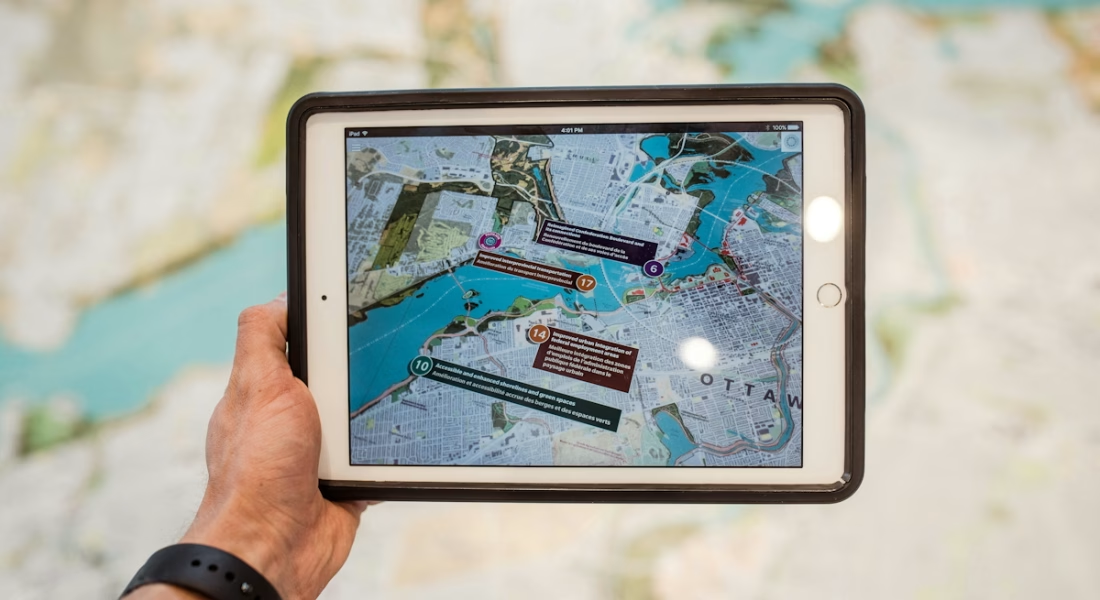
In today’s world, geospatial data isn’t just about pinning points on a map anymore-it’s the backbone for smarter decisions across countless fields. Platforms at the forefront combine vast satellite and drone imagery with advanced processing to spot patterns, track changes over time, and predict trends with impressive accuracy. The real game-changer? Many now integrate AI to automate tedious tasks like object detection or land classification, slashing processing time from days (or weeks) down to minutes while keeping results reliable even in dense or messy scenes.
What sets the top contenders apart is how accessible they’ve become-no need for deep coding skills or massive hardware setups. Cloud-based options let teams collaborate in real time, customize models for specific needs, and pull in multispectral or high-res data effortlessly. Whether it’s monitoring crop health in agriculture, spotting maintenance issues on infrastructure, or supporting conservation efforts, these solutions adapt to fit unique workflows and deliver results that drive real impact.
Popular Geospatial Data Solutions Tools
Geospatial data solutions include tools that process satellite, drone, and aerial imagery or location data to support mapping, monitoring, and analysis. Some emphasize AI for quick object detection in complex scenes, others focus on 3D visualization, site management with live inputs, or offline navigation for field and outdoor work. They aim to make spatial information easier to handle so decisions can move faster, whether in professional projects or personal exploration.

1. FlyPix AI
We built FlyPix AI as a platform that lets users analyze satellite, aerial, and drone imagery with AI agents doing the heavy lifting for detection, monitoring, and inspection at scale. The system spots and outlines objects in geospatial images fast, even when scenes get dense or complicated, and turns visual data into something structured and ready to use without endless manual clicking. Anyone can train custom models simply by adding their own annotations for whatever they need to track – no coding involved at all.
What we noticed early on is how much time this kind of automation frees up. Tasks that used to drag on for minutes or hours now finish in seconds for many cases, which matters a lot when you’re dealing with large areas or frequent updates. Construction sites, farms, forests, infrastructure crews – different fields find ways to apply it for things like land-use changes or asset checks. We keep the free trial open so people can jump in and see how it fits their workflow, and once custom training starts, the platform shifts to match exactly what the project calls for. It’s straightforward enough that you don’t have to be a GIS expert to get solid results.
Key Highlights:
- AI agents handle object detection across imagery
- Custom model training using user annotations
- Quick processing for satellite, aerial, and drone data
- No programming required to create models
- Built-in time comparison showing manual vs AI annotation
Services:
- Geospatial data solutions
- Automated object detection and outlining in geospatial images
- Custom AI model training for specific use cases
- Change detection and monitoring over time
- Land classification and asset inspection at scale
- Fast analysis of dense or complex scenes
- Integration of multiple imagery sources
Contact Information:
- Website: flypix.ai
- Email: [email protected]
- Phone: +49 6151 2776497
- Address: Robert-Bosch-Str. 7, 64293 Darmstadt, Germany
- LinkedIn: www.linkedin.com/company/flypix-ai

2. ArcGIS Pro
ArcGIS Pro serves as a full-featured desktop GIS application from Esri. Users install it on Windows machines only, and it handles advanced mapping along with analytics and data management tasks. The software fits into the broader ArcGIS platform, giving access to various geoprocessing tools for working with spatial data.
People often turn to it when they need detailed control over workflows, including options to automate processes or adjust the interface for specific jobs. A free trial runs for twenty-one days, which includes certain user types and credits for getting started. Paid versions tie into different license levels that unlock additional editing or analysis functions.
Key Highlights:
- Desktop application requiring Windows installation
- Handles mapping, data management, and analysis
- Supports automation of GIS tasks
- Offers flexible access to large datasets and imagery
- Includes trial with limited user types and credits
Services:
- Advanced desktop mapping and geoprocessing
- Workflow automation and interface customization
- Data management and large imagery handling
- Spatial analysis with extensive toolsets
- Integration within the ArcGIS platform
Contact Information:
- Website: www.esri.com
- Phone: +19097932853
- Address: 380 New York Street, Redlands, California, United States of America
- LinkedIn: www.linkedin.com/company/esri
- Facebook: www.facebook.com/esrigis
- Twitter: x.com/Esri

3. QGIS
QGIS stands out as free open-source GIS software that runs on Windows, Mac, and Linux without any licensing costs. It covers everything from making detailed maps to editing layers and running analysis. The interface stays customizable, and plugins extend what it can do for different projects.
Cartography tools let users design for print or digital outputs, while editing features handle precise digitizing of points, lines, and polygons. Analysis stays integrated, with ways to chain tools into workflows or pull in third-party additions. Sharing options support various formats and standards for moving work to web or mobile.
Key Highlights:
- Completely free and open-source
- Cross-platform support across major operating systems
- Strong cartographic and layout design options
- Advanced editing and geometry tools
- Extensible through plugins and community contributions
- Broad data format and standards compatibility
Services:
- Professional cartography and map layout design
- Precise vector digitizing and geometry editing
- Integrated spatial analysis and processing toolbox
- Workflow chaining and model building
- Data format conversion and web/mobile publishing
- Plugin-based extensibility
Contact Information:
- Website: qgis.org
- Email: [email protected]
- Facebook: www.facebook.com/people/QGIS/100057434859831

4. Google Earth Engine
Google Earth Engine functions as a cloud-based platform geared toward Earth science data and large-scale analysis. It draws on Google’s infrastructure to process satellite imagery and other geospatial datasets at a massive scale. Scientists and developers rely on it for spotting surface changes or tracking long-term trends.
The catalog holds decades of historical imagery along with scientific layers that get regular updates. Access happens through Python or JavaScript APIs, which suit code-driven workflows rather than point-and-click interfaces. Non-commercial and research use stays free, while commercial applications require separate arrangements.
Key Highlights:
- Cloud-powered with planetary-scale processing
- Multi-petabyte archive of satellite and geospatial data
- APIs in Python and JavaScript
- Free for academic and research purposes
- Supports change detection and time-series analysis
Services:
- Large-scale satellite imagery processing
- Time-series change detection and trend analysis
- Access to historical geospatial archives
- Scripted analysis via Python/JavaScript APIs
- Environmental and Earth science modeling
Contact Information:
- Website: earthengine.google.com
- Address: 12396 Grant St, Thornton, CO 80241
- LinkedIn: www.linkedin.com/company/google
- Facebook: www.facebook.com/Google
- Twitter: x.com/google
- Instagram: www.instagram.com/google

5. Mapbox
Mapbox provides a location platform built around APIs and SDKs for creating maps, navigation, and search experiences. Developers use it to build customizable maps for web, mobile, automotive, or AR applications. It includes routing with traffic considerations and precise place searching.
The service offers ready-made styles alongside options to tweak visuals, including recent additions like detailed building appearances or road lane data. A free tier exists for getting started, with paid plans scaling up for heavier use. It sees adoption in navigation systems and location-aware features.
Key Highlights:
- APIs and SDKs for maps, navigation, and search
- Customizable styles and live data integration
- Support for web, mobile, automotive, and AR
- Free tier available to start
- Features like traffic-aware routing and 3D details
Services:
- Custom map rendering for web and mobile
- Traffic-aware navigation and routing
- Location search and geocoding
- 3D and AR map experiences
- Automotive navigation integration
Contact Information:
- Website: www.mapbox.com
- LinkedIn: www.linkedin.com/company/mapbox
- Twitter: x.com/mapbox
- Instagram: www.instagram.com/mapbox

6. CARTO
CARTO operates as a cloud-native GIS platform focused on keeping data in existing cloud setups like Oracle without moving it around. It offers tools for analytics, visualization, and even AI agents that let users interact with maps through natural language. The setup aims at making spatial work available to analysts, developers, and others without silos or extra ETL steps.
Low-code analysis comes through drag-and-drop components, some with machine learning baked in, and APIs handle automation when needed. Visualization handles large point counts and provides instant insights via AI helpers. Free trials exist to test it out, with demos for deeper looks.
Key Highlights:
- Stays fully cloud-native
- Integrates with existing cloud ecosystems
- Drag-and-drop spatial analysis
- Natural language map interactions
- AI agents for automation
- App development tools included
Services:
- Cloud-native spatial analytics
- Low-code drag-and-drop analysis components
- Natural language querying of maps
- AI agent-driven automation
- Large-scale data visualization
- Location intelligence app building
Contact Information:
- Website: carto.com
- Email: [email protected]
- Facebook: www.facebook.com/CartoDB
- LinkedIn: www.linkedin.com/company/carto
- Twitter: x.com/CARTO

7. GRASS GIS
GRASS GIS acts as an open-source computational engine built for raster, vector, and general geospatial processing. It covers terrain modeling, hydrology, ecosystem work, data management, and imagery tasks. A temporal framework handles time series, while the Python API opens up scripting for custom analysis on different hardware.
Downloads come free, and the project ties into the Open Source Geospatial Foundation along with NumFOCUS sponsorship. Community resources exist for learning and support, plus options to contribute code. Recent releases keep it updated for ongoing use.
Key Highlights:
- Free and open-source
- Strong raster and vector processing
- Built-in temporal analysis framework
- Python API for scripting
- Suited for large-scale computations
Services:
- Raster and vector geospatial processing
- Terrain and hydrological modeling
- Time-series and temporal data analysis
- Python-based scripting and automation
- Large-scale environmental computations
Contact Information:
- Website: grass.osgeo.org
- Email: [email protected]
- Address: 14525 SW Millikan #42523, Beaverton, Oregon, United States
- Linkedin: www.linkedin.com/company/grass-gis
- Twitter: x.com/grassgis

8. GeoMedia
GeoMedia functions as a GIS management platform from Hexagon that pulls data from different sources into one view for analysis and mapping. It combines tabular and geographic info to create maps that support decisions like traffic studies or site selection. Access happens to various data forms without conversion hassles in many cases.
The tool fits workflows in utilities, cities, public safety, transportation, and defense where quick integration matters. Support resources include tutorials, case studies, and technical docs through an online portal. Pricing requires a request since no public list appears.
Key Highlights:
- Aggregates data from multiple sources
- Unified map view for processing
- Supports dynamic data updates
- Analytical tools for actionable outputs
- Used in utilities, safety, and transportation
Services:
- Multi-source data integration and unification
- Dynamic geospatial analysis and mapping
- Actionable intelligence for decision support
- Workflow support for utilities and infrastructure
- Public safety and transportation analytics
Contact Information:
- Website: hexagon.com
- Phone: +46 8 601 26 20
- Address: Lilla Bantorget 15, SE-111 23 Stockholm, Sweden
- LinkedIn: www.linkedin.com/company/hexagon-ab
- Facebook: www.facebook.com/HexagonAB
- Twitter: x.com/HexagonAB
- Instagram: www.instagram.com/hexagon_ab

9. ENVI
ENVI handles image processing and analysis for geospatial data, focusing on extracting information from various imagery types. It supports hyperspectral, multispectral, thermal, LiDAR, and SAR data through patented algorithms that aim for reliable results. Built-in workflows guide users through steps like calibration, atmospheric correction, orthorectification, and registration before moving to detection or modeling tasks.
The interface keeps things straightforward with task-based tools that don’t demand deep remote sensing knowledge to get usable outputs. Integration with ArcGIS exists, and extensibility allows customization for specific projects. A quote or purchase process handles licensing, though trials aren’t detailed on the main page.
Key Highlights:
- Processes hyperspectral and multispectral imagery
- Includes automated workflows for change detection and classification
- Supports anomaly detection and feature extraction
- Offers spectral analysis tools
- Integrates with ArcGIS
Services:
- Hyperspectral and multispectral image processing and analysis
- Automated workflows for change detection and classification
- Anomaly detection and feature extraction
- Spectral analysis
- Integration with ArcGIS
Contact Information:
- Website: www.nv5geospatialsoftware.com
- Phone: +1 (303) 786-9900
- Email: [email protected]
- Address: 385 Interlocken Crescent, Suite 300, Broomfield, CO 80021, United States of America
- LinkedIn: www.linkedin.com/company/nv5geospatialsoftware
- Facebook: www.facebook.com/NV5GeospatialSoftware
- Twitter: x.com/GeoByENVI
- Instagram: www.instagram.com/geobyenvi

10. Global Mapper
Global Mapper delivers GIS processing with support for a wide range of file formats covering vector, raster, elevation, and point cloud data. The interface stays logical to help users get familiar quickly, and recent updates added things like a dockable file browser, better animation tools, and expanded format imports. Separate standard and pro versions exist, with pro including advanced lidar handling, point cloud classification, and scripting options.
Terrain analysis covers contours, viewsheds, watersheds, and volume calculations, while raster tools handle calculations like NDVI or reclassification. Batch processing and script support streamline repetitive work. A trial download is available for testing.
Key Highlights:
- Supports extensive file formats without add-ons
- Includes terrain and lidar analysis tools
- Offers vector editing and creation
- Provides 3D visualization and fly-throughs
- Features batch conversion and scripting
- Has standard and pro editions
Services:
- Processing and support for a wide range of data formats
- Terrain and point cloud analysis
- Vector feature creation and editing
- 3D visualization and fly-through recording
- Raster calculations and image processing
- Batch processing and scripting automation
Contact Information:
- Website: www.bluemarblegeo.com
- Phone: +1-207-622-4622
- Email: [email protected]
- Address: 22 Carriage Lane, Hallowell, Maine 04347 U.S.A.
- LinkedIn: www.linkedin.com/company/blue-marble-geographics
- Facebook: www.facebook.com/bluemarble.geographics
- Instagram: www.instagram.com/bluemarblegeo
Geospatial Data Companies Overview
Geospatial data solutions come from companies that build platforms, software, and services around satellite imagery, drone data, 3D visualization, location intelligence, and GIS workflows. Some specialize in AI-powered analysis of aerial and satellite photos, others focus on custom development, consulting for spatial projects, or tools that unify different data sources into actionable views. A few lean toward outdoor navigation apps or enterprise-grade mapping software that supports planning and operations across industries.
Below are several companies we’ve looked at recently. Each brings its own angle – from automated imagery processing to full GIS stacks, 3D geospatial platforms, or AI consulting services.

1. AI Superior
AI Superior operates as a German-based company that specializes in end-to-end AI application development and consulting. The company designs and builds web, mobile, and custom software products centered around complex machine learning models and algorithms. Ph.D.-level data scientists and software engineers handle the technical side from initial idea through to deployment.
Services span AI software development for tailored solutions, training programs to build internal AI skills, consulting to spot and prioritize AI opportunities, and R&D to foster data-driven practices. Computer vision covers image and video analysis like object detection or segmentation. Natural language processing tackles text tasks such as sentiment analysis or question answering. Predictive analytics forecasts trends or risks from historical and current data. BI and big data analytics turn raw sources into visualizations and real-time insights.
Key Highlights:
- End-to-end AI application development
- Consulting for AI opportunity assessment
- Training programs for AI skills
- Computer vision and image processing
- Natural language processing capabilities
- Predictive and big data analytics
Services:
- Custom AI-driven software building
- Artificial intelligence training sessions
- AI consulting and strategy guidance
- Computer vision for image/video tasks
- NLP for text and sentiment analysis
- Predictive modeling and BI solutions
Contact Information:
- Website: aisuperior.com
- Phone: +49 6151 3943489
- Email: [email protected]
- Address: Robert-Bosch-Str. 7, 64293 Darmstadt, Germany
- LinkedIn: www.linkedin.com/company/ai-superior
- Facebook: www.facebook.com/aisuperior
- Twitter: x.com/aisuperior
- Instagram: www.instagram.com/ai_superior

2. Privateer
Privateer combines satellite, terrestrial, and customer data streams into one place for analysis. Raw imagery and sensing data go through AI and machine learning processing before landing in the Elements platform where fusion and deeper analysis happen. Insights come out through a user interface or APIs and microservices depending on the application.
Elements covers land, sea, air, space, and cyber domains. It handles things like vessel tracking, supply chain monitoring, GNSS interference detection, and space domain awareness. Finance and insurance folks use it for commodities trading or risk modeling. Government and defense turn to it for illicit activity monitoring or disaster response. Energy operations apply it to pipeline watching or extraction optimization.
Key Highlights:
- Integrates satellite and terrestrial data streams
- AI/ML processing for raw imagery
- Elements platform for multi-domain fusion
- Actionable insights via UI or APIs
- Covers vessel tracking and GNSS detection
Services:
- Data fusion across land sea air space cyber
- Real-time intelligence for supply chain monitoring
- Vessel and pattern-of-life tracking
- GNSS interference detection
- Space domain awareness analytics
- Insights for finance insurance energy defense
Contact Information:
- Website: www.privateer.com
- LinkedIn: www.linkedin.com/company/privateerspace
- Twitter: x.com/privateerspace
- Instagram: www.instagram.com/privateer.space
3. Sparkgeo
Sparkgeo develops geospatial software and solutions for different organizations. Consulting applies geospatial knowledge to technical or business problems. System modernization moves legacy setups to cloud environments with custom code and automation. Platform development turns ideas into scalable products focused on clients.
Spatial analytics adds machine learning and AI to datasets for spatial context. Custom projects build tailored mapping or web map solutions. The prescient.earth lab handles workflows for petabyte-scale data from sensors, IoT, and other sources. Partnerships with Mapbox, AWS, and Satellogic provide tech and imagery support.
Key Highlights:
- Geospatial software development focus
- Consulting for technical challenges
- Cloud migration of legacy systems
- Custom mapping product creation
- Petabyte-scale data workflows
Services:
- Geospatial consulting and problem solving
- Legacy system modernization to cloud
- Scalable platform development
- Machine learning on spatial datasets
- Tailored web map solutions
- Large-scale sensor data processing
Contact Information:
- Website: sparkgeo.com
- Email: [email protected]
- LinkedIn: www.linkedin.com/company/sparkgeo
- Twitter: x.com/sparkgeo
- Instagram: www.instagram.com/sparkgeoxyz

4. Vantor
Vantor develops tools to unify spatial data on an AI-ready living globe. The company creates a spatial intelligence platform that connects sensors from space, air, and ground. Vantor automates tasking, collection management, and AI-powered analysis cycles. The Vantor constellation supplies accurate mapping products to feed into the system.
Products include Raptor for GPS resilience in autonomous systems and Sentry for persistent monitoring. Vivid offers basemaps, mosaics, terrain models, and vector features. WorldView provides tasking access to high-res satellite imagery, radar, and space views. Defense uses it for common operating pictures, intelligence for unified ISR, and commercial for mapping or monitoring.
Key Highlights:
- Unified spatial data on living globe
- Automated intelligence cycle
- Vantor constellation for mapping
- Sensor connection across domains
- Products like Raptor and Vivid
Services:
- Multi-sensor data unification
- Real-time spatial data fusion
- Automated tasking and analysis
- High-res basemaps and terrain models
- Satellite imagery tasking access
- Persistent global monitoring
Contact Information:
- Website: vantor.com
- Phone: 800.496.1225
- Email: [email protected]
- LinkedIn: www.linkedin.com/company/vantortech
- Facebook: www.facebook.com/VantorTech
- Twitter: x.com/vantortech
- Instagram: www.instagram.com/vantor_tech

5. blackshark.ai
blackshark.ai develops the Visual Earth Operating System (VEOS), a platform that ingests imagery from various sources such as satellites, aerial cameras, drones, LiDAR, or DSM data without requiring preprocessing. The company trains custom AI models to detect features, performs 2D analysis like zoning, land use, or damage classification, and reconstructs environments in 3D for outputs such as planning models or digital twins. REVEAL handles model training for specific classification tasks, while REPLIKA converts 2D results into structured 3D representations.
Blackshark.ai deploys its solutions in cloud environments, air-gapped systems, edge setups, or hybrid configurations depending on security and operational needs. The system supports batch processing of large image repositories and integrates with existing GIS software as well as Unreal Engine for visualization. Government organizations apply it to tasks like damage assessment after disasters or wildfire monitoring. Enterprise and autonomy users employ the technology for simulation environments or urban planning projects.
Key Highlights:
- Multi-source imagery ingestion
- Custom AI model training
- 2D to 3D reconstruction
- Cloud-optional deployment
Services:
- Large-scale geospatial AI processing
- Feature detection from pixel sources
- Model training for land use classification
- 3D environment reconstruction
- Integration with GIS and game engines
- Petabyte-scale data handling
Contact Information:
- Website: blackshark.ai
- Email: [email protected]
- LinkedIn: www.linkedin.com/company/blackshark-ai

6. HERE
HERE focuses on location technology that feeds real-time map data into cars, trucks, and industrial setups. The company pulls together precise map layers with live updates for things like automated driving or fleet routing. Privacy gets built in from the start – location info stays protected unless users opt in.
In practice, HERE ends up in heavy-duty spots where standard maps just don’t cut it, like private mining yards or open-pit sites with ever-changing roads. Custom routing helps avoid hazards or restricted zones. Fleet operators sometimes note it smooths out navigation in those messy, unmapped environments.
Key Highlights:
- Real-time precise location mapping
- Privacy-protected data handling
- Custom maps for private industrial areas
- Routing adapted to vehicle limits
- Integration for connected navigation
Services:
- High-accuracy mapping for mining operations
- Real-time path planning in dynamic sites
- Geofencing for safety zones
- Location data for fleet efficiency
- Custom industrial yard navigation
Contact Information:
- Website: www.here.com
- Address: Suite 240, 280 N Old Woodward Ave, Birmingham, Michigan 48009-5300, United States
- LinkedIn: www.linkedin.com/company/here
- Facebook: www.facebook.com/here
- Twitter: x.com/HERE
- Instagram: www.instagram.com/here

7. Planet
Planet runs a fleet of small satellites that snap pictures of the whole planet almost every day. PlanetScope gives broad three-meter views daily while SkySat handles closer fifty-centimeter tasking shots. Newer stuff like Owl pushes monitoring further, and mosaics stitch those frequent images into seamless layers.
Users pull daily snapshots to watch site changes, stockpiles, or nearby land use. Derived products cover soil moisture or vegetation shifts. AI spots vessels or other features automatically. It’s the consistent repeat coverage that people come back for.
Key Highlights:
- Near-daily satellite image collection
- Mix of broad and high-res imagery
- AI vessel and change detection
- Monthly mosaic composites
- Historical archive access
Services:
- Regular site monitoring for mines
- Change tracking over time
- On-demand high-detail tasking
- Soil and vegetation derived data
- Maritime activity detection
Contact Information:
- Website: www.planet.com
- Address: 645 Harrison Street, 4th Floor, San Francisco, CA 94107
- LinkedIn: www.linkedin.com/company/planet-labs
- Facebook: www.facebook.com/PlanetLabs
- Twitter: x.com/planet
- Instagram: www.instagram.com/planetlabs
8. Cesium
Cesium supplies an open platform for working with 3D geospatial data in apps. CesiumJS runs in browsers, while versions plug into Unreal and Unity engines. Cesium ion takes care of hosting, tiling, and prepping big 3D datasets for smooth streaming.
Folks layer drone shots, LiDAR, or terrain models to create digital site views. Planners use it for pit progress walkthroughs or reclamation previews. Some add live operational overlays during reviews. The developer conference in Philadelphia this June keeps the conversation going.
Key Highlights:
- Streaming large 3D datasets efficiently
- Precise globe rendering
- Unreal and Unity engine support
- Interoperable open standards
Services:
- 3D site and terrain visualization
- Drone and LiDAR data integration
- Digital twin building for operations
- Immersive 3D exploration views
- Operational data layering
Contact Information:
- Website: cesium.com
- Email: [email protected]
- Address: 601 Walnut Street, Suite 250 S, Philadelphia, PA 19106
- LinkedIn: www.linkedin.com/company/cesium-gs
- Twitter: x.com/CesiumJS

9. BlackSky
BlackSky operates satellites designed for quick-revisit imaging when timing is critical. The company develops the Spectra platform to manage tasking in minutes and apply AI analysis to images immediately upon capture. BlackSky collects multiple shots throughout the day – sometimes up to fifteen – to provide a more complete picture than a single pass can offer.
Defense and security form the primary focus, though mining operations sometimes use it for urgent imagery after weather events or to verify activity at remote sites. The repeated captures throughout the day deliver a clearer view of changes or developments. Results arrive quickly to support time-sensitive decisions.
Key Highlights:
- Rapid satellite tasking capability
- Multiple daily image passes
- Automatic AI image processing
- Time-sensitive intelligence focus
Services:
- Fast-tasked imagery for urgent needs
- Multi-pass daily site coverage
- AI change and activity detection
- Persistent monitoring of remote areas
- Rapid delivery of analyzed results
Contact Information:
- Website: www.blacksky.com
- Address: 1000 Dexter Ave N, Suite 300, Seattle, WA 98109
- LinkedIn: www.linkedin.com/company/blackskyinc
- Twitter: x.com/BlackSky_Inc

10. Propeller Aero
Propeller Aero builds a cloud platform that pulls in drone maps, machine telematics, and field data for site management. It works hardware-agnostic – drone surveys, GNSS rovers, or total stations all feed into one unified map with high-precision processing. The map-based hub connects documents, designs, and live machine positions so everyone sees the same view.
Teams overlay CAD files for markup and collaboration from field or office. Real-time telematics show machine locations, cycle times, and utilization directly on the map. Mobile access keeps things handy without needing technical know-how. Some users mention it cuts down on miscommunication across crews.
Key Highlights:
- Cloud-based unified site mapping
- Hardware-agnostic data upload
- High-precision processing alignment
- Real-time machine telematics integration
- CAD overlay and field markup tools
Services:
- Drone mapping and reality capture
- Site document management hub
- Live machine tracking and analytics
- Design file integration on maps
- Mobile site oversight and collaboration
- Reporting and progress monitoring
Contact Information:
- Website: www.propelleraero.com
- LinkedIn: www.linkedin.com/company/propeller-aero
- Facebook: www.facebook.com/propelleraero
- Instagram: www.instagram.com/propeller_aero
Conclusion
Wrapping this up, it’s pretty clear that geospatial data solutions aren’t some niche tech toy anymore – they’ve quietly become the quiet engine behind so many decisions that actually matter. Whether you’re trying to figure out where the next flood might hit hardest, optimize delivery routes in a city that’s always jammed, or just keep an eye on how forests are holding up against drought, the right tool changes everything from “this might take weeks” to “done by lunch.”
What stands out most is how much easier the whole field has gotten. You don’t need a PhD in remote sensing or a server farm in your garage to get meaningful results these days. Cloud setups, no-code interfaces, AI helpers that actually understand what you’re asking – all of it means more people can actually use location intelligence without drowning in menus or code. Sure, some platforms lean hard one way (desktop depth vs browser speed, free-and-open vs enterprise polish), but the direction is the same: faster insights, fewer headaches, bigger impact.
At the end of the day, the real win isn’t picking the “perfect” tool – it’s finding the one that fits how you already work and then quietly making you look smarter than you probably are. The tech keeps evolving fast, but the goal stays simple: turn messy piles of coordinates and pixels into answers that help people, places, and projects move forward. If you’re not using geospatial data yet, honestly, you’re probably leaving something useful on the table. And if you are? Keep pushing it – the next breakthrough is usually just one better question away.