
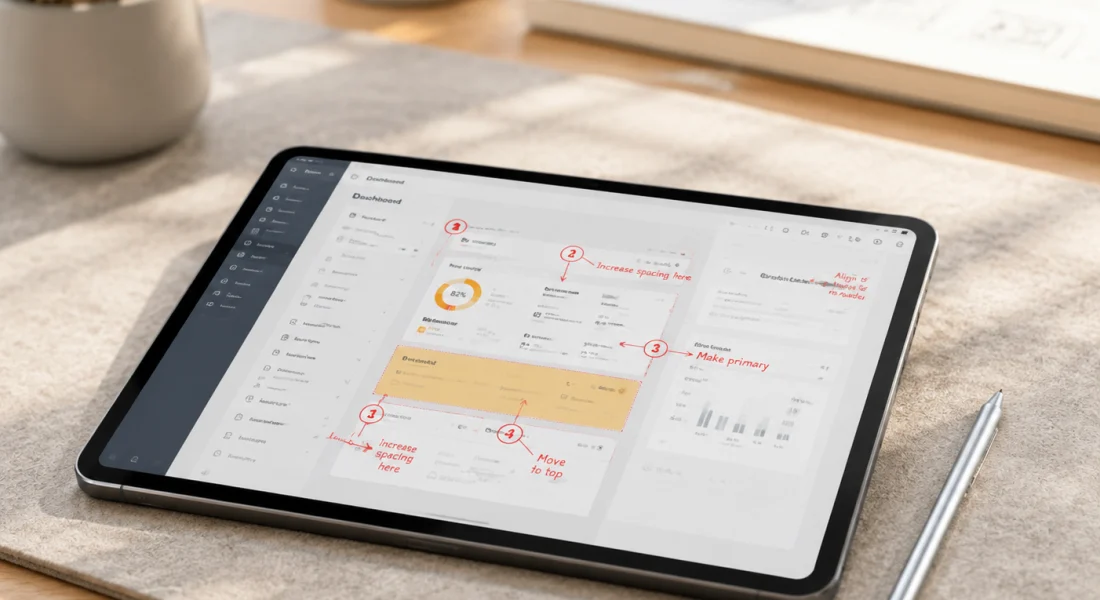
त्वरित सारांश: Annotely एक मुफ़्त, ब्राउज़र-आधारित स्क्रीनशॉट एनोटेशन टूल है जिसके लिए किसी साइनअप की आवश्यकता नहीं है और यह ब्लर, क्रमांकित चरण, तीर और टेक्स्ट सहित आवश्यक मार्कअप सुविधाएँ प्रदान करता है। इसे स्क्रीनशॉट पर त्वरित मार्कअप के लिए डिज़ाइन किया गया है, जो इसे बग रिपोर्ट, डिज़ाइन फ़ीडबैक और दस्तावेज़ीकरण वर्कफ़्लो के लिए आदर्श बनाता है जहाँ उन्नत सुविधाओं की तुलना में गति और सरलता अधिक महत्वपूर्ण होती है।.
स्क्रीनशॉट एनोटेशन टूल आधुनिक कार्यप्रवाहों के लिए अनिवार्य हो गए हैं। बग रिपोर्ट, डिज़ाइन फीडबैक, दस्तावेज़ीकरण—इन सभी में दृश्य स्पष्टता आवश्यक है। आप स्क्रीन पर कुछ कैप्चर करते हैं, लेकिन उसके बाद क्या? मार्कअप के बिना, स्क्रीनशॉट में संदर्भ का अभाव होता है।.
यहीं पर Annotely जैसे टूल काम आते हैं। यह बिना अकाउंट बनाने या सॉफ्टवेयर डाउनलोड करने की झंझट के तुरंत और मुफ्त एनोटेशन का वादा करता है। लेकिन क्या यह अपना वादा पूरा करता है?
यह समीक्षा Annotely का हर पहलू से विश्लेषण करती है: इसकी विशेषताएं, प्रदर्शन, सीमाएं और 2026 में यह अन्य विकल्पों के मुकाबले कैसा है। चाहे आप बग रिपोर्ट करने वाले डेवलपर हों, फीडबैक देने वाले डिज़ाइनर हों या गाइड बनाने वाली सपोर्ट टीम हों, सही एनोटेशन टूल संशोधन चक्र को कम कर सकता है और संचार को बेहतर बना सकता है।.
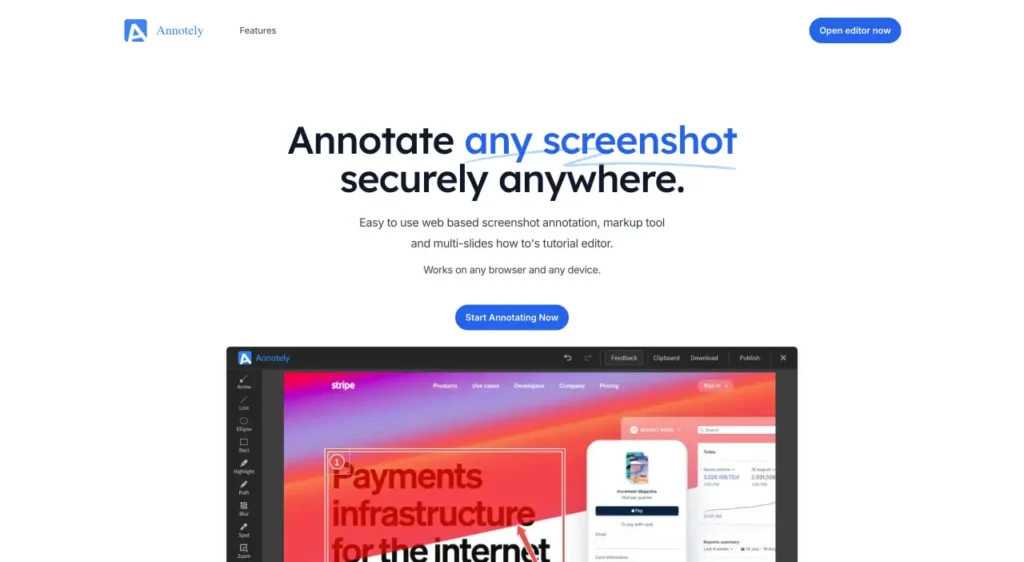
Annotely क्या है?
Annotely एक ब्राउज़र-आधारित स्क्रीनशॉट एनोटेशन टूल है जो सरलता और गति पर केंद्रित है। यह पूरी तरह से आपके वेब ब्राउज़र में चलता है - इसके लिए किसी इंस्टॉलेशन की आवश्यकता नहीं है।.
इसका मूल उद्देश्य सीधा-सादा है: स्क्रीनशॉट अपलोड करें, एनोटेशन जोड़ें और परिणाम डाउनलोड करें। विडोकू के सत्यापित आंकड़ों के अनुसार, एनोटली पूरी तरह से मुफ्त है और इसके लिए किसी पंजीकरण की आवश्यकता नहीं है, जिससे कई एनोटेशन टूल में मौजूद दो प्रमुख समस्याओं का समाधान हो जाता है।.
लेकिन बात यह है कि Annotely हर किसी की हर ज़रूरत को पूरा करने की कोशिश नहीं कर रहा है। यह कोई व्यापक डिज़ाइन टूल या AI-आधारित एनोटेशन प्लेटफ़ॉर्म नहीं है। इसे त्वरित मार्कअप कार्यों के लिए बनाया गया है, जहाँ आपको स्क्रीनशॉट में दृश्य संदर्भ जोड़ना होता है और उन्हें तुरंत साझा करना होता है।.
Annotely का इस्तेमाल असल में कौन करता है?
उद्योग में उपयोग के पैटर्न के आधार पर, Annotely कई अलग-अलग समूहों को आकर्षित करता है:
- डेवलपर्स विज़ुअल संदर्भ के साथ बग रिपोर्ट सबमिट करते हैं
- QA टीमें परीक्षण चक्रों के दौरान आने वाली समस्याओं का दस्तावेजीकरण करती हैं।
- ग्राहक सहायता एजेंट एनोटेटेड समस्या निवारण गाइड तैयार कर रहे हैं
- डिजाइनर मॉकअप या प्रोटोटाइप पर त्वरित प्रतिक्रिया साझा करते हैं
- मार्केटिंग टीमें सोशल मीडिया विजुअल्स या कैंपेन एसेट्स तैयार कर रही हैं।
- एंटरप्राइज़ टूल्स के बिना विज़ुअल प्रोजेक्ट्स पर सहयोग करने वाली दूरस्थ टीमें
इन सबमें एक समान बात क्या है? ऐसी टीमें जिन्हें एनोटेशन की सुविधा चाहिए लेकिन वे भारी-भरकम सॉफ्टवेयर या सब्सक्रिप्शन लागतों के लिए प्रतिबद्ध नहीं होना चाहतीं।.
मुख्य विशेषताओं का विस्तृत विवरण
आइए देखें कि Annotely वास्तव में क्या प्रदान करता है। इसमें जानबूझकर सीमित सुविधाएँ दी गई हैं, जो आपकी आवश्यकताओं के आधार पर एक खूबी या कमी हो सकती है।.
आवश्यक एनोटेशन उपकरण
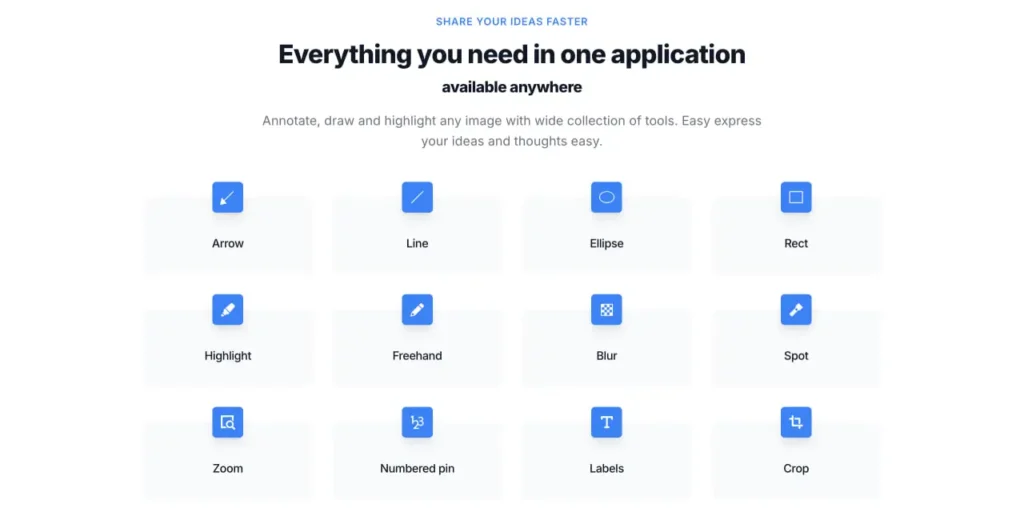
Annotely मूलभूत मार्कअप टूलकिट प्रदान करता है जिसकी अधिकांश स्क्रीनशॉट वर्कफ़्लो को आवश्यकता होती है:
- तीर और आकृतियाँ: विशिष्ट यूआई तत्वों की ओर इशारा करें, समस्या वाले क्षेत्रों को हाइलाइट करें, या विवरणों पर ध्यान आकर्षित करें। तीर विशेष रूप से बग रिपोर्ट के लिए उपयोगी होते हैं जहाँ आपको यह इंगित करने की आवश्यकता होती है कि समस्या ठीक कहाँ दिखाई देती है।.
- शेप्स लाइब्रेरी में आयत, वृत्त और रेखाएँ शामिल हैं। इनका उपयोग क्षेत्रों को हाइलाइट करने, सीमाएँ बनाने या संबंधित तत्वों को जोड़ने के लिए किया जा सकता है।.
- पाठ संबंधी टिप्पणियाँ: छवि पर सीधे लेबल, स्पष्टीकरण या निर्देश जोड़ें। टेक्स्ट बॉक्स के रंग और आकार को अनुकूलित किया जा सकता है, जिससे विभिन्न संदर्भों के अनुरूप बुनियादी फ़ॉर्मेटिंग की जा सकती है।.
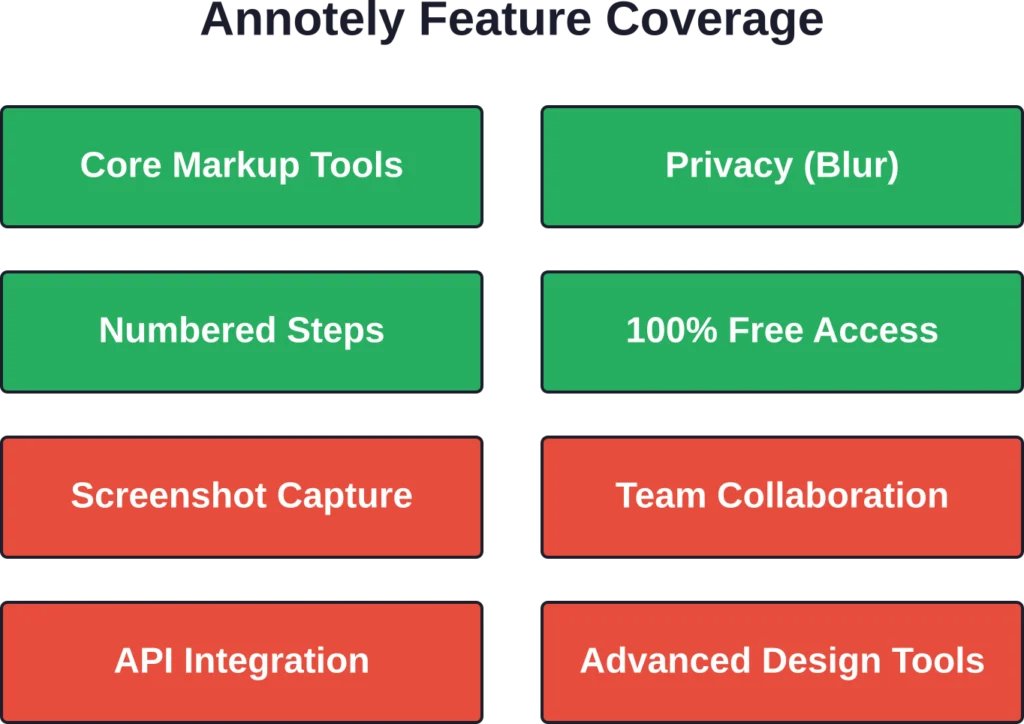
- कलंक उपकरण: विडोकु के आधिकारिक आंकड़ों के अनुसार, एनोटली में ब्लर फ़ीचर शामिल है - जो बुनियादी एनोटेशन टूल में अक्सर नहीं पाया जाने वाला एक महत्वपूर्ण फ़ीचर है। यह टीमों को स्क्रीनशॉट को बाहरी रूप से साझा करने से पहले व्यक्तिगत डेटा, एपीआई कुंजी या गोपनीय व्यावसायिक जानकारी जैसी संवेदनशील जानकारी को छिपाने की अनुमति देता है।.
- क्रमांकित चरण: विडोकु ने पुष्टि की है कि एनोटली क्रमांकित चरण एनोटेशन का समर्थन करता है, जो ट्यूटोरियल निर्माण, बहु-चरणीय बग पुनरुत्पादन निर्देशों या अनुक्रमिक प्रक्रिया प्रलेखन के लिए विशेष रूप से मूल्यवान है।.
क्या नहीं हैं
सच कहें तो: Annotely का सरलीकृत दृष्टिकोण का मतलब है कि प्रीमियम टूल्स में आमतौर पर मिलने वाली कई सुविधाएं इसमें उपलब्ध नहीं हैं।.
उन्नत सहयोग सुविधाओं का अभाव है। कोई कमेंट थ्रेड नहीं, कोई अनुमोदन वर्कफ़्लो नहीं, कोई वर्ज़न हिस्ट्री नहीं। यदि आपकी टीम को संरचित समीक्षा प्रक्रियाओं की आवश्यकता है, तो रचनात्मक और विपणन टीमों के लिए डिज़ाइन किए गए प्लेटफ़ॉर्म अधिक बेहतर विकल्प प्रदान करते हैं।.
एकीकरण क्षमताएं सीमित हैं। Annotely एक स्टैंडअलोन वेब टूल के रूप में काम करता है, जिसमें API एक्सेस या प्रोजेक्ट मैनेजमेंट प्लेटफॉर्म, क्लाउड स्टोरेज या डिज़ाइन टूल से कनेक्शन की सुविधा नहीं है।.
FlyPix AI की मदद से भू-स्थानिक छवियों को उपयोगी डेटा में बदलें।
हवाई, उपग्रह या ड्रोन छवियों के साथ काम करने वाले संगठन अक्सर छवियों की मैन्युअल रूप से समीक्षा करने और उन्हें लेबल करने में काफी समय व्यतीत करते हैं।. फ्लाईपिक्स एआई यह ऑब्जेक्ट डिटेक्शन, इमेज एनोटेशन और जियोस्पेशियल एनालिसिस को स्वचालित करने में मदद करता है, जिससे बड़े डेटासेट से उपयोगी जानकारी निकालना आसान हो जाता है।.
क्या आप भू-स्थानिक छवियों की विशाल मात्रा के साथ काम कर रहे हैं?
FlyPix AI निम्नलिखित में मदद कर सकता है:
- स्वचालित छवि एनोटेशन
- हवाई और उपग्रह छवियों में वस्तु का पता लगाना
- कस्टम एआई मॉडल प्रशिक्षण
- बड़े पैमाने पर भू-स्थानिक डेटा विश्लेषण
👉 FlyPix AI को आजमाएं भौगोलिक छवि विश्लेषण कार्यप्रवाहों का पता लगाने के लिए।.
मूल्य निर्धारण और पहुंच मॉडल
यहीं पर Annotely अपने प्रतिस्पर्धियों से खुद को स्पष्ट रूप से अलग करती है। 25 मार्च, 2026 को प्रकाशित Vidocu के आधिकारिक आंकड़ों के अनुसार, Annotely सभी सुविधाओं तक पूर्ण पहुंच के साथ 100% का निःशुल्क टियर प्रदान करती है।.
कोई फ्री प्लान नहीं। फ्री प्लान में वॉटरमार्क वाले एक्सपोर्ट नहीं। अपग्रेड करने पर ही फीचर्स सीमित होंगे। पूरा टूल बिल्कुल फ्री है, बस।.
यह उन कई एनोटेशन प्लेटफॉर्मों के बिल्कुल विपरीत है जो उपयोगकर्ताओं को सशुल्क सदस्यता लेने के लिए प्रेरित करने से पहले सीमित निःशुल्क परीक्षण की सुविधा प्रदान करते हैं। क्लाउड शेयरिंग सुविधाएँ विभिन्न एनोटेशन प्लेटफॉर्मों पर सशुल्क ऐड-ऑन के रूप में उपलब्ध हैं।.
बिना पंजीकरण के लाभ
Annotely में खाता बनाने की आवश्यकता नहीं है, जिससे त्वरित एनोटेशन कार्य में कोई परेशानी नहीं होती। आपको कोई और पासवर्ड याद रखने, ईमेल सत्यापित करने या व्यक्तिगत जानकारी देने की आवश्यकता नहीं है।.
लेकिन रुकिए। इस डिज़ाइन निर्णय के कुछ नुकसान भी हैं। खातों के बिना, आप अपने एनोटेशन इतिहास को सहेज नहीं सकते, बार-बार उपयोग किए जाने वाले एनोटेशन की लाइब्रेरी नहीं बना सकते या विभिन्न उपकरणों पर काम को सिंक नहीं कर सकते।.
एक बार के कार्यों के लिए—उदाहरण के लिए, किसी बग रिपोर्ट में संलग्न करने के लिए स्क्रीनशॉट पर निशान लगाना—बिना पंजीकरण वाला मॉडल एकदम सही है। लेकिन लगातार एनोटेशन के काम के लिए, जहाँ आप टेम्प्लेट बनाना चाहते हैं या एकरूपता बनाए रखना चाहते हैं, स्थायी भंडारण की कमी एक सीमा बन जाती है।.
प्रदर्शन और उपयोगिता
एनोटेशन टूल्स के लिए गति महत्वपूर्ण है। जब कोई व्यक्ति बग की रिपोर्ट करने या तत्काल डिज़ाइन संबंधी प्रतिक्रिया देने की कोशिश कर रहा होता है, तो टूल की गति धीमी हो जाती है।.
अपलोड और प्रोसेसिंग गति
Annotely पूरी तरह से ब्राउज़र में चलता है, जिसका अर्थ है कि प्रोसेसिंग क्लाइंट-साइड पर होती है। अपलोड का समय मुख्य रूप से आपकी इमेज फ़ाइल के आकार और नेटवर्क कनेक्शन पर निर्भर करता है, न कि सर्वर प्रोसेसिंग कतारों पर।.
व्यवहार में, इसका मतलब है कि इमेज अपलोड करने के बाद लगभग तुरंत ही इमेज तैयार हो जाती है। क्लाउड रेंडरिंग या सर्वर-साइड प्रोसेसिंग का इंतजार नहीं करना पड़ता। एनोटेशन इंटरफ़ेस तुरंत लोड हो जाता है और बदलाव तुरंत लागू हो जाते हैं।.
इंटरफ़ेस डिज़ाइन
इसका इंटरफ़ेस जानबूझकर सरल रखा गया है। टूल्स को एक ही टूलबार में व्यवस्थित किया गया है, एनोटेशन सीधे कैनवास पर दिखाई देते हैं, और कंट्रोल्स समझने में आसान हैं।.
यह सरलता जानबूझकर अपनाई गई है। उन उपयोगकर्ताओं के लिए जो छवियों पर टिप्पणी करना अपना मुख्य कार्य नहीं मानते, बल्कि कभी-कभार ही ऐसा करते हैं, न्यूनतम यूजर इंटरफेस सीखने में लगने वाले समय को कम करता है। इसमें जटिल मेनू संरचना या याद रखने के लिए कीबोर्ड शॉर्टकट नहीं हैं।.
हालांकि, पेशेवर डिज़ाइन टूल के आदी पावर यूज़र्स को इसका इंटरफ़ेस सीमित लग सकता है। इसमें लेयर्स पैनल, बारीक प्रॉपर्टी कंट्रोल और कस्टमाइज़ेबल वर्कस्पेस जैसी सुविधाएं नहीं हैं। सब कुछ बुनियादी स्तर पर ही काम करता है।.
ब्राउज़र संगतता
वेब आधारित टूल होने के नाते, Annotely macOS, Windows, Linux और Chrome OS सहित सभी ऑपरेटिंग सिस्टम पर काम करता है। कोई भी आधुनिक ब्राउज़र इसे बिना किसी समस्या के चला सकता है।.
यह क्रॉस-प्लेटफ़ॉर्म संगतता उन विखंडनों को समाप्त करती है जो नेटिव एप्लिकेशन को परेशान करते हैं, जहां स्क्रीनस्नैप प्रो जैसा मैकओएस-केंद्रित टूल मैक उपयोगकर्ताओं के लिए खूबसूरती से काम करता है लेकिन विंडोज या लिनक्स टीमों के लिए कुछ भी प्रदान नहीं करता है।.
Annotely बनाम विकल्प
2026 में एनोटेशन टूल का बाजार काफी प्रतिस्पर्धी है। अन्य विकल्पों की तुलना में Annotely कैसा है?
| औजार | के लिए सर्वश्रेष्ठ | कोई पंजीकरण आवश्यक नहीं | कलंक उपकरण | क्रमांकित चरण | निःशुल्क स्तर |
|---|---|---|---|---|---|
| एनोटली | त्वरित स्क्रीनशॉट मार्कअप | ✅ | ✅ | ✅ | 100% मुफ़्त |
| वेबविज़ियो | डिजाइन और QA टीमें | ✅ | ✅ | ✅ | 100% मुफ़्त |
| विडोकू | प्रलेखन टीमें | ✅ | ✅ | ❌ | 100% मुफ़्त |
| स्क्रीनस्नैप प्रो | macOS कैप्चर + एनोटेशन | ❌ | ✅ | ✅ | $29 एक बार |
25 मार्च, 2026 को प्रकाशित विडोकु के तुलनात्मक आंकड़ों के अनुसार, कई उपकरण एनोटली की मुख्य विशेषताओं को साझा करते हैं: ब्राउज़र-आधारित संचालन, कोई पंजीकरण आवश्यकता नहीं और पूरी तरह से मुफ्त पहुंच।.
उदाहरण के लिए, Webvizio इसी तरह की कार्यक्षमता प्रदान करता है, साथ ही इसमें डिज़ाइन और डेवलपमेंट टीमों के लिए अतिरिक्त सुविधाएँ भी हैं। आधिकारिक आंकड़ों के अनुसार, Webvizio पूरी तरह से मुफ़्त और तुरंत उपलब्ध है, इसके लिए किसी साइन-अप या इंस्टॉलेशन की आवश्यकता नहीं है।.
Vidocu इमेज एनोटेशन को वीडियो-टू-डॉक्यूमेंटेशन वर्कफ़्लो और AI सबटाइटल के साथ जोड़ता है, जिससे यह उन टीमों के लिए उपयुक्त है जो विज़ुअल और वीडियो दोनों तरह की सामग्री तैयार करती हैं। यह 100% फ्री भी है, लेकिन इसमें नंबर वाले स्टेप एनोटेशन की सुविधा नहीं है।.
ScreenSnap Pro एक अलग श्रेणी का एप्लिकेशन है: यह macOS के लिए एक सशुल्क नेटिव एप्लिकेशन है (8 मार्च, 2026 तक) जो स्क्रीनशॉट कैप्चर को एनोटेशन के साथ एकीकृत करता है। इसमें 15 एनोटेशन टूल और 150 से अधिक वॉलपेपर बैकग्राउंड उपलब्ध हैं, जो इसे अधिक फीचर-रिच बनाते हैं, लेकिन यह सीमित प्लेटफॉर्म पर ही उपलब्ध है और निःशुल्क नहीं है।.
Annotely कब उपयोगी साबित होता है?
Annotely कुछ खास परिस्थितियों में उत्कृष्ट प्रदर्शन करता है:
- सदस्यता प्रतिबद्धता के बिना तदर्थ एनोटेशन की आवश्यकताएँ
- गोपनीयता के प्रति जागरूक उपयोगकर्ता जो खाते बनाना पसंद नहीं करते हैं
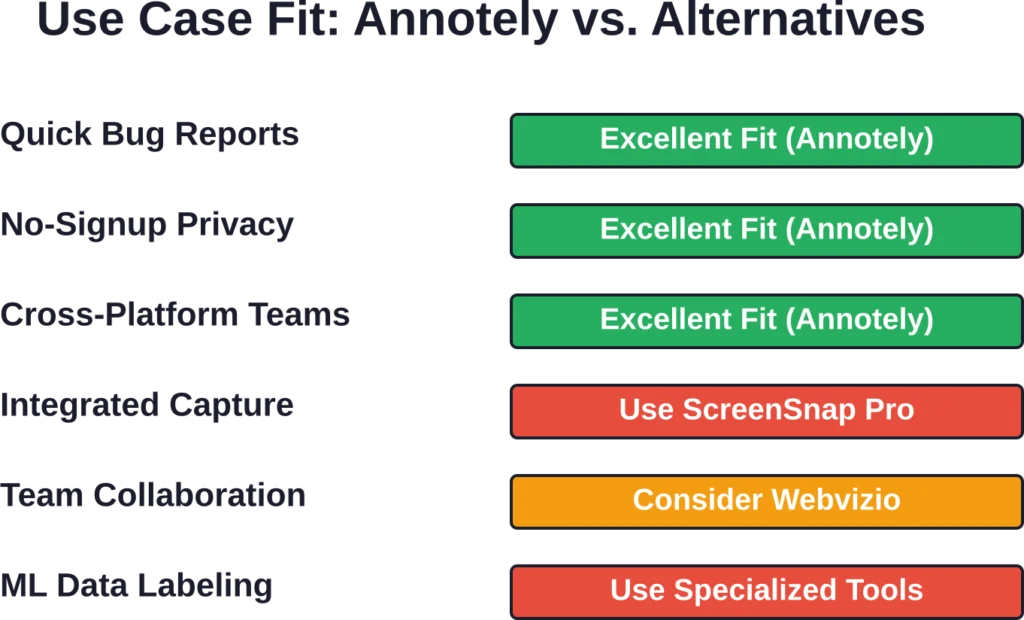
- क्रॉस-प्लेटफ़ॉर्म टीमें जिन्हें ऑपरेटिंग सिस्टम की परवाह किए बिना सुसंगत टूलिंग की आवश्यकता होती है
- बजट की कमी वाले प्रोजेक्ट जहां मुफ्त उपकरण अनिवार्य हैं
- सरल मार्कअप कार्य जिनके लिए उन्नत सुविधाओं की आवश्यकता नहीं होती है
कब अन्यत्र देखना चाहिए
कुछ विशिष्ट उपयोग मामलों के लिए Annotely की क्षमता से परे क्षमताओं की आवश्यकता होती है:
यदि आपको एकीकृत कैप्चर-टू-एनोटेशन वर्कफ़्लो की आवश्यकता है, तो ScreenSnap Pro जैसे नेटिव एप्लिकेशन वह सहज अनुभव प्रदान करते हैं। स्क्रीनशॉट टूल और ब्राउज़र-आधारित एनोटेटर के बीच लगातार स्विच करने से अधिक मात्रा वाले वर्कफ़्लो में असुविधा उत्पन्न होती है।.
जिन टीमों को सहयोग संबंधी सुविधाओं की आवश्यकता होती है — जैसे अनुमोदन वर्कफ़्लो, टिप्पणी थ्रेड, संशोधन इतिहास — उन्हें रचनात्मक और विपणन टीमों के लिए विशेष रूप से निर्मित प्लेटफ़ॉर्म का मूल्यांकन करना चाहिए। ज़िफ़्लो के शोध के अनुसार, सही एनोटेशन टूल का उपयोग करने वाली टीमें संशोधन चक्रों को काफी हद तक कम कर देती हैं, और इसके लिए आमतौर पर एनोटली द्वारा दी जाने वाली सुविधाओं की तुलना में अधिक संरचित सहयोग सुविधाओं की आवश्यकता होती है।.
मशीन लर्निंग या एआई एनोटेशन परियोजनाओं के लिए, जहां डेटा लेबलिंग महत्वपूर्ण है, सर्वसम्मति स्कोरिंग, सीओसीओ और पास्कल वीओसी प्रारूप समर्थन, और विस्तृत पिक्सेल-स्तरीय एनोटेशन जैसी सुविधाओं से लैस विशेष एनोटेशन टूल आवश्यक हैं। ज़िफ्लो डेटा के अनुसार, इन कार्यप्रवाहों में एनोटेटर्स को एक ही छवि पर 30 मिनट तक का समय लग सकता है, और इसके लिए सटीक उपकरणों की आवश्यकता होती है।.
वास्तविक दुनिया के वर्कफ़्लो एकीकरण
Annotely आपकी वास्तविक दैनिक कार्यप्रणालियों में कैसे फिट बैठता है? इसका उत्तर काफी हद तक आपके मौजूदा टूलचेन और प्रक्रिया संरचना पर निर्भर करता है।.
डेवलपर बग रिपोर्टिंग
एक सामान्य डेवलपर वर्कफ़्लो कुछ इस तरह दिख सकता है: किसी बग का सामना करना, सिस्टम टूल या ब्राउज़र एक्सटेंशन का उपयोग करके स्क्रीनशॉट लेना, ब्राउज़र टैब में Annotely खोलना, स्क्रीनशॉट अपलोड करना, समस्या वाले क्षेत्र की ओर इशारा करते हुए तीर जोड़ना और अपेक्षित बनाम वास्तविक व्यवहार को समझाने वाला टेक्स्ट जोड़ना, एनोटेटेड इमेज डाउनलोड करना और इसे GitHub इश्यू या Jira टिकट से अटैच करना।.
यह प्रक्रिया कारगर है, लेकिन इसमें कई बार संदर्भ बदलना पड़ता है। प्रतिदिन दर्जनों बग रिपोर्ट दर्ज करने वाली टीमों के लिए, अपलोड-एनोटेट-डाउनलोड का चक्र अनावश्यक परेशानी पैदा करता है।.
डिज़ाइन फ़ीडबैक लूप
मॉकअप या प्रोटोटाइप की समीक्षा करने वाले डिज़ाइनरों को अक्सर प्रासंगिक प्रतिक्रिया देने की आवश्यकता होती है। Annotely त्वरित दृश्य टिप्पणियाँ प्रदान करता है: गलत तरीके से संरेखित तत्व को गोलाकार करें, किसी भिन्न रंग का सुझाव देने वाला टेक्स्ट नोट जोड़ें, अंतिम संस्करण में नहीं होने वाली प्लेसहोल्डर सामग्री को धुंधला करें।.
लेकिन यहीं पर कुछ सीमाएँ सामने आती हैं। डिज़ाइन फीडबैक में अक्सर कई हितधारक और संशोधन के दौर शामिल होते हैं। सहयोग सुविधाओं के अभाव में, Annotely टीमों को मैन्युअल रूप से वर्ज़निंग प्रबंधित करने के लिए बाध्य करता है — कई एनोटेटेड प्रतियाँ डाउनलोड करना, यह ट्रैक करना कि किस फीडबैक पर काम किया गया है, और अलग-अलग संचार चैनलों के माध्यम से समन्वय करना।.
दस्तावेज़ निर्माण
नॉलेज बेस आर्टिकल या ट्यूटोरियल बनाने वाली सपोर्ट टीमें और टेक्निकल राइटर नंबर वाले स्टेप एनोटेशन से लाभान्वित होते हैं। Annotely में नंबर वाले स्टेप्स की सुविधा होने से स्पष्ट और क्रमबद्ध विजुअल गाइड बनाना संभव हो जाता है।.
कार्यप्रणाली सीधी-सादी है: प्रक्रिया के प्रत्येक चरण में स्क्रीनशॉट लें, क्रमांकित मार्करों और व्याख्यात्मक पाठ के साथ एनोटेट करें, और एनोटेट की गई छवियों को दस्तावेज़ीकरण में एम्बेड करें।.
वीडियो ट्यूटोरियल के साथ-साथ दस्तावेज़ तैयार करने वाली टीमों को विडोकु जैसे टूल में अधिक एकीकृत मूल्य मिल सकता है, जो एक ही वर्कफ़्लो में इमेज एनोटेशन को वीडियो-टू-डॉक्यूमेंटेशन क्षमताओं के साथ जोड़ता है।.
सुरक्षा और गोपनीयता संबंधी विचार
संवेदनशील जानकारी को संभालने वाली टीमों के लिए, एनोटेशन टूल की सुरक्षा महत्वपूर्ण है।.
Annotely का ब्राउज़र-आधारित, बिना खाता वाला आर्किटेक्चर गोपनीयता के कई फायदे देता है। उपयोगकर्ता खातों के बिना, कंपनी के सर्वरों पर कोई व्यक्तिगत डेटा संग्रहीत नहीं होता है। एनोटेशन के लिए अपलोड किए गए स्क्रीनशॉट आपकी पहचान से जुड़े क्लाउड डेटाबेस में स्थायी रूप से सहेजे नहीं जाते हैं।.
प्रोसेसिंग आपके ब्राउज़र में क्लाइंट-साइड पर होती है। इमेज को रेंडरिंग या स्टोरेज के लिए बाहरी सर्वर पर नहीं भेजा जाता है। यह आर्किटेक्चर गोपनीय स्क्रीनशॉट के लीक होने के जोखिम को कम करता है जिनमें मालिकाना जानकारी होती है।.
सुरक्षा के लिहाज़ से देखें तो ब्लर टूल बेहद ज़रूरी हो जाता है। एनोटेटेड स्क्रीनशॉट को बाहरी तौर पर साझा करने या उन्हें सार्वजनिक बग ट्रैकर पर पोस्ट करने से पहले, टीमें संवेदनशील डेटा - जैसे API कुंजी, व्यक्तिगत जानकारी, ग्राहक डेटा, आंतरिक सिस्टम विवरण - को छिपा सकती हैं।.
हालांकि, सख्त अनुपालन आवश्यकताओं (HIPAA, GDPR, SOC 2) वाली टीमों को यह सुनिश्चित करना चाहिए कि ब्राउज़र-आधारित प्रोसेसिंग उनकी सुरक्षा नीतियों के अनुरूप हो। उद्यम अक्सर औपचारिक सुरक्षा प्रमाणपत्रों, ऑडिट लॉग और प्रशासनिक नियंत्रणों वाले टूल को प्राथमिकता देते हैं।.
सीमाएँ और कमियाँ
कोई भी टूल परफेक्ट नहीं होता। Annotely की कुछ स्पष्ट सीमाएँ हैं जिन्हें इसे अपने प्राथमिक एनोटेशन समाधान के रूप में अपनाने से पहले समझना आवश्यक है।.
कोई स्थायी संग्रहण नहीं
बिना खाते वाले इस मॉडल का मतलब है कि किया गया काम स्थायी नहीं रहता। ब्राउज़र टैब बंद करते ही, बिना सहेजे गए सभी एनोटेशन नष्ट हो जाते हैं। इसमें कोई प्रोजेक्ट हिस्ट्री नहीं होती, पहले से एनोटेट की गई इमेज को दोबारा एडिट करने का कोई तरीका नहीं होता, और न ही सहेजे गए काम की कोई लाइब्रेरी होती है।.
एक बार के एनोटेशन के लिए यह कोई समस्या नहीं है। लेकिन लगातार एनोटेशन के काम के लिए, इससे बार-बार मेहनत करनी पड़ती है।.
सीमित एनोटेशन अनुकूलन
हालांकि Annotely आवश्यक एनोटेशन टूल प्रदान करता है, लेकिन अनुकूलन विकल्प बुनियादी हैं। आप कस्टम आकार नहीं बना सकते, एनोटेशन टेम्प्लेट सहेज नहीं सकते, या अपनी टीम के मानक कॉलआउट या फ़ॉर्मेटिंग के साथ पुन: प्रयोज्य एनोटेशन लाइब्रेरी नहीं बना सकते।.
मोबाइल ऑप्टिमाइज़ेशन उपलब्ध नहीं है
Annotely को डेस्कटॉप ब्राउज़र के लिए डिज़ाइन किया गया है। हालाँकि यह तकनीकी रूप से मोबाइल उपकरणों पर भी काम करता है, लेकिन इसका एनोटेशन इंटरफ़ेस टच इनपुट या छोटी स्क्रीन के लिए अनुकूलित नहीं है।.
यह उन टीमों के लिए उपयोगिता को सीमित करता है जिन्हें मोबाइल उपकरणों पर कैप्चर किए गए स्क्रीनशॉट पर एनोटेशन करने या मोबाइल-फर्स्ट संदर्भों में काम करने की आवश्यकता होती है।.
निर्यात प्रारूप संबंधी प्रतिबंध
Annotely छवियों को मानक प्रारूपों में निर्यात करता है, लेकिन इसमें वेक्टर निर्यात का विकल्प नहीं है। एनोटेशन छवि में ही रैस्टराइज़ हो जाते हैं, जिसका अर्थ है कि निर्यात के बाद आप व्यक्तिगत एनोटेशन तत्वों को दोबारा संपादित नहीं कर सकते।.
पेशेवर डिज़ाइन टूल अक्सर एनोटेशन लेयर्स को अलग से सुरक्षित रखते हैं, जिससे बाद में संशोधन करना संभव होता है। Annotely का तरीका सरल है लेकिन कम लचीला है।.
Annotely का उपयोग किसे करना चाहिए?
विशेषताओं, प्रदर्शन और सीमाओं की जांच करने के बाद, उपयोग के स्पष्ट परिदृश्य सामने आते हैं।.
आदर्श उपयोगकर्ता:
- व्यक्तिगत डेवलपर या छोटी टीमें कभी-कभार बग रिपोर्ट दर्ज करती हैं
- फ्रीलांसर जिन्हें सदस्यता शुल्क के बिना एनोटेशन सुविधाओं की आवश्यकता है
- गोपनीयता के प्रति जागरूक उपयोगकर्ता जो खाते बनाने से बचना पसंद करते हैं
- कई ऑपरेटिंग सिस्टम पर काम करने वाली टीमें जिन्हें एक समान टूलिंग की आवश्यकता होती है
- सीमित बजट वाली परियोजनाएं जहां मुफ्त उपकरण अनिवार्य हैं
- ऐसे उपयोगकर्ता जिन्हें सीखने में अधिक समय लगाए बिना त्वरित और सरल मार्कअप की आवश्यकता होती है।
इसके लिए अनुपयुक्त:
- बड़ी टीमों को सहयोगात्मक कार्यप्रवाह और अनुमोदन प्रक्रियाओं की आवश्यकता होती है
- जिन संगठनों को औपचारिक सुरक्षा प्रमाणपत्रों की आवश्यकता होती है, उनके लिए अनुपालन संबंधी आवश्यकताएं होती हैं।
- वे शक्तिशाली उपयोगकर्ता जिन्हें व्यापक अनुकूलन और उन्नत एनोटेशन सुविधाओं की आवश्यकता होती है
- ऐसे वर्कफ़्लो जिनमें एकीकृत स्क्रीनशॉट कैप्चर और एनोटेशन की आवश्यकता होती है
- परिशुद्धता आवश्यकताओं के साथ मशीन लर्निंग डेटा लेबलिंग से संबंधित परियोजनाएं
- मोबाइल-फर्स्ट संदर्भ जहां टच ऑप्टिमाइजेशन आवश्यक है
Annotely के साथ शुरुआत करना
Annotely के साथ शुरुआत करने में लगभग कोई सेटअप शामिल नहीं होता है, और यही इसका मुख्य उद्देश्य है।.
- वेब ब्राउज़र खोलें और Annotely की वेबसाइट पर जाएं। वहां कोई पंजीकरण फॉर्म नहीं है, कोई ईमेल सत्यापन नहीं है, और न ही भुगतान संबंधी कोई जानकारी दर्ज करनी है।.
- अपना स्क्रीनशॉट अपलोड करें। आप ड्रैग एंड ड्रॉप का विकल्प चुन सकते हैं, या अपने सिस्टम में मौजूद फ़ाइलों को ब्राउज़ करने के लिए फ़ाइल पिकर का उपयोग कर सकते हैं।.
- टूलबार से एनोटेशन टूल चुनें। प्रासंगिक क्षेत्रों की ओर इशारा करने वाले तीर जोड़ें, क्षेत्रों को हाइलाइट करने के लिए आकृतियाँ बनाएँ, स्पष्टीकरण के साथ टेक्स्ट बॉक्स डालें, संवेदनशील जानकारी को धुंधला करें, या अनुक्रमिक निर्देशों के लिए क्रमांकित चरण जोड़ें।.
- दृश्यता और स्पष्टता के लिए आवश्यकतानुसार रंग और आकार अनुकूलित करें।.
- एनोटेटेड इमेज डाउनलोड करें। परिणाम स्वरूप प्राप्त इमेज आपके डिफ़ॉल्ट डाउनलोड फ़ोल्डर में एक मानक इमेज फ़ाइल के रूप में सेव हो जाएगी, जिसे आप टिकट के साथ अटैच कर सकते हैं, दस्तावेज़ों में एम्बेड कर सकते हैं या ईमेल के माध्यम से साझा कर सकते हैं।.
सरल एनोटेशन के लिए अपलोड से लेकर डाउनलोड तक की पूरी प्रक्रिया में आमतौर पर एक मिनट से भी कम समय लगता है।.
स्क्रीनशॉट एनोटेशन के लिए सर्वोत्तम अभ्यास
आप चाहे कोई भी उपकरण चुनें, कुछ प्रथाएं एनोटेशन की प्रभावशीलता को बेहतर बनाती हैं।.
- निरंतरता मायने रखती है।. विभिन्न प्रकार के एनोटेशन के लिए मानक रंग निर्धारित करें — उदाहरण के लिए, त्रुटियों के लिए लाल, सही तत्वों के लिए हरा और सुझावों के लिए नीला। एक समान दृश्य भाषा दर्शकों को एनोटेटेड छवियों को जल्दी समझने में मदद करती है।.
- संदर्भ अत्यंत महत्वपूर्ण है।. यह मानकर न चलें कि दर्शक समझ रहे हैं कि वे क्या देख रहे हैं। स्क्रीनशॉट में क्या दिखाया गया है, क्या गलत है और अपेक्षित व्यवहार क्या होना चाहिए, यह समझाने के लिए पर्याप्त टेक्स्ट एनोटेशन जोड़ें।.
- चुनिंदा रूप से हाइलाइट करें।. बहुत अधिक एनोटेशन से दृश्य अव्यवस्था उत्पन्न होती है। केवल सबसे प्रासंगिक तत्वों को ही चिह्नित करें। यदि सब कुछ हाइलाइट किया जाता है, तो कुछ भी स्पष्ट रूप से दिखाई नहीं देता।.
- अपने श्रोताओं पर विचार करें।. बग रिपोर्ट में तकनीकी सटीकता आवश्यक है। उपयोगकर्ता के लिए दस्तावेज़ स्पष्टता और सरलता से तैयार किए जाने चाहिए। अपनी टिप्पणी शैली को दर्शकों की आवश्यकताओं के अनुरूप ढालें।.
- व्यवस्थित रूप से संपादित करें।. अपनी टीम के सदस्यों के अलावा किसी भी एनोटेटेड स्क्रीनशॉट को साझा करने से पहले, संवेदनशील जानकारी की जांच कर लें। व्यक्तिगत डेटा, पहचान पत्र, गोपनीय जानकारी या ऐसी किसी भी सामग्री को ब्लर करें जो सार्वजनिक रूप से दिखाई नहीं देनी चाहिए।.
भविष्य का विकास और उपकरण विकास
एनोटेशन टूल का बाजार तेजी से विकसित हो रहा है। 2026 में विकास को आकार देने वाले रुझानों में एआई-सहायता प्राप्त एनोटेशन, सहयोग प्लेटफार्मों के साथ बेहतर एकीकरण और मोबाइल-अनुकूलित अनुभव शामिल हैं।.
सामान्य तौर पर, Annotely जैसे मुफ़्त टूल प्रीमियम प्लेटफ़ॉर्मों पर प्रतिस्पर्धा बनाए रखते हैं। जैसे-जैसे अधिक सक्षम मुफ़्त विकल्प सामने आते हैं, सशुल्क टूल को उन्नत सुविधाओं, एकीकरणों या सहयोगात्मक क्षमताओं के माध्यम से खुद को अलग दिखाना होगा।.
विशेष रूप से Annotely के लिए, संभावित विकास पथों में स्थायी संग्रहण चाहने वाले उपयोगकर्ताओं के लिए वैकल्पिक खाता निर्माण, मोबाइल इंटरफ़ेस अनुकूलन, या बुनियादी टीम सुविधाओं को शामिल किया जा सकता है, जबकि मूल निःशुल्क, बिना पंजीकरण वाला विकल्प बरकरार रखा जा सकता है।.
इस टूल का भविष्य संभवतः उपयोगकर्ताओं द्वारा इसे अपनाने और उनकी प्रतिक्रिया पर निर्भर करेगा। ब्राउज़र-आधारित टूल सुलभता और क्रॉस-प्लेटफ़ॉर्म संगतता के मामले में बेहतर हैं, लेकिन इन्हें नेटिव एप्लिकेशन और एकीकृत प्लेटफ़ॉर्म समाधानों से प्रतिस्पर्धा का सामना करना पड़ता है।.
अक्सर पूछे जाने वाले प्रश्नों
जी हां, विडोकू के आधिकारिक आंकड़ों के अनुसार, एनोटली पूरी तरह से मुफ्त है और इसमें सभी सुविधाओं का पूर्ण उपयोग उपलब्ध है। इसमें कोई सशुल्क विकल्प नहीं है, कोई अतिरिक्त शुल्क नहीं है और सुविधाओं पर कोई सीमा नहीं है। यह पूरा टूल बिना किसी प्रतिबंध के उपयोग के लिए उपलब्ध है।.
किसी खाते की आवश्यकता नहीं है। आधिकारिक आंकड़ों से पुष्टि होती है कि Annotely के लिए साइन अप की आवश्यकता नहीं है, जिससे एनोटेशन टूल तक तुरंत पहुंच प्राप्त होती है। यह डिज़ाइन डेटा संग्रह से संबंधित गोपनीयता की चिंताओं को दूर करता है और त्वरित एनोटेशन कार्यों में आने वाली बाधाओं को कम करता है।.
Annotely में तीर, आकृतियाँ (आयत, वृत्त, रेखाएँ), टेक्स्ट एनोटेशन, संवेदनशील जानकारी को छिपाने के लिए ब्लर टूल और क्रमबद्ध निर्देशों के लिए क्रमांकित चरण जैसे मूलभूत मार्कअप टूल उपलब्ध हैं। ये सुविधाएँ बग रिपोर्ट, डिज़ाइन फीडबैक और दस्तावेज़ीकरण के लिए स्क्रीनशॉट एनोटेशन की सबसे आम ज़रूरतों को पूरा करती हैं।.
Annotely केवल मौजूदा छवियों पर एनोटेशन करता है — इसमें स्क्रीनशॉट कैप्चर करने की सुविधा नहीं है। उपयोगकर्ताओं को एनोटेशन के लिए छवियों को Annotely पर अपलोड करने से पहले अपने ऑपरेटिंग सिस्टम के नेटिव टूल्स या अलग स्क्रीनशॉट एप्लिकेशन का उपयोग करके स्क्रीनशॉट कैप्चर करने होंगे।.
हालांकि Annotely ब्राउज़र-आधारित है और तकनीकी रूप से मोबाइल उपकरणों से भी सुलभ है, लेकिन इसका इंटरफ़ेस टच इनपुट या छोटी स्क्रीन के लिए अनुकूलित नहीं है। यह टूल मुख्य रूप से डेस्कटॉप ब्राउज़र के उपयोग के लिए डिज़ाइन किया गया है। मोबाइल एनोटेशन की आवश्यकता वाली टीमों को मोबाइल-अनुकूलित विकल्पों पर विचार करना चाहिए।.
Annotely आवश्यक एनोटेशन सुविधाएँ निःशुल्क प्रदान करता है, लेकिन इसमें सशुल्क टूल में मिलने वाली उन्नत क्षमताएँ नहीं हैं। यह ScreenSnap Pro (मार्च 2026 तक macOS के लिए $29 का एक बार का भुगतान) की तरह एकीकृत स्क्रीनशॉट कैप्चर, एंटरप्राइज़ प्लेटफ़ॉर्म में आम टीम सहयोग सुविधाएँ, या सत्रों के दौरान स्थायी स्टोरेज जैसी सुविधाएँ प्रदान नहीं करता है। सरल मार्कअप कार्यों के लिए, Annotely का निःशुल्क उपयोग आकर्षक है। सहयोग, वर्ज़निंग या एकीकरण की आवश्यकता वाले जटिल वर्कफ़्लो के लिए, सशुल्क टूल ऐसी क्षमताएँ प्रदान करते हैं जो Annotely में नहीं हैं।.
Annotely आपके ब्राउज़र में क्लाइंट-साइड पर छवियों को प्रोसेस करता है, जिसका मतलब है कि स्क्रीनशॉट रेंडरिंग के लिए बाहरी सर्वरों पर नहीं भेजे जाते हैं। बिना खाता प्रबंधन के, इसका मतलब है कि कंपनी के सर्वरों पर कोई व्यक्तिगत डेटा संग्रहीत नहीं होता है। गोपनीयता के प्रति सजग उपयोगकर्ताओं के लिए जो गैर-संवेदनशील स्क्रीनशॉट का उपयोग करते हैं, यह तरीका जोखिम को कम करता है। हालांकि, सख्त अनुपालन आवश्यकताओं वाली टीमों को यह सुनिश्चित करना चाहिए कि ब्राउज़र-आधारित प्रोसेसिंग उनकी सुरक्षा नीतियों और नियामक दायित्वों के अनुरूप है।.
अंतिम निर्णय
तो Annotely के बारे में अंतिम निष्कर्ष क्या है?
यह ठीक वैसा ही है जैसा कि यह दावा करता है: स्क्रीनशॉट पर त्वरित मार्कअप के लिए एक सरल, निःशुल्क, ब्राउज़र-आधारित एनोटेशन टूल। यदि यह आपकी आवश्यकताओं को पूरा करता है, तो यह प्रभावी रूप से काम करता है।.
100% की निःशुल्क कीमत और बिना पंजीकरण की आवश्यकता के, कई अन्य एनोटेशन टूल में मौजूद कमियों को दूर करती है। ब्लर और क्रमांकित चरणों जैसी आवश्यक सुविधाओं का समावेश सामान्य उपयोग के मामलों को आसान बनाता है। क्रॉस-प्लेटफ़ॉर्म ब्राउज़र संगतता ऑपरेटिंग सिस्टम की परवाह किए बिना निरंतर उपयोग सुनिश्चित करती है।.
लेकिन Annotely पेशेवर डिज़ाइन टीमों, उद्यम सहयोग या विशेष एनोटेशन वर्कफ़्लो के लिए एक व्यापक समाधान बनने का प्रयास नहीं कर रहा है। इन उपयोग मामलों के लिए ऐसी क्षमताओं की आवश्यकता होती है जो Annotely जानबूझकर प्रदान नहीं करता है।.
यह टूल अपने उद्देश्य में उत्कृष्ट है: बिना किसी बाधा के त्वरित दृश्य मार्कअप को सक्षम बनाना। तात्कालिक एनोटेशन की ज़रूरतों के लिए, मुफ़्त पहुँच, शून्य सेटअप और पर्याप्त सुविधाओं का यह संयोजन बेजोड़ है।.
जिन टीमों की ज़रूरतें ज़्यादा जटिल हैं — जैसे कि स्थायी स्टोरेज, सहयोगात्मक कार्यप्रवाह, एकीकृत कैप्चर, उन्नत अनुकूलन — उन्हें विकल्पों का मूल्यांकन करना होगा। अच्छी बात यह है कि 2026 के एनोटेशन टूल बाज़ार में विभिन्न मूल्य श्रेणियों और सुविधाओं के साथ कई विकल्प उपलब्ध हैं।.
अपने अगले स्क्रीनशॉट एनोटेशन कार्य के लिए Annotely को आज़माएँ। यदि यह आपकी आवश्यकताओं को पूरा करता है, तो आपको एक निःशुल्क समाधान मिल गया है। यदि नहीं, तो कम से कम आपने इसे जानने के लिए कुछ मिनटों के अलावा कुछ भी निवेश नहीं किया है।.