
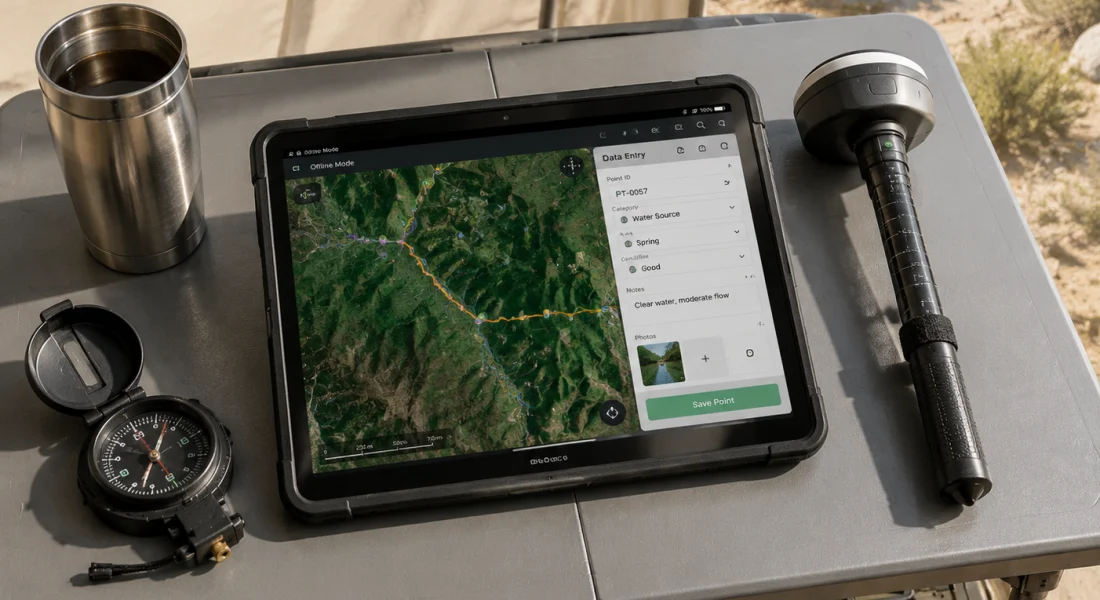
त्वरित सारांश: ArcGIS Field Maps, Esri का एक व्यापक मोबाइल डेटा संग्रह ऐप है जो फील्ड टीमों को ऑफ़लाइन या ऑनलाइन माध्यम से स्थानिक डेटा को कैप्चर करने, संपादित करने और प्रबंधित करने में सक्षम बनाता है। अपने एकीकृत प्लेटफ़ॉर्म दृष्टिकोण, स्मार्ट फ़ॉर्म और रीयल-टाइम लोकेशन शेयरिंग के साथ, Field Maps अलग-अलग टूल्स को एक मैप-केंद्रित मोबाइल समाधान से बदलकर फील्ड कार्यों को सुव्यवस्थित करता है। यह ऐप ArcGIS Online और Enterprise के साथ सहजता से एकीकृत होता है, कई GNSS रिसीवरों को सपोर्ट करता है और इसमें 400 क्रेडिट के साथ 21 दिनों का निःशुल्क परीक्षण शामिल है।.
फील्ड डेटा संग्रह का तरीका क्लिपबोर्ड और कागजी फॉर्म के ज़माने से बहुत आगे निकल चुका है। मोबाइल जीआईएस टूल अब टीमों को सीधे घटनास्थल पर स्थानिक जानकारी एकत्र करने, इसे कार्यालय प्रणालियों के साथ तुरंत सिंक्रनाइज़ करने और कनेक्टिविटी के बिना दूरस्थ स्थानों में भी सटीकता बनाए रखने की सुविधा देते हैं।.
ArcGIS Field Maps, Esri की फील्ड ऑपरेशन रणनीति का केंद्र है। Collector, Explorer और Tracker जैसे पुराने टूल्स के उत्तराधिकारी के रूप में जारी किया गया यह ऐप कई वर्कफ़्लो को एक मोबाइल ऐप में समेकित करता है। लेकिन क्या यह अपने वादे पर खरा उतरता है?
यह समीक्षा इस बात की पड़ताल करती है कि फील्ड मैप्स वास्तव में क्या करता है, इसका उपयोग करने से सबसे अधिक लाभ किसे होता है, और मोबाइल डेटा संग्रह में यह विकल्पों के मुकाबले कहां खड़ा है।.
ArcGIS फील्ड मैप्स क्या हैं?
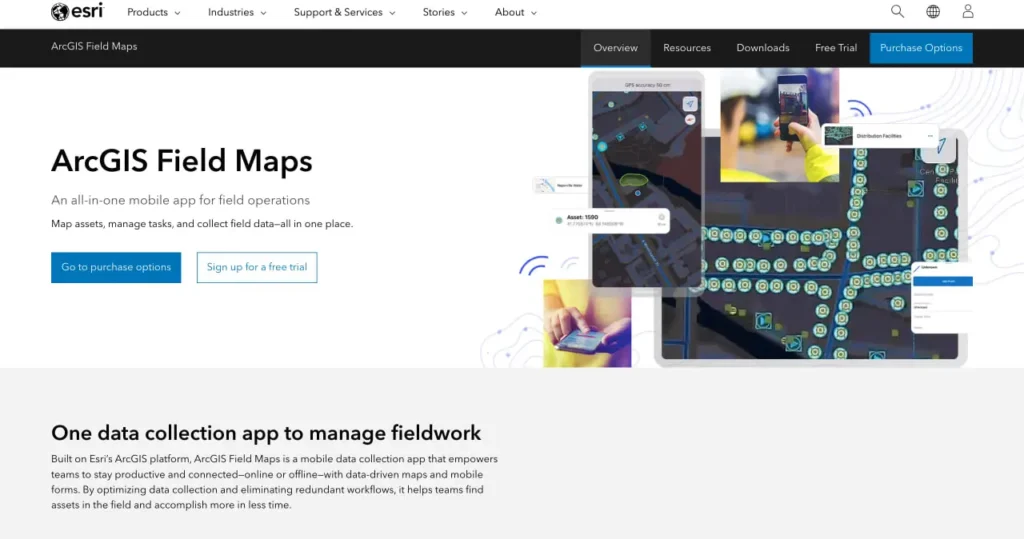
ArcGIS Field Maps एक मोबाइल ऐप है जिसे फील्ड में काम करने वाले उन कर्मचारियों के लिए डिज़ाइन किया गया है जिन्हें स्मार्टफोन या टैबलेट से GIS डेटा कैप्चर करने, देखने और संपादित करने की आवश्यकता होती है। Esri के ArcGIS प्लेटफॉर्म पर निर्मित यह ऐप इंटरैक्टिव डिजिटल मैप्स के माध्यम से सामान्य फील्ड गतिविधियों - संपत्ति का पता लगाना, डेटा कैप्चर करना, निरीक्षण और नेविगेशन - को संभालता है।.
यह ऐप एंड्रॉइड और आईओएस दोनों डिवाइस पर चलता है। फील्ड मैप्स, आर्कजीआईएस ऑनलाइन या आर्कजीआईएस एंटरप्राइज से डेटा लेता है, जिसका मतलब है कि संगठन क्लाउड में मैप और फॉर्म कॉन्फ़िगर करते हैं, फिर उन्हें मोबाइल डिवाइस पर भेजते हैं। कर्मचारी ऑफ़लाइन उपयोग के लिए मैप डाउनलोड कर सकते हैं, बिना कनेक्टिविटी के डेटा एकत्र कर सकते हैं, और फिर ऑनलाइन वापस आने पर उसे सिंक कर सकते हैं।.
लेकिन बात यह है कि फील्ड मैप्स सिर्फ बिंदुओं को कैप्चर करने तक सीमित नहीं है। यह रेखा और बहुभुज विशेषताओं को संभालता है, जटिल डेटा संबंधों के लिए संबंधित तालिकाओं का समर्थन करता है, और वर्क ऑर्डर सिस्टम जैसे उद्यम वर्कफ़्लो के साथ एकीकृत होता है।.
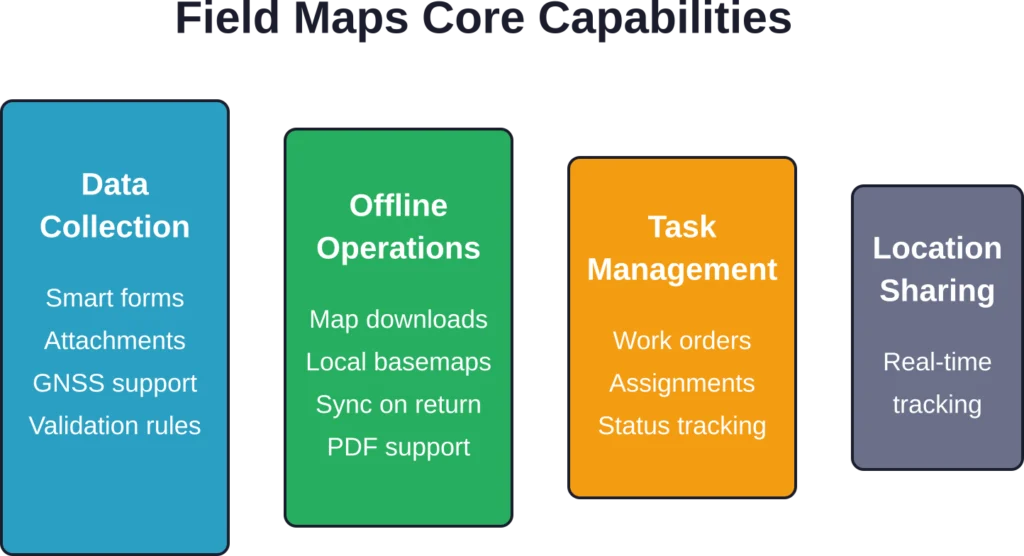
मुख्य विशेषताएं और क्षमताएं
फील्ड मैप्स क्या कर सकता है, यह समझने के लिए मोबाइल ऐप और इसे कॉन्फ़िगर करने वाले फील्ड मैप्स डिज़ाइनर वेब ऐप दोनों को देखना आवश्यक है।.
डेटा संग्रहण और प्रपत्र
मोबाइल ऐप में फील्ड मैप्स डिज़ाइनर में निर्मित स्मार्ट फ़ॉर्म मौजूद हैं। ये फ़ॉर्म फ़ीचर प्रकार, उपयोगकर्ता इनपुट और स्थान के आधार पर अनुकूलित होते हैं। सशर्त दृश्यता, ArcGIS आर्केड एक्सप्रेशन के माध्यम से परिकलित फ़ील्ड और कैस्केडिंग विकल्प सूचियाँ फ़ॉर्म को सुव्यवस्थित रखती हैं और त्रुटियों को कम करती हैं।.
आधिकारिक वेबसाइट के अनुसार, फील्ड मैप्स डेटा संग्रह वर्कफ़्लो को अनुकूलित करके टीमों को "मैदान में संसाधनों का पता लगाने और कम समय में अधिक कार्य पूरा करने" में मदद करता है। फॉर्म फ़ोटो, हस्ताक्षर, बारकोड स्कैनिंग और कई प्रकार के अटैचमेंट को सपोर्ट करते हैं।.
ऑफ़लाइन पहुँच और सिंक्रोनाइज़ेशन
सच बात यह है कि फील्ड में कनेक्टिविटी की गारंटी नहीं होती। फील्ड मैप्स उपयोगकर्ताओं को बाहर जाने से पहले मैप एरिया डाउनलोड करने की सुविधा देकर ऑफलाइन स्थितियों को संभालता है। मार्च 2026 के रिलीज़ से, ऑफलाइन सपोर्ट में जियोस्पेशियल पीडीएफ को एक नए प्रकार के ऑफलाइन मैप और लोकल बेस मैप फॉर्मेट के रूप में शामिल किया गया है।.
डाउनलोड किए गए मानचित्रों में सभी कॉन्फ़िगर किए गए लेयर, अटैचमेंट और संबंधित डेटा शामिल होते हैं। ऑफ़लाइन किए गए संपादन स्थानीय रूप से कतार में जमा हो जाते हैं और कनेक्टिविटी वापस आने पर स्वचालित रूप से सिंक हो जाते हैं। एक ही फ़ीचर को कई उपयोगकर्ताओं द्वारा संपादित किए जाने की स्थिति में विवाद समाधान प्रणाली काम करती है।.
स्थान ट्रैकिंग और जीएनएसएस एकीकरण
कई फील्ड ऑपरेशनों के लिए स्थिति की सटीकता महत्वपूर्ण होती है। फील्ड मैप्स ऐप ब्लूटूथ के माध्यम से बाहरी GNSS रिसीवरों से जुड़कर मीटर से भी कम या सेंटीमीटर स्तर की सटीकता प्रदान करता है। यह ऐप कई कैप्चर तकनीकों का समर्थन करता है—स्ट्रीमिंग (निरंतर कैप्चर), वर्टेक्स (रेखाओं और बहुभुजों के लिए बिंदु-दर-बिंदु कैप्चर), और सिंगल-पॉइंट कैप्चर।.
कार्लटन कॉलेज की जीआईएस लैब के दस्तावेज़ों के अनुसार, फील्ड मैप्स में स्थानों को कैप्चर करने के तरीके को कॉन्फ़िगर करने के लिए व्यापक संग्रह सेटिंग्स उपलब्ध हैं, जिनमें औसत निकालना, ऊंचाई फ़िल्टरिंग और सटीकता सीमा शामिल हैं।.
कार्य प्रबंधन
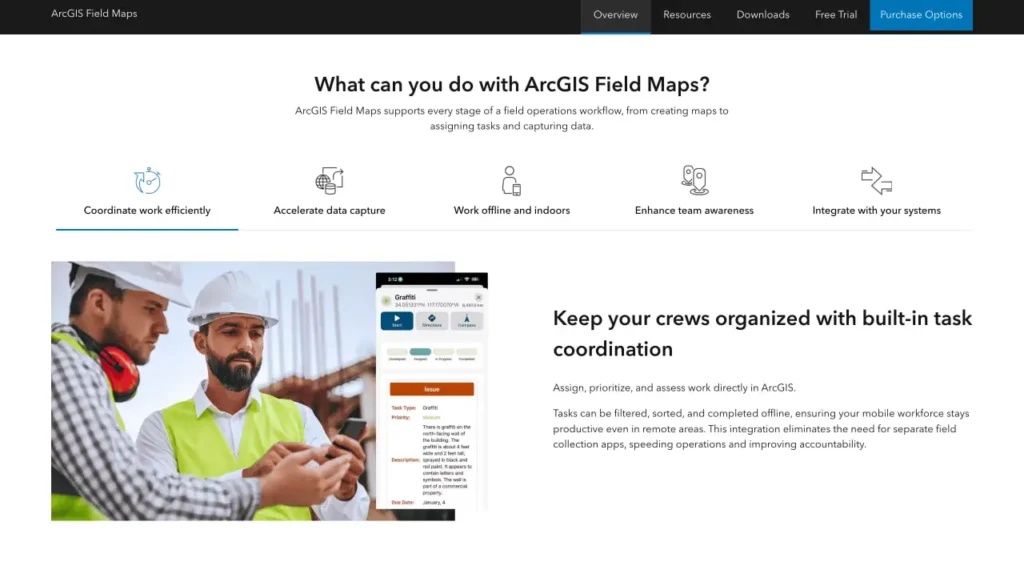
2025 के एक अपडेट में टास्क मैनेजमेंट की सुविधा जोड़ी गई। डिस्पैचर फील्ड वर्करों को वर्क ऑर्डर या निरीक्षण कार्य सौंप सकते हैं, जिन्हें मोबाइल ऐप में सीधे अपने कार्य दिखाई देते हैं। स्थिति संबंधी अपडेट वास्तविक समय में कार्यालय को भेजे जाते हैं।.
यह एकीकरण फील्ड मैप्स को एंटरप्राइज एसेट मैनेजमेंट और वर्क ऑर्डर सिस्टम से जोड़ता है, जिससे कार्य सौंपने और फील्ड में निष्पादन के बीच का अंतर समाप्त हो जाता है।.
FlyPix AI के साथ फील्ड डेटा को भू-स्थानिक अंतर्दृष्टि में बदलें
जमीनी स्तर पर डेटा एकत्र करना प्रक्रिया का केवल एक हिस्सा है। FlyPix AI संगठनों को ड्रोन, हवाई और उपग्रह छवियों का विश्लेषण करने में मदद करता है ताकि वस्तुओं की पहचान की जा सके, स्थानों की निगरानी की जा सके और भू-स्थानिक डेटासेट से उपयोगी जानकारी निकाली जा सके।.
क्या आप तेज़ भू-स्थानिक विश्लेषण की तलाश में हैं?
FlyPix AI निम्नलिखित में मदद कर सकता है:
- छवि-आधारित परिसंपत्ति निगरानी
- वस्तु का पता लगाना और वर्गीकरण
- ड्रोन और उपग्रह छवि विश्लेषण
- कस्टम एआई मॉडल प्रशिक्षण
👉 FlyPix AI को आजमाएं भौगोलिक विश्लेषण कार्यप्रवाहों का पता लगाने के लिए।.
फील्ड मैप्स सेट अप करना
तैनाती के लिए बैकएंड कॉन्फ़िगरेशन और मोबाइल सेटअप दोनों की आवश्यकता होती है। संगठन फ़ील्ड मैप्स डिज़ाइनर से शुरुआत करते हैं—यह एक वेब एप्लिकेशन है जिसे ArcGIS Online या Enterprise के माध्यम से एक्सेस किया जा सकता है।.
डिज़ाइनर में, प्रशासक यह चुनते हैं कि मानचित्र पर कौन सी फ़ीचर परतें दिखाई देंगी, पॉप-अप कॉन्फ़िगर करते हैं, सशर्त तर्क के साथ फ़ॉर्म बनाते हैं, स्थान ट्रैकिंग पैरामीटर सेट करते हैं, और यह परिभाषित करते हैं कि कौन से उपयोगकर्ता प्रत्येक मानचित्र तक पहुँच सकते हैं। मानचित्र कई डेटा स्रोतों को एकीकृत कर सकते हैं, जिनमें फ़ीचर सेवाएँ, टाइल परतें और एंटरप्राइज़ जियोडेटाबेस शामिल हैं।.
एक बार कॉन्फ़िगर हो जाने के बाद, मानचित्र स्वचालित रूप से मोबाइल उपकरणों पर सिंक हो जाते हैं। कर्मचारी अपने ArcGIS क्रेडेंशियल से साइन इन करते हैं, और मानचित्र उनकी मानचित्र लाइब्रेरी में दिखाई देते हैं। फ़ॉर्म या लेयर कॉन्फ़िगरेशन में किए गए अपडेट मैन्युअल डाउनलोड की आवश्यकता के बिना ही उपकरणों पर पहुंच जाते हैं।.
लाइसेंसिंग और मूल्य निर्धारण संरचना
फील्ड मैप्स के लिए ArcGIS उपयोगकर्ता प्रकार लाइसेंस की आवश्यकता होती है। आधिकारिक मूल्य निर्धारण पृष्ठ के अनुसार, तीन स्तर पहुंच प्रदान करते हैं:
| उपयोगकर्ता का प्रकार | फील्ड मैप्स एक्सेस | क्रेडिट शामिल हैं | के लिए सर्वश्रेष्ठ |
|---|---|---|---|
| निर्माता | पूर्ण पहुँच | 500 क्रेडिट | जीआईएस पेशेवर जो मानचित्रों को कॉन्फ़िगर करते हैं और डेटा का विश्लेषण करते हैं |
| पेशेवर | पूर्ण पहुँच | 500 क्रेडिट | उन्नत उपयोगकर्ताओं को ArcGIS Pro डेस्कटॉप क्षमताओं की आवश्यकता होती है |
| व्यवसायिक श्रेष्ठता | पूर्ण पहुँच | 500 क्रेडिट | ऐसे शक्तिशाली उपयोगकर्ता जिन्हें 3डी और उन्नत स्थानिक विश्लेषण की आवश्यकता होती है |
मोबाइल वर्कर उपयोगकर्ता प्रकार—विशेष रूप से फील्ड स्टाफ के लिए डिज़ाइन किए गए—कम लागत पर फील्ड मैप्स तक पहुंच प्रदान करते हैं। 2022 में लाइसेंसिंग में बदलाव आया जब फील्ड मैप्स प्राथमिक फील्ड ऐप बन गया, जिससे कलेक्टर, ट्रैकर और एक्सप्लोरर में फैली लाइसेंसिंग को समेकित किया गया।.
आधिकारिक वेबसाइट 21 दिनों का निःशुल्क परीक्षण प्रदान करती है जिसमें वर्कफ़्लो पूरा करने के लिए 400 क्रेडिट शामिल हैं। संगठन परीक्षण अवधि के दौरान या उसके 30 दिन बाद तक सदस्यता खरीद सकते हैं।.
वास्तविक दुनिया के परिदृश्यों में प्रदर्शन
फील्ड मैप्स का उपयोग कई उद्योगों में होता है। बिजली कंपनियां इसका इस्तेमाल संपत्ति निरीक्षण और क्षति आकलन के लिए करती हैं। पर्यावरण टीमें पर्यावास संबंधी डेटा और जल गुणवत्ता के नमूने एकत्र करती हैं। सरकारी एजेंसियां बुनियादी ढांचे का मानचित्रण करती हैं और सेवा अनुरोधों का जवाब देती हैं।.
राष्ट्रीय वनअग्नि समन्वय समूह घटना प्रबंधन के लिए पसंदीदा मोबाइल डेटा संग्रह विधि के रूप में फील्ड मैप्स की सिफारिश करता है, इसकी ऑफ़लाइन क्षमताओं और सामान्य परिचालन चित्र लाभों को देखते हुए।.
लेकिन रुकिए। प्रदर्शन काफी हद तक सही कॉन्फ़िगरेशन पर निर्भर करता है। खराब डिज़ाइन वाले फ़ॉर्म डेटा संग्रह को धीमा कर देते हैं। बहुत अधिक परतों वाले मानचित्र या असंवर्धित सेवाएं बैटरी जल्दी खत्म कर देती हैं और क्रैश का कारण बनती हैं। संगठनों को फ़ील्ड मैप्स को प्रभावी ढंग से स्थापित करने के लिए जीआईएस विशेषज्ञता की आवश्यकता होती है।.
फील्ड मैप बनाम विकल्प
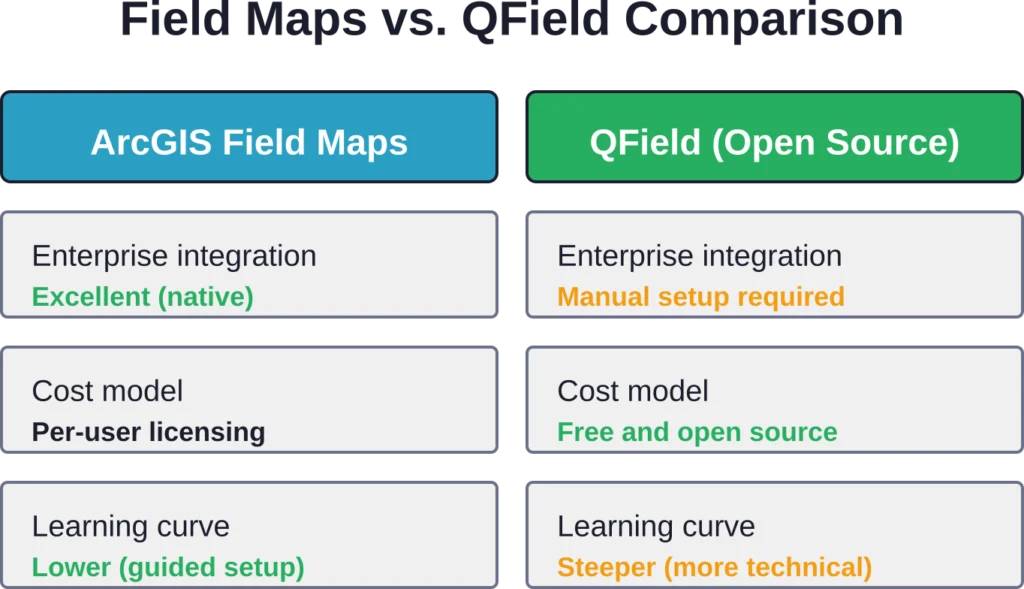
QField एक प्रमुख ओपन-सोर्स विकल्प प्रस्तुत करता है। QGIS पर आधारित QField, बिना किसी लाइसेंस शुल्क के, QGIS के समान ऑफ़लाइन डेटा संग्रह और फ़ॉर्म-आधारित डेटा कैप्चर की सुविधा प्रदान करता है। लेकिन इसमें एक कमी है: QField में अधिक मैन्युअल कॉन्फ़िगरेशन की आवश्यकता होती है और इसमें ArcGIS में अंतर्निहित एंटरप्राइज़ एकीकरण की सुविधा नहीं है।.
Survey123, Esri का एक और विकल्प है जो मानचित्र-आधारित कार्यप्रवाहों के बजाय विशेष रूप से प्रपत्र-आधारित सर्वेक्षणों पर केंद्रित है। Field Maps व्यापक क्षेत्र संचालन - निरीक्षण, परिसंपत्ति स्थान निर्धारण, नेविगेशन - को संभालता है, जबकि Survey123 संरचित प्रश्नावली में उत्कृष्ट है।.
जिन संगठनों ने पहले से ही ArcGIS में निवेश किया हुआ है, उन्हें Field Maps से सबसे अधिक लाभ होता है क्योंकि इसमें डेटा का प्रवाह सहज होता है और एकीकरण की जटिलता कम हो जाती है। QGIS के साथ काम करने वाली टीमें या लागत नियंत्रण को प्राथमिकता देने वाली टीमें QField को पसंद कर सकती हैं, भले ही इसकी कॉन्फ़िगरेशन प्रक्रिया थोड़ी जटिल हो।.
ताकत और सीमाएं
जहां फील्ड मैप्स उत्कृष्ट प्रदर्शन करता है
एकीकृत ऐप दृष्टिकोण से टूल बदलने की आवश्यकता समाप्त हो जाती है। लोकेशन शेयरिंग से वास्तविक समय में स्थिति की जानकारी मिलती है। कंडीशनल लॉजिक वाले स्मार्ट फॉर्म से डेटा कैप्चर करते समय होने वाली त्रुटियां कम हो जाती हैं। ऑफलाइन क्षमताएं दूरस्थ कार्य को प्रभावी ढंग से संभालती हैं।.
ArcGIS प्लेटफॉर्म के साथ एकीकरण का मतलब है कि डेटा निर्यात-आयात चक्रों के बिना सीधे उद्यम भू-डेटाबेस, वेब मैप और विश्लेषण वर्कफ़्लो में प्रवाहित होता है। जिन संगठनों में पहले से ही ArcGIS का उपयोग हो रहा है, वे नए डेटा साइलो बनाए बिना फील्ड क्षमताओं को जोड़ सकते हैं।.
जहां यह कमज़ोर पड़ता है
जटिलता अभी भी एक समस्या बनी हुई है। प्रभावी मानचित्र बनाने के लिए जीआईएस ज्ञान की आवश्यकता होती है—केवल तकनीकी कौशल ही नहीं, बल्कि स्थानिक डेटा मॉडल, डोमेन और संबंधों की समझ भी। समर्पित जीआईएस स्टाफ के बिना छोटे संगठनों को इसे अपनाने में अधिक कठिनाई का सामना करना पड़ता है।.
पुराने उपकरणों पर यह ऐप धीमा चल सकता है, खासकर बड़े डेटासेट या उच्च-रिज़ॉल्यूशन वाली छवियों के साथ। GNSS रिसीवर के साथ लंबे समय तक ऑफ़लाइन उपयोग के दौरान बैटरी जल्दी खत्म हो जाती है, इसलिए पहले से योजना बनाना आवश्यक है।.
बड़ी फील्ड टीमों वाले संगठनों के लिए लागत बढ़ जाती है। हालांकि मोबाइल वर्कर लाइसेंस क्रिएटर लाइसेंस से सस्ते होते हैं, लेकिन दर्जनों या सैकड़ों उपयोगकर्ताओं के लिए वार्षिक सदस्यता शुल्क कई गुना बढ़ जाता है।.
हालिया अपडेट और रोडमैप
मार्च 2026 के रिलीज़ में ऑफ़लाइन जियोस्पेशियल पीडीएफ़ सपोर्ट और बेहतर फ़ॉर्म एलिमेंट्स शामिल किए गए। 2025 के दौरान, Esri ने टास्क मैनेजमेंट इंटीग्रेशन, ऑफ़लाइन ट्रेसिंग के लिए यूटिलिटी नेटवर्क सपोर्ट और डेटा कैप्चर वर्कफ़्लो में सुधार पर ध्यान केंद्रित किया।.
स्थान साझाकरण सुविधा का विस्तार फील्ड ऑपरेशन ऐप परिवार में किया गया है, और अब यह फील्ड मैप्स, क्विककैप्चर और सर्वे123 में काम कर रही है। यह क्रॉस-ऐप समन्वय संगठनों को विशिष्ट कार्य आवश्यकताओं के आधार पर उपकरणों को मिश्रित करने की अनुमति देता है, साथ ही सभी फील्ड कार्यकर्ताओं की दृश्यता बनाए रखता है।.
दस्तावेज़ और सामुदायिक संसाधन लगातार बढ़ रहे हैं। Esri कम्युनिटी फ़ोरम, ट्यूटोरियल सीरीज़ और आधिकारिक दस्तावेज़ प्रशासकों और फील्ड उपयोगकर्ताओं दोनों के लिए व्यापक मार्गदर्शन प्रदान करते हैं।.
फील्ड मैप का उपयोग किसे करना चाहिए?
जो संगठन पहले से ही ArcGIS Online या Enterprise का उपयोग कर रहे हैं, उन्हें सबसे अधिक लाभ मिलता है। उपयोगिता कंपनियां, सरकारी एजेंसियां, पर्यावरण सलाहकार और अवसंरचना प्रबंधक प्रमुख उपयोगकर्ता समूह हैं।.
टीमों को विश्वसनीय उपकरणों (अधिमानतः नए स्मार्टफोन या मजबूत टैबलेट), सिंक्रनाइज़ेशन के लिए सेलुलर या वाईफाई कनेक्टिविटी और कॉन्फ़िगरेशन को संभालने के लिए जीआईएस अवधारणाओं से परिचित कम से कम एक व्यक्ति की आवश्यकता होती है।.
एक बार के प्रोजेक्ट या बहुत ही सरल डेटा संग्रह के लिए, Survey123 या सामान्य उपयोग वाले उपकरण पर्याप्त हो सकते हैं। फील्ड मैप्स तब उपयोगी होता है जब कार्यों में निरीक्षण, परिसंपत्ति प्रबंधन, जटिल डेटा संबंध या उद्यम प्रणालियों के साथ एकीकरण शामिल हो।.
अक्सर पूछे जाने वाले प्रश्नों
जी हां। फील्ड मैप्स पूरी तरह से ऑफलाइन डेटा संग्रह का समर्थन करता है। फील्ड में जाने से पहले मानचित्र क्षेत्रों को डाउनलोड करें, ऑफलाइन डेटा कैप्चर करें, और कनेक्टिविटी वापस आने पर परिवर्तनों को सिंक करें। मार्च 2026 के रिलीज़ में जियोस्पेशियल पीडीएफ को ऑफलाइन बेस मैप फॉर्मेट के रूप में सपोर्ट करने की सुविधा जोड़ी गई है।.
Field Maps ऐप Android स्मार्टफोन और टैबलेट (Google Play पर उपलब्ध) और iOS डिवाइस, जिनमें iPhone और iPad शामिल हैं, पर चलता है। इस ऐप के लिए डिवाइस के अपेक्षाकृत नए संस्करण आवश्यक हैं—वर्तमान संगतता आवश्यकताओं के लिए आधिकारिक डाउनलोड पृष्ठ देखें।.
जी हां। फील्ड मैप्स बेहतर लोकेशन सटीकता के लिए ब्लूटूथ के माध्यम से बाहरी GNSS रिसीवर को सपोर्ट करता है। इससे उन अनुप्रयोगों के लिए सब-मीटर या सेंटीमीटर स्तर की सटीकता संभव हो पाती है जिन्हें मानक डिवाइस GPS क्षमताओं से परे उच्च स्थानिक सटीकता की आवश्यकता होती है।.
फील्ड मैप्स के लिए ArcGIS उपयोगकर्ता प्रकार लाइसेंस आवश्यक है। क्रिएटर, प्रोफेशनल और प्रोफेशनल प्लस लाइसेंस में फील्ड मैप्स की सुविधा शामिल है और इनके साथ 500 क्रेडिट मिलते हैं। मोबाइल वर्कर लाइसेंस फील्ड में काम करने वाले उपयोगकर्ताओं के लिए कम कीमत पर फील्ड मैप्स की सुविधा प्रदान करते हैं। 400 क्रेडिट के साथ 21 दिन का निःशुल्क परीक्षण उपलब्ध है—वर्तमान मूल्य निर्धारण के लिए Esri की आधिकारिक वेबसाइट देखें।.
फील्ड मैप्स मानचित्र-केंद्रित है और इसे कई स्तरों पर परिसंपत्ति स्थान निर्धारण, निरीक्षण और स्थानिक संपादन के लिए डिज़ाइन किया गया है। सर्वे123 प्रपत्र-आधारित सर्वेक्षणों और संरचित प्रश्नावली पर केंद्रित है। नेविगेशन और स्थानिक संदर्भ की आवश्यकता वाले कार्यों के लिए फील्ड मैप्स बेहतर काम करता है; सर्वे123 दोहराए जाने योग्य डेटा संग्रह प्रपत्रों में उत्कृष्ट है।.
फॉर्म को फ़ील्ड मैप्स डिज़ाइनर में कॉन्फ़िगर किया जाता है, जो ArcGIS Online या Enterprise के माध्यम से एक्सेस किया जाने वाला एक वेब एप्लिकेशन है। एडमिनिस्ट्रेटर यह तय करते हैं कि कौन से फ़ील्ड दिखाई देंगे, सशर्त दृश्यता सेट करते हैं, आर्केड एक्सप्रेशन का उपयोग करके गणना किए गए फ़ील्ड जोड़ते हैं और इनपुट प्रकारों को कॉन्फ़िगर करते हैं। परिवर्तन स्वचालित रूप से मोबाइल उपकरणों पर सिंक हो जाते हैं।.
फील्ड मैप्स एक साथ कई उपयोगकर्ताओं को सपोर्ट करता है। ऑनलाइन काम करते समय, किए गए बदलाव लगभग तुरंत सिंक हो जाते हैं। ऑफ़लाइन काम के लिए, सिस्टम ओवरलैपिंग बदलावों को सिंक करने वाले उपयोगकर्ताओं के बीच टकराव का पता लगाता है और बदलावों को सही ढंग से मर्ज करने के लिए टकराव समाधान वर्कफ़्लो प्रदान करता है।.
अंतिम निर्णय
ArcGIS Field Maps अपने मूल वादे को पूरा करता है, जिसमें फील्ड ऑपरेशन्स को एक मोबाइल ऐप में समेकित करना शामिल है। जिन संगठनों के पास पहले से ही ArcGIS इंफ्रास्ट्रक्चर है, उनके लिए यह फील्ड डेटा संग्रह को सुव्यवस्थित करता है, स्मार्ट फॉर्म के माध्यम से त्रुटियों को कम करता है और ऑफलाइन सिंक क्षमताओं के साथ डेटा की गुणवत्ता बनाए रखता है।.
जीआईएस को सीखने में लगने वाला समय और लाइसेंसिंग लागत छोटे संगठनों या जीआईएस में नए लोगों के लिए वास्तविक बाधाएं हैं। सेटअप के लिए स्थानिक डेटा विशेषज्ञता की आवश्यकता होती है, और बड़े फील्ड टीमों में प्रति उपयोगकर्ता लाइसेंसिंग की लागत तेजी से बढ़ जाती है।.
लेकिन उपयोगिता कंपनियों, सरकारी एजेंसियों और उद्यमों के लिए, जहाँ फील्ड डेटा की सटीकता और उद्यम एकीकरण महत्वपूर्ण हैं, फील्ड मैप्स एक परिपक्व और सक्षम समाधान है। 2025-2026 के संस्करणों में कई महत्वपूर्ण क्षमताएँ जोड़ी गईं - कार्य प्रबंधन, पीडीएफ समर्थन, बेहतर ऑफ़लाइन सुविधाएँ - जो वास्तविक फील्ड वर्कफ़्लो आवश्यकताओं को पूरा करती हैं।.
21 दिनों के ट्रायल से शुरुआत करें और देखें कि फील्ड मैप्स आपकी विशिष्ट परिचालन आवश्यकताओं के अनुरूप है या नहीं। एक पायलट मैप बनाएं, ऑफ़लाइन परिदृश्यों का परीक्षण करें और मूल्यांकन करें कि क्या प्लेटफ़ॉर्म एकीकरण आपके उपयोग के मामले के लिए निवेश को उचित ठहराता है।.