

त्वरित सारांश: ArcGIS Online एक क्लाउड-आधारित वेब GIS प्लेटफॉर्म है जो उपयोगकर्ताओं को पारंपरिक डेस्कटॉप सॉफ़्टवेयर के बिना इंटरैक्टिव मानचित्र और स्थानिक डेटा बनाने, साझा करने और प्रबंधित करने की सुविधा देता है। विभिन्न प्रकार के उपयोगकर्ताओं (क्रिएटर, प्रोफेशनल, प्रोफेशनल प्लस), मजबूत सहयोग सुविधाओं और उपयोग के अनुसार भुगतान प्रणाली के साथ, यह उन संगठनों की जरूरतों को पूरा करता है जिन्हें सुलभ भू-स्थानिक विश्लेषण की आवश्यकता होती है - हालांकि डेस्कटॉप GIS की तुलना में क्रेडिट प्रबंधन और सुविधाओं की सीमाएं चुनौतियां पेश कर सकती हैं।.
भौगोलिक सूचना प्रणाली (GIS) का परिदृश्य क्लाउड-आधारित प्लेटफॉर्मों की ओर नाटकीय रूप से बदल गया है। ArcGIS Online इस परिवर्तन के केंद्र में है, जो संगठनों को सर्वर इंफ्रास्ट्रक्चर का प्रबंधन किए बिना मानचित्रण और स्थानिक विश्लेषण क्षमताओं को तैनात करने का एक तरीका प्रदान करता है।.
लेकिन क्या यह उम्मीदों पर खरा उतरता है? यह समीक्षा विस्तार से बताती है कि 2026 में ArcGIS Online वास्तव में क्या प्रदान करता है, इसके उपयोगकर्ता प्रकार संरचना से लेकर इसके क्रेडिट-आधारित मूल्य निर्धारण मॉडल तक। चाहे आप इसका मूल्यांकन पर्यावरणीय समीक्षा वर्कफ़्लो, व्यावसायिक बुद्धिमत्ता या सहयोगी डेटा प्रबंधन के लिए कर रहे हों, इसकी खूबियों और सीमाओं को समझना महत्वपूर्ण है।.
ArcGIS Online क्या है?
ArcGIS Online (जिसे अक्सर AGOL के रूप में संक्षिप्त किया जाता है) Esri का सॉफ्टवेयर-एज़-ए-सर्विस वेब GIS प्लेटफॉर्म है। यह पूरी तरह से वेब ब्राउज़र में चलता है, जिससे उपयोगकर्ता डेस्कटॉप एप्लिकेशन इंस्टॉल किए बिना इंटरैक्टिव मैप बना सकते हैं, स्थानिक विश्लेषण कर सकते हैं और भू-स्थानिक सामग्री साझा कर सकते हैं।.
यह प्लेटफ़ॉर्म स्थानिक डेटा के लिए मैपिंग टूल और कंटेंट मैनेजमेंट सिस्टम दोनों के रूप में कार्य करता है। संगठन फीचर लेयर्स, टाइल लेयर्स और अन्य भौगोलिक डेटासेट को होस्ट कर सकते हैं और भूमिका-आधारित अनुमतियों के माध्यम से पहुंच को नियंत्रित कर सकते हैं।.
पारंपरिक डेस्कटॉप जीआईएस के विपरीत, जिसके लिए स्थानीय इंस्टॉलेशन और पर्याप्त कंप्यूटिंग संसाधनों की आवश्यकता होती है, आर्कजीआईएस ऑनलाइन प्रोसेसिंग का भार एसरी के क्लाउड इंफ्रास्ट्रक्चर पर डाल देता है। इस प्रबंधित दृष्टिकोण का मतलब है कि टीमों को सर्वर रखरखाव, बैकअप या स्केलिंग की जिम्मेदारी नहीं लेनी पड़ती - एसरी ही इस इंफ्रास्ट्रक्चर का प्रबंधन करता है।.
मुख्य विशेषताएं और क्षमताएं
ArcGIS Online की विशेषताओं में वे सभी आवश्यक कार्यप्रवाह शामिल हैं जिनकी अधिकांश संगठनों को वेब जीआईएस प्लेटफॉर्म से आवश्यकता होती है।.
मानचित्र निर्माण और दृश्यीकरण
मैप व्यूअर इंटरफ़ेस उपयोगकर्ताओं को डेटासेट को लेयर करने, सिम्बोलॉजी लागू करने, पॉप-अप कॉन्फ़िगर करने और कार्टोग्राफिक आउटपुट डिज़ाइन करने की सुविधा देता है। स्मार्ट मैपिंग टूल डेटा विशेषताओं के आधार पर स्वचालित रूप से विज़ुअलाइज़ेशन विधियों का सुझाव देते हैं।.
सीन व्यूअर उन अनुप्रयोगों के लिए त्रि-आयामी मानचित्रण का काम करता है जिनमें ऊंचाई, भवन मॉडल या आयतन विज़ुअलाइज़ेशन की आवश्यकता होती है। 2D और 3D दोनों आउटपुट को वेबसाइटों में एम्बेड किया जा सकता है या स्टैंडअलोन ऐप के रूप में साझा किया जा सकता है।.
डेटा होस्टिंग और प्रबंधन
संगठन फ़ीचर लेयर्स (वेक्टर डेटा), टाइल लेयर्स (रास्टर/इमेज) और फ़ाइल-आधारित डेटासेट अपलोड और होस्ट कर सकते हैं। आधिकारिक दस्तावेज़ के अनुसार, स्टैंडर्ड फ़ीचर डेटा स्टोर 500 जीबी तक फ़ीचर डेटा स्टोरेज को सपोर्ट करता है, जिसका शुल्क पे-एज़-यू-गो मॉडल के तहत क्रेडिट के माध्यम से लिया जाता है।.
प्रीमियम फीचर डेटा स्टोर उच्च मात्रा वाले वर्कफ़्लो के लिए निश्चित मूल्य निर्धारण और बेहतर प्रदर्शन प्रदान करता है - हालांकि विशिष्ट मूल्य निर्धारण सदस्यता स्तर के अनुसार भिन्न होता है।.
विश्लेषण उपकरण
स्थानिक विश्लेषण क्षमताओं में निकटता विश्लेषण, ओवरले संचालन, पैटर्न पहचान और सारांश शामिल हैं। ये उपकरण सर्वर-साइड पर चलते हैं और प्रोसेसिंग की जटिलता के आधार पर क्रेडिट का उपयोग करते हैं।.
ओहियो स्टेट यूनिवर्सिटी के अकादमिक दस्तावेज़ के अनुसार, जियोकोडिंग में प्रति 1,000 पतों पर 40 क्रेडिट खर्च होते हैं। जियोएनरिचमेंट में जनसांख्यिकीय और जीवनशैली संबंधी डेटा को स्थानों में जोड़ा जाता है, जिसमें प्रति 1,000 विशेषताओं पर 10 क्रेडिट खर्च होते हैं।.
सहयोग और साझाकरण
संगठन समूहों, साझाकरण नीतियों और आइटम-स्तरीय अनुमतियों के माध्यम से सामग्री की दृश्यता को नियंत्रित करते हैं। सामग्री निजी रह सकती है, संगठन के भीतर साझा की जा सकती है या सार्वजनिक रूप से प्रकाशित की जा सकती है।.
सहयोग से ArcGIS Online और ArcGIS Enterprise परिनियोजनों के बीच अंतर-संगठनात्मक डेटा साझाकरण संभव होता है, जो वितरित वर्कफ़्लो और भागीदार डेटा विनिमय का समर्थन करता है।.
FlyPix AI के साथ बड़े पैमाने पर भू-स्थानिक डेटा का विश्लेषण करें
बड़े भू-स्थानिक डेटासेट के साथ काम करने में अक्सर इमेज रिव्यू और डेटा प्रोसेसिंग के लिए काफी समय लगता है। FlyPix AI, AI-संचालित डिटेक्शन, क्लासिफिकेशन और मॉनिटरिंग टूल्स के माध्यम से इन कार्यों को स्वचालित करने में मदद करता है।.
क्या आपको भू-स्थानिक डेटा को संसाधित करने का कोई तेज़ तरीका चाहिए?
FlyPix AI निम्नलिखित में मदद कर सकता है:
- बड़े पैमाने पर छवि विश्लेषण
- स्वचालित छवि एनोटेशन
- भूमि उपयोग और परिसंपत्ति वर्गीकरण
- भू-स्थानिक निगरानी
👉 FlyPix AI को आजमाएं भौगोलिक निगरानी समाधानों का पता लगाने के लिए।.
उपयोगकर्ता प्रकार और पहुंच स्तर
ArcGIS Online तीन प्राथमिक उपयोगकर्ता प्रकारों के माध्यम से पहुंच को व्यवस्थित करता है, जिनमें से प्रत्येक अलग-अलग संगठनात्मक भूमिकाओं और जीआईएस क्षमता आवश्यकताओं के अनुरूप होता है।.
| उपयोगकर्ता का प्रकार | प्रमुख क्षमताएं | विशिष्ट भूमिका |
|---|---|---|
| निर्माता | कोर मैपिंग, डेटा निर्माण, बुनियादी विश्लेषण | जीआईएस विश्लेषक, डेटा प्रबंधक |
| पेशेवर | क्रिएटर में मौजूद सभी सुविधाओं के साथ-साथ उन्नत संपादन और स्वचालन की सुविधा भी उपलब्ध है। | वरिष्ठ विश्लेषक, परियोजना प्रमुख |
| व्यवसायिक श्रेष्ठता | प्रोफेशनल प्लस प्रीमियम विश्लेषण टूल में सब कुछ शामिल है। | जीआईएस विशेषज्ञ, उन्नत उपयोगकर्ता |
Esri की आधिकारिक वेबसाइट के अनुसार, प्रत्येक उपयोगकर्ता प्रकार को सालाना 500 क्रेडिट मिलते हैं। इन क्रेडिट का उपयोग जियोकोडिंग, स्थानिक विश्लेषण और प्रीमियम डेटा एक्सेस जैसी उपयोग-आधारित गतिविधियों के लिए किया जाता है।.
इस स्तरीय संरचना का उद्देश्य कार्यक्षेत्र के अनुरूप पहुंच प्रदान करना है। संगठन मुख्य रूप से मानचित्र बनाने और साझा करने वाले टीम सदस्यों को क्रिएटर लाइसेंस आवंटित कर सकते हैं, जबकि जटिल वर्कफ़्लो चलाने वाले उपयोगकर्ताओं के लिए प्रोफेशनल या प्रोफेशनल प्लस लाइसेंस आरक्षित रख सकते हैं।.
मुफ्त पहुंच के बारे में क्या?
Esri उन संगठनों के लिए 21 दिनों का निःशुल्क परीक्षण प्रदान करता है जो ArcGIS Online का मूल्यांकन करना चाहते हैं। सीमित कार्यक्षमता वाले सार्वजनिक खाते भी सीखने और गैर-व्यावसायिक परियोजनाओं के लिए उपलब्ध हैं।.
शैक्षणिक संस्थान अक्सर संस्थागत समझौतों के माध्यम से छात्रों और शोधकर्ताओं को सुविधाएँ प्रदान करते हैं। ये कार्यक्रम आमतौर पर एक निश्चित क्रेडिट राशि आवंटित करते हैं - उदाहरण के लिए, ओहियो स्टेट यूनिवर्सिटी का ArcGIS Online संगठन डिफ़ॉल्ट रूप से प्रति उपयोगकर्ता 1,000 क्रेडिट प्रदान करता है।.
ऋण प्रणाली की व्याख्या
अब यहाँ से बात दिलचस्प हो जाती है। ArcGIS Online की क्रेडिट प्रणाली उपयोग-आधारित गतिविधियों के लिए एक आंतरिक मुद्रा के रूप में कार्य करती है। विभिन्न कार्यों में क्रेडिट की खपत अलग-अलग दरों पर होती है।.
प्रत्येक उपयोगकर्ता प्रकार को प्रति माह 500 क्रेडिट मिलते हैं। ये क्रेडिट समाप्त होने पर संगठन अतिरिक्त क्रेडिट खरीद सकते हैं। इस मॉडल का उद्देश्य गतिविधि की परवाह किए बिना एक समान दर वसूलने के बजाय वास्तविक उपयोग के अनुसार लागत को समायोजित करना है।.
क्रेडिट का उपयोग किन चीजों में होता है?
आधिकारिक दस्तावेजों के अनुसार, तीन प्रकार की गतिविधियों में क्रेडिट खर्च होते हैं:
- स्टोरेज की सुविधा: वेक्टर डेटा होस्टिंग का शुल्क 0.24 क्रेडिट प्रति 10 एमबी प्रति माह है (प्रति घंटा गणना करने पर लगभग 0.000322 क्रेडिट प्रति एमबी प्रति घंटा)।.
- विश्लेषण उपकरण: जियोकोडिंग, रूटिंग, स्थानिक विश्लेषण और अन्य सर्वर-साइड प्रोसेसिंग।.
- प्रीमियम सामग्री: Esri के सुनियोजित जनसांख्यिकीय स्तरों, जीवनशैली विभाजन डेटा और अन्य मूल्यवर्धित डेटासेट तक पहुंच।.
रास्टर डेटा और टाइल कैश के लिए फ़ाइल स्टोरेज की लागत 1.2 क्रेडिट प्रति 1 जीबी (1,024 एमबी) प्रति माह है। डेटा होस्ट होने तक ये दरें लगातार लागू रहती हैं।.
मासिक बिलिंग मॉडल का मतलब है कि लागत समय के साथ बढ़ती जाती है। पूरे महीने के लिए होस्ट की गई 100 एमबी की फीचर लेयर ठीक 24 क्रेडिट्स की खपत करती है (प्रति माह 10 एमबी पर 2.4 क्रेडिट्स × 10)।.
क्रेडिट प्रबंधन चुनौतियाँ
सामुदायिक चर्चाओं में क्रेडिट ट्रैकिंग को एक परेशानी के रूप में उजागर किया गया है। सावधानीपूर्वक निगरानी के बिना, संगठन अपेक्षा से अधिक तेज़ी से आवंटन समाप्त कर सकते हैं, विशेष रूप से बैच जियोकोडिंग चलाने या बड़े डेटासेट को संग्रहीत करने के दौरान।.
Esri उपयोग डैशबोर्ड प्रदान करता है, लेकिन विशिष्ट शुल्कों के कारणों को समझने के लिए लॉग की गहन जांच करनी पड़ती है। क्रेडिट बजट और अलर्ट सेट करना मददगार होता है, हालांकि इससे प्रशासनिक कार्यभार बढ़ जाता है।.
ArcGIS ऑनलाइन की खूबियाँ
वेब जीआईएस अपनाने वाले संगठनों के लिए आर्कजीआईएस ऑनलाइन को आकर्षक बनाने वाले कई पहलू हैं।.
शून्य अवसंरचना प्रबंधन
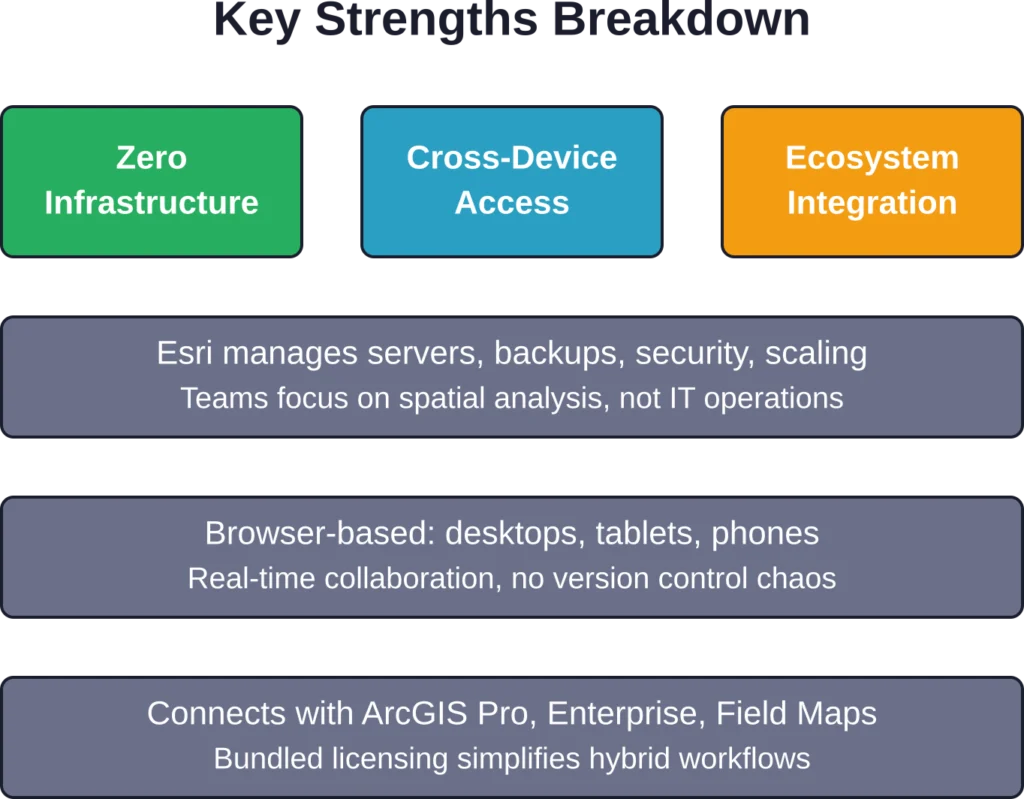
होस्टेड मॉडल सर्वर एडमिनिस्ट्रेशन की झंझट से मुक्ति दिलाता है। न पैचिंग, न बैकअप, न स्केलिंग की चिंता। Esri इंफ्रास्ट्रक्चर का प्रबंधन करता है, जबकि टीमें स्थानिक वर्कफ़्लो पर ध्यान केंद्रित करती हैं।.
जिन छोटे संगठनों के पास समर्पित आईटी कर्मचारी नहीं हैं, उनके लिए यह जीआईएस को अपनाने में आने वाली एक महत्वपूर्ण बाधा को दूर करता है। यहां तक कि बड़े उद्यम भी परिचालन संबंधी बोझ कम होने से लाभान्वित होते हैं।.
पहुँच और सहयोग
ब्राउज़र-आधारित एक्सेस का मतलब है कि उपयोगकर्ता बिना सॉफ़्टवेयर इंस्टॉल किए किसी भी डिवाइस से काम कर सकते हैं। फील्ड स्टाफ मोबाइल ऐप के ज़रिए डेटा दे सकते हैं, ऑफिस एनालिस्ट डेस्कटॉप पर मैप बना सकते हैं और अधिकारी टैबलेट पर डैशबोर्ड देख सकते हैं - ये सभी एक ही होस्ट किए गए डेटा से जुड़े होते हैं।.
साझा डेटासेट पर वास्तविक समय में सहयोग करने से फ़ाइल-आधारित जीआईएस वर्कफ़्लो को प्रभावित करने वाली संस्करण नियंत्रण संबंधी समस्याओं को कम किया जा सकता है।.
ArcGIS इकोसिस्टम के साथ एकीकरण
ArcGIS Online, ArcGIS Pro (डेस्कटॉप सॉफ्टवेयर), ArcGIS Enterprise (सेल्फ-होस्टेड), Field Maps (मोबाइल डेटा संग्रह) और दर्जनों अन्य Esri उत्पादों के साथ सहजता से जुड़ता है।.
ArcGIS Online के उपयोगकर्ता प्रकारों में लाइसेंस स्तर के आधार पर बेसिक, स्टैंडर्ड या एडवांस्ड लाइसेंस स्तरों पर ArcGIS Pro तक पहुंच शामिल है। यह संयुक्त दृष्टिकोण हाइब्रिड वर्कफ़्लो के लिए लाइसेंसिंग को सरल बनाता है।.
तेजी से तैनाती
ArcGIS Online संगठन को स्थापित करने में कुछ ही मिनट लगते हैं। इसकी तुलना ArcGIS Enterprise को तैनात करने से करें, जिसमें सर्वर प्रोविजनिंग, सॉफ़्टवेयर इंस्टॉलेशन और कॉन्फ़िगरेशन शामिल होता है।.
कम समय सीमा वाली परियोजनाओं या प्रारंभिक स्तर की पहलों के लिए, त्वरित सेटअप महत्वपूर्ण होता है।.
सीमाएँ और कमियाँ
कोई भी प्लेटफॉर्म परिपूर्ण नहीं होता। ArcGIS Online में कुछ कमियां हैं जो कुछ उपयोग मामलों को दूसरों की तुलना में अधिक प्रभावित करती हैं।.
प्रदर्शन संबंधी बाधाएँ
वेब-आधारित विश्लेषण Esri के साझा बुनियादी ढांचे पर चलता है। बड़े डेटासेट पर जटिल स्थानिक संक्रियाएं ArcGIS Pro चलाने वाले शक्तिशाली स्थानीय वर्कस्टेशन पर समकक्ष प्रसंस्करण की तुलना में धीमी हो सकती हैं।.
बड़े पैमाने पर रास्टर डेटासेट या गहन गणनात्मक मॉडल के साथ काम करने वाले उपयोगकर्ता अक्सर प्रदर्शन की सीमा तक पहुँच जाते हैं। ऐसे जटिल कार्यों के लिए डेस्कटॉप जीआईएस के अभी भी कई फायदे हैं।.
डेस्कटॉप की तुलना में सुविधाओं में अंतर
ArcGIS Online में ArcGIS Pro में उपलब्ध कुछ उन्नत भू-प्रसंस्करण उपकरणों की कमी है। कुछ स्थानिक विश्लेषण विधियाँ, कस्टम स्क्रिप्टिंग क्षमताएँ और विशेष एक्सटेंशन वेब वातावरण में उपलब्ध नहीं हैं।.
प्लेटफ़ॉर्म इन कमियों को दूर करने का प्रयास जारी रखे हुए है — Esri की 2025 ArcGIS Online वार्षिक समीक्षा (17 दिसंबर, 2025 को प्रकाशित) के अनुसार, सुधारों में डैशबोर्ड सुविधाओं, दिनांक सीमा चयन और समय श्रृंखला विज़ुअलाइज़ेशन में संवर्द्धन शामिल हैं, जिनके बारे में अतिरिक्त विवरण मासिक रिलीज़ नोट्स में उपलब्ध हैं। लेकिन डेस्कटॉप कार्यक्षमता के साथ समानता अभी पूरी तरह से प्राप्त नहीं हुई है।.
क्रेडिट लागत की अनिश्चितता
पे-एज़-यू-गो क्रेडिट मॉडल बजट संबंधी अनिश्चितता पैदा करता है। प्लेटफ़ॉर्म पर नए संगठन अक्सर खपत का कम अनुमान लगाते हैं, जिससे अप्रत्याशित लागतें सामने आती हैं।.
सैद्धांतिक रूप से यह मॉडल लागत को उपयोग के अनुरूप रखता है, लेकिन क्रेडिट खपत पर नज़र रखने और उसका पूर्वानुमान लगाने के लिए सक्रिय प्रबंधन की आवश्यकता होती है। फ्लैट सब्सक्रिप्शन मॉडल, हालांकि कम लचीले होते हैं, लेकिन अधिक पूर्वानुमान योग्य बजट प्रदान करते हैं।.
विक्रेता बंदी
ArcGIS Online संगठनों को Esri के इकोसिस्टम से जोड़ता है। डेटा और वर्कफ़्लो को वैकल्पिक प्लेटफ़ॉर्म पर माइग्रेट करने में मेहनत लगती है, खासकर उन टीमों के लिए जो Esri टूल्स के साथ गहराई से जुड़ी हुई हैं।.
GeoServer, QGIS Cloud और PostGIS जैसे ओपन-सोर्स विकल्प अधिक लचीलापन प्रदान करते हैं, लेकिन इसके लिए अधिक प्रत्यक्ष प्रबंधन और तकनीकी विशेषज्ञता की आवश्यकता होती है।.
वास्तविक दुनिया में उपयोग के मामले
ArcGIS Online की खूबियों को समझना विशिष्ट संगठनात्मक आवश्यकताओं के लिए उसकी उपयुक्तता का मूल्यांकन करने में सहायक होता है।.
पर्यावरण समीक्षा कार्यप्रवाह
पर्यावरण समीक्षा समाधान प्रस्तावित परियोजनाओं के पारिस्थितिक रूप से संवेदनशील क्षेत्रों पर पड़ने वाले प्रभावों के आकलन को सुव्यवस्थित करता है। यह समाधान नियामक अनुपालन के लिए मानकीकृत कार्यप्रवाहों के साथ ArcGIS Online की मानचित्रण क्षमताओं को एकीकृत करता है।.
परियोजना आवेदक ArcGIS हब साइटों के माध्यम से प्रस्ताव प्रस्तुत करते हैं, समीक्षक स्थानिक विश्लेषण उपकरणों का उपयोग करके प्रभावों का मूल्यांकन करते हैं, और हितधारक सार्वजनिक डैशबोर्ड के माध्यम से परियोजना की स्थिति देखते हैं। क्लाउड-आधारित दृष्टिकोण डेटा को केंद्रीकृत करता है और समीक्षा चक्रों को गति प्रदान करता है।.
आपातकालीन प्रतिक्रिया और आपदा प्रबंधन
जब भीषण मौसम संबंधी घटनाएं या जंगल में आग लगती है, तो ArcGIS Online तेजी से मानचित्र बनाने और जानकारी साझा करने में सक्षम बनाता है। राहत दल वास्तविक समय के स्थिति मानचित्र प्रकाशित करते हैं, संसाधनों की तैनाती का समन्वय करते हैं और प्रभावित आबादी के साथ संवाद स्थापित करते हैं।.
इस प्लेटफॉर्म की सुलभता का मतलब है कि फील्ड क्रू, आपातकालीन संचालन केंद्र और सार्वजनिक सूचना अधिकारी सभी जटिल डेटा सिंक्रोनाइज़ेशन के बिना वर्तमान डेटा से काम कर सकते हैं।.
व्यावसायिक बुद्धिमत्ता और साइट चयन
रिटेल चेन, हेल्थकेयर सिस्टम और सेवा संगठन बाज़ार के अवसरों का विश्लेषण करने और सुविधाओं के स्थान को अनुकूलित करने के लिए ArcGIS Online का उपयोग करते हैं। जियोएनरिचमेंट टूल संभावित साइटों में जनसांख्यिकीय प्रोफाइल जोड़ते हैं, निकटता विश्लेषण प्रतिस्पर्धा का मूल्यांकन करता है, और ड्राइव-टाइम विश्लेषण ग्राहक पहुंच का मॉडल तैयार करता है।.
इन व्यावसायिक अनुप्रयोगों के लिए अक्सर पर्यावरण या इंजीनियरिंग कार्यप्रवाहों की तुलना में कम तकनीकी जीआईएस विशेषज्ञता की आवश्यकता होती है, जिससे वेब इंटरफेस विशेष रूप से उपयुक्त हो जाता है।.
तुलना: ArcGIS Online बनाम ArcGIS Enterprise
संगठन अक्सर Esri के सेल्फ-होस्टेड GIS प्लेटफॉर्म ArcGIS Enterprise के मुकाबले ArcGIS Online का मूल्यांकन करते हैं। चुनाव नियंत्रण, अनुकूलन और परिचालन संबंधी प्राथमिकताओं पर निर्भर करता है।.
| पहलू | आर्कजीआईएस ऑनलाइन | आर्कजीआईएस एंटरप्राइज़ |
|---|---|---|
| तैनाती | Esri द्वारा क्लाउड-होस्टेड | सेल्फ-होस्टेड ऑन-प्रिमाइसेस या प्राइवेट क्लाउड |
| आधारभूत संरचना | पूरी तरह से प्रबंधित | संगठन सर्वरों का रखरखाव करता है |
| अनुकूलन | मानक विन्यास | गहन अनुकूलन संभव है |
| डेटा नियंत्रण | Esri के बुनियादी ढांचे पर होस्ट किया गया | पूर्ण डेटा संप्रभुता |
| सेटअप समय | मिनट | दिनों से हफ्तों तक |
| मूल्य निर्धारण मॉडल | सदस्यता + क्रेडिट | लाइसेंस + बुनियादी ढांचा लागत |
डेटा संप्रभुता संबंधी सख्त आवश्यकताओं, जटिल एकीकरण की ज़रूरतों या बड़े पैमाने पर विश्लेषणात्मक कार्यभार वाले संगठनों के लिए ArcGIS Enterprise उपयुक्त विकल्प है। गोपनीय डेटा संभालने वाली सरकारी एजेंसियां या नियामकीय बाधाओं वाले उद्यम अक्सर स्व-होस्टेड परिनियोजन का विकल्प चुनते हैं।.
ArcGIS Online उन संगठनों के लिए उपयुक्त है जो सरलता, त्वरित तैनाती और न्यूनतम परिचालन लागत चाहते हैं। हालांकि, इसमें नियंत्रण कम होता है और Esri के बुनियादी ढांचे पर निर्भरता बढ़ जाती है।.
मूल्य निर्धारण में पारदर्शिता और योजना
कुल लागत को समझने के लिए आधारभूत सदस्यता शुल्क से परे जाकर उपयोग के पैटर्न और विकास अनुमानों पर भी ध्यान देना आवश्यक है।.
प्रत्येक उपयोगकर्ता प्रकार (क्रिएटर, प्रोफेशनल, प्रोफेशनल प्लस) के लिए प्रति माह 500 क्रेडिट मिलते हैं। संगठन मानक सदस्यता प्रबंधन के माध्यम से आवश्यकतानुसार अतिरिक्त क्रेडिट खरीद सकते हैं। आधिकारिक मूल्य क्षेत्र और उपयोग की मात्रा के अनुसार भिन्न होते हैं - वर्तमान दरों की जानकारी के लिए Esri की वेबसाइट देखें या बिक्री प्रतिनिधियों से संपर्क करें।.
बजट नियोजन में निम्नलिखित बातों का ध्यान रखा जाना चाहिए:
- उपयोगकर्ता प्रकार असाइनमेंट (अधिक प्रोफेशनल प्लस लाइसेंस = उच्चतर आधार लागत)
- अपेक्षित डेटा भंडारण मात्रा और वृद्धि
- विश्लेषण उपकरण के उपयोग की आवृत्ति (जियोकोडिंग, रूटिंग आदि)
- प्रीमियम सामग्री की आवश्यकताएँ
21 दिनों के परीक्षण के दौरान एक प्रूफ-ऑफ-कॉन्सेप्ट प्रोजेक्ट चलाने से वार्षिक सदस्यता लेने से पहले विशिष्ट वर्कफ़्लो के लिए क्रेडिट खपत को कैलिब्रेट करने में मदद मिलती है।.
ArcGIS Online का उपयोग किसे करना चाहिए?
यह प्लेटफॉर्म कई संगठनात्मक प्रोफाइलों के लिए विशेष रूप से उपयुक्त है।.
जिन छोटे और मध्यम आकार के संगठनों के पास समर्पित जीआईएस बुनियादी ढांचा नहीं है, वे होस्टेड मॉडल से लाभान्वित होते हैं। पर्यावरण परामर्श फर्म, क्षेत्रीय योजना एजेंसियां और गैर-लाभकारी संस्थाएं आईटी निवेश के बिना उन्नत मानचित्रण क्षमताओं को तैनात कर सकती हैं।.
विभिन्न विभागों में जीआईएस को सुलभ बनाने की चाह रखने वाले बड़े उद्यम, विशेष जीआईएस टीमों से परे स्थानिक क्षमताओं का विस्तार करने के लिए आर्कजीआईएस ऑनलाइन का उपयोग करते हैं। मार्केटिंग, संचालन और विश्लेषण समूह केंद्रीय जीआईएस कर्मचारियों पर बोझ डाले बिना मानचित्र बना सकते हैं और बुनियादी विश्लेषण कर सकते हैं।.
Esri इकोसिस्टम में भारी निवेश करने वाले संगठनों को ArcGIS Online मौजूदा टूल्स के साथ सहजता से एकीकृत होता हुआ प्रतीत होता है। साझा पहचान प्रबंधन, डेटा प्रारूप और वर्कफ़्लो से काम में आने वाली बाधाएं कम हो जाती हैं।.
कब अन्यत्र देखना चाहिए
जिन संगठनों को पूर्ण डेटा संप्रभुता की आवश्यकता होती है या जो एयर-गैप्ड वातावरण में काम करते हैं, वे क्लाउड-होस्टेड प्लेटफॉर्म का उपयोग नहीं कर सकते। ऐसे में ArcGIS Enterprise या ओपन-सोर्स विकल्प आवश्यक हो जाते हैं।.
बड़े पैमाने पर गहन गणनात्मक स्थानिक विश्लेषण करने वाली टीमों को क्लाउड-आधारित विश्लेषण क्रेडिट की तुलना में डेस्कटॉप जीआईएस या कस्टम प्रोसेसिंग पाइपलाइन अधिक लागत प्रभावी लग सकती हैं।.
सीमित बजट वाले संगठनों, विशेष रूप से अकादमिक शोधकर्ताओं या सामुदायिक समूहों को, वाणिज्यिक प्लेटफार्मों को अपनाने से पहले QGIS, GeoServer और Leaflet जैसे ओपन-सोर्स विकल्पों का पता लगाना चाहिए।.
2025 का विकास
2025 में ArcGIS Online में महत्वपूर्ण सुधार हुए। उन्नत 3D विज़ुअलाइज़ेशन, बेहतर विश्लेषण उपकरण, बेहतर मोबाइल समर्थन और AI-संचालित सुविधाओं ने इसकी क्षमताओं का विस्तार किया।.
यह प्लेटफॉर्म लगातार विकसित हो रहा है, डेस्कटॉप जीआईएस के साथ कार्यात्मक कमियों को दूर कर रहा है और साथ ही अपनी सुगमता का लाभ भी बनाए रख रहा है। Esri के विकास रोडमैप से वेब और डेस्कटॉप क्षमताओं के बीच और अधिक तालमेल का संकेत मिलता है।.
हालांकि, इसका मूल ढांचा — ब्राउज़र-आधारित, क्लाउड-होस्टेड, क्रेडिट-मीटर वाला — अपरिवर्तित रहता है। 2026 में इस प्लेटफॉर्म का मूल्यांकन करने वाले संगठन एक परिपक्व उत्पाद का आकलन कर रहे हैं, जिसकी खूबियां और कमियां स्पष्ट रूप से परिभाषित हैं।.
अक्सर पूछे जाने वाले प्रश्नों
ArcGIS Online एक क्लाउड-आधारित वेब GIS प्लेटफॉर्म है जिसे ब्राउज़र के माध्यम से एक्सेस किया जाता है। ArcGIS Pro एक डेस्कटॉप सॉफ़्टवेयर है जिसे उन्नत स्थानिक विश्लेषण और डेटा प्रबंधन के लिए विंडोज कंप्यूटर पर इंस्टॉल किया जाता है। ArcGIS Online के उपयोगकर्ता प्रकारों में विभिन्न लाइसेंस स्तरों पर ArcGIS Pro तक पहुंच शामिल है, जिससे हाइब्रिड वर्कफ़्लो सक्षम होते हैं।.
Esri संगठनों के लिए 21 दिन का निःशुल्क परीक्षण प्रदान करता है। सीमित कार्यक्षमता वाले सार्वजनिक खाते सीखने और गैर-व्यावसायिक उपयोग के लिए उपलब्ध हैं। शैक्षणिक संस्थान अक्सर संस्थागत समझौतों के माध्यम से छात्रों और शोधकर्ताओं को इसकी सुविधा प्रदान करते हैं।.
क्रेडिट का उपयोग जियोकोडिंग, स्थानिक विश्लेषण, डेटा संग्रहण और प्रीमियम सामग्री तक पहुंच जैसी उपयोग-आधारित गतिविधियों के लिए आंतरिक मुद्रा के रूप में किया जाता है। प्रत्येक उपयोगकर्ता प्रकार को प्रति माह 500 क्रेडिट मिलते हैं। विभिन्न कार्यों के लिए क्रेडिट की खपत दर अलग-अलग होती है - उदाहरण के लिए, जियोकोडिंग के लिए प्रति 1,000 पतों पर 40 क्रेडिट लगते हैं।.
Esri एंटरप्राइज़-स्तरीय सुरक्षा प्रदान करता है, जिसमें डेटा के ट्रांज़िट और रेस्ट एन्क्रिप्शन, भूमिका-आधारित एक्सेस नियंत्रण और अनुपालन प्रमाणपत्र शामिल हैं। हालांकि, डेटा Esri के इंफ्रास्ट्रक्चर पर रहता है। जिन संगठनों को डेटा संप्रभुता संबंधी सख्त आवश्यकताएं हैं, उन्हें स्व-होस्टेड परिनियोजन के लिए ArcGIS Enterprise का मूल्यांकन करना चाहिए।.
स्टैंडर्ड फीचर डेटा स्टोर 500 जीबी तक के फीचर डेटा को सपोर्ट करता है। प्रीमियम फीचर डेटा स्टोर अधिक क्षमता और उच्च-मात्रा वाले वर्कफ़्लो के लिए बेहतर प्रदर्शन प्रदान करता है। हालांकि, बहुत बड़े रास्टर डेटासेट या गहन गणना वाले विश्लेषण अक्सर डेस्कटॉप जीआईएस या कस्टम प्रोसेसिंग इंफ्रास्ट्रक्चर पर बेहतर प्रदर्शन करते हैं।.
संगठन मानक सदस्यता प्रबंधन के माध्यम से आवश्यकतानुसार अतिरिक्त क्रेडिट खरीद सकते हैं। प्रशासक उपयोगकर्ताओं को क्रेडिट आवंटित कर सकते हैं और बजट निर्धारित कर सकते हैं। क्रेडिट समाप्त होने पर उपयोग-आधारित गतिविधियाँ तब तक रुक जाती हैं जब तक कि नए क्रेडिट नहीं खरीदे जाते, हालांकि मौजूदा मानचित्रों और डेटा तक पहुंच अप्रभावित रहती है।.
अंतिम निर्णय
ArcGIS Online एक सक्षम और सुलभ वेब GIS प्लेटफॉर्म प्रदान करता है जो बुनियादी ढांचे की बाधाओं को दूर करता है और सहयोगात्मक स्थानिक कार्यप्रवाह को सक्षम बनाता है। इसका होस्टेड मॉडल, विभिन्न उपकरणों पर इसकी पहुंच और इकोसिस्टम एकीकरण इसे उन संगठनों के लिए आकर्षक बनाता है जो मानचित्रण क्षमताओं को शीघ्रता से लागू करना चाहते हैं।.
क्रेडिट प्रणाली में उपयोग-आधारित लागतें शामिल हैं जो खपत के अनुरूप होती हैं, लेकिन अप्रत्याशित खर्चों से बचने के लिए सक्रिय प्रबंधन की आवश्यकता होती है। डेस्कटॉप जीआईएस की तुलना में प्रदर्शन और सुविधाओं में कुछ सीमाएं हैं, जिसका अर्थ है कि यह सभी स्थानिक कार्यप्रवाहों के लिए एक सर्वव्यापी विकल्प नहीं है।.
जिन संगठनों के लिए पूर्ण नियंत्रण और अधिकतम गणना शक्ति की तुलना में सुगम पहुंच, सहयोग और परिचालन सरलता प्राथमिकता है, उनके लिए ArcGIS Online उपयुक्त है। जिन संगठनों को डेटा संप्रभुता, गहन प्रसंस्करण या सटीक बजट पूर्वानुमान की आवश्यकता है, उन्हें अन्य विकल्पों पर सावधानीपूर्वक विचार करना चाहिए।.
यह प्लेटफॉर्म लगातार बेहतर होता जा रहा है। आज यह जो सुविधाएँ प्रदान करता है, वे दो साल पहले की तुलना में काफी अलग हैं, और Esri की विकास यात्रा निरंतर क्षमता विस्तार का संकेत देती है।.
अपने विशिष्ट कार्यप्रवाहों के आधार पर इसका मूल्यांकन करें, अवधारणा परीक्षण चलाएं और क्रेडिट उपयोग के पैटर्न पर नज़र रखें। 21 दिन का परीक्षण वार्षिक सदस्यता लेने से पहले इसकी उपयुक्तता का आकलन करने के लिए पर्याप्त समय प्रदान करता है। वर्तमान मूल्य निर्धारण, सुविधाओं की जानकारी और आपकी संस्था की आवश्यकताओं के अनुरूप उपयोगकर्ता प्रकारों की तुलना के लिए Esri की आधिकारिक वेबसाइट देखें।.