
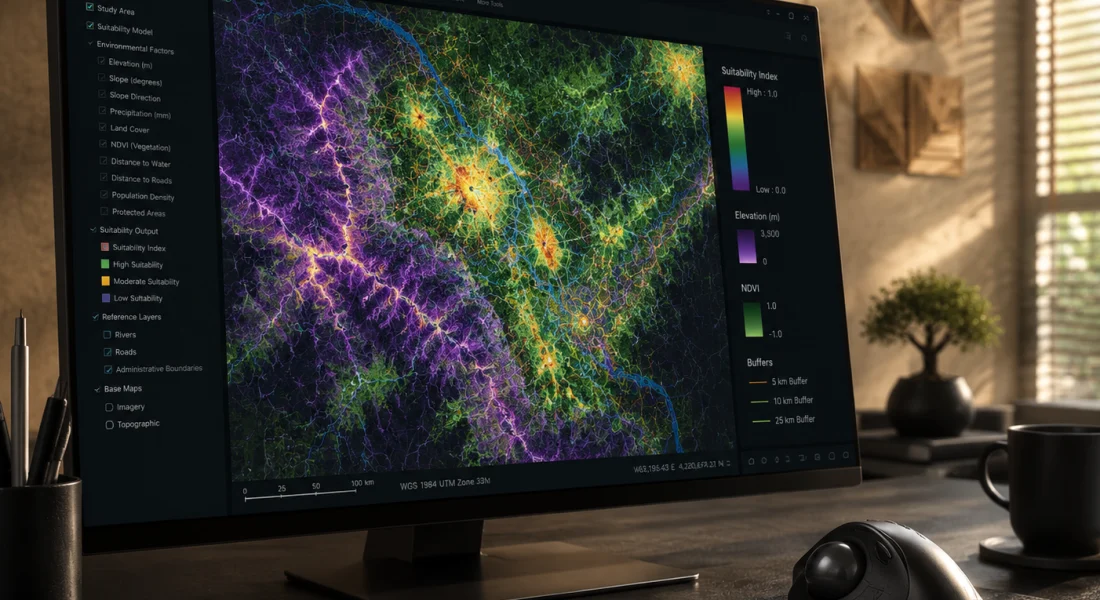
त्वरित सारांश: ArcGIS Spatial Analyst, ArcGIS Pro और ArcGIS Enterprise के लिए एक शक्तिशाली एक्सटेंशन है जो भू-भाग मॉडलिंग, स्थान उपयुक्तता, जल विज्ञान विश्लेषण और स्थानिक पैटर्न पहचान के लिए उन्नत रास्टर और वेक्टर विश्लेषण उपकरण प्रदान करता है। प्रोफेशनल प्लस उपयोगकर्ता प्रकार के साथ उपलब्ध, इसमें सैकड़ों उपकरण विशेष टूलसेट में व्यवस्थित हैं, और हाल ही में किए गए प्रदर्शन सुधारों से मल्टी-कोर प्रोसेसिंग संभव हो गई है, जिससे संचालन काफी तेज हो जाता है।.
भौगोलिक सूचना प्रणाली (जीआईएस) में अभूतपूर्व विकास हुआ है, और स्थानिक विश्लेषण क्षमताएं आधुनिक जीआईएस कार्यप्रवाहों का मूल आधार हैं। ArcGIS Spatial Analyst उद्योग में सबसे स्थापित एक्सटेंशनों में से एक है, जो हजारों संगठनों को सेवा प्रदान करता है।.
लेकिन क्या यह 2026 में भी कारगर साबित होगा? और इससे भी महत्वपूर्ण बात यह है कि क्या यह आपकी विशिष्ट आवश्यकताओं के लिए सही उपकरण है?
यह समीक्षा विस्तार से बताती है कि स्पेशल एनालिस्ट वास्तव में क्या प्रदान करता है, हाल ही में टूलबॉक्स में क्या सुधार हुए हैं, और वर्तमान जीआईएस परिदृश्य में इसकी क्या भूमिका है।.
ArcGIS Spatial Analyst क्या है?
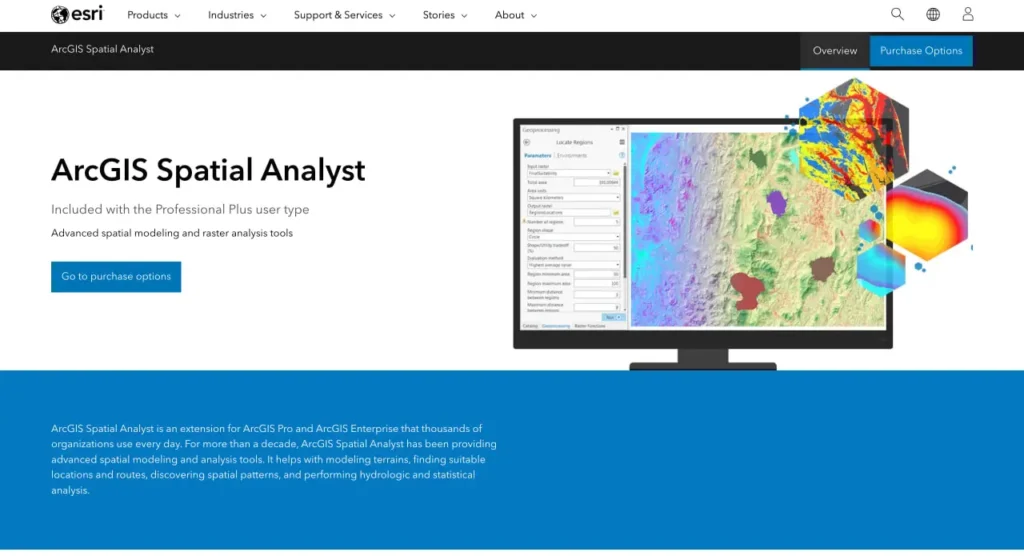
Esri के आधिकारिक दस्तावेज़ के अनुसार, ArcGIS Spatial Analyst एक एक्सटेंशन है जो रास्टर (सेल-आधारित) और फ़ीचर (वेक्टर) डेटा दोनों के लिए शक्तिशाली स्थानिक मॉडलिंग और विश्लेषण क्षमताओं की एक विस्तृत श्रृंखला प्रदान करता है। यह एक्सटेंशन ArcGIS Pro और ArcGIS Enterprise के साथ सीधे एकीकृत होता है, जिससे विशेष विश्लेषणात्मक कार्यों के साथ मूल प्लेटफ़ॉर्म का विस्तार होता है।.
यह टूलबॉक्स सैकड़ों जियोप्रोसेसिंग टूल्स को उनके विश्लेषणात्मक उद्देश्य के आधार पर अलग-अलग श्रेणियों में व्यवस्थित करता है। स्थानिक विश्लेषण संगठनों को जटिल स्थान-आधारित समस्याओं को हल करने, भौगोलिक दृष्टिकोण से डेटा का विश्लेषण करने, स्थानिक संबंधों का निर्धारण करने, पैटर्न का पता लगाने और डेटा-आधारित पूर्वानुमान लगाने में सक्षम बनाता है।.
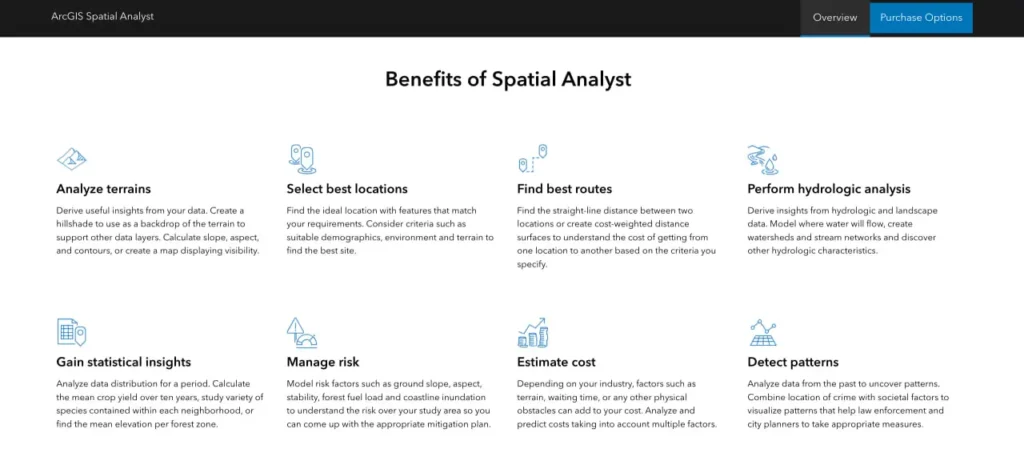
लेकिन खास बात यह है कि स्पेशल एनालिस्ट सिर्फ साधारण मैपिंग से कहीं अधिक व्यापक कार्यक्षेत्र को कवर करता है। यह एक्सटेंशन भू-भाग विश्लेषण, सांख्यिकीय संक्रियाएं, दूरी की गणना, सतह निर्माण, जल विज्ञान मॉडलिंग और उपयुक्तता विश्लेषण जैसे कार्यों को एक एकीकृत ढांचे के भीतर ही संभालता है।.
प्रोफेशनल प्लस में शामिल है
ArcGIS Spatial Analyst प्रोफेशनल प्लस यूजर टाइप के साथ पहले से ही शामिल है। संगठनों को इसे अलग से खरीदने की आवश्यकता नहीं है; इसके बजाय, प्रशासक उपयुक्त लाइसेंस स्तर वाले उपयोगकर्ताओं को एक्सटेंशन असाइन करते हैं। असाइन होने के बाद, टूल्स का उपयोग शुरू करने से पहले एक्सटेंशन को ठीक से सक्षम करना आवश्यक है।.
हाल के वर्षों में लाइसेंसिंग मॉडल नामित उपयोगकर्ता लाइसेंसिंग की ओर स्थानांतरित हो गया है, जो एक्सटेंशन को एक संगठन के भीतर व्यक्तिगत उपयोगकर्ता खातों से जोड़ता है, बजाय समवर्ती उपयोग वाले डेस्कटॉप इंस्टॉलेशन के।.
FlyPix AI के साथ भू-स्थानिक डेटा को उपयोगी जानकारियों में बदलें
स्थानिक डेटा के साथ काम करने में अक्सर विश्लेषण और व्याख्या के लिए काफी समय लगता है। FlyPix AI संगठनों को AI-संचालित पहचान, निगरानी और वर्गीकरण उपकरणों के माध्यम से इमेजरी को संसाधित करने और उपयोगी जानकारी निकालने में मदद करता है।.
स्थानिक डेटा का विश्लेषण करने का कोई तेज़ तरीका चाहिए?
FlyPix AI निम्नलिखित में मदद कर सकता है:
- भूस्थानिक छवि प्रसंस्करण
- भूमि उपयोग वर्गीकरण
- परिसंपत्ति और अवसंरचना निगरानी
- कस्टम एआई मॉडल विकास
👉 FlyPix AI को आजमाएं भौगोलिक विश्लेषण समाधानों का पता लगाने के लिए।.
मुख्य टूलसेट और क्षमताएं
स्पेशियल एनालिस्ट टूलबॉक्स कार्यक्षमता को विशेष टूलसेट में विभाजित करता है, जिनमें से प्रत्येक विशिष्ट विश्लेषणात्मक कार्यप्रवाहों को संबोधित करता है। यह व्यवस्था उपयोगकर्ताओं को एक जटिल सूची में उलझे बिना यह पहचानने में मदद करती है कि कौन से उपकरण उनकी विशिष्ट समस्याओं के लिए उपयुक्त हैं।.
भूभाग और सतह विश्लेषण
सतही उपकरण ऊंचाई डेटा से सार्थक जानकारी प्राप्त करते हैं। मानचित्र संबंधी पृष्ठभूमि के लिए हिलशेड बनाएं, भूभाग की विशेषताओं के लिए ढलान और दिशा की गणना करें, समोच्च रेखाएं बनाएं, या अवलोकन बिंदुओं से दृश्यता निर्धारित करने के लिए दृश्य क्षेत्र विश्लेषण करें।.
ये उपकरण डिजिटल एलिवेशन मॉडल, बाथिमेट्रिक सतहों, या किसी भी निरंतर रास्टर सतह के साथ काम करते हैं जो एक मापने योग्य घटना का प्रतिनिधित्व करती है।.
दूरी और आवंटन
दूरी मापने के उपकरण सीधी रेखा में यूक्लिडियन दूरी, विभिन्न भूभागों में लागत-भारित दूरी, या निकटतम स्थानों तक की दूरी की गणना करते हैं। ये उपकरण "निकटतम अस्पताल कितनी दूर है?" या "यात्रा की कठिनाई को ध्यान में रखते हुए कौन सा सेवा क्षेत्र इस स्थान को कवर करता है?" जैसे प्रश्नों के उत्तर देते हैं।“
जलवैज्ञानिक विश्लेषण
जलविज्ञान उपकरण सतहों पर जल प्रवाह का मॉडल तैयार करते हैं। ये उपकरण प्रवाह की दिशा निर्धारित करते हैं, जलविभाजकों की सीमाएँ निर्धारित करते हैं, जलधाराओं के जाल की पहचान करते हैं और प्रवाह संचय की गणना करते हैं। पर्यावरण वैज्ञानिक और जल संसाधन प्रबंधक जल निकासी विश्लेषण और बाढ़ मॉडलिंग के लिए इन क्षमताओं पर अत्यधिक निर्भर रहते हैं।.
क्षेत्रीय संचालन
क्षेत्रीय उपकरण परिभाषित क्षेत्रों या ज़ोन के भीतर सांख्यिकी की गणना करते हैं। प्रशासनिक सीमाओं, पारिस्थितिक क्षेत्रों या किसी भी बहुभुज डेटासेट के आधार पर रास्टर मानों का सारांश प्रस्तुत करें। ज़ोनल स्टैटिस्टिक्स टूल पूरे एक्सटेंशन में सबसे अधिक उपयोग किए जाने वाले उपकरणों में से एक है।.
ओवरले और उपयुक्तता
ओवरले उपकरण विशिष्ट मानदंडों को पूरा करने वाले स्थानों की खोज के लिए कई डेटासेट को संयोजित करते हैं। भारित ओवरले विभिन्न कारकों को महत्व मान प्रदान करके बहु-मानदंड निर्णय लेने में सहायता करता है। स्थल चयन, संरक्षण योजना और भूमि उपयोग विश्लेषण में आमतौर पर इन विधियों का उपयोग किया जाता है।.
2025 में प्रदर्शन में सुधार
स्पेशियल एनालिस्ट टीम ने 2025 के दौरान प्रदर्शन में महत्वपूर्ण सुधार किए। वर्ष की समीक्षा करने वाले आधिकारिक एसरी ब्लॉग के अनुसार, कई प्रमुख उपकरणों को समानांतर प्रसंस्करण के लिए अनुकूलित किया गया।.
जोनल स्टैटिस्टिक्स, जोनल स्टैटिस्टिक्स एज़ टेबल और जोनल कैरेक्टराइजेशन टूल अब कंप्यूटर पर उपलब्ध सभी प्रोसेसरों को सपोर्ट करते हैं। डिफ़ॉल्ट रूप से, यदि पैरेलल प्रोसेसिंग फैक्टर वातावरण के लिए कोई मान निर्दिष्ट नहीं किया गया है, तो टूल सभी उपलब्ध कोर में से 80% का उपयोग करेंगे।.
सच कहें तो, यह एक महत्वपूर्ण सुधार है। बड़े रास्टर पर क्षेत्रीय संचालन पहले सिंगल-कोर निष्पादन पर ही अटक जाता था। मल्टी-कोर सपोर्ट से क्षेत्रीय सारांश और स्थानिक एकत्रीकरण वर्कफ़्लो के लिए प्रोसेसिंग समय में काफी कमी आई है।.
स्थानिक विश्लेषक पूरक उपकरण
Esri ने जुलाई 2025 में Spatial Analyst Supplemental Tools का संस्करण 2.0 जारी किया। यह अलग टूलबॉक्स सर्वोत्तम कार्यप्रणालियों को प्रदर्शित करता है और मुख्य एक्सटेंशन से परे कार्यक्षमता का विस्तार करता है। इसमें नए परिवर्धन के रूप में Create Flood Simulation Raster और Locate Zonal Statistics टूल शामिल किए गए हैं।.
उपयोगकर्ता ArcGIS Online से पूरक टूलबॉक्स डाउनलोड कर सकते हैं और इसे सीधे ArcGIS Pro प्रोजेक्ट में जोड़ सकते हैं। यह टूलबॉक्स उन्नत कार्यप्रवाहों को प्रदर्शित करता है और मुख्य एक्सटेंशन द्वारा कवर न की गई विशिष्ट विश्लेषणात्मक आवश्यकताओं को पूरा करता है।.
स्पेशियल एनालिस्ट टूल्स के साथ काम करना
सही तरीके से सक्षम होने पर स्थानिक विश्लेषक की कार्यक्षमता कई इंटरफेस के माध्यम से उपलब्ध हो जाती है। उपकरणों तक पहुँचने और उन्हें चलाने का तरीका समझने से उत्पादकता को अधिकतम करने में मदद मिलती है।.
टूल डायलॉग इंटरफ़ेस
सबसे सरल तरीका ArcGIS Pro में जियोप्रोसेसिंग फलक के माध्यम से टूल खोलना है। टूलसेट ब्राउज़ करें, एक टूल चुनें, डायलॉग बॉक्स में पैरामीटर फ़ील्ड भरें और उसे चलाएं। यह विधि एक बार के विश्लेषण या प्रारंभिक कार्य के लिए अच्छी तरह काम करती है।.
पायथन और आर्कपी
बार-बार दोहराए जाने वाले वर्कफ़्लो के लिए, पायथन स्क्रिप्टिंग स्वचालन और बैच प्रोसेसिंग क्षमताएं प्रदान करती है। आर्कपी लाइब्रेरी सभी स्थानिक विश्लेषक उपकरणों को कॉलबल फ़ंक्शन के रूप में उपलब्ध कराती है। विश्लेषक संचालन को श्रृंखला में जोड़ सकते हैं, कई इनपुट के माध्यम से लूप कर सकते हैं, या स्थानिक विश्लेषण को बड़े डेटा पाइपलाइन में एकीकृत कर सकते हैं।.
ArcGIS Pro में नोटबुक कोड, विज़ुअलाइज़ेशन और दस्तावेज़ीकरण को एक ही इंटरफ़ेस में एकीकृत करती हैं। यह वातावरण पुनरावर्ती विश्लेषण और पुनरुत्पादनीय अनुसंधान के लिए उपयुक्त है।.
मॉडल निर्माता
मॉडल बिल्डर के माध्यम से विज़ुअल प्रोग्रामिंग, फ़्लोचार्ट इंटरफ़ेस का उपयोग करके उपकरणों को वर्कफ़्लो में जोड़ती है। मॉडल विश्लेषणात्मक प्रक्रियाओं का दस्तावेज़ीकरण करते हैं, पैरामीटर प्रतिस्थापन को सक्षम बनाते हैं, और कोडिंग के बिना संचालन अनुक्रम चलाते हैं।.
लाइसेंसिंग और पहुंच संबंधी विचार
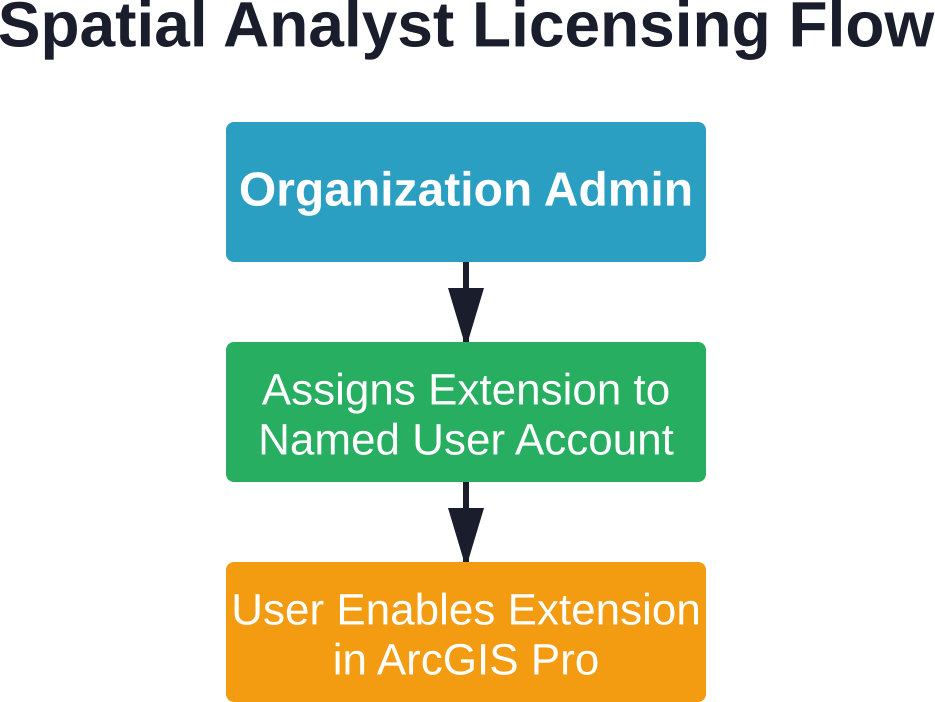
संगठन नामित उपयोगकर्ता लाइसेंसिंग सिस्टम के माध्यम से स्थानिक विश्लेषक (Spatial Analyst) का प्रबंधन करते हैं। प्रशासक को ArcGIS Pro में इसे सक्षम करने से पहले व्यक्तिगत उपयोगकर्ता खातों को एक्सटेंशन असाइन करना होगा।.
एक्सटेंशन लाइसेंसिंग चरण
सबसे पहले, संगठन प्रशासक ArcGIS Online या ArcGIS Enterprise पोर्टल में लॉग इन करता है। वे संगठन सेटिंग्स पर जाते हैं, विशिष्ट उपयोगकर्ता का चयन करते हैं और Spatial Analyst एक्सटेंशन लाइसेंस असाइन करते हैं।.
दूसरा चरण यह है कि अंतिम उपयोगकर्ता ArcGIS Pro खोलता है और प्रोजेक्ट सेटिंग्स के अंतर्गत लाइसेंसिंग अनुभाग में जाता है। वे Spatial Analyst एक्सटेंशन टॉगल को सक्षम करते हैं। यह एक्सटेंशन उस प्रोजेक्ट के लिए आगे भी सक्षम रहता है।.
एक्सटेंशन तक पहुँचने में आने वाली समस्याएं आमतौर पर तीन में से किसी एक कारण से उत्पन्न होती हैं: एक्सटेंशन को व्यवस्थापक द्वारा असाइन नहीं किया गया था, उपयोगकर्ता अपने प्रोजेक्ट में इसे सक्षम करना भूल गया था, या लाइसेंसिंग सर्वरों में कनेक्टिविटी की समस्याएँ हैं।.
व्यक्तिगत उपयोग और छात्रों की पहुंच
रेडिट जैसे प्लेटफॉर्म पर होने वाली सामुदायिक चर्चाओं में अक्सर व्यक्तिगत लाइसेंसिंग संबंधी प्रश्न उठाए जाते हैं। Esri शैक्षिक कार्यक्रमों के माध्यम से छात्रों के लिए लाइसेंस प्रदान करता है, जिससे सीखने के उद्देश्य से Spatial Analyst सहित कई एक्सटेंशन तक पहुंच प्राप्त होती है।.
व्यक्तिगत उपयोग के लाइसेंस प्रोग्राम के अनुसार अलग-अलग होते हैं। वर्तमान व्यक्तिगत उपयोग संबंधी पेशकशों और पात्रता आवश्यकताओं के लिए Esri की आधिकारिक वेबसाइट देखें, पुरानी जानकारी पर भरोसा न करें।.
स्पेशियल एनालिस्ट की तुलना विकल्पों से करना
ओपन-सोर्स जीआईएस प्लेटफॉर्म काफी विकसित हो चुके हैं। क्यूजीआईएस, ग्रास जीआईएस और आर स्पेशल पैकेज बिना लाइसेंस शुल्क के रास्टर विश्लेषण क्षमताएं प्रदान करते हैं। लेकिन क्या इससे स्पेशल एनालिस्ट अप्रचलित हो जाता है?
| पहलू | स्थानिक विश्लेषक | ओपन सोर्स विकल्प |
|---|---|---|
| लागत मॉडल | प्रोफेशनल प्लस लाइसेंस के साथ शामिल है | निःशुल्क और ओपन सोर्स |
| एकीकरण | नेटिव ArcGIS Pro एकीकरण | भिन्न-भिन्न; कुछ के लिए स्क्रिप्टिंग की आवश्यकता होती है |
| उपकरण प्रलेखन | व्यापक आधिकारिक दस्तावेज | समुदाय-संचालित; परिवर्तनशील गुणवत्ता |
| उद्यम समर्थन | Esri की तकनीकी सहायता उपलब्ध है | सामुदायिक मंच और सलाहकार |
| सीखने की अवस्था | ArcGIS इकोसिस्टम के अनुरूप | कुछ पैकेजों के लिए कीमत अधिक है |
| प्रदर्शन | हाल ही में मल्टी-कोर के लिए अनुकूलित किया गया | यह उपकरण और कार्यान्वयन के आधार पर भिन्न होता है। |
जिन संगठनों ने पहले से ही ArcGIS इंफ्रास्ट्रक्चर में निवेश किया हुआ है, उन्हें सहज एकीकरण का लाभ मिलता है। Spatial Analyst टूल बिना किसी रूपांतरण लागत के सीधे एंटरप्राइज जियोडेटाबेस, वेब सेवाओं और अन्य Esri प्रारूपों के साथ काम करते हैं।.
हालांकि, जो टीमें खुले मानकों को प्राथमिकता देती हैं, किसी एक विक्रेता पर निर्भर होने से बचना चाहती हैं या सीमित बजट के साथ काम करती हैं, उन्हें सक्षम विकल्प मिल जाते हैं। चुनाव संगठनात्मक संदर्भ, मौजूदा कार्यप्रणालियों और तकनीकी विशेषज्ञता पर निर्भर करता है।.
विभिन्न उद्योगों में व्यावहारिक अनुप्रयोग
हजारों संगठन प्रतिदिन स्थानिक विश्लेषक की क्षमताओं का उपयोग करते हैं। सामान्य उपयोग के मामलों को समझने से यह स्पष्ट होता है कि यह एक्सटेंशन कहाँ मूल्य प्रदान करता है।.
पर्यावरण प्रबंधन
एजेंसियां पर्यावास की उपयुक्तता का मॉडल तैयार करती हैं, भूमि आवरण में परिवर्तन पर नज़र रखती हैं और पारिस्थितिकी तंत्र की संबद्धता का विश्लेषण करती हैं। जलविज्ञान संबंधी उपकरण जलसंभर प्रबंधन और बाढ़ जोखिम मूल्यांकन में सहायता करते हैं।.
शहरी नियोजन
योजनाकार विकास के लिए स्थल की उपयुक्तता का मूल्यांकन करते हैं, सेवाओं तक पहुंच का विश्लेषण करते हैं और विकास परिदृश्यों का मॉडल तैयार करते हैं। दृश्य क्षेत्र विश्लेषण प्रस्तावित संरचनाओं के दृश्य प्रभाव का आकलन करने में सहायक होता है।.
प्राकृतिक संसाधन प्रबंधन
वन संगठन कटाई की योजना बनाने के लिए भू-भाग विश्लेषण का उपयोग करते हैं। खनन कंपनियां अयस्क भंडार की विशेषताओं का मॉडल तैयार करती हैं और निष्कर्षण मार्गों को अनुकूलित करती हैं। कृषि अनुप्रयोगों में सटीक खेती और सिंचाई योजना शामिल हैं।.
आपातकालीन प्रतिक्रिया
आपातकालीन प्रबंधक सेवा क्षेत्र विश्लेषण के लिए दूरी संबंधी उपकरणों, स्टेजिंग क्षेत्र चयन के लिए उपयुक्तता मॉडलिंग और निकासी मार्ग निर्धारण के लिए सतही विश्लेषण का उपयोग करते हैं।.
सीमाएँ और विचारणीय बातें
कोई भी उपकरण हर स्थिति के लिए पूरी तरह से उपयुक्त नहीं होता। स्पेशियल एनालिस्ट के साथ कुछ कमियां भी जुड़ी हुई हैं जिन्हें समझना जरूरी है।.
इस एक्सटेंशन के लिए प्रोफेशनल प्लस यूजर टाइप की आवश्यकता होती है, जो लाइसेंसिंग का उच्चतर स्तर दर्शाता है। बुनियादी जीआईएस आवश्यकताओं वाले संगठनों को हल्के विकल्पों की तुलना में इसकी लागत अधिक लग सकती है।.
रास्टर प्रक्रियाओं में काफी कंप्यूटिंग संसाधनों की खपत हो सकती है, विशेष रूप से बड़े क्षेत्र को कवर करने वाले उच्च-रिज़ॉल्यूशन डेटासेट के साथ। हाल ही में मल्टी-कोर तकनीक में हुए सुधारों के बावजूद, कुछ विश्लेषणों में अभी भी काफी समय लगता है।.
उन्नत स्थानिक मॉडलिंग के लिए सीखने की प्रक्रिया बुनियादी उपकरण संचालन से कहीं आगे तक फैली हुई है। उदाहरण के लिए, प्रभावी उपयुक्तता विश्लेषण के लिए स्थानिक संबंधों, उपयुक्त भारण योजनाओं और मॉडल सत्यापन को समझना आवश्यक है—ये ऐसे कौशल हैं जिन्हें विकसित करने में समय लगता है।.
आगे की ओर देखते हुए
स्थानिक विश्लेषण व्यापक जीआईएस रुझानों के साथ-साथ विकसित होता जा रहा है। क्लाउड-आधारित प्रसंस्करण, कृत्रिम बुद्धिमत्ता का एकीकरण और वास्तविक समय विश्लेषण ऐसे क्षेत्र हैं जहां क्षमताओं का विस्तार होने की संभावना है।.
2025 में किए गए सुधार प्रदर्शन अनुकूलन में निरंतर निवेश को दर्शाते हैं। कंप्यूटिंग हार्डवेयर में प्रगति और डेटासेट के आकार में वृद्धि के साथ, समानांतर प्रसंस्करण समर्थन तेजी से महत्वपूर्ण होता जा रहा है।.
Esri और व्यापक GIS समुदाय द्वारा शैक्षिक सामग्री का विस्तार लगातार जारी है। प्रशिक्षण संसाधन उपयोगकर्ताओं को उनके अनुभव स्तर की परवाह किए बिना टूलसेट का अधिकतम लाभ उठाने में मदद करते हैं।.
अक्सर पूछे जाने वाले प्रश्नों
बेसिक स्लोप और हिलशेड कैलकुलेशन स्टैंडर्ड ArcGIS Pro टूल्स के माध्यम से Spatial Analyst एक्सटेंशन के बिना भी उपलब्ध हैं। हालांकि, कॉस्ट डिस्टेंस, सूटेबिलिटी मॉडलिंग और हाइड्रोलॉजिक एनालिसिस जैसे एडवांस्ड ऑपरेशंस के लिए एक्सटेंशन की आवश्यकता होती है।.
जी हाँ। हालाँकि यह एक्सटेंशन रास्टर विश्लेषण में विशेषज्ञता रखता है, फिर भी कई उपकरण फ़ीचर (वेक्टर) इनपुट स्वीकार करते हैं। टूलबॉक्स में एकीकृत रास्टर-वेक्टर वर्कफ़्लो के लिए कार्यक्षमता शामिल है, जो आवश्यकतानुसार प्रारूपों के बीच रूपांतरण करती है।.
स्पेशियल एनालिस्ट, ArcGIS Enterprise सर्वर वातावरणों तक विस्तारित है, जो पोर्टल इंटरफेस के माध्यम से वेब-आधारित स्थानिक विश्लेषण को सक्षम बनाता है। लाइसेंसिंग ArcGIS Pro के समान नामित उपयोगकर्ता मॉडल का अनुसरण करती है, जिसमें प्रशासक एंटरप्राइज पोर्टल के माध्यम से क्षमताएं आवंटित करते हैं।.
ज़ोनल स्टैटिस्टिक्स, ज़ोनल स्टैटिस्टिक्स एज़ टेबल और ज़ोनल कैरेक्टराइज़ेशन टूल्स को मल्टी-कोर प्रोसेसिंग सपोर्ट प्राप्त हुआ है। डिफ़ॉल्ट रूप से ये टूल्स अब उपलब्ध प्रोसेसर कोर के 80% का उपयोग करते हैं, जिससे क्षेत्रीय एकत्रीकरण कार्यों के निष्पादन समय में काफी कमी आई है।.
व्यावहारिक सीमाएँ उपलब्ध सिस्टम मेमोरी और स्टोरेज पर निर्भर करती हैं। Spatial Analyst बड़े रास्टर को संभाल सकता है, लेकिन महाद्वीपीय विस्तार को कवर करने वाले अत्यधिक उच्च रिज़ॉल्यूशन डेटा के साथ प्रदर्शन में गिरावट आती है। टाइलिंग रणनीतियाँ और पिरामिड निर्माण बड़े डेटासेट को कुशलतापूर्वक प्रबंधित करने में सहायक होते हैं।.
बिल्कुल। ArcPy के माध्यम से Python स्क्रिप्टिंग सभी टूल्स तक पूर्ण पहुँच प्रदान करती है। मॉडल बिल्डर विज़ुअल वर्कफ़्लो ऑटोमेशन की सुविधा देता है। दोनों ही तरीके बैच प्रोसेसिंग, पैरामीटर प्रतिस्थापन और बाहरी सिस्टम के साथ एकीकरण का समर्थन करते हैं।.
इमेज एनालिस्ट विशेष रूप से रिमोट सेंसिंग वर्कफ़्लो पर केंद्रित है, जिसमें वर्गीकरण, परिवर्तन पहचान और मल्टीस्पेक्ट्रल विश्लेषण शामिल हैं। स्पेशल एनालिस्ट व्यापक स्थानिक मॉडलिंग को संबोधित करता है जिसमें भूभाग, जल विज्ञान, दूरी और उपयुक्तता विश्लेषण शामिल हैं। कुछ संगठनों को व्यापक क्षमताओं के लिए दोनों एक्सटेंशन की आवश्यकता होती है।.
अंतिम निर्णय
Esri इकोसिस्टम के अंतर्गत काम करने वाले संगठनों के लिए ArcGIS Spatial Analyst एक मजबूत और अच्छी तरह से प्रलेखित एक्सटेंशन बना हुआ है। हाल ही में किए गए प्रदर्शन सुधारों ने पिछली बाधाओं को दूर कर दिया है, जिससे क्षेत्रीय विश्लेषण कार्य काफी तेज हो गए हैं।.
जिन टीमों के पास पहले से ही ArcGIS Professional Plus का लाइसेंस है, उनके लिए Spatial Analyst बिना किसी अतिरिक्त लागत के पर्याप्त विश्लेषणात्मक क्षमता प्रदान करता है। एंटरप्राइज़ इंफ्रास्ट्रक्चर के साथ इसका एकीकरण, सुसंगत इंटरफ़ेस और व्यापक टूलसेट विभिन्न उद्योगों में इसके निरंतर उपयोग को उचित ठहराते हैं।.
जीआईएस प्लेटफॉर्म का शुरू से मूल्यांकन करने वाले संगठनों को कुल लागत और कार्यप्रवाह संबंधी आवश्यकताओं के बीच संतुलन स्थापित करना चाहिए। कुछ उपयोग मामलों के लिए ओपन-सोर्स विकल्प व्यवहार्य मार्ग प्रदान करते हैं, विशेष रूप से जहां बजट वाणिज्यिक लाइसेंसिंग को बाधित करता है।.
यह एक्सटेंशन हर स्थिति के लिए एक सटीक समाधान नहीं है। लेकिन ArcGIS वातावरण में स्थानिक मॉडलिंग, भू-भाग विश्लेषण और स्थान संबंधी जानकारी के लिए, Spatial Analyst निरंतर विकास द्वारा समर्थित विश्वसनीय कार्यक्षमता प्रदान करता रहता है।.
क्या आप स्थानिक विश्लेषण क्षमताओं का पता लगाने के लिए तैयार हैं? अपने संगठन की लाइसेंसिंग स्थिति की जाँच करें, एक्सटेंशन को सक्षम करें और मुख्य कार्यप्रवाहों से परिचित होने के लिए स्थानिक विश्लेषक ट्यूटोरियल डेटासेट से शुरुआत करें।.