
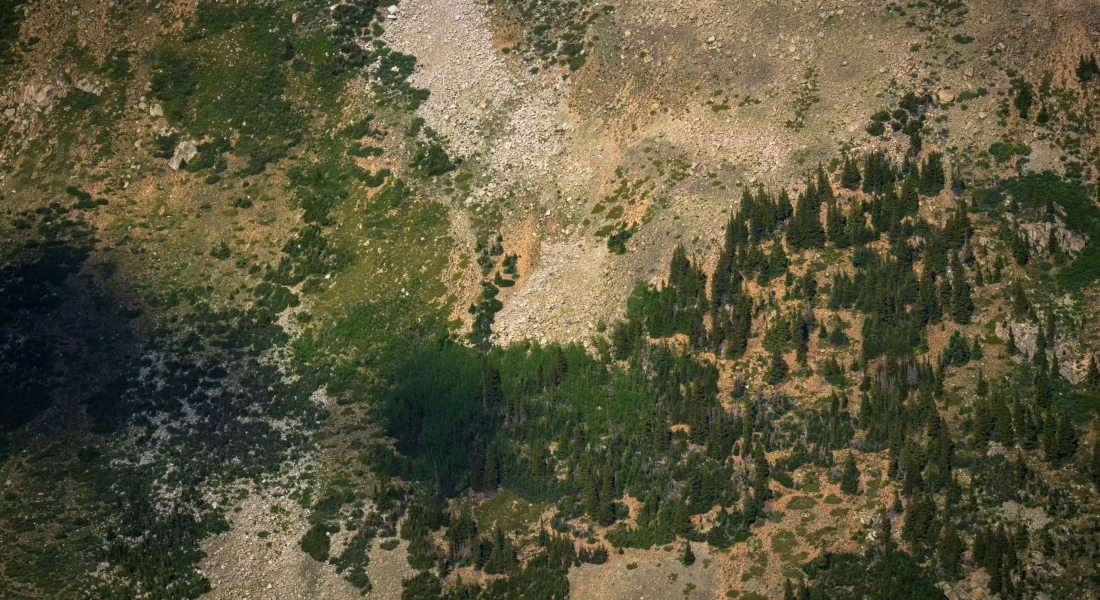
Annotating high-resolution gigapixel images manually has always been incredibly time-consuming. These massive files contain billions of pixels full of fine detail, making the work slow and exhausting.
Fortunately, modern annotation tools are changing the game. Leveraging advanced AI, they quickly identify and outline numerous objects even in the most complex and dense scenes, turning hours of manual effort into just seconds with remarkable precision.

1. FlyPix AI
We built FlyPix AI as a specialized tool for working with satellite, aerial, and drone imagery. It uses AI agents to automatically detect and outline objects in these images, even when the scenes are dense and complex. It is particularly handy for turning raw high-resolution geospatial data into usable outlines without spending endless hours on manual work.
We let users train custom AI models directly inside the interface, using their own annotations, and without needing coding experience. Once trained, the models can process large gigapixel-scale images quickly. We also included an analytics dashboard for reviewing results, along with options to export vector layers and share maps. Multispectral data support is available depending on the plan, and the overall flow feels geared toward practical inspection and monitoring tasks rather than pure manual drawing.
Key Highlights:
- AI agent-based object detection and outlining in satellite drone and aerial images
- Custom AI model training from user annotations
- Support for processing gigapixel-scale imagery
- Analytics dashboard for result review
- Vector layer export and map sharing features
- Multispectral data handling options
Who it’s Best For:
- Users analyzing large volumes of drone and satellite imagery
- Projects in agriculture forestry or infrastructure monitoring
- Anyone needing automated detection in complex geospatial scenes
- Teams that want to train models tailored to their specific objects
Contact Information:
- Website: flypix.ai
- Phone: +49 6151 3943470
- Email: [email protected]
- Address: Robert-Bosch-Str. 7, 64293 Darmstadt, Germany
- LinkedIn: www.linkedin.com/company/flypix-ai
2. GIGAmacro
GIGAmacro works as a system built specifically for viewing, annotating, and sharing gigapixel macro images. Сan see the full subject in one view and then zoom all the way in to examine tiny details, almost like moving through a digital microscope right inside the browser.
Users add notes or comments directly on the image using simple drawing tools. The system also lets people measure features with scale bars and compare multiple images either side by side or stacked on top of each other with adjustable transparency. Zooming and panning can be done independently on each image or kept in sync. It runs smoothly on phones, tablets, and regular desktop browsers, and administrators can control who sees what when sharing collections of images.
Key Highlights:
- Full-subject overview with deep microscopic zoom
- Drawing tools to add notes and comments
- Measurement with scale bars
- Side-by-side and layered comparison views
- Adjustable transparency between layers
- Works on mobile phones, tablets and desktop browsers
Who it’s Best For:
- Researchers who work with macro photography
- Quality control specialists inspecting small objects
- Scientists documenting detailed specimens
- Anyone who needs to annotate and compare very detailed close-up images
Contact Information:
- Website: gigamacro.com
- Phone: +1 (415) 841-3322
- Email: [email protected]
- Address: 128 Ebbetts Pass Road, Vallejo, CA 94589
- LinkedIn: www.linkedin.com/company/gigamacro

3. BIIGLE
BIIGLE serves as a web-based tool for annotating images and video, with particular strength in handling gigapixel mosaics from microscopy or orthophotos. The interface stays fast and responsive even when exploring extremely large images directly in the browser.
Annotators can mark up the content using basic shapes such as points, rectangles, circles, lines, and polygons. The tool also includes AI-assisted options like MAIA to help locate objects of interest and Magic SAM based on the Segment Anything Model to speed up segmentation across big collections. This combination makes working through large sets of high-resolution images feel less tedious.
Key Highlights:
- Fast browser-based annotation of gigapixel mosaics
- Support for microscopy images and orthophotos
- Annotation shapes including points, rectangles, circles, lines and polygons
- AI-assisted object detection with MAIA
- Rapid segmentation using Magic SAM
Who it’s Best For:
- Biologists working with microscope data
- Researchers analyzing orthophotos
- Scientists dealing with large image mosaics
- Anyone annotating detailed scientific imagery
Contact Information:
- Website: biigle.de
- Phone: +49 521 106-5225
- Email: [email protected]
- Address: Universitätsstr. 25, 33615 Bielefeld, Germany

4. Encord
Encord focuses on annotation across different data types including high-resolution images, video, DICOM files, and whole slide images. The system brings annotation, alignment, and evaluation steps together so users do not need to switch between separate tools.
Workflows support video-native labeling with consistent labels across frames and include quality control features such as label QA and lineage tracking. Automation options through API and SDK help integrate the process into larger pipelines. The tool also offers embedding-based search to find similar examples or edge cases during curation.
Key Highlights:
- Annotation support for high-resolution images and video
- Handling of DICOM and medical imaging data
- Video-native annotation workflows
- Quality control with lineage tracking
- API and SDK for automation
Who it’s Best For:
- Projects involving medical imaging annotation
- Teams preparing data for computer vision models
- Groups working with video and image datasets together
- Users who need structured quality checks in their labeling process
Contact Information:
- Website: encord.com
- LinkedIn: www.linkedin.com/company/encord-team

5. Labelbox
Labelbox is set up for annotation of large volumes of high-resolution image data, including multimodal tasks that combine vision with other information. It supports structured labeling through custom rubrics and offers AI-powered features to help manage data diversity.
The system handles complex workflows such as robotics data collection and long-horizon tasks. Rubric-based evaluations allow consistent scoring across different types of content, and the tool includes options for generating and evaluating data used in frontier AI development.
Key Highlights:
- Scalable annotation for high-resolution images
- Multimodal labeling support
- Rubric-based structured evaluation
- AI assistance for data diversity
- Tools for robotics and reinforcement learning data
Who it’s Best For:
- Computer vision development projects
- Robotics teams building training datasets
- Organizations handling large and varied image collections
- Groups working on multimodal AI tasks
Contact Information:
- Website: labelbox.com
- LinkedIn: www.linkedin.com/company/labelbox
- Facebook: www.facebook.com/getlabelbox
- Twitter: x.com/labelbox

6. SuperAnnotate
SuperAnnotate focuses on annotation workflows aimed at enterprise-scale image labeling. The service handles high volumes of images through a combination of human input and automation features designed to keep consistency across large projects.
Users can set up structured labeling pipelines that include quality review steps. The interface supports common annotation shapes and allows integration with existing data storage solutions. Some AI assistance options help suggest labels or speed up repetitive tasks, though the main strength lies in organizing work for bigger annotation efforts.
Key Highlights:
- Enterprise-oriented image annotation workflows
- Structured labeling pipelines with review steps
- Support for common annotation shapes
- Options for AI-assisted labeling
- Integration with data storage systems
Who it’s Best For:
- Companies handling large image annotation volumes
- Projects requiring consistent quality control
- Organizations with structured annotation needs
- Teams managing complex labeling pipelines
Contact Information:
- Website: www.superannotate.com
- LinkedIn: www.linkedin.com/company/superannotate
- Twitter: x.com/superannotate
- Facebook: www.facebook.com/superannotate

7. Kili Technology
Kili Technology provides a geospatial annotation tool focused on high-resolution satellite and aerial imagery. The system uses dynamic tiling so users can navigate and annotate large files smoothly without slowdowns, even when the images reach hundreds of megabytes in size.
Annotation covers land use categories like buildings, roads, vegetation and water bodies, along with agricultural features such as crop health or field boundaries. One-click measurement tools give distances in real units, and the interface integrates external map layers for extra context. AI assistance through models like SAM 2 helps speed up labeling while quality controls keep things consistent. Supported formats include GeoTIFF, JP2 and NTF with automatic preservation of geographic coordinates.
Key Highlights:
- Dynamic tiling for smooth navigation of large satellite images
- Annotation for land use and agricultural monitoring
- One-click mensuration tool for distance measurement
- Integration with WMS and WMTS layers
- AI assistance using SAM 2
- Support for GeoTIFF, JP2 and NTF formats
Who it’s Best For:
- Analysts working with satellite and multispectral imagery
- Projects involving environmental change detection
- Users who need precise geospatial measurements
- Organizations handling classified or sensitive data
Contact Information:
- Website: kili-technology.com
- LinkedIn: www.linkedin.com/company/kili-technology
- Facebook: www.facebook.com/kilitechnology
- Twitter: x.com/Kili_Technology

8. Satlabel
Satlabel works as an AI-powered tool dedicated to labeling satellite imagery and remote sensing data. It allows importing images in standard formats such as GeoTIFF and COG, then applies smart AI features to reduce repetitive manual labeling.
The process includes built-in quality control steps to review and validate annotations for consistency. Labels can be exported in formats that fit common machine learning frameworks, and the tool integrates with existing GIS software and pipelines. While the basic version stays simple, the overall flow aims to move from raw satellite data to ready-to-use labeled datasets without unnecessary steps.
Key Highlights:
- Import support for GeoTIFF and COG satellite images
- AI-assisted labeling to handle repetitive tasks
- Built-in quality control and validation tools
- Export options compatible with machine learning frameworks
- Integration with GIS and remote sensing workflows
Who it’s Best For:
- Remote sensing data annotators
- Researchers creating satellite image datasets
- Users who combine labeling with GIS tools
- Projects focused on machine learning from aerial imagery
Contact Information:
- Website: www.satlabel.com
- Email: [email protected]
- Address: David Pogorzelski, Geisbergstraße 18, 10777 Berlin

9. Element84
Element84 functions as a free labeling tool created for building machine learning datasets from satellite, drone and aerial imagery. It supports semantic segmentation through freehand lasso and polygon drawing, along with object detection using contours or bounding boxes that cope with typical aerial challenges like varying orientation and noise.
Large images get broken into manageable pieces for classification tasks, which helps when dealing with high-resolution geospatial files. The architecture stores imagery as cloud-optimized GeoTIFFs and saves labels as GeoJSON, with final exports following the SpatioTemporal Asset Catalog standard. A managed service option exists for those who prefer assistance with annotation or custom model training.
Key Highlights:
- Freehand lasso and polygon tools for semantic segmentation
- Bounding boxes and contours for object detection
- Image classification by splitting large geospatial files
- Cloud-optimized GeoTIFF storage
- GeoJSON labels and STAC export format
- Managed annotation services available
Who it’s Best For:
- Developers creating custom training datasets
- Researchers working with satellite and drone imagery
- Users focused on semantic segmentation tasks
- Projects that need STAC-compatible exports
Contact Information:
- Website: element84.com
- Phone: 703.650.5490
- Email: [email protected]
- Address: 210 N. Lee Street, Suite 203 Alexandria, VA 22314
- LinkedIn: www.linkedin.com/company/element84
- Twitter: x.com/element84

10. iMerit
iMerit handles data annotation with support for various modalities including DICOM files commonly used in medical imaging. The tool allows annotation of whole slide images through object detection, segmentation, and classification tasks while incorporating automation features that let users bring their own models for pre-annotation.
Workflows stay customizable so different steps can be arranged according to project needs. Domain experts review the labeled data in quality assurance modes, and the system includes options for handling edge cases. This setup makes the process feel practical when dealing with complex high-resolution pathology slides, although the interface can sometimes require a bit of adjustment to get comfortable with all the options.
Key Highlights:
- DICOM support for medical whole slide images
- Annotation types including object detection and segmentation
- Bring-your-own-model for pre-annotation
- Customizable annotation workflows
- Quality assurance and edge-case handling modes
Who it’s Best For:
- Medical imaging annotation projects
- Groups working with pathology slides
- Users who combine AI models with manual review
- Healthcare AI data preparation tasks
Contact Information:
- Website: imerit.net
- Phone: +1 (650) 777-7857
- Email: [email protected]
- LinkedIn: www.linkedin.com/company/imerit
- Facebook: www.facebook.com/iMeritTechnology
- Twitter: x.com/iMeritDigital
- Instagram: www.instagram.com/imeritdigital

11. Indica Labs
Indica Labs offers a modular setup for quantitative pathology work on whole slide images. The system includes tools for detailed annotation and analysis of high-resolution pathology slides with options to apply different modules depending on the specific task.
Annotation can involve both manual marking and AI-supported methods to quantify tissue features or biomarkers. The modular design lets users focus on particular analysis types without loading unnecessary functions. Some users find the range of available modules a little overwhelming at first, but it provides flexibility once the right combination is selected for the slides being processed.
Key Highlights:
- Modular design for quantitative pathology
- Annotation and analysis of whole slide images
- Support for AI-assisted quantification
- Tools for tissue and biomarker evaluation
Who it’s Best For:
- Pathologists performing quantitative analysis
- Research groups in digital pathology
- Users needing modular annotation workflows
- Projects focused on biomarker discovery in slides
Contact Information:
- Website: indicalab.com
- Phone: +1 (505) 492-0979
- Email: [email protected]
- Address: Indica Labs, 8700 Education Pl NW, Bldg. B Albuquerque, NM 87114
- LinkedIn: www.linkedin.com/company/indica-labs
- Facebook: www.facebook.com/IndicaLabs.HALO
12. PathAI AISight
PathAI AISight serves as a cloud-based workflow solution centered on digital pathology with built-in AI tools for whole slide image handling. The system manages case and image workflows while integrating artificial intelligence directly into the annotation and analysis steps for histopathology.
Users can apply AI models to assist with biomarker assessment and other pathology tasks on high-resolution slides. The interface keeps case management and AI features in one place, which simplifies moving from raw scans to annotated results. It occasionally takes time to get used to how the AI suggestions interact with manual annotation, but the overall flow supports both clinical and research use cases.
Key Highlights:
- Cloud-native workflow for digital pathology
- Built-in AI tools for whole slide images
- Support for histopathology annotation
- Case and image management integration
- AI assistance for biomarker evaluation
Who it’s Best For:
- Laboratories working with digital pathology
- Researchers in histopathology AI
- Users combining annotation with AI analysis
- Clinical and trial-related slide review
Contact Information:
- Website: www.pathai.com
- Phone: 833-451-2147
- Email: [email protected]
- LinkedIn: www.linkedin.com/company/pathai
- Twitter: x.com/path_ai

13. Gestalt Diagnostics PathFlow
Gestalt Diagnostics PathFlow acts as a vendor-neutral image management system for digital pathology. It brings together whole slide images from different scanners into one place for viewing and case handling, with options for cloud or on-premise setup.
The system includes separate modules for anatomic pathology work, education, and research activities. Annotation happens as part of the overall digital workflow, and the setup stays flexible enough to work with various scanners and AI tools without locking users into one vendor. Some find the modular structure helpful once they pick the right module for their slides, though switching between clinical and research modes can feel a bit separate at times.
Key Highlights:
- Vendor-neutral support for whole slide images from multiple scanners
- Unified case and image management
- Modular design with dedicated modes for clinical, education and research use
- Integration options for AI tools
- Flexible deployment choices
Who it’s Best For:
- Pathology labs seeking scanner-agnostic solutions
- Users managing mixed clinical and research workflows
- Groups that need to combine images with case information
- Institutions exploring AI alongside traditional review
Contact Information:
- Website: gestaltdiagnostics.com
- Phone: (509) 492-4912
- Email: [email protected]
- Address: 809 W. Main Ave., Ste. 212, Spokane, WA 99201
- LinkedIn: www.linkedin.com/company/gestalt-diagnostics
- Twitter: x.com/Gestalt122
14. Aiforia
Aiforia provides a cloud-based system focused on AI-assisted analysis of pathology images, including whole slide images. It supports both ready-made models for specific cancer types and a tool called Aiforia Create that lets users build their own deep learning models through an intuitive interface.
Annotation appears mainly through AI-generated overlays that mark findings directly on the slides at different magnification levels. Users can then review, quantify, and share these markings along with the cases. The research side offers study-centric workflows for repetitive tasks, while clinical workflows stay case-focused. The whole setup works especially well when someone wants to move from manual review toward more automated marking, although getting custom models validated can require some patience.
Key Highlights:
- Cloud-based AI analysis for whole slide images
- Pre-built models for various cancer types and metastasis detection
- Aiforia Create for building custom deep learning models
- AI-generated visual overlays and quantification
- Support for sharing cases and markings
- Study-centric and case-centric workflow options
Who it’s Best For:
- Pathologists using AI for diagnostic support
- Research labs automating image analysis tasks
- Users developing and validating their own AI models
- Groups working with veterinary or human pathology slides
Contact Information:
- Website: www.aiforia.com
- Phone: +1 617 362 7047
- Email: [email protected]
- Address: 1 Broadway, 14th Floor Cambridge, MA 02142, United States
- LinkedIn: www.linkedin.com/company/aiforia-tech
- Facebook: www.facebook.com/aiforiatech
- Twitter: x.com/aiforia_tech
- Instagram: www.instagram.com/aiforia_tech

15. Proscia
Proscia serves as a digital pathology solution built around whole slide images. It brings together image viewing, case management, and annotation capabilities into one environment that works with slides from different scanners.
The annotation tools let users mark up high-resolution pathology images directly while handling routine clinical or research workflows. Some pathologists mention that the interface feels quite smooth once you get used to the layout, though switching between annotation and review modes can take a short adjustment period.
Key Highlights:
- Digital pathology environment for whole slide images
- Annotation tools integrated with case workflows
- Support for slides from multiple scanners
- Combined viewing and markup features
Who it’s Best For:
- Pathologists working in digital environments
- Labs handling routine clinical slide review
- Research groups using whole slide images
- Users who need annotation within daily case workflows
Contact Information:
- Website: proscia.com
- Phone: +1 (215) 608-5411
- Email: [email protected]
- Address: 1700 Market Street, Suite 2450 Philadelphia, PA 19103
- LinkedIn: www.linkedin.com/company/proscia
- Twitter: x.com/Proscia

16. Visiopharm
Visiopharm offers professional software focused on image analysis and annotation of whole slide images. It provides both pre-built analysis apps and the ability to train custom deep learning models for tissue morphology tasks.
Users can perform segmentation of tissue regions, quantify cells and biomarkers, and run spatial analysis on multiplexed images. The system supports different stains and modalities such as H&E, IHC, and FISH. Some users find the modular app structure helpful for specific projects, although building and validating custom analysis apps requires a bit of hands-on work and iteration.
Key Highlights:
- Image analysis and annotation for whole slide images
- Deep learning tools for training custom apps
- Segmentation and quantification of tissue features
- Spatial analysis in multiplexed images
- Support for various stains and imaging modalities
Who it’s Best For:
- Researchers doing quantitative pathology analysis
- Groups working with biomarker quantification
- Users performing tissue segmentation on slides
- Labs exploring spatial biology in multiplex images
Contact Information:
- Website: visiopharm.com
- Phone: +45 88 20 20 88
- Email: [email protected]
- Address: Agern Allé 24, 2970 Hoersholm, Denmark
- LinkedIn: www.linkedin.com/company/visiopharm
Conclusion
Choosing the right high-resolution gigapixel image annotation software can feel overwhelming at first. With so many options available, each one handles massive images and complex scenes in its own way, and what works smoothly for one project might feel clunky for another.
In the end, the most useful tools are those that actually save real time without forcing you into complicated setups or endless manual fixes. Whether you need fast AI-assisted detection for drone and satellite data or precise control over every tiny detail in pathology slides, the key is finding something that fits how you actually work.
The field keeps moving quickly, so staying open to new features and testing a couple of different approaches usually pays off. At the end of the day, good annotation software should make the heavy lifting feel lighter, letting you focus on the insights hidden inside those enormous images rather than fighting the tool itself.