
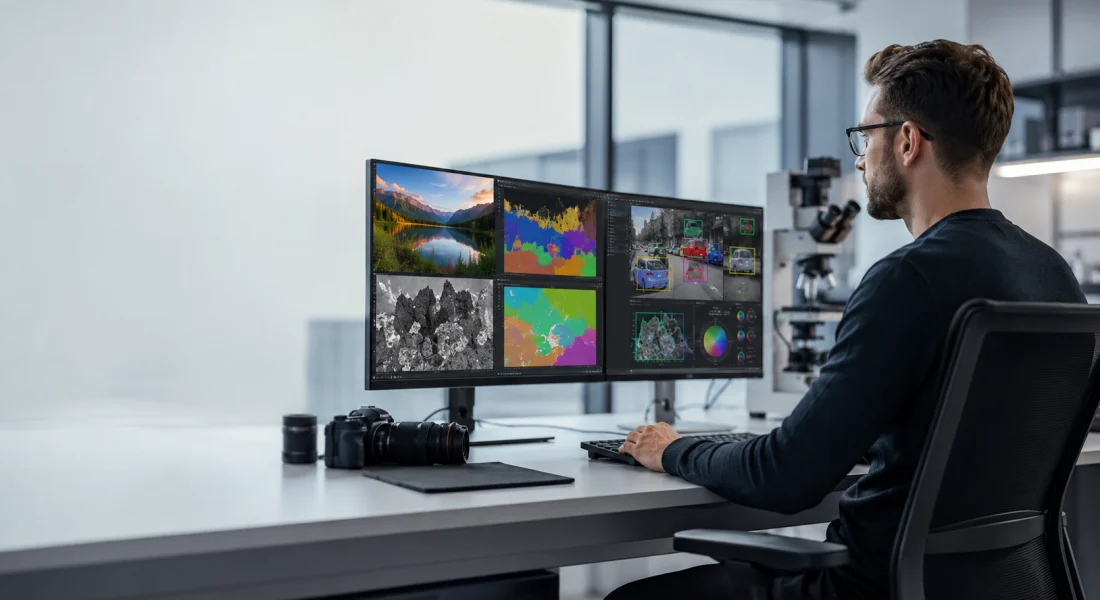
Most teams don’t struggle with collecting images anymore. If anything, there’s too much of it – satellite data, drone footage, camera streams, screenshots, scans. The real problem starts after that.
Image processing solutions sit right in that gap. They take raw visual input and turn it into something usable without forcing people to sort through everything manually. Sometimes that means detecting objects. Sometimes it’s cleaning up noisy data. Other times it’s just making sense of patterns that would take hours to notice by eye.
What’s interesting is how different these tools can feel in practice. Some are built for precision-heavy work like medical or industrial analysis. Others focus more on speed and scale, where the goal is simply to process thousands of images without slowing everything down.
Either way, the direction is pretty clear – less manual effort, faster decisions, and systems that can actually keep up with the amount of visual data being generated.
Image Processing Tools That Turn Raw Visual Data Into Insights
Before getting into specific tools, it’s worth looking at how much image processing has evolved in the last few years. What used to take hours of manual work can now be handled in seconds, especially when dealing with large volumes of images from cameras, drones, or satellites.
Modern tools make it easier to process, analyze, and extract useful information without getting stuck in repetitive tasks. Whether it’s detecting objects, improving image quality, or identifying patterns across datasets, the right setup can save a surprising amount of time while making the output far more consistent.

1. FlyPix AI
At FlyPix, our AI platform is designed for working with geospatial image data and automating how it is analyzed. Our tools use AI agents to detect, monitor, and inspect objects in satellite, aerial, and drone imagery. Instead of relying on manual annotation, our system processes large volumes of visual data in a more structured way, which helps reduce repetitive work.
Our platform is built to adapt to different use cases rather than follow a fixed setup. Our tools allow training custom AI models based on specific needs, so the same system can be used across areas like construction, agriculture, and infrastructure. The focus stays on turning visual data into something usable without long preparation or complex workflows.
Key Highlights:
- AI agents for object detection and monitoring
- Support for satellite, aerial, and drone imagery
- Automation of image annotation workflows
- Custom AI model training for specific use cases
- Application across multiple industries
Capabilities:
- Image processing solutions
- Object detection and classification
- Custom AI model training
- Geospatial data analysis
- Monitoring and inspection workflows
Contact Information:
- Website: flypix.ai
- Email: [email protected]
- Phone: +49 6151 3943470
- Address: Robert-Bosch-Str. 7, 64293 Darmstadt, Germany
- LinkedIn: www.linkedin.com/company/flypix-ai

2. MathWorks
MathWorks develops software environments used for technical computing, modeling, and simulation. Their tools are widely used by engineers and researchers to work with data, develop algorithms, and test systems before they are implemented in real-world conditions. Instead of focusing only on raw image handling, they approach image processing as part of a broader workflow that includes analysis, modeling, and system design.
The ecosystem combines programming, visualization, and simulation, which allows teams to move from data exploration to deployment without switching between separate tools. Image-related tasks are often handled alongside signal processing and machine learning, making the setup more suitable for complex engineering work rather than isolated image operations.
Key Highlights:
- Environment for data analysis, modeling, and algorithm development
- Integration of image processing with simulation and system design
- Support for engineering and scientific workflows
- Tools for development and testing before deployment
- Training resources and documentation
Capabilities:
- Data analysis and visualization tools
- Image and signal processing capabilities
- Modeling and simulation
- Machine learning integration
- Training and educational resources
Contact Information:
- Website: www.mathworks.com
- Address: 1 Apple Hill Drive, Natick, MA 01760-2098, UNITED STATES
- Phone: +48 (12) 630 49 50
- E-mail: [email protected]
- LinkedIn: www.linkedin.com/company/the-mathworks_2
- Twitter: x.com/MATLAB
- Facebook: www.facebook.com/MATLAB
- Instagram: www.instagram.com/matlab

3. OpenCV
OpenCV is an open-source library focused on computer vision and image processing. It provides developers with direct access to a large set of algorithms for tasks like object detection, image transformation, and video analysis. Because it is open source, it is often used as a base layer rather than a complete solution.
The library supports multiple programming languages and works across different platforms, which makes it flexible for various types of applications. It is commonly used in systems where real-time processing matters, such as robotics or mobile apps, but it typically requires more hands-on implementation compared to managed tools.
Key Highlights:
- Optimized for real-time use cases
- Cross-platform compatibility
- Open-source computer vision library
- Large collection of image and video processing algorithms
- Support for multiple programming languages
Capabilities:
- Face recognition capabilities
- Training and learning resources
- Computer vision algorithm library
- Image and video processing tools
- Consulting through partner ecosystem
Contact Information:
- Website: opencv.org
- E-mail: [email protected]
- Twitter: x.com/opencvlibrary
- Facebook: www.facebook.com/opencvlibrary

4. TensorFlow
TensorFlow is a machine learning platform used to build models for tasks like image recognition and classification. It treats image processing as part of a larger workflow that includes data preparation, model training, and deployment rather than as a standalone task.
The platform supports different stages of development, from small experiments to production systems. Image-related use cases are typically handled through neural networks, which allows for more complex pattern detection, though it requires some familiarity with machine learning concepts.
Key Highlights:
- Platform for building and training ML models
- Support for image classification and recognition
- Tools for deployment across environments
- Access to datasets and pre-trained models
- Full machine learning workflow support
Capabilities:
- Machine learning model development
- Image recognition and classification
- Data preprocessing pipelines
- Model deployment tools
- Developer resources and documentation
Contact Information:
- Website: www.tensorflow.org
- Twitter: x.com/tensorflow

5. Microsoft Azure Vision
Microsoft Azure Vision provides tools for analyzing visual content as part of a broader cloud environment. The focus is on making image processing accessible through prebuilt features that can be integrated into applications without deep technical setup.
The system supports image tagging, text extraction, facial recognition, and spatial analysis. It is commonly used in applications where images need to be processed continuously, with a usage-based model that allows scaling depending on demand.
Key Highlights:
- Cloud-based image analysis tools
- Image tagging and classification
- OCR for text extraction
- Facial recognition capabilities
- Integration with cloud services
Capabilities:
- Image analysis and tagging
- Optical character recognition
- Facial recognition and verification
- Spatial analysis
- AI integration tools
Contact Information:
- Website: azure.microsoft.com
- Phone: (800) 642 7676
- Linkedin: www.linkedin.com/showcase/microsoft-azure
- Facebook: www.facebook.com/MicrosoftUkraine
- Instagram: www.instagram.com/microsoftazure

6. Amazon Rekognition
Amazon Rekognition provides image and video analysis through a set of APIs that can be integrated into applications. It focuses on automating common computer vision tasks without requiring machine learning expertise.
The system supports object detection, face analysis, text extraction, and content moderation. It is often used in cases where large volumes of visual data need to be processed quickly, with the ability to scale based on usage.
Key Highlights:
- API-based image and video analysis
- Face detection and recognition
- Object and scene detection
- Text extraction from images and video
- Content moderation tools
Capabilities:
- Image and video analysis APIs
- Face detection and comparison
- Object recognition
- Text detection and extraction
- Content moderation
Contact Information:
- Website: aws.amazon.com
- LinkedIn: www.linkedin.com/company/amazon-web-services
- Twitter: x.com/awscloud
- Facebook: www.facebook.com/amazonwebservices
- Instagram: www.instagram.com/amazonwebservices

7. Fiji
Fiji is an image processing tool built on top of ImageJ, mainly used for scientific image analysis. It comes as a bundled distribution with a large set of plugins included, so users can start working without setting up everything manually. The installation is simple, and the system manages updates and dependencies on its own.
In practice, the tool is often used in research environments where consistency across large image datasets matters. Since it is developed by a global community, it keeps evolving over time, with new plugins and improvements added regularly depending on user needs.
Key Highlights:
- Bundled distribution of ImageJ with preinstalled plugins
- Open-source and community-driven development
- Support for scientific image analysis workflows
- Automatic updates and dependency management
- Large ecosystem of plugins
Capabilities:
- Scientific image processing tools
- Plugin-based image analysis
- Support for multidimensional image data
- Integration with scientific tools
- Community-driven extensions and updates
Contact Information:
- Website: fiji.sc
- Twitter: x.com/FijiSc

8. Adobe Photoshop
Adobe Photoshop is an image processing tool used for editing, composing, and designing visual content. It provides a wide set of features for working with images, including adjustments, layering, and transformations. The tool is structured around giving users control over how visual elements are modified and combined.
Unlike analytical tools, this one is typically used in creative and production workflows, where visual output matters more than data interpretation. Over time, it has added AI-based features that help automate certain tasks, though most workflows still rely on manual control and adjustments.
Key Highlights:
- Advanced image editing and manipulation tools
- Support for layered and non-destructive workflows
- AI-assisted features for editing and composition
- Available across desktop, web, and mobile
- Integration with creative ecosystems
Capabilities:
- Image editing and retouching
- Graphic design and composition
- Object removal and background editing
- Color correction and adjustments
- AI-assisted image generation and editing
Contact Information:
- Website: www.adobe.com
- Address: 345 Park Avenue, San Jose, California 95110-2704, USA
- E-mail: [email protected]
- LinkedIn: www.linkedin.com/company/adobe
- Twitter: x.com/Adobe
- Facebook: www.facebook.com/Adobe
- Instagram: www.instagram.com/adobe

9. GIMP
GIMP is an image processing tool designed for photo editing, image composition, and graphic design. It is open source and works across different operating systems, which makes it accessible for a wide range of users. The tool includes a set of core features along with options for customization through plugins and scripts.
For many users, it becomes a flexible workspace that can be adjusted depending on the task. Because of its open nature, it is often used in environments where control over the software setup is important, or where teams prefer working with free and modifiable tools.
Key Highlights:
- Cross-platform compatibility
- Support for plugins and scripting
- Open-source image editing software
- Tools for photo editing and design
- Customizable workflows
Capabilities:
- Color management and publishing support
- Image editing and retouching
- Graphic design tools
- Scripting and automation
- Plugin-based extensions
Contact Information:
- Website: www.gimp.org
Image Processing Companies That Turn Visual Data Into Real Workflows
Before getting into specific companies, it helps to look at how this space is actually evolving. Image processing is no longer just about editing or basic detection – it’s becoming part of larger systems that handle data at scale, often in real time.
What these companies are building tends to reflect that shift. Some focus on infrastructure and APIs, others on full platforms or specialized tools, but the goal is usually the same – reduce manual effort and make visual data easier to work with in everyday tasks.

1. AI Superior
AI Superior is a company that works with artificial intelligence systems, including computer vision and image processing as part of broader software solutions. They focus on building applications that rely on machine learning models, combining image analysis with other types of data processing when needed. Their work often connects visual data with business use cases rather than treating it as a standalone task.
The company approaches projects as full-cycle development, starting from problem definition and moving through prototyping, testing, and integration. Image processing is usually part of a larger system, where it supports tasks like object detection, classification, or extracting information from visual inputs in real-world scenarios.
Key Highlights:
- AI services focused on custom software development
- Integration of image processing with machine learning models
- Support for end-to-end AI project workflows
- Use of computer vision in business applications
- Work across multiple industries
Services:
- AI software development
- Computer vision and image processing solutions
- Artificial intelligence consulting
- AI research and development
- Training and educational programs
Contact Information:
- Website: aisuperior.com
- Phone: +49 6151 3943489
- Email: [email protected]
- Address: Robert-Bosch-Str. 7, 64293 Darmstadt, Germany
- LinkedIn: www.linkedin.com/company/ai-superior
- Facebook: www.facebook.com/aisuperior
- Twitter: x.com/aisuperior
- Instagram: www.instagram.com/ai_superior

2. Megvii
Megvii develops AI technologies that combine image processing with real-world systems. The company focuses on computer vision and AIoT, using visual data from cameras and sensors to detect, identify, and track objects in physical environments. Their work is often connected to systems like access control, monitoring, and smart infrastructure.
Across their solutions, Megvii builds around a broader setup that includes algorithms, computing, and data processing. This allows them to support different types of deployments, from standalone devices to larger systems used in buildings, campuses, and city environments, where visual data needs to be handled continuously.
Key Highlights:
- AIoT systems combining vision and physical infrastructure
- Support for real-world image and video analysis
- Integration of algorithms, computing, and data handling
- Use in smart buildings and urban environments
- Focus on continuous visual data processing
Services:
- Image and video analysis solutions
- Face recognition and identity verification
- Smart device and camera integration
- AI model training and deployment
- Infrastructure monitoring systems
Contact Information:
- Website: www.megvii.com
- Address: Jinnovation Park Building S1, No. 27 Jiancaicheng Middle Rd, Beijing
- Phone: 400-6700-866
- E-mail: [email protected]
- Twitter: x.com/Megvii
- Facebook: www.facebook.com/megvii

3. Clarifai
Clarifai develops a platform for managing and running AI models, including those used for image and visual data processing. The company focuses on inference and deployment, making it possible to work with models without setting up infrastructure manually. Their approach supports different types of models, including custom and third-party ones.
Within their ecosystem, Clarifai provides tools that fit into existing development workflows. Models can be deployed, tested, and scaled depending on the workload, which makes the platform suitable for teams that need to process large volumes of data while keeping performance stable.
Key Highlights:
- Flexible deployment options
- Platform for AI model deployment and inference
- Support for custom and third-party models
- Integration with existing development workflows
- Focus on scalable processing
Services:
- Inference and compute management
- AI model hosting and deployment
- Image and multimodal data processing
- Workflow integration tools
- Model testing and scaling
Contact Information:
- Website: www.clarifai.com
- E-mail: [email protected]
- LinkedIn: www.linkedin.com/company/clarifai
- Twitter: x.com/clarifai
- Facebook: www.facebook.com/Clarifai
- Instagram: www.instagram.com/clarifai

4. SenseTime
SenseTime develops AI technologies focused on computer vision and multimodal data analysis. The company works with image and video data to understand environments, people, and interactions, with applications across business systems, urban infrastructure, and digital services.
Their solutions are supported by a broader AI infrastructure that allows different types of data to be processed together. This makes it possible to apply visual analysis in systems where images are only one part of a larger data flow.
Key Highlights:
- Application across business and urban environments
- Integration with larger AI models
- Computer vision and multimodal AI systems
- Support for image and video understanding
- Focus on combining physical and digital data
Services:
- Digital avatar and content generation
- Smart city and business solutions
- Image and video analysis
- Multimodal AI processing
- AI model development
Contact Information:
- Website: www.sensetime.com
- Address: 2/F, Harbour View 1, No. 12 Science Park East Avenue, HKSTP, Shatin, Hong Kong
- E-mail: [email protected]
- LinkedIn: www.linkedin.com/company/sensetime-group-limited
- Facebook: www.facebook.com/sensetimegroup

5. V7 Labs
V7 Labs develops AI tools for working with documents, images, and structured data in workflows that involve analysis and decision-making. The company focuses on automation, where data from different sources is processed and turned into structured outputs that can be used in reports or internal systems.
In their approach, image data is often part of a broader workflow rather than a standalone element. The system connects different stages of work, from data input to final output, which helps reduce manual effort in tasks like reviewing documents or preparing structured information.
Key Highlights:
- AI tools for data and document processing
- Integration of image and structured data analysis
- Automation of repetitive workflows
- Focus on decision-oriented outputs
- Support for connected data sources
Services:
- Image and document data extraction
- Workflow automation tools
- Data structuring and analysis
- Report and output generation
- Integration with external systems
Contact Information:
- Website: www.v7labs.com
- Address: Fifth Floor, 60 Margaret Street, London, W1W 8TF
- E-mail: [email protected]
- LinkedIn: www.linkedin.com/company/v7labs
- Twitter: x.com/v7labs

6. RealSense
RealSense develops hardware and software for depth sensing and computer vision. The company focuses on capturing spatial data from the physical world and using it for tasks like object tracking, navigation, and environmental understanding.
Their products are commonly used in robotics and automation, where understanding physical space is important. The systems are designed to work across different environments, including indoor and outdoor conditions, and can be integrated into applications that rely on consistent visual perception.
Key Highlights:
- Depth sensing and computer vision systems
- Combination of image and spatial data
- Use in robotics and automation
- Support for real-world environments
- Integration with development tools
Services:
- Depth camera hardware
- Spatial data processing
- Computer vision development tools
- Robotics vision integration
- Environmental perception systems
Contact Information:
- Website: www.realsenseai.com
- LinkedIn: www.linkedin.com/company/realsenseai

7. Ambarella
Ambarella focuses on building AI vision processors that handle image and video data directly on edge devices. Their technology is used in cameras and embedded systems where visual data needs to be analyzed as it is captured. Instead of sending everything to the cloud, processing happens locally, which helps in situations where timing and responsiveness matter.
A big part of their work revolves around combining hardware and image processing into a single system. This approach is often used in areas like automotive systems, surveillance, and smart environments, where continuous video streams need to be interpreted without delay.
Key Highlights:
- AI vision processors for edge applications
- Real-time video analysis on devices
- Integration of hardware and image processing
- Use in surveillance and automotive systems
- Focus on on-device processing
Services:
- Image and video processing solutions
- Edge AI vision processing
- Object detection and classification
- Smart camera integration
- Embedded vision systems
Contact Information:
- Website: www.ambarella.com
- Address: 3001 Tasman Drive, Santa Clara, CA 95054, USA
- Phone: +1.408.734.8888
- LinkedIn: www.linkedin.com/company/ambarella
- Twitter: x.com/Ambarella_Inc
- Facebook: www.facebook.com/ambarellacorp

8. DeepAI
DeepAI works on AI tools that deal with images, video, and other types of digital content. Their platform includes features for generating visuals, editing images, and analyzing data through simple interfaces that can be used directly in a browser or through APIs.
Beyond general tools, their work also extends into more technical projects where computer vision is applied in real-world scenarios. This often involves processing data from sources like drones or satellites and turning it into something that can be used for monitoring, mapping, or decision-making.
Key Highlights:
- AI tools for image and content processing
- Support for image generation and editing
- API access for integration into applications
- Work with multi-source visual data
- Applied computer vision projects
Services:
- Image generation and editing tools
- Video and content processing
- Computer vision system development
- Visual data analysis
- API integration for AI features
Contact Information:
- Website: deepai.org
- E-mail: [email protected]
- LinkedIn: www.linkedin.com/company/deepai
- Twitter: x.com/DeepAI
- Instagram: www.instagram.com/deepai_org

9. Roboflow
Roboflow builds tools that help teams work with image and video data when developing computer vision models. Their platform covers the full process, from preparing datasets to deploying models into real applications. The goal is to make this process more manageable without splitting it across too many separate tools.
In their setup, different parts of the workflow are connected into one system. This allows image processing tasks to move smoothly from data collection to model output, which is useful in environments where visual data needs to be handled continuously or at scale.
Key Highlights:
- Platform for computer vision model development
- Support for image and video data processing
- Tools for dataset preparation and annotation
- Integration with deployment environments
- Focus on end-to-end workflows
Services:
- Workflow automation tools
- Image and video data processing
- Model training and deployment
- Dataset management and annotation
- Integration with external systems
Contact Information:
- Website: roboflow.com
- LinkedIn: www.linkedin.com/company/roboflow-ai
- Twitter: x.com/roboflow
Conclusion
After going through all these image processing solutions, one thing becomes pretty obvious – there isn’t a single “right” type of tool or company. It really depends on what kind of problem you’re dealing with and how much control you need over the process.
Some setups are built around infrastructure and scaling, where the goal is to process large amounts of visual data without thinking too much about the underlying system. Others are closer to development tools or platforms, where more flexibility comes at the cost of a bit more setup and decision-making. Then there are solutions that sit somewhere in between, handling specific tasks well but still fitting into a larger workflow.
What’s changed over time is not just the technology itself, but how it’s used. Image processing is no longer a separate step – it’s part of everyday systems, whether that’s monitoring environments, analyzing documents, or supporting automated decisions. And because of that, the tools are starting to look less like standalone products and more like pieces of a bigger pipeline.
In practice, the choice usually comes down to something simple: how much work you want the system to take off your hands, and how much you’re willing to manage yourself. The better the fit, the less time you spend dealing with the data – and the more time you actually spend using it.