

Quick Summary: 3D City Planner is a web-based urban planning platform that combines real-time 3D visualization with GIS integration and scenario testing, enabling municipal teams and consultants to model development proposals, analyze policy impacts, and collaborate with stakeholders. The tool stands out for its 4D planning capabilities, comprehensive policy datasets, and browser-based accessibility without requiring expensive hardware or CAD licenses.
Urban planning has traditionally required juggling disconnected tools—one for mapping, another for 3D modeling, a third for policy analysis. That fragmentation slows down decision-making and makes stakeholder engagement a logistical nightmare.
3D City Planner promises to consolidate those workflows into a single browser-based platform. But does it deliver on that promise, or does it add yet another tool to an already crowded software stack?
This review examines 3D City Planner’s core capabilities, pricing structure, workflow integration, and how it compares to established players like Esri ArcGIS Urban, Autodesk InfraWorks, and Bentley OpenBuildings Designer. Testing shows the platform has genuine strengths in scenario modeling and policy analysis, but also notable gaps that certain planning teams will find limiting.
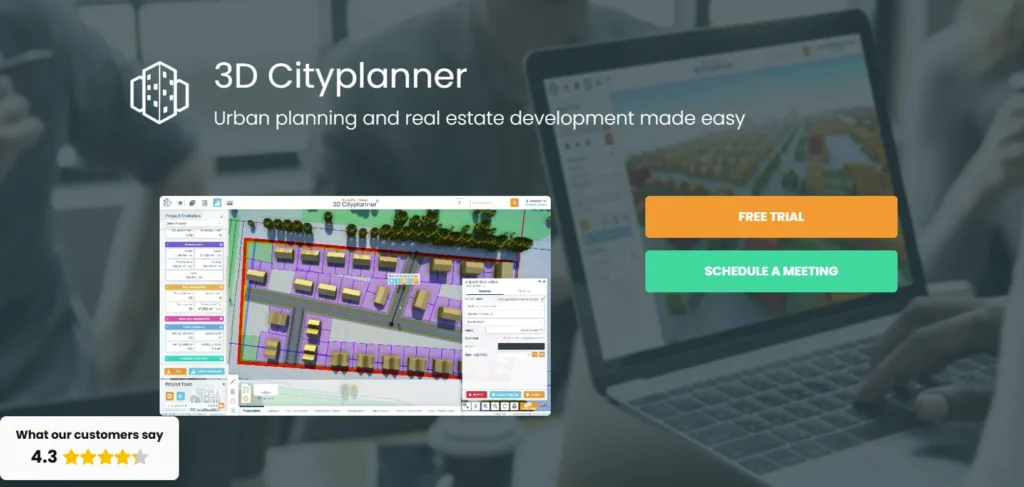
What Is a 3D City Planner?
3D City Planner positions itself as an integrated urban planning platform built for municipal planners, consultants, and developers who need to visualize proposals, test regulatory scenarios, and communicate with non-technical stakeholders.
The platform runs entirely in a web browser—no local installation, no high-end workstation required. That’s a meaningful difference from desktop-heavy tools like ArcGIS Pro or InfraWorks, which demand substantial computing resources and annual license renewals.
Core Capabilities
At its foundation, 3D City Planner combines three layers:
- GIS integration: Direct connection to geospatial datasets, parcel boundaries, zoning layers, and demographic data.
- 3D visualization: Real-time rendering of buildings, terrain, infrastructure, and proposed developments in an interactive 3D environment.
- 4D planning: Time-based scenario modeling that shows how proposals evolve across phases, seasons, or regulatory timelines.
The “4D” component is where the platform differentiates itself. Rather than static snapshots, planners can simulate construction phases, shadow studies across different times of year, or policy changes over multi-year horizons.
That capability matters when presenting to city councils or community groups who struggle to interpret static renderings or 2D zoning maps.
Primary Use Cases
3D City Planner targets several distinct workflows:
- Development review: Visualizing proposed projects against existing context, checking setbacks, height limits, and shadow impacts.
- Zoning analysis: Testing “what-if” scenarios for upzoning, overlay districts, or form-based code changes.
- Stakeholder engagement: Presenting proposals in town halls, public hearings, or online consultation sessions using accessible 3D visuals.
- Master planning: Long-range scenario modeling for neighborhoods, corridors, or districts.
The platform is less suited for detailed engineering design or construction documentation—those tasks still require CAD or BIM tools like Revit or Civil 3D.
Key Features Breakdown
Understanding what 3D City Planner actually does requires looking beyond marketing copy and examining how each feature performs in typical planning workflows.
3D Visualization Engine
The visualization layer uses WebGL rendering, which means it runs directly in browsers on standard hardware. Performance is surprisingly responsive for models up to several square kilometers, though very large metropolitan-scale models can experience frame-rate drops on older machines.
Buildings and terrain render with adjustable detail levels. For early-stage concept work, simple massing models load quickly. For final presentations, higher-detail textures and materials provide photorealistic output comparable to dedicated rendering tools like Enscape or Twinmotion.
Shadow studies update in real time as users drag a time-of-day slider. That’s invaluable for assessing sunlight access on parks, plazas, or residential buildings—issues that often dominate public hearings.
GIS and Data Integration
3D City Planner connects to standard GIS data sources: Esri shapefiles, GeoJSON, WMS/WFS servers, and proprietary city databases. That means existing parcel data, zoning layers, and infrastructure networks are imported without manual conversion.
The platform includes built-in demographic and policy datasets for many regions, though coverage varies. Major North American and European cities have comprehensive data; smaller municipalities may need to supply their own layers.
Spatial analysis tools include:
- Buffer and proximity analysis
- Density calculations (FAR, dwelling units per acre)
- Viewshed and sightline studies
- Accessibility mapping (walk scores, transit catchment)
These aren’t as advanced as ArcGIS Pro’s analytical toolkit, but they cover 80% of common planning tasks without requiring specialized GIS expertise.
4D Planning and Scenario Testing
The 4D layer adds a temporal dimension. Planners can define multiple scenarios—”current zoning,” “proposed upzone,” “maximum buildout”—and toggle between them instantly.
Each scenario can include phased development timelines. A mixed-use project might show Phase 1 (residential tower) in Year 1, Phase 2 (retail podium) in Year 3, and Phase 3 (public plaza) in Year 5. Stakeholders see not just the final outcome but the construction sequence and interim conditions.
Shadow studies can animate across seasons, showing summer versus winter sunlight impacts. That’s critical for projects near parks or outdoor dining areas where seasonal variation matters.
Testing different regulatory frameworks—increasing height limits, reducing setbacks, adding affordable housing overlays—happens through parameter adjustments rather than manual remodeling. The system recalculates allowable envelopes and updates visualizations automatically.
Collaboration and Stakeholder Engagement
3D City Planner includes built-in collaboration features:
- Shared project links: Browser-based access means stakeholders don’t need software licenses. A simple URL grants view-only or comment access.
- Annotation tools: Reviewers can drop pins, highlight areas, and leave threaded comments directly on the 3D model.
- Presentation mode: Full-screen walkthroughs with saved camera paths for consistent presentations across meetings.
For public engagement, the platform supports embedding 3D views into municipal websites or online consultation portals. Residents can explore proposals at their own pace rather than attending in-person meetings or interpreting 2D PDFs.
Recent research from Harvard’s Data-Smart City Solutions highlights how St. Louis used interactive 3D digital twins to rebuild trust in historically disinvested neighborhoods. The Ville neighborhood project demonstrated that accessible spatial technology can shift skepticism into accountability when residents see proposals in context rather than abstract plans.
How 3D City Planner Compares to Alternatives
No planning software exists in isolation. Teams evaluating 3D City Planner need to understand how it fits within—or replaces—existing toolsets.
3D City Planner vs. ArcGIS Urban
Esri’s ArcGIS Urban is the most direct competitor. Both platforms emphasize scenario modeling and stakeholder communication, but they approach the problem differently.
ArcGIS Urban advantages:
- Deeper integration with the broader ArcGIS ecosystem (Pro, Online, Enterprise)
- More sophisticated spatial analysis through ArcGIS Pro toolsets
- Enterprise deployment options for large municipal IT environments
- Established vendor support and training resources
3D City Planner advantages:
- Simpler onboarding—no GIS background required to create basic scenarios
- Lower total cost for small teams (no need for concurrent ArcGIS Pro licenses)
- Faster rendering for real-time stakeholder sessions
- More intuitive interface for non-technical users
Teams already invested in Esri infrastructure will find ArcGIS Urban the natural choice. Smaller municipalities or consultants without existing GIS licenses often find 3D City Planner more accessible.
3D City Planner vs. Autodesk InfraWorks
InfraWorks targets infrastructure-heavy projects: highways, bridges, utilities, and large-scale civil engineering. It excels at detailed engineering design and construction simulation.
3D City Planner focuses on land use, zoning, and urban design—building massing, policy scenarios, and community engagement. The two platforms overlap in visualization but serve different primary workflows.
InfraWorks is better for:
- Transportation corridor design
- Utility network modeling
- Civil engineering integration (AutoCAD Civil 3D, Revit)
- Construction sequencing and cost estimation
3D City Planner is better for:
- Zoning and land-use analysis
- Mixed-use development scenarios
- Public engagement and non-technical stakeholders
- Browser-based access without local installation
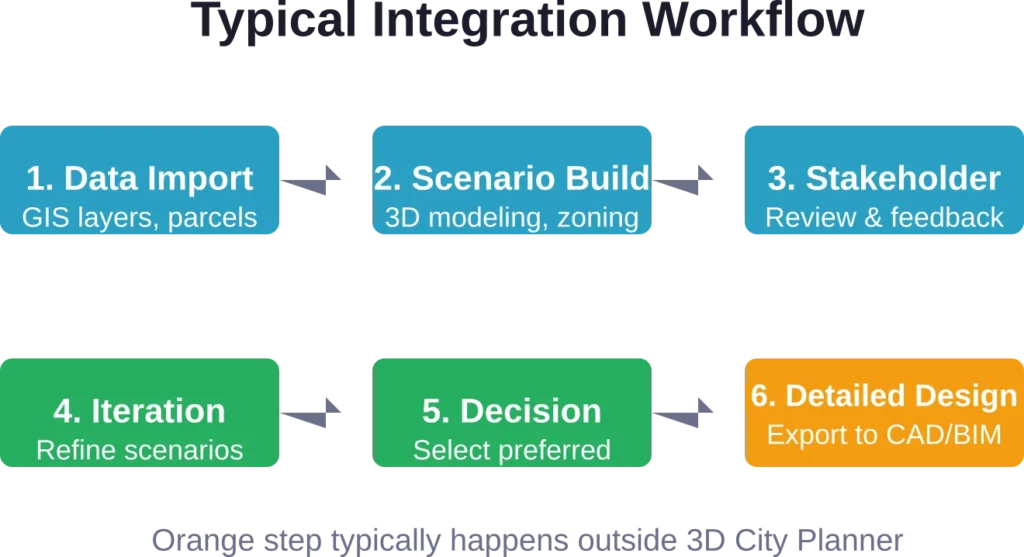
Many firms use both tools in tandem: 3D City Planner for early concept and stakeholder engagement, InfraWorks for detailed engineering once a preferred scenario is selected.
3D City Planner vs. CityEngine
Esri’s CityEngine specializes in procedural modeling—generating entire city blocks from rule sets. It’s powerful for creating large-scale urban contexts quickly but requires scripting knowledge and a steeper learning curve.
3D City Planner trades procedural flexibility for ease of use. It won’t generate a procedural cityscape from CGA rules, but planners can model specific development proposals and test regulatory scenarios without writing code.
CityEngine suits academic research, film production, and large-scale visualization projects. 3D City Planner suits day-to-day municipal planning tasks.

Build Better City Planning Data with FlyPix AI
City planning tools work better when the base geospatial data is clear, structured, and ready for analysis.
FlyPix AI helps teams process satellite, drone, aerial, LiDAR, SAR, and multispectral imagery into usable geospatial outputs. For 3D city planning workflows, this can support early-stage data preparation, including the identification of buildings, roads, land areas, infrastructure, and visible site changes.
FlyPix AI can support city planning work with:
- Detecting buildings, roads, and other visible urban features
- Segmenting mapped areas for planning or review
- Classifying land cover and land use from geospatial imagery
- Comparing imagery from different dates to identify changes
- Training custom AI models for local planning requirements
- Preparing geospatial data for analysis, export, or reporting
Talk to FlyPix AI about geospatial data support for your city planning workflow.
Pricing and Licensing Model
Pricing transparency remains a challenge across the urban planning software industry. Many vendors require sales contact just to see basic cost structures.
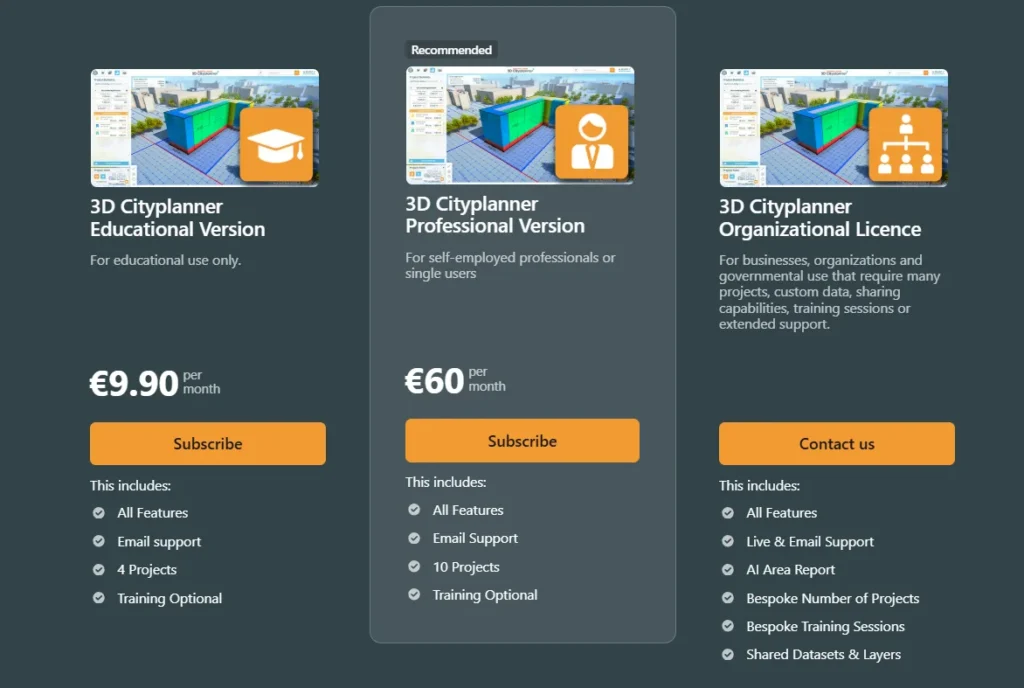
3D City Planner uses a subscription model with tiered pricing based on features and team size. Check the official website for current pricing, as subscription costs and tier structures change periodically.
Typical Pricing Structure
Based on available data, the platform generally offers:
- Individual/Small Team: Monthly or annual subscription for 1-5 users, includes core visualization and scenario modeling.
- Municipal/Enterprise: Custom pricing for larger teams, adds collaboration features, priority support, and data hosting.
- Consulting Firms: Project-based or seat-based licensing depending on firm size and usage patterns.
Educational discounts are typically available for accredited planning programs, though specific terms vary by region.
Total Cost of Ownership
Beyond subscription fees, teams should account for:
- Training time: Onboarding ranges from a few hours for basic tasks to several days for advanced workflows.
- Data preparation: Importing and cleaning GIS layers, especially for municipalities without standardized datasets.
- Hardware: Unlike desktop tools, 3D City Planner runs on standard business laptops. No workstation-class GPUs required.
- Integration costs: Connecting to existing city databases or enterprise GIS systems may require IT support.
For small teams, the lack of expensive hardware requirements makes 3D City Planner more accessible than InfraWorks or CityEngine, which demand high-end workstations for acceptable performance.
Real-World Performance and Limitations
No software solves every problem. Testing reveals where 3D City Planner excels and where teams will hit friction.
Performance Under Load
Browser-based rendering imposes trade-offs. Models covering a few city blocks perform smoothly on mid-range laptops. Expanding to district or citywide scale can slow interaction, especially with high-detail textures and complex terrain.
The platform handles this through level-of-detail (LOD) management: distant buildings render as simple boxes, nearby structures show full detail. That works well for presentations but can complicate analysis tasks that require citywide detail.
Internet connectivity matters. While the software caches data locally, initial project loading and collaboration features require stable bandwidth. Teams in areas with unreliable internet may find desktop tools like ArcGIS Pro more reliable.
Data Coverage Gaps
Built-in policy datasets cover major metropolitan areas comprehensively. Smaller cities, rural regions, and international markets outside North America and Europe often lack pre-loaded zoning, demographic, or infrastructure data.
Teams in those areas need to import their own GIS layers—feasible if the municipality already maintains digital data, but a significant hurdle for jurisdictions still relying on paper maps or outdated CAD files.
Limited Engineering Capabilities
3D City Planner intentionally stays high-level. It won’t replace tools like Civil 3D for grading design, drainage analysis, or construction documentation.
For projects requiring detailed engineering, the platform serves as a front-end for stakeholder engagement and scenario testing, with outputs exported to CAD/BIM tools for detailed design.
Teams expecting a single tool that handles everything from concept to construction documents will be disappointed. Those recognizing 3D City Planner’s role as a planning-focused platform within a broader toolkit will find it fits well.
Collaboration Workflow Friction
While the platform supports multi-user collaboration, version control and conflicting edits can create headaches. Unlike enterprise tools with formal check-in/check-out workflows, 3D City Planner relies on manual coordination.
Larger teams may need external project management practices—assigning clear ownership of scenarios, scheduling edit windows, or using external version control for exported data files.
Who Should Use 3D City Planner?
The platform serves specific user groups better than others.
Ideal Users
- Municipal planning departments without dedicated GIS staff benefit from the accessible interface and browser-based deployment. Smaller cities that can’t justify ArcGIS Pro licenses for every planner find 3D City Planner a cost-effective entry point.
- Planning consultants who prioritize client communication and public engagement over detailed engineering use the platform for early-stage concept work and stakeholder presentations.
- Community development organizations and advocacy groups gain access to professional-grade visualization without expensive software budgets, enabling them to propose alternatives or critique proposals on equal footing with developers.
Poor Fit Users
- Civil engineering firms focused on infrastructure design will find the platform too high-level. InfraWorks or Civil 3D remain necessary for detailed engineering tasks.
- Large metropolitan planning organizations with existing enterprise GIS infrastructure will likely prefer ArcGIS Urban’s deeper integration with ArcGIS Pro and Enterprise.
- Academic researchers needing procedural modeling or custom scripting will find CityEngine or Grasshopper-based workflows more flexible.
Integration with Existing Workflows
Successful software adoption depends on how well a new tool fits existing processes.
Import and Export Formats
3D City Planner supports standard interchange formats:
- Import: Shapefile, GeoJSON, KML, DXF, OBJ, FBX, IFC (limited)
- Export: PDF reports, PNG/JPEG images, MP4 video walkthroughs, GeoJSON scenarios
BIM interoperability remains limited. While the platform can import IFC building models, detailed Revit families or parametric components often simplify during import. Teams needing full BIM coordination should plan for manual cleanup or accept reduced detail in 3D City Planner visualizations.
API and Automation
The platform offers a REST API for programmatic access to project data, scenario parameters, and visualization outputs. That enables:
- Automated scenario generation from spreadsheets or databases
- Integration with municipal permit systems or development tracking dashboards
- Custom reporting workflows for recurring analysis tasks
Documentation and developer support vary. Larger enterprise customers typically receive more extensive API guidance; smaller teams may need to rely on community forums or experimentation.
Learning Curve and Training Resources
Adoption speed depends heavily on team background and available training.
Onboarding Timeline
For planners with GIS experience, basic proficiency arrives within a few hours. The interface borrows conventions from tools like ArcGIS Online and Google Earth, reducing cognitive load.
For planners without GIS backgrounds—common in smaller municipalities or community organizations—expect one to two weeks of part-time practice to reach comfortable proficiency. The 4D scenario features require additional time to master.
Available Training Materials
3D City Planner provides:
- Official video tutorials covering common workflows
- Written documentation with step-by-step guides
- Webinar series for new releases and advanced techniques
- Community forum for peer support
Compared to Esri’s extensive training ecosystem (Esri Academy, user conferences, regional user groups), 3D City Planner’s resources feel thinner. Teams accustomed to robust vendor support may find the lighter touch frustrating.
Recent Developments and Future Direction
Urban planning software evolves rapidly, driven by advances in cloud computing, real-time rendering, and spatial data availability.
AI and Machine Learning Integration
Planning tools increasingly incorporate AI-assisted design, though capabilities remain early-stage. Recent research from the University of Michigan’s Robotics Department explores AI-enabled digital twins for 3D concrete printing, with the project ‘AI-Enabled Digital Twins for Closed-Loop Robotic 3D Concrete Printing’ receiving $42,500 in seed funding from the Bold Challenges Initiative., while MIT research published April 28, 2026 suggests constructing buildings from interlocking subunits using robotic assembly (MILAbots) should have “a much smaller carbon footprint” compared to conventional construction, with steel and wood voxel designs offering “significant environmental benefits.”
These developments point toward future planning software that not only visualizes proposals but actively suggests optimizations for carbon footprint, construction efficiency, or regulatory compliance.
3D City Planner has not yet integrated generative AI features comparable to emerging tools in the architectural design space, but industry trends suggest such capabilities will become table stakes within the next few years.
Digital Twin Convergence
The line between static planning models and live digital twins continues to blur. Cities increasingly expect planning software to sync with real-time data streams—building permits, traffic sensors, utility usage, air quality monitors.
Research from UC San Diego’s Urban Studies and Planning GIS Visualization Lab and the Urban Digital Twin Lab at UCF highlights how multi-dimensional planning support systems are evolving toward continuous feedback loops rather than one-time analyses.
3D City Planner’s current architecture supports scenario comparison but not real-time data integration. Future versions will likely need to incorporate live data feeds to remain competitive as digital twin platforms mature.
Pros and Cons Summary
| Pros | Cons |
|---|---|
| Browser-based—no local installation or high-end hardware required | Performance lags with very large models or slow internet |
| Intuitive interface for non-GIS professionals | Limited advanced spatial analysis compared to ArcGIS Pro |
| Strong 4D scenario modeling and temporal visualization | Data coverage gaps outside major metropolitan areas |
| Effective stakeholder engagement and public-facing tools | Lacks detailed engineering capabilities (grading, utilities) |
| Lower total cost of ownership for small teams | Thinner training resources compared to Esri ecosystem |
| Real-time shadow studies and environmental analysis | BIM interoperability remains basic |
Practical Recommendations for Evaluation
Deciding whether 3D City Planner fits your workflow requires hands-on testing, not just feature checklists.
Trial and Proof-of-Concept Steps
Request a trial or demo that includes:
- Import your actual GIS data: Test how well the platform handles your city’s parcel layers, zoning maps, and infrastructure networks. Pre-loaded demo data always works perfectly; real-world datasets reveal friction points.
- Model a recent project: Recreate a development proposal your team already analyzed in other tools. Compare visualization quality, workflow speed, and stakeholder feedback.
- Run a stakeholder session: Present the 3D model to a non-technical audience—planning commissioners, community groups, or elected officials. Gauge whether the interface actually improves comprehension or introduces new confusion.
- Test collaboration: If you have multiple team members, simulate concurrent editing and commenting. Identify version control or coordination issues before committing.
Questions to Ask Vendors
During sales discussions, probe beyond feature lists:
- What data preparation is required for our specific region?
- How does pricing scale as our team grows?
- What level of API access and customization is included?
- What is the typical implementation timeline for municipalities of our size?
- How does the platform handle data security and privacy for sensitive planning proposals?
Alternatives Worth Considering
No single tool fits every team. Depending on priorities, these alternatives may serve better:
- ArcGIS Urban: Best for teams already invested in Esri infrastructure and needing enterprise-scale deployment.
- Autodesk InfraWorks: Best for infrastructure-heavy projects requiring civil engineering integration.
- SketchUp Pro: Best for small teams needing simple 3D modeling without extensive GIS or scenario analysis.
- Bentley OpenBuildings Designer: Best for large institutional projects requiring full BIM coordination.
- Unreal Engine (via Twinmotion): Best for photorealistic visualization and real-time rendering when stakeholder presentation quality is paramount.
Frequently Asked Questions
The platform runs in web browsers on standard business laptops. A mid-range processor, 8GB RAM, and integrated graphics suffice for typical projects. High-end GPUs or workstations are not necessary, though larger models benefit from faster internet connections and more RAM.
Not entirely. 3D City Planner handles scenario modeling, visualization, and stakeholder engagement effectively, but lacks ArcGIS Pro’s advanced spatial analysis, geoprocessing tools, and enterprise data management. Many teams use both: ArcGIS Pro for analytical tasks, 3D City Planner for visualization and communication.
Limited offline capability exists through browser caching, but the platform requires internet connectivity for most tasks. Teams in areas with unreliable internet should plan accordingly or consider desktop-based alternatives like CityEngine or InfraWorks.
The platform offers both cloud-hosted and on-premises deployment options. Cloud hosting simplifies setup but requires trusting the vendor’s data security practices. On-premises deployment keeps data within municipal IT infrastructure but increases setup complexity. Review the vendor’s data handling policies carefully, especially for pre-development proposals not yet public.
The platform serves developers, consultants, advocacy organizations, and municipal staff equally. Pricing tiers and licensing accommodate different user types. Community groups often benefit from educational or nonprofit discounts where available.
Basic tasks—importing buildings, adjusting heights, testing zoning scenarios—require minimal 3D modeling experience. Advanced workflows like custom texturing, detailed landscape design, or complex geometry benefit from CAD or 3D modeling backgrounds, though the platform’s procedural tools automate much of that work.
Integration depends on available APIs and data formats. The platform’s REST API allows programmatic data exchange with municipal databases, but custom integration often requires IT support or vendor professional services. Check with your IT department and the vendor about specific integration requirements for your systems.
Final Verdict: Where 3D City Planner Excels
3D City Planner delivers the strongest value in three specific scenarios.
First, it empowers smaller municipalities and planning departments that lack extensive GIS infrastructure or dedicated technical staff. The accessible interface and browser-based deployment remove barriers that make tools like ArcGIS Pro or InfraWorks impractical for under-resourced teams.
Second, it transforms stakeholder engagement by making urban planning proposals legible to non-experts. City councils, community groups, and the general public grasp 3D scenarios more intuitively than zoning maps or technical reports. That capability alone justifies adoption for teams prioritizing public participation.
Third, it accelerates scenario testing during early planning phases. The ability to toggle between regulatory frameworks, building envelopes, and temporal phasing in real time shortens the concept exploration cycle from weeks to hours.
The platform does not replace detailed engineering tools, enterprise GIS systems, or specialized BIM workflows. Teams expecting a single tool to handle everything from concept through construction will find gaps.
But for its intended purpose—visualizing urban development scenarios, testing policy impacts, and communicating with stakeholders—3D City Planner performs competently at a price point accessible to teams beyond large metro planning organizations.
Evaluate the platform against your specific workflow requirements, not generic feature lists. If scenario modeling and stakeholder communication dominate your priorities, a trial will likely confirm fit. If advanced spatial analysis or detailed engineering matter more, look to complementary tools within a broader software stack.
Urban planning software continues evolving rapidly, driven by cloud computing, real-time rendering, and expanding spatial datasets. Tools that integrate cleanly into existing workflows while lowering barriers for new users will gain ground. 3D City Planner positions itself in that space—not the most powerful platform available, but accessible and effective for teams that prioritize communication over technical depth.