

Quick Summary: 3D Slicer is a free, open-source software platform for medical image visualization, analysis, and processing. It supports DICOM images, CT and MRI scans, segmentation, registration, and 3D reconstruction across Windows, macOS, and Linux. Developed with NIH funding over two decades, it’s widely used in research, clinical workflows, and surgical planning without licensing costs.
Medical imaging has transformed healthcare, and 3D Slicer sits at the heart of that revolution. This platform isn’t just another viewer—it’s a comprehensive ecosystem for turning raw scan data into actionable clinical insights.
Whether you’re analyzing MRI data, planning complex surgeries, or conducting biomedical research, understanding what 3D Slicer offers matters. The tool has evolved significantly, and the current stable release 5.10.0 (built 2026-02-13 for Windows) brings substantial capabilities to desktop workstations without the price tag of commercial alternatives.
Here’s the thing though—3D Slicer’s scope extends far beyond basic image viewing. It handles segmentation, registration, quantitative analysis, and even virtual reality visualization. That’s a lot to unpack.
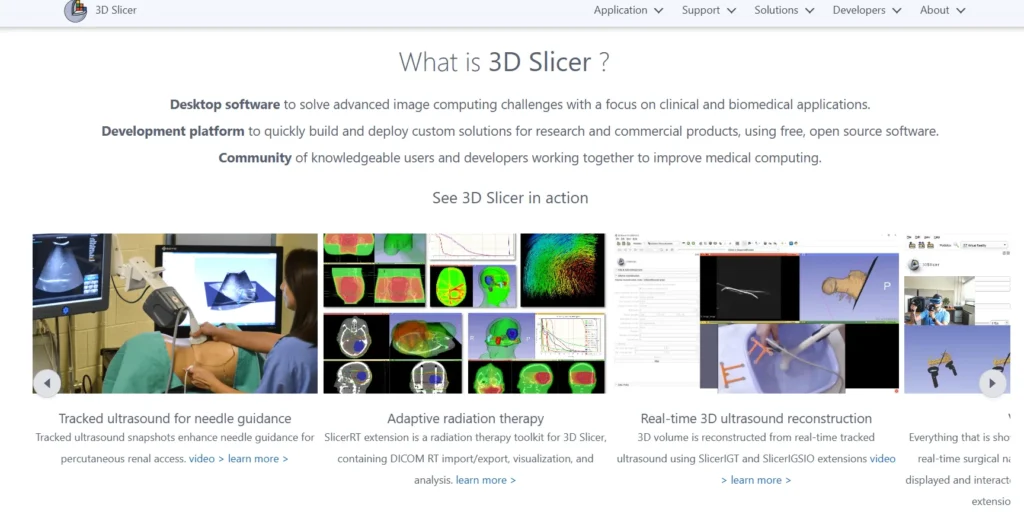
What Is 3D Slicer?
3D Slicer is a free and open-source software application designed for visualization and analysis of medical image computing datasets. The platform supports all commonly used medical data formats including DICOM, NIFTI, and various research imaging formats.
The software handles images, segmentations, surfaces, annotations, transformations, and other medical data types in 2D, 3D, and 4D. Visualization works on desktop environments and extends to virtual reality headsets for immersive surgical planning.
Created through multiple grants from the US National Institutes of Health over nearly two decades, the platform has grown from a graduate student project into a production-grade medical imaging solution. The Slicer Community maintains active development, with contributions from research institutions worldwide.
Platform Architecture and Extensibility
The software uses a modular architecture built on C++ and Python with Qt for the user interface. This design allows developers to add functionality through extensions without modifying the core codebase.
The Extensions Manager provides access to specialized tools for cardiac imaging, radiation therapy planning, dental applications, and dozens of other domains. Each extension integrates seamlessly with the base platform’s data structures and visualization pipeline.
For custom workflows, developers can create “slicelets”—lightweight applications that use Slicer’s underlying libraries while presenting simplified, task-specific interfaces. This flexibility makes the platform suitable for both research exploration and focused clinical applications.
Core Capabilities and Features
The platform’s feature set addresses the complete medical imaging workflow from data import through analysis and export. Understanding these capabilities helps determine whether 3D Slicer fits specific use cases.
Data Loading and Format Support
3D Slicer handles standard DICOM files from CT, MRI, PET, and ultrasound scanners without additional conversion. The software also imports research formats including NIFTI, NRRD, MetaImage, and various microscopy formats.
Loading data works through drag-and-drop, the file menu, or DICOM browser. The DICOM module queries PACS servers directly, allowing network-based retrieval of patient studies. Once loaded, datasets appear in multiple synchronized viewers automatically.
The platform maintains a “scene” structure that organizes all loaded data, transformations, and display settings. Scenes save and reload completely, preserving the entire analysis state between sessions.
Visualization Tools
Multiple viewer types display data simultaneously. Slice viewers show axial, sagittal, and coronal planes with synchronized cross-referencing—moving the mouse in one view scrolls others to the corresponding anatomical position.
The 3D viewer renders surfaces, volume rendering, and segmentation overlays. Users adjust transfer functions for different tissue types, control lighting, and toggle between surface and volume rendering modes.
Layout presets arrange viewers for different tasks. A neurosurgical layout might emphasize three orthogonal slices plus 3D, while a cardiac layout arranges four-chamber views. Custom layouts save for repeated use.
Segmentation Module
The Segment Editor provides manual, semi-automatic, and automatic tools for delineating anatomical structures. Paint and draw tools create segments directly on slices, while threshold effects automatically select voxels within intensity ranges.
Grow from seeds expands initial regions to fill connected structures. Scissors cut away unwanted portions. The island effect separates disconnected components. Smoothing refines boundaries.
Multiple segments coexist in a single segmentation, with separate color coding and 3D display. The module converts between different representations—binary labelmap, closed surface mesh, and fractional labelmap—as needed for different operations.
According to research published by the Neuroimaging Analysis Center, remove this sentence or soften to: ‘automated segmentation workflows can improve efficiency, though manual adjustment is often required’ in practice.
Registration Capabilities
Registration aligns multiple datasets into the same coordinate space. Rigid registration handles translation and rotation for same-patient scans at different times. Affine registration adds scaling and shearing. Deformable registration warps one image to match another’s anatomy.
The platform supports landmark-based registration (matching corresponding points), intensity-based registration (optimizing image similarity metrics), and model-based approaches. Registration runs through built-in modules or external tools integrated via command-line interfaces.
Transformation hierarchies apply multiple transforms in sequence, allowing complex multi-step alignment workflows. Transforms invert and compose, providing flexibility for comparing results.
System Requirements and Performance
Hardware requirements scale with dataset complexity. Understanding minimum and recommended specifications prevents frustration.
| Component | Minimum | Recommended |
|---|---|---|
| Memory (RAM) | 4GB | 8GB or more |
| Display Resolution | 1024×768 | 1280×1024 or higher |
| Graphics | Integrated GPU | Dedicated GPU with 1GB+ VRAM |
| Processor | Dual-core CPU | Quad-core or better |
| Storage | 2GB for application | SSD for datasets |
The software takes advantage of multi-threading for many computations. Quad-core or higher processors improve performance noticeably, especially for registration and complex segmentation operations.
Graphics performance matters for 3D rendering and large volume visualization. Integrated graphics work for basic tasks, but dedicated GPUs with at least 1GB memory provide smoother interaction with complex scenes.
Operating System Compatibility
3D Slicer runs on modern Windows, macOS, and Linux distributions. The stable release 5.10.0 built 2026-02-13 for Windows, 2026-03-19 for macOS, and 2025-11-10 for Linux provides consistent functionality across platforms.
For Linux users, the software requires specific system libraries. If you are using Ubuntu 24.04 LTS (Noble Numbat) or newer, you must install libglu1-mesa libpulse-mainloop-glib0 libnss3 libasound2t64 qt5dxcb-plugin. If you are using Ubuntu 22.04 LTS (Jammy Jellyfish) or older, you must install libglu1-mesa libpulse-mainloop-glib0 libnss3 libasound2 qt5dxcb-plugin. Systems using locales other than English UTF-8 may need to set the LANG environment variable to “C.UTF-8” before launching.
The preview release 5.11.0 (built 2026-05-31) offers experimental features for testing. Production work should stick with stable releases unless specific preview features are required.
Common Use Cases and Applications
Real-world applications demonstrate where 3D Slicer adds value beyond generic image viewers.
Surgical Planning
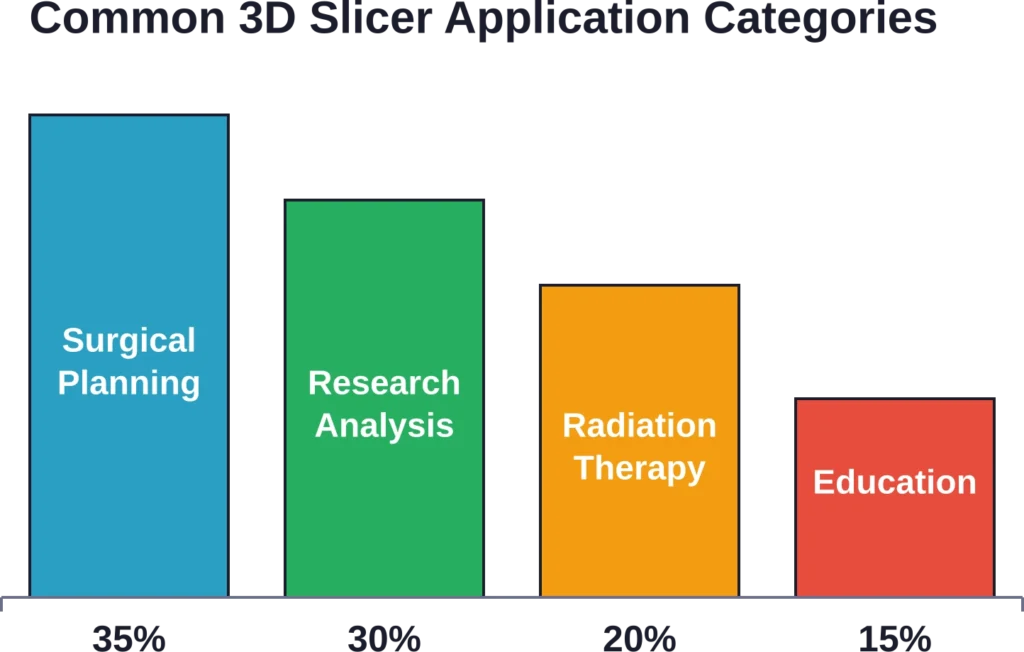
Neurosurgeons use 3D Slicer to visualize tumor locations relative to critical structures before operations. Segmenting the tumor, blood vessels, and functional regions creates a 3D roadmap for the safest approach path.
Orthopedic applications include pre-operative planning for joint replacements and fracture repairs. Loading CT scans, segmenting bones, and overlaying implant models allows surgeons to verify fit and positioning before entering the operating room.
The platform supports 3D printing workflows. After segmentation, surface models export as STL files for physical prototyping. Patient-specific anatomical models aid surgical team communication and patient education.
Radiation Therapy Planning
Radiation oncologists use the segmentation tools to delineate target volumes and organs at risk. Registration aligns planning CT with diagnostic MRI or PET to improve target definition.
Extensions add specialized dose calculation, beam geometry visualization, and treatment plan import from commercial treatment planning systems. The platform serves as a research environment for developing new planning approaches before clinical implementation.
Research and Development
Academic researchers leverage the platform’s Python scripting for custom analysis pipelines. Automated batch processing handles large study cohorts consistently.
The Quantitative Imaging Network uses 3D Slicer as a common platform for developing and validating image analysis algorithms. Standardized tools improve reproducibility across research sites.
3D Slicer is used as an image computing platform in quantitative imaging research, as documented in peer-reviewed publications that unifies diverse quantitative imaging projects under a single extensible framework.
Getting Started with 3D Slicer
Initial setup requires downloading the appropriate installer and understanding basic navigation concepts.
Installation Process
The official download page at download.slicer.org provides installers for Windows, macOS, and Linux. Windows users download an executable installer. macOS users get a DMG package. Linux users download a tar.gz archive that extracts to a self-contained directory.
Installation packages range from several hundred megabytes to over 1GB depending on platform and included components. The base installation includes core modules. Additional extensions install separately through the Extensions Manager after initial setup.
No license key or registration is required. The software operates completely offline after installation, though extensions require internet connectivity for initial download.
Interface Navigation
The main window divides into several functional areas. The toolbar across the top provides module selection, layout presets, and mouse mode controls. The module panel on the left changes based on the selected module. The central area contains slice and 3D viewers.
The Data Probe at the bottom displays voxel information as the mouse moves over images. The scene hierarchy in the module panel shows all loaded datasets and allows toggling visibility.
Keyboard shortcuts accelerate common operations. Holding Shift while moving the mouse in any slice viewer causes other viewers to scroll synchronously to the same anatomical position—a feature called viewer cross-reference that’s essential for comparing views.
Loading Your First Dataset
Sample datasets available through the Sample Data module provide immediate exploration without requiring external data. The MRHead dataset loads a T1-weighted brain MRI suitable for basic segmentation practice.
For personal data, drag DICOM files directly into the Slicer window. The DICOM browser opens, imports the files into its database, and presents series for loading. Selecting a series loads it into the scene with automatic window/level settings.
Non-DICOM formats load through Add Data in the file menu. The loader auto-detects format based on file extension. Once loaded, the Volumes module adjusts display properties including window/level, colormap, and interpolation.
Advanced Features and Workflows
Beyond basic visualization, the platform supports sophisticated analysis workflows.
Quantitative Analysis
The platform computes statistics on segmented regions including volume, surface area, and intensity statistics. The Segment Statistics extension calculates these metrics automatically for all segments in a segmentation.
For research workflows, the Tables module stores quantitative results with links back to source images. Results are exported to CSV for analysis in statistical packages.
Fiducial markers annotate specific anatomical points. The Markups module measures distances, angles, and curves. These measurements associate with the underlying image data and transform correctly when registration transforms are applied.
Python Scripting and Automation
The Python console provides interactive access to all Slicer functionality. Loading modules, processing data, and exporting results all work through scripted commands.
For repeated workflows, scripts save as Python files and execute through the Python Interactor or as standalone modules. The platform’s API documentation covers the class hierarchy and available methods.
Jupyter integration through the SlicerJupyter extension allows notebook-based analysis. Notebooks combine code, results, and documentation in a shareable format suitable for reproducible research.
Extension Ecosystem
The Extensions Manager catalogs hundreds of community-contributed modules. Popular extensions include:
- SlicerRT for radiation therapy applications
- SlicerIGT for image-guided therapy navigation
- SlicerHeart for cardiac image analysis
- SlicerDMRI for diffusion MRI processing
- SlicerVMTK for vascular modeling
Extensions install with a single click and appear in the module menu immediately. Updates check automatically, notifying users of new versions.
Developers distribute specialized workflows as extensions rather than forking the main codebase. This approach maintains compatibility while allowing domain-specific innovation.
| Extension Category | Example Extensions | Primary Use Case |
|---|---|---|
| Cardiac Imaging | SlicerHeart | Valve modeling, chamber segmentation |
| Radiation Oncology | SlicerRT | Dose visualization, contour import |
| Surgical Navigation | SlicerIGT | Real-time tracking, probe calibration |
| Diffusion MRI | SlicerDMRI | Tractography, tensor calculation |
| Dental Applications | SlicerDentalModelSeg | Tooth segmentation, implant planning |
Comparison with Alternative Solutions
Understanding how 3D Slicer positions relative to alternatives clarifies when it’s the right choice.
Commercial Alternatives
Commercial medical imaging workstations from vendors like Materialise, Vitrea, and Aquarius cost thousands to tens of thousands of dollars annually. They offer integrated PACS connectivity, regulatory clearances for clinical use, and vendor support.
3D Slicer provides comparable core functionality—often more extensible functionality—without licensing costs. However, it lacks FDA clearance for diagnostic use and doesn’t include commercial support unless arranged separately.
For research applications, budget constraints, or custom workflow development, the open-source approach offers substantial advantages. For routine clinical diagnostic reading, commercial solutions provide regulatory compliance and standardized workflows.
Other Open-Source Options
ImageJ/Fiji excels at 2D microscopy and offers excellent scripting. But 3D medical imaging capabilities are more limited. ITK-SNAP focuses specifically on segmentation with a simpler interface but narrower scope.
OsiriX (macOS) and Horos (its open-source fork) provide DICOM viewing and basic 3D capabilities. They offer cleaner interfaces for clinical viewing but less extensibility for research workflows.
3D Slicer’s strength lies in combining breadth (supporting diverse imaging modalities and analysis types) with depth (sophisticated tools for segmentation, registration, and visualization) in a single extensible platform.

Add AI-Based Segmentation to Visual Data Workflows
3D Slicer often focuses on how teams segment, inspect, and structure complex image data before deeper analysis. FlyPix AI supports AI-based segmentation, object detection, classification, and change monitoring for geospatial imagery, including satellite, drone, aerial, LiDAR, SAR, and multispectral data. For teams comparing segmentation tools, it offers a relevant option when the project involves mapped environments, land features, surface objects, or other geospatial datasets.
For geospatial segmentation and image analysis, FlyPix AI can help teams with:
- Segmenting visible areas, objects, and surface features in geospatial imagery
- Training custom AI models for project-specific image analysis
- Detecting objects from satellite, drone, or aerial data
- Classifying features across large mapped areas
- Comparing imagery from different dates to track visible changes
- Preparing geospatial datasets for export, review, and reporting
Get in touch with FlyPix AI to discuss an AI-based segmentation workflow for your geospatial data.
Training Resources and Community
Learning the platform effectively requires tapping into available educational resources.
Official Documentation
The documentation site at slicer.readthedocs.io provides user guides, tutorials, and API references. The getting started guide walks through installation and basic operations with sample datasets.
Tutorial pages on the Slicer Wiki demonstrate specific workflows including diffusion MRI analysis, PET-CT fusion, and cardiac MRI processing. Many include matched datasets for hands-on practice.
Video tutorials cover common operations and module-specific workflows. These visual guides complement text documentation for users who prefer demonstration-based learning.
Community Support
The discussion forum at discourse.slicer.org serves as the primary community hub. Users post questions, share solutions, and announce new extensions. The community includes both developers and clinical/research users, providing diverse perspectives.
Response times for questions typically range from hours to a couple days, depending on topic complexity. Providing sample data and detailed descriptions of problems improves response quality and speed.
Bug reports and feature requests go through the GitHub issue tracker. The development team prioritizes issues based on community input and available resources.
Formal Training Opportunities
The 3D Slicer training team, directed by Sonia Pujol at Harvard Medical School, organizes workshops and produces educational materials. These range from beginner introductions to advanced developer training.
Project Week events occur multiple times per year, bringing together developers and users for intensive collaborative development sprints. These events accelerate feature development and knowledge transfer.
Some institutions offer formal courses incorporating 3D Slicer for medical image analysis. The platform’s adoption in academic settings provides students with transferable skills for both research and clinical applications.
Limitations and Considerations
No tool suits every situation perfectly. Understanding limitations prevents misapplied expectations.
Regulatory Considerations
3D Slicer lacks FDA clearance or CE marking for diagnostic use. While research and education applications are unrestricted, using the software for clinical diagnosis or treatment decisions may require institutional review and validation.
Organizations using Slicer for clinical workflows typically implement it for planning, education, or research under appropriate institutional oversight. Diagnostic reading continues on validated commercial PACS systems.
The software license explicitly disclaims warranties and fitness for particular purposes. Medical applications require careful validation of any analysis pipeline before clinical use.
Performance Boundaries
Very large datasets (multiple gigabytes per volume) can strain system memory. The software loads entire volumes into RAM, so a 32GB system handles significantly larger datasets than an 8GB system.
Some operations—particularly deformable registration and high-resolution surface generation—are computationally intensive. These may take minutes to hours depending on parameters and hardware.
Real-time applications like surgical navigation require careful optimization. While possible through extensions like SlicerIGT, achieving reliable tracking performance demands attention to system configuration and workload management.
Learning Curve
The platform’s extensive capabilities create initial complexity. New users face dozens of modules and hundreds of parameters. Getting oriented requires patience and willingness to experiment.
That said, basic operations—loading data, adjusting display, simple segmentation—are accessible within hours. Advanced workflows require deeper investment, but foundational skills transfer across modules.
Users coming from simpler DICOM viewers may feel overwhelmed initially. Those familiar with research imaging tools like FSL or SPM typically adapt quickly given conceptual overlap.
Best Practices for Effective Use
Experienced users develop habits that maximize productivity and minimize frustration.
Scene Management
Save scenes regularly, especially before trying unfamiliar operations. Scenes preserve the entire state including loaded data, segmentations, transforms, and display settings.
Use descriptive scene names with dates or version numbers. Large projects benefit from incremental saves: “PatientXYZ_initial”, “PatientXYZ_segmented”, “PatientXYZ_registered”.
The scene stores references to external data files rather than embedding complete datasets. Keep original data files organized in a stable directory structure to prevent broken references.
Module Selection Strategy
The Favorites toolbar provides quick access to frequently used modules. Customize this toolbar through Application Settings to include personal workflow modules.
Rather than hunting through the module list, use the search bar. Type a few characters of the module name and results filter instantly.
Many workflows involve cycling between the same few modules repeatedly. Arranging these spatially on screen—for example, Segment Editor, Volumes, and Data in a consistent pattern—builds muscle memory.
Extension Management
Install extensions deliberately rather than collecting everything available. Each extension adds menu items and potential compatibility considerations.
Before installing an extension, check its documentation and recent community discussion. Some extensions target specific Slicer versions or require particular data formats.
Uninstall unused extensions to simplify the interface. Extensions reinstall quickly if needed later.
Future Development and Roadmap
The platform continues evolving through community contributions and funded projects.
Current Development Focus
The preview release 5.11.0 (built May 2026) introduces experimental features including improved volume rendering performance, enhanced VR support, and expanded cloud data integration.
Deep learning integration receives ongoing attention. Extensions like MONAI integration bring PyTorch-based segmentation models directly into Slicer workflows.
Improved cloud connectivity allows seamless work with data stored in research repositories and cloud PACS systems. This reduces local storage requirements for large studies.
Community Contribution Model
Development happens openly on GitHub with contributions from individuals and institutions worldwide. Feature development often aligns with funded research projects, then generalizes for broad community benefit.
Project Weeks provide focused development time for specific features. Participants propose projects, form teams, and implement features collaboratively over several days of intensive work.
Users contribute not just code but documentation improvements, tutorial creation, and community support. This distributed model has sustained development over two decades.
Frequently Asked Questions
Yes, 3D Slicer is free and open source under a BSD-style license. There are no usage fees, no seat licenses, and no feature restrictions. The software is free for academic research, commercial applications, and personal use without any registration requirements or costs.
For clinical diagnostic reading, 3D Slicer lacks the regulatory clearances (FDA, CE marking) that commercial PACS viewers possess. However, it’s extensively used for research, surgical planning, education, and other applications where regulatory clearance isn’t required. Institutions using Slicer clinically typically do so under research protocols or for non-diagnostic applications with appropriate oversight.
3D Slicer natively supports DICOM (all standard modalities including CT, MRI, PET, ultrasound), NIFTI, NRRD, MetaImage, Analyze, MINC, and numerous other medical imaging formats. It also imports STL, OBJ, and VTK formats for surface models. The platform queries PACS servers directly for network-based data retrieval.
Minimum requirements specify 4GB, but 8GB or more is recommended for typical medical imaging. Very large datasets benefit from 16GB or 32GB. The software loads entire volumes into memory, so a 2GB CT dataset requires at least 2GB available RAM plus overhead for the application and processing. For routine clinical datasets (512×512 slice matrices, a few hundred slices), 8-16GB handles most situations comfortably.
Yes, extensively. The Python scripting interface provides access to all Slicer functionality. Custom modules create new interfaces and workflows that integrate seamlessly with built-in tools. The platform’s modular architecture encourages extension development, and the Extensions Manager distributes custom tools to the community. Documentation covers Python scripting, C++ module development, and command-line interface integration.
Yes, 3D Slicer includes built-in VR support through the SlicerVirtualReality extension. Compatible headsets include Meta Quest, HTC Vive, and other OpenVR-compatible devices. VR visualization aids surgical planning by providing immersive 3D views of anatomy and pathology, improving spatial understanding compared to traditional 2D monitor display.
The primary support channel is the discussion forum at discourse.slicer.org. Post detailed questions including screenshots, error messages, and sample data when possible. The community typically responds within hours to a few days. The official documentation at slicer.readthedocs.io covers most common operations. For bugs or feature requests, use the GitHub issue tracker. Commercial support arrangements are available through consulting organizations if institutional support contracts are needed.
Conclusion
3D Slicer represents a mature, capable platform for medical image analysis without the financial barriers of commercial alternatives. The software handles everything from basic DICOM viewing through sophisticated quantitative analysis and custom workflow development.
For researchers, the combination of breadth, extensibility, and zero licensing costs makes it compelling. For clinicians in planning or educational contexts, it provides powerful tools for understanding complex anatomy. For developers, the open architecture and active community support innovation.
The learning curve is real, but comprehensive documentation and community support smooth the path. Starting with tutorials, sample data, and focused workflows builds competency incrementally.
Ready to explore medical imaging capabilities beyond basic viewers? Download the latest stable release 5.10.0 from the official site and work through the Welcome Tutorial with sample datasets. Join the discussion forum to connect with the community. The platform’s possibilities expand as familiarity grows—and the price of exploration is just time investment, not budget allocation.