

Quick Summary: 3Dsurvey is an all-in-one photogrammetry software designed for professionals, particularly in land surveying, construction, and mining. It excels by integrating drone mapping, LiDAR data processing, and robust CAD tools into a single, cohesive workflow, enabling users to move from data capture to final deliverables without switching between multiple applications. Its modular design and strong customer support make it a powerful and flexible choice for a variety of projects.
In the world of surveying and drone mapping, professionals are constantly seeking software that streamlines complex workflows without sacrificing precision. 3Dsurvey has emerged as a powerful contender, positioning itself as a complete solution built by surveyors, for surveyors. This isn’t just another photogrammetry engine; it’s an integrated platform designed to handle everything from data capture to final CAD deliverables.
But does it live up to the hype? With so many drone mapping and photogrammetry software options on the market, choosing the right tool is critical. This review takes a deep dive into 3Dsurvey, exploring its core functionalities, unique advantages, and where it fits in the professional landscape of 2026.
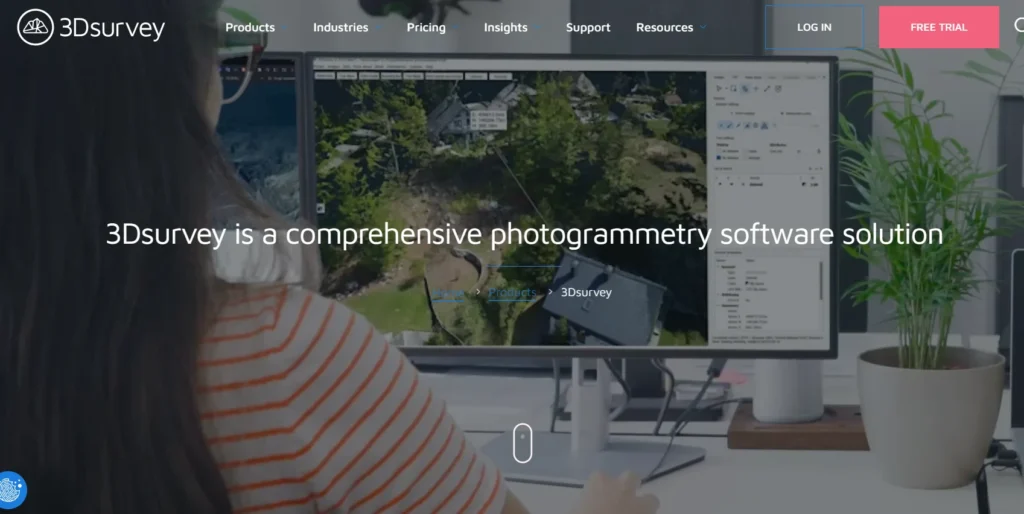
What is 3Dsurvey? An All-in-One Approach
At its core, 3Dsurvey is a comprehensive photogrammetry software solution that processes data from various sources to create highly accurate 3D models, orthophotos, and digital elevation models. What sets it apart is its “all-in-one” philosophy. The platform is designed to manage the entire project lifecycle within a single environment.
Users can capture data using any drone, camera, or even smartphones, and the software is compatible with numerous data types, including LiDAR, SONAR, and GNSS. This flexibility means professionals don’t have to overhaul their existing hardware to fit into the 3Dsurvey ecosystem. The software is particularly popular in industries like land surveying, construction, and surface mining, where precision and efficiency are paramount.
The workflow is designed to be intuitive, mirroring how real-world surveying projects operate. It guides users through capturing data, processing it into point clouds and meshes, extracting necessary information with integrated CAD tools, and finally, sharing the results with clients via a cloud platform.
Key Features That Make 3Dsurvey Stand Out
3Dsurvey isn’t just a list of features; it’s a toolbox crafted for surveyors. The tools are practical and solve real-world problems, moving beyond flashy demos to deliver tangible results in the field.
Powerful Data Integration and Processing
One of the software’s biggest strengths is its ability to handle and merge diverse datasets. Whether you’re working with aerial drone imagery, terrestrial LiDAR scans, SLAM point clouds, or even RTK videogrammetry, 3Dsurvey brings it all together in a single project environment. This unified workflow is a significant time-saver, eliminating the need to juggle multiple software applications for different data types. The platform’s processing engine is robust, allowing users to generate detailed point clouds, textured 3D meshes, and high-resolution orthophotos. The latest versions, like 4.0, feature a rebuilt mesh engine that produces sharper building edges and more realistic renderings of thin objects like powerlines.
Integrated CAD Engine: A True Differentiator
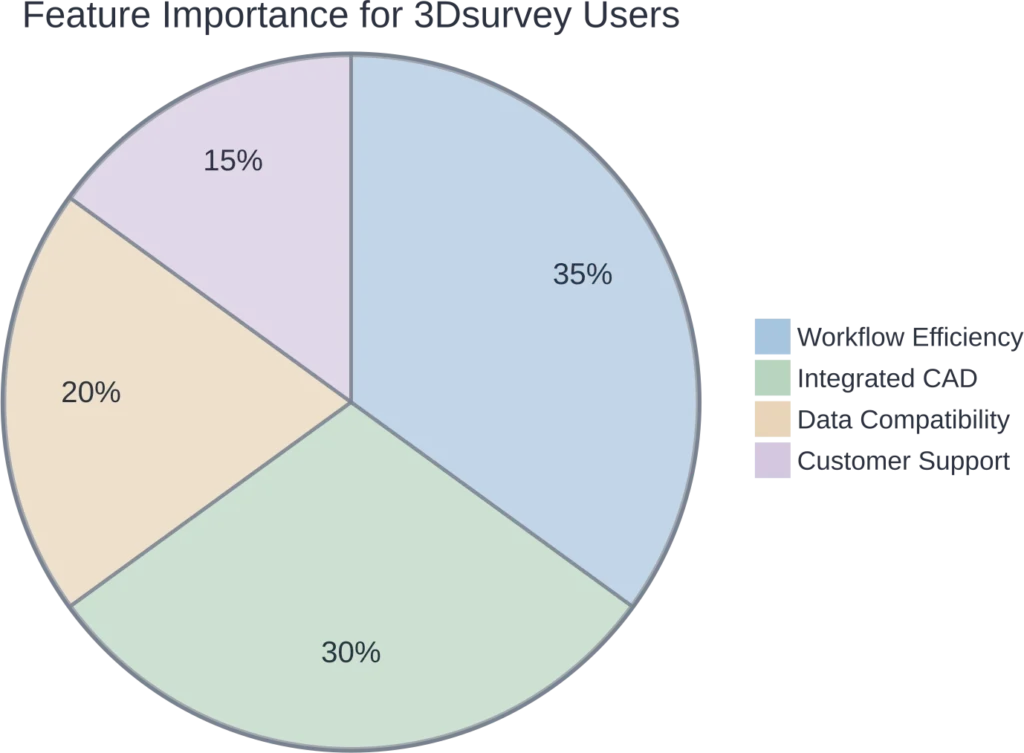
Perhaps the most significant advantage of 3Dsurvey is its built-in CAD functionality. Many photogrammetry software options require users to export their point clouds or meshes to a separate CAD program for drafting and analysis. 3Dsurvey eliminates this step entirely. Professionals can draw, snap, and vectorize directly on their 3D models, point clouds, or orthophotos.
This integration dramatically shortens the time from data collection to final deliverable. Key CAD features include:
- Direct Drawing on 3D Data: Create polylines, measure areas, and generate profiles directly on the point cloud or mesh.
- X-Ray and Snapping Tools: Features like X-ray view simplify drawing floor plans on complex point clouds, while smart snapping ensures precision.
- Vectorization: Efficiently convert raster data from orthophotos or DSMs into usable vector formats like DXF for reports or further use.
Specialized Modules for Advanced Workflows
3Dsurvey offers optional modules that extend its capabilities for specific, high-demand tasks. This modular approach ensures users only pay for the advanced functionality they need.
Two notable modules are:
- Scan Module: This enhances the software’s ability to work with LiDAR and laser scan data. It includes tools for manual and automatic registration of multiple scans and allows for direct CAD drawing on massive point clouds.
- RTK Videogrammetry Module: A truly innovative feature that allows users to create accurate, geo-referenced 3D models directly from RTK-enabled video, often captured with a smartphone. This is ideal for quickly documenting sites or areas where drone flights are restricted.
| Feature | Description | Primary Benefit |
|---|---|---|
| All-in-One Workflow | Combines photogrammetry, LiDAR processing, and CAD in one software. | Increases efficiency, reduces need for multiple software licenses. |
| Integrated CAD Tools | Draw, measure, and vectorize directly on 3D models and point clouds. | Shortens time to deliverable, eliminates data export/import steps. |
| Multi-Source Data Fusion | Supports drones, cameras, LiDAR, SLAM, and sonar data. | High flexibility, works with existing hardware and diverse project needs. |
| Volume Calculations | Simple and precise volume calculation tools for earthworks and stockpiles. | Crucial for construction and mining applications. |
| Cloud Sharing Platform | Easily share project results, including volumes and profiles, with clients. | Improves client communication and project collaboration. |
| Linux Support | A native Linux version is currently available as a public Beta version (released in April 2026 with version 4.1). | While it includes the core processing engine, certain features like built-in automated report generation are currently unavailable in this release. |
3Dsurvey vs. The Competition
How does 3Dsurvey stack up against other popular photogrammetry software? The key difference often comes down to the target user and workflow philosophy.
| Software | Key Strength | Best For | Primary Limitation |
|---|---|---|---|
| 3Dsurvey | All-in-one workflow with integrated CAD and survey tools. | Surveyors, construction, and mining professionals needing a complete solution. | Higher initial cost than some competitors. |
| Agisoft Metashape | High-quality, customizable outputs and works with various data types. | Users needing detailed control over processing parameters. | Requires separate CAD software for final drafting. |
| DJI Terra | Fast processing and simple, one-click workflow. | Beginners or users needing quick visualizations. | Lacks advanced settings and specialized survey tools. |
| Pix4Dmapper | Advanced analytics and in-depth processing options. | Users focused on agriculture, inspection, and detailed analysis. | Can have a steeper learning curve and higher pricing tiers. |
While tools like DJI Terra prioritize speed and simplicity, they often fall short on the specialized tools needed for professional deliverables. Others, like Agisoft Metashape, are powerful processing engines but still require users to export their data to another program to complete the job. 3Dsurvey’s main competitive edge is its successful integration of these separate stages into one fluid process.

Improve Survey Mapping Workflows with FlyPix AI
Surveying projects need clear imagery analysis when teams work with land areas, site features, infrastructure, or visible changes across mapped locations.
FlyPix AI helps process satellite, drone, aerial, LiDAR, SAR, and multispectral imagery for geospatial detection, segmentation, classification, and change monitoring. For workflows connected to 3Dsurvey, it can support the analysis stage by helping teams identify objects, classify land cover, segment areas, and prepare geospatial outputs from visual data.
FlyPix AI can help survey and mapping teams with:
- Detecting visible site features from drone or aerial imagery
- Segmenting land areas, objects, and infrastructure elements
- Classifying land cover and land use from geospatial data
- Comparing imagery from different dates to track site changes
- Training custom AI models for survey-specific mapping tasks
- Preparing geospatial datasets for review, export, or reporting
FlyPix AI fits projects where survey data needs additional AI-based image analysis before reporting, planning, or further geospatial processing.
Reach out to FlyPix AI to discuss image analysis support for your survey mapping workflow.
Pros and Cons of 3Dsurvey
No software is perfect. While 3Dsurvey offers a compelling package, it’s essential to weigh its strengths against its potential drawbacks.
Pros: The Clear Advantages
- Workflow Efficiency: The all-in-one approach with integrated CAD is a massive time-saver for surveying professionals.
- Built by Experts: Developed by surveyors, the software’s features and workflow are practical and align with real-world project needs.
- Excellent Support: Users frequently praise the high quality and responsiveness of the customer support team.
- Hardware Agnostic: Compatibility with any drone, camera, and a wide range of data formats provides great flexibility.
- Powerful Deliverables: Easily generate essential outputs like contour lines, profile lines, cross-sections, and detailed orthophotos.
Cons: What to Consider
- Learning Curve: While intuitive for surveyors, the sheer number of features can present a learning curve for complete beginners to photogrammetry.
- Cost: As a professional-grade tool, the upfront cost for a perpetual license can be significant for freelancers or small businesses compared to subscription-based or free alternatives.
- Processing Demands: Like all photogrammetry software, processing large datasets requires a powerful computer with a capable GPU and ample RAM.
Is 3Dsurvey the Right Tool for You?
The short answer? It depends on your primary job function. If you are a land surveyor, a construction manager, or involved in mining operations, 3Dsurvey is an extremely compelling option. Its workflow is built around the tasks these professionals perform daily, from calculating stockpile volumes to creating topographic maps and as-built documentation.
For those who simply need to create a quick 3D model for visualization, a simpler or less expensive tool might suffice. But for professionals whose final product is a precise map, a detailed plan, or a verified measurement, the integrated CAD and survey-grade tools in 3Dsurvey provide immense value. The ability to handle both drone photogrammetry and LiDAR data in one place further solidifies its position as a forward-thinking, all-in-one solution.
The company offers a free 14-day trial, which is the best way to determine if its workflow and features fit your specific needs.
Frequently Asked Questions (FAQ)
3Dsurvey is primarily used for land surveying, construction site monitoring, mining operations, and infrastructure planning. Its core strengths are creating highly accurate topographic maps, calculating volumes, as-built documentation, and generating other survey-grade deliverables from drone or LiDAR data.
You can import a wide variety of data. The software is compatible with images from any drone or camera (JPG, TIFF, PNG), LiDAR data (LAS, e57), point clouds (PLY, TXT), and even geotagged videos (MP4, MOV). This makes it a very flexible data integration platform.
No, one of the main advantages of 3Dsurvey is its fully integrated CAD engine. You can perform all necessary drawing, vectorization, and measurement tasks directly within the software, eliminating the need to export to a third-party CAD program.
The software is capable of producing centimeter-grade accuracy. The final precision of a project depends on factors like the quality of the image capture, the use of Ground Control Points (GCPs), and the capabilities of the hardware used, such as an RTK/PPK drone. Photogrammetry, when done correctly, delivers highly reliable data.
Yes, 3Dsurvey has robust support for LiDAR data. It can import, process, and classify LiDAR point clouds. The optional ‘Scan’ module provides advanced tools for registering multiple laser scans and integrating them seamlessly with photogrammetry projects.
3Dsurvey primarily offers a perpetual license, which includes one year of support and upgrades. There are also monthly subscription options for its specialized modules like ‘Scan’ and ‘Videogrammetry’. They offer a free 14-day trial and special licenses for educational institutions.
Yes, 3Dsurvey includes a cloud platform for easy project sharing. You can upload your 3D models, orthophotos, and even specific measurements like volumes and profiles. Clients can then view and interact with the data in a web browser on any device without needing to install special software.