

If you’ve been thinking about switching to Starlink or you’re just curious how well it holds up in the real world, you’re not alone. The idea of satellite internet that can actually stream, game, and work without making you want to throw your laptop sounds… well, kind of magical. But the question still stands: how fast is Starlink, actually?
We’re going to break it down simply – no space jargon, no vague claims. Just real numbers, real-world performance, and what you can actually expect whether you’re on land, off-grid, or somewhere in between.
A Quick Snapshot of Starlink Speeds
Starlink performance isn’t a single number. It ranges depending on your service plan, location, and even the time of day. Still, here’s what the company itself reports for typical user experiences:
- Download speeds: Usually between 45 and 280 Mbps.
- Upload speeds: Generally 10 to 30 Mbps.
- Latency: 25 to 60 ms on land (higher in remote areas like oceans or the Arctic).
These ranges mean Starlink is often capable of supporting:
- 4K and HD video streaming.
- Video calls (Zoom, Teams, etc.).
- Online gaming (especially in fixed locations).
- Remote work setups with cloud-based tools.
But keep in mind: these are typical, not guaranteed. Performance can dip when many users are online at once or if you’re in a spot with a lot of signal interference.
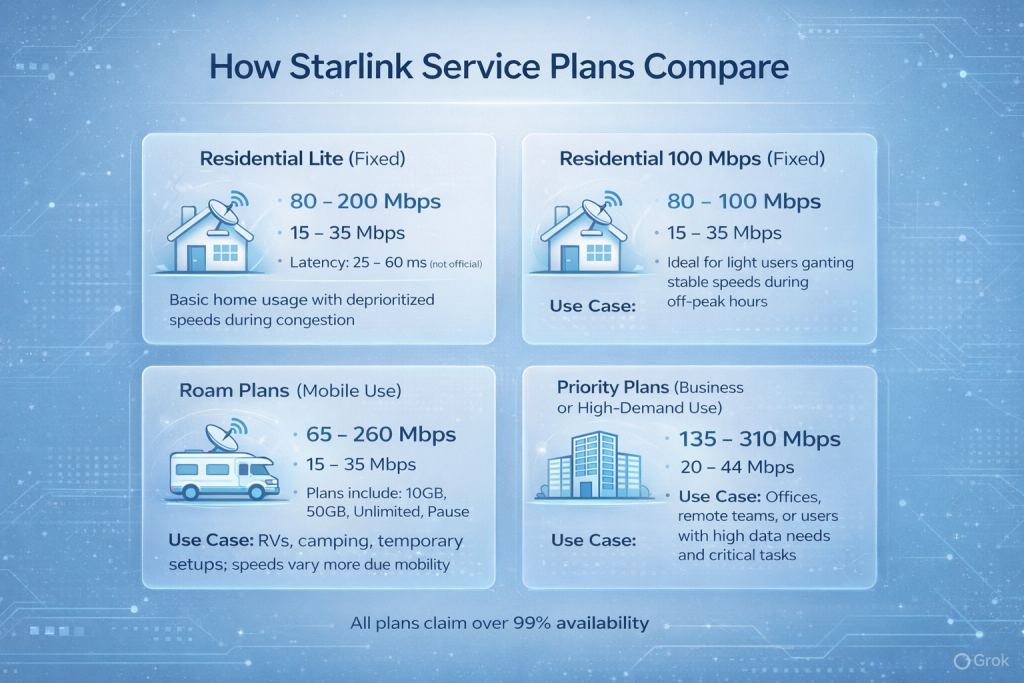
How Starlink Service Plans Compare
Let’s get into the details. Starlink offers different plans for different use cases, from standard home setups to high-demand business and mobile needs.
1. Residential Lite (Fixed)
- Download: 80 – 200 Mbps
- Upload: 15 – 35 Mbps
- Latency: Not officially listed, but usually in the 25 – 60 ms range
- Use Case: Basic home usage with slightly deprioritized speeds during congestion
2. Residential 100 Mbps (Fixed)
- Download: 80 – 100 Mbps
- Upload: 15 – 35 Mbps
- Use Case: Ideal for light users who want stable speeds during off-peak hours
3. Roam Plans (Mobile Use)
- Download: 65 – 260 Mbps
- Upload: 15 – 35 Mbps
- Plans include: 10GB, 50GB, Unlimited, and Pause options
- Use Case: RVs, camping, temporary setups; speeds vary more due to mobility
4. Priority Plans (Business or High-Demand Use)
- Download: 135 – 310 Mbps
- Upload: 20 – 44 Mbps
- Use Case: Offices, remote teams, or users with high data needs and critical tasks
All plans claim over 99% availability, though your actual experience will depend on how crowded the network is in your area.
The Role of Latency in Starlink Performance
Latency is the delay between sending and receiving data. In older satellite systems, this was often over 600 ms due to high orbits. Starlink, however, runs its satellites at around 550 km, which slashes latency to roughly 25 – 60 ms on land. That’s comparable to rural cable or 4G.
Still, there are some caveats:
- Latency in oceanic and remote areas can exceed 150 ms, depending on conditions.
- Mobility (like using Starlink in a van or boat) can lead to variable pings.
- Real-time apps like competitive gaming might notice small hiccups.
In standby or pause mode, speeds can fall as low as 500 Kbps. That’s just enough for basic email or light browsing, not much else.

What Affects Your Starlink Speed?
Starlink doesn’t behave like fiber or cable where you plug in and expect consistent performance. Several factors can slow things down, especially during peak hours or poor setups.
1. Obstructions and Dish Placement
If your dish doesn’t have a clear view of the sky, expect trouble. Trees, chimneys, or even a bad mounting angle can block the signal. The dish adjusts itself, but it can’t see through solid stuff.
2. Weather Conditions
Heavy rain, snow buildup, or dense cloud cover can mess with the signal. The dish is designed to melt snow, but a full-on blizzard will still put a dent in your speed.
3. Network Congestion
Starlink satellites serve large areas. If a bunch of users in your zone are online at the same time, speeds can dip. Lower-tier plans usually get slowed first.
4. Cabling and Install Quality
Bad cables or a sloppy setup can limit what the system can deliver. Even if the satellites are doing their job, a loose connection or long, low-grade cable can bottleneck everything.
5. Device Limitations
Old laptops, phones, or Wi-Fi routers can drag down performance. If you’re using outdated gear, don’t blame Starlink for slow speeds right away.
6. Power Supply Issues
Unstable or low-quality power can cause interruptions. Starlink needs a steady feed to perform well. Flickering power or weak voltage might cause the router to reboot or drop signal.
7. Other Random Factors
A few less common issues can pop up too: improper grounding on your setup, third-party extenders or signal boosters, physical damage to the dish, natural events like lightning, flooding, or landslides. It’s a short list, but worth checking when something feels off.
What Starlink Doesn’t Guarantee
One thing to know up front: Starlink is clear that speeds and reliability are not guaranteed. The system is still evolving. Speeds can drop during heavy usage periods or if you’re deprioritized based on your plan.
Here’s what you might experience in some scenarios:
- Evening slowdowns if your area is crowded.
- Lower priority if you’re on a lite or roam plan.
- Seasonal drops if your setup gets obstructed (trees, snow, etc.).
And if you’re on a boat or RV? Expect more variability depending on where you are, how often you move, and what kind of antenna setup you’re using.
Is Starlink Fast Enough for Streaming, Gaming, or Work?
For most households, yes. Starlink easily handles:
- HD and even 4K video streaming.
- Zoom or Teams calls without lag.
- Working with cloud-based tools like Google Workspace or Microsoft 365.
- Downloading large files or updates.
Online gaming is a mixed bag. It’s possible, but not always ideal if you’re moving or in a congested zone. First-person shooters or fast-paced games may be more sensitive to even small latency spikes. Business users will do better with a Priority Plan, which provides higher-speed ranges and more stable performance.
Regional Differences in Starlink Speed
Starlink’s satellite coverage is wide, but not uniform. That means speeds can differ depending on your region:
- North America and Europe: Generally the best performance due to high satellite density.
- Remote regions (Alaska, Antarctica, Northern Canada): Higher latency and more variability.
- Oceans and Islands: Good coverage, but only for certain maritime or global plans.
- Urban vs Rural: Ironically, rural users sometimes get better results because urban cells are more congested.
Starlink uses data prioritization to allocate bandwidth, meaning some users (especially on lower-tier plans) might see slower speeds if demand is high in their area.
Does Starlink Get Slower Over Time?
Most users report stable performance for several years, though official lifespan varies depending on use. But like any tech, the system may become outdated. Over time, you may need to upgrade to a newer terminal model, adjust for new satellite frequencies or coverage zones, or replace damaged cables or mounting gear.
Starlink also pushes out firmware and software updates to improve performance remotely, but some limitations can only be solved with newer hardware.

Why Starlink Matters for FlyPix AI Users in the Field
At FlyPix AI, we help users make sense of satellite, aerial, and drone imagery faster by automating object detection and analysis with AI. Our platform is built for real-world work – think complex geospatial scenes, dense annotation layers, and tight feedback loops. But none of that works smoothly without a solid connection.
For teams working in remote environments, Starlink has filled a critical gap. When you’re in the middle of a forest scan, inspecting coastal infrastructure, or surveying farmland, uploading massive raster files or syncing annotations can get messy fast without a dependable internet. A stable Starlink link means our users can run AI processing, send large datasets, and collaborate in real time – right where the data is collected.
This kind of low-latency, field-ready connectivity doesn’t just make things easier. It reshapes how fast decisions get made. Instead of waiting to return to the office to start analysis, teams using FlyPix can review results, refine models, and move projects forward on the spot. Starlink helps make our geospatial AI tools more responsive, more mobile, and more useful where it counts.
Final Thoughts
Starlink is fast enough for most people, and considering it’s satellite-based, that’s saying a lot. It might not beat fiber in perfect conditions, but that’s not really the point. Its real advantage is delivering solid, usable internet to places that were practically offline before.
If you’re thinking about making the switch, the key is to match the plan to your actual needs and location. A proper dish setup makes a big difference, especially if you’re somewhere with tricky weather or a lot of trees. And while speeds can vary – more so if you’re mobile or in a congested zone – you’ll get the best experience when using modern devices and a reliable router.
It’s not magic, but it’s close. As more satellites go up and the system matures, the gap between Starlink and traditional broadband keeps closing. In places where wired connections aren’t an option, that’s a game changer.
FAQ
It depends on what kind of gaming you’re into. For turn-based games, casual titles, or even most RPGs, Starlink holds up surprisingly well. But if you’re playing competitive shooters or anything where latency under 30 ms matters, you might notice occasional spikes. Fixed-location users usually get better results than folks on the move.
It can. Heavy rain, thick snow, or ice buildup on the dish can slow things down or cause short outages. The system tries to work through weather, but it’s still satellite-based. A clean view of the sky makes a noticeable difference. If you’re in an area with tough winters, it’s worth checking the dish regularly.
Most residential users see something between 80 and 200 Mbps, with occasional bumps higher or lower. It’s fast enough for streaming, work, video calls, and even large downloads. That said, your experience will shift a bit depending on time of day and how many people nearby are also using Starlink.
For a lot of rural and remote users, it already does. If you’re comparing Starlink to a fiber line in a city, fiber still wins in terms of raw speed and consistency. But if your alternative is DSL or nothing at all, Starlink feels like a giant leap forward. And it’s getting better as more satellites go up.
Yes, especially on the higher-end plans. Most users get 15 to 35 Mbps upload, and Priority users can see up to 44 Mbps. That’s more than enough for livestreaming, large file uploads, or remote work that leans on cloud storage. The main thing is consistency, which improves with a stable dish setup.
Starlink kits are built to last at least a couple of years – some people stretch them longer. You’ll get software updates along the way, but eventually, like most tech, the hardware will age out. If you’re rough on gear or constantly moving, you might want to plan for a replacement a little sooner.