

OpenClaw has gained significant attention since early 2026, with community reports of strong GitHub engagement and generating intense discussion in developer communities. But here’s the thing—most people know OpenClaw as “that AI agent thing” without understanding what it actually does.
Unlike ChatGPT or Claude that just talk, OpenClaw actually acts. It controls your browser through CDP protocol integration, sends emails, runs shell commands, fills out forms, manages smart home devices, and executes multi-step workflows. According to VentureBeat, this represents what they call “the OpenClaw moment”—the first time autonomous AI agents have successfully “escaped the lab” and moved into general workforce hands.
Real talk: it’s powerful and controversial. Some developers automate their entire marketing agencies with it. Others call it “a security nightmare.” Both perspectives have merit, and we’ll cover both.
What Makes OpenClaw Different from Traditional Automation
Traditional RPA (Robotic Process Automation) tools follow rigid scripts. Click here, type there, done. They break the moment a website updates its layout or an unexpected popup appears.
OpenClaw operates differently. According to APIYI’s technical analysis, the core differences span five dimensions:
| Dimension | Traditional RPA | OpenClaw AI Agent |
|---|---|---|
| Decision-Making | Pre-programmed rules only | Dynamic reasoning with LLMs |
| Adaptability | Breaks on UI changes | Understands context, adapts to changes |
| Setup Complexity | Requires workflow mapping | Natural language instructions |
| Error Handling | Stops and alerts | Attempts problem-solving |
| Cost Structure | Consumption-based or Hybrid licensing | LLM API usage + infrastructure + Agent-Token licensing |
The practical difference? You can tell OpenClaw “check my email every morning and summarize anything urgent” without mapping every click. It figures out the how.
The 7 Core Capability Modules
According to documentation from Easton Dev’s comprehensive capability matrix, OpenClaw ships with over 100 pre-configured skills organized into seven modules:
1. Shell Command Execution
OpenClaw runs terminal commands directly on your machine. It can manage processes, execute scripts, and interact with system resources. This is powerful for DevOps workflows but also the biggest security concern.
2. Browser Control
The browser capability uses Chrome DevTools Protocol (CDP) for programmatic control. According to APIYI’s browser tutorial, core functions include:
- Element snapshots for visual understanding
- Automated form filling with context awareness
- Screenshot generation and navigation
- Multi-tab session management
Web scraping becomes conversational: “Get me the pricing from these five competitor websites” actually works.
3. Email Integration
Email automation often gets overlooked in security discussions, but Mailtrap’s documentation highlights why it matters. Once OpenClaw sends an email, you can’t recall it. Unlike internal actions, messages leave your control immediately.
Smart implementations use email sandboxing for testing before granting production access.
4. File System Operations
OpenClaw reads, writes, and organizes files. It can process documents, analyze images, and manage data pipelines. Developers commonly use this for content workflows and data processing tasks.
5. API Integrations
With 50+ service integrations available, OpenClaw connects to Discord, WhatsApp, Telegram, Slack, GitHub, and major SaaS platforms. The extensible plugin ecosystem means the integration count keeps growing.
6. Monitoring and Alerts
OpenClaw watches servers, tracks metrics, and sends notifications when thresholds trigger. It’s basically a smart monitoring assistant that doesn’t just alert—it can also respond.
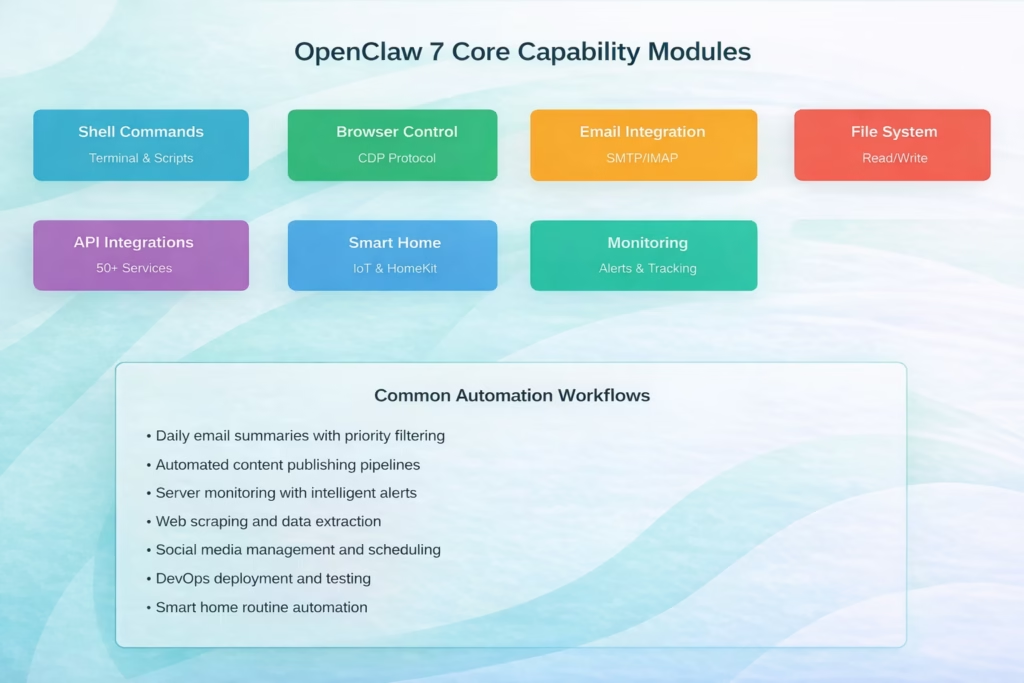
The seven core modules that power OpenClaw’s automation capabilities, with common workflow examples used by the developer community.
Real OpenClaw Automation Use Cases
Theory matters less than practice. Here’s what people actually build with OpenClaw in 2026.
Business Automation
Community members have shared experiences automating business tasks.
Common business workflows include:
- Lead generation and qualification pipelines
- Client reporting automation with data aggregation
- Social media content scheduling across platforms
- Invoice processing and expense tracking
- Customer onboarding sequences
Personal Productivity
Daily briefing automation ranks among the most popular use cases. OpenClaw checks email, aggregates calendar events, pulls weather data, summarizes news, and delivers a formatted morning brief.
Other productivity wins:
- Automated expense categorization from receipts
- Flight check-in reminders and execution
- Document organization and filing
- Meeting notes transcription and distribution
Content Creation Pipelines
Writers and content creators use OpenClaw for research aggregation, draft generation, SEO optimization, image sourcing, and multi-platform publishing. The entire pipeline runs with minimal manual intervention.
DevOps and Monitoring
Developers automate deployment checks, log analysis, performance monitoring, and incident response. When a server issue occurs, OpenClaw can attempt basic diagnostics before escalating to humans.
The Smart Home Controversy
HomeKit integration sounds appealing—voice commands that trigger complex home automation sequences. But community discussions reveal strong hesitation.
Community members have expressed concern about granting OpenClaw access to HomeKit devices, citing security considerations around local-first AI automation and home infrastructure access.
The concern centers on security defaults and plugin reliability, which brings us to the elephant in the room.
Security Considerations You Can’t Ignore
OpenClaw’s power creates risk. According to community discussions, security defaults and plugin reliability present ongoing concerns.
Let’s address this honestly.
The Real Security Issues
OpenClaw runs with the permissions you grant it.
That means:
- Shell access allows system-level commands
- File permissions enable read/write across directories
- Network access permits external connections
- API keys stored locally become accessible
- Third-party plugins may contain vulnerabilities
Unlike cloud AI services that sandbox operations, OpenClaw runs locally with direct machine access. That’s simultaneously its strength and weakness.
Mitigation Strategies
Security-conscious implementations follow these practices:
| Security Layer | Implementation | Protection Level |
|---|---|---|
| Network Isolation | Dedicated VLAN or airgapped system | High |
| Permission Scoping | Minimal necessary file/network access | High |
| Plugin Vetting | Source code review before installation | Medium |
| API Key Management | Environment variables, never hardcoded | Medium |
| Email Sandboxing | Test environment before production | Medium |
| Audit Logging | Complete action history tracking | Low (detective) |
According to Mailtrap’s documentation, email automation deserves special attention. Messages can’t be recalled once sent, making pre-production testing essential.
Community consensus emphasizes the importance of isolated testing before connecting OpenClaw to sensitive systems or personal infrastructure.
Setup Options: From Free to Production-Ready
According to Sid Saladi’s complete setup guide, OpenClaw involves two costs: a machine to run it on and an LLM to power it.
The Completely Free Route
Run OpenClaw locally on your existing machine with free LLM APIs. Performance suffers, but it works for testing and light automation.
The Budget-Friendly Option
Cloud hosting on a VPS ($15-40/month) plus affordable LLM APIs (GPT-5 mini or GPT-4.1 nano at $0.20-0.25/1M tokens).This handles moderate automation workloads.
The Production Setup
Dedicated infrastructure with robust LLMs (GPT-4 or Claude Opus), proper monitoring, backup systems, and security hardening. Costs scale with usage but deliver enterprise reliability.
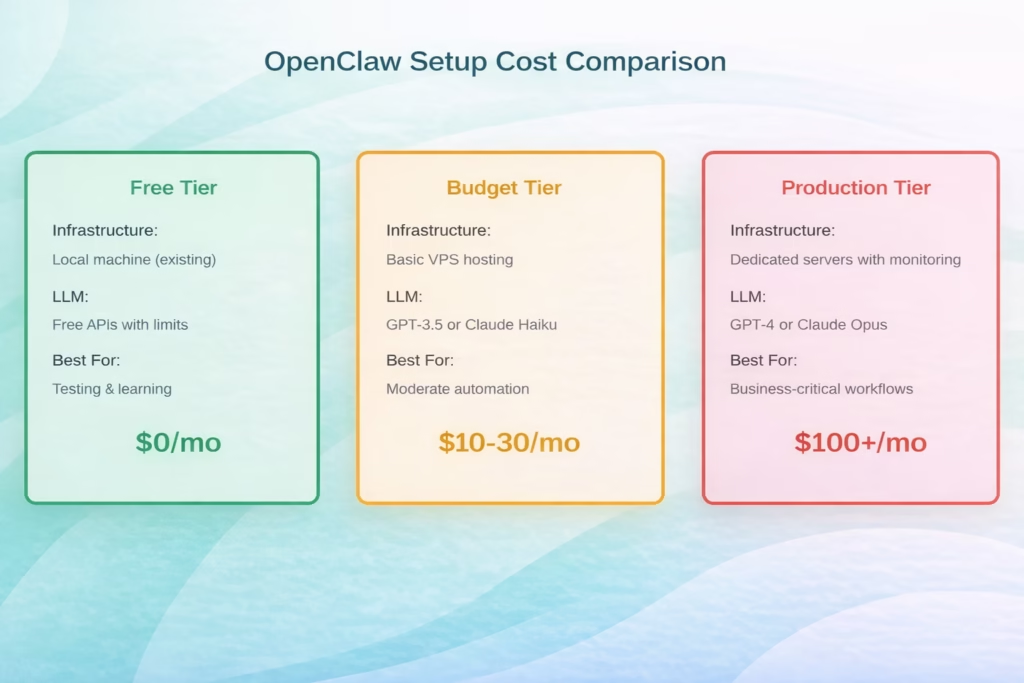
Three common OpenClaw setup tiers with infrastructure, LLM choices, and typical monthly costs based on community implementations.
The Setup Reality Check
Community discussions reveal setup can present challenges for some users. Several developers have created wrapper tools specifically to address setup complexity.
Community members offer to help others getting started: detailed guides exist for various systems and technical skill levels.
The technical barrier remains real, especially for non-developers. Expect terminal commands, dependency management, configuration files, and troubleshooting.
OpenClaw vs Cloud AI Services
Why choose OpenClaw over established cloud automation platforms?
Advantages of OpenClaw
- Data sovereignty: Everything runs on your infrastructure
- Unlimited customization: Open-source means complete control
- No recurring licensing: Pay only for compute and LLM usage
- Local resource access: Direct file system and application control
- Privacy: Sensitive data never leaves your environment
Disadvantages of OpenClaw
- Security responsibility: You own all configuration and hardening
- Maintenance burden: Updates, monitoring, and troubleshooting fall on you
- Setup complexity: Significant technical barriers for non-developers
- Support limitations: Community-driven, no SLA guarantees
- Stability concerns: Complex setups may require careful workflow design
Cloud services offer polish, reliability, and support. OpenClaw offers control, flexibility, and transparency. Choose based on your priorities.
Integration Ecosystem and Tools
OpenClaw doesn’t work in isolation.
Developers commonly pair it with:
- n8n: Workflow orchestration platform for complex automation chains
- Convex: Backend database for state management and data storage
- Supabase: Open-source Firebase alternative for authentication and APIs
- Discord/Telegram: Chat interfaces for agent interaction
- GitHub Actions: CI/CD pipeline integration
According to Medium’s advanced automation guide, these tool combinations enable sophisticated workflows.
Common Pitfalls and How to Avoid Them
The “OpenClaw moment” generated enthusiasm, but real-world implementations include challenges. Here’s what goes wrong.
The Long-Running Task Problem
Complex tasks requiring long execution times, multiple steps, or concurrent operations can present challenges. OpenClaw handles quick actions well but requires careful workflow design for extended operations.
Solution: Break complex tasks into smaller sequential steps with explicit checkpoints.
The Plugin Security Issue
Community members report security concerns about third-party plugins.
Solution: Only install vetted plugins from trusted sources. Review source code when possible. Use minimal plugin sets.
The Context Window Limitation
LLMs have token limits. Complex automation with extensive context can exceed these boundaries, causing failures.
Solution: Design workflows that maintain focused context. Use summarization for long histories.
The Cost Consideration
LLM API usage costs can accumulate during extensive automation, particularly with premium models.
Solution: Monitor API usage closely. Start with cheaper models. Optimize prompts to reduce token consumption.
Practical Implementation Tips
If you’re moving forward with OpenClaw automation, these practices help.
Start Small and Specific
Don’t automate your entire business on day one. Pick one annoying repetitive task. Get that working reliably. Build confidence before expanding scope.
Use Sandbox Environments
Test automations in isolated environments first. Especially for email, social media, or any public-facing action. Mistakes happen—make them privately.
Implement Monitoring and Logging
You can’t fix what you can’t see. Comprehensive logging reveals where automations fail, why they fail, and how to improve them.
Document Your Workflows
Three months from now, you won’t remember why you configured something a certain way. Document prompts, configurations, and rationale. Your future self will thank you.
Build Failure Recovery
Automations fail. Network issues, API changes, unexpected inputs—assume problems will occur. Design workflows that handle failures gracefully rather than cascading into chaos.
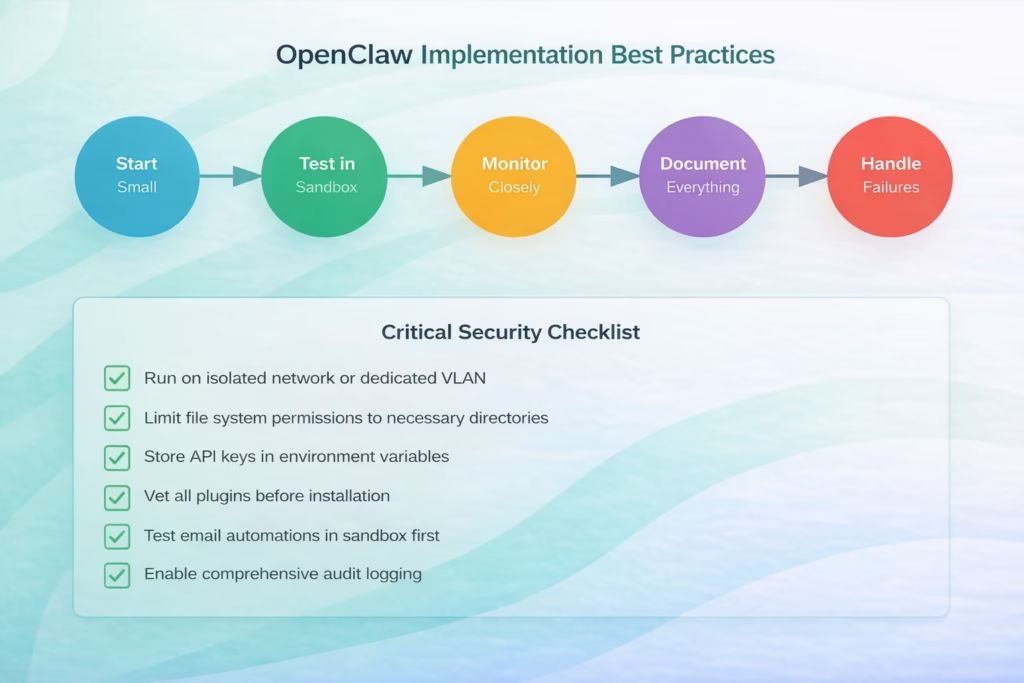
The recommended implementation workflow for OpenClaw automation, from initial testing through production deployment with essential security measures.
The Future of OpenClaw Automation
OpenClaw represents a shift from AI that talks to AI that acts. But where’s it heading?
According to VentureBeat’s enterprise analysis, the “OpenClaw moment” represents several significant shifts in autonomous AI deployment:
- Autonomous agents have moved from labs to general use
- Local-first AI automation competes with cloud-only solutions
- Security and privacy concerns influence adoption patterns
- Open-source flexibility enables rapid innovation
- Implementation complexity remains a significant challenge
The technology works. The question isn’t capability—it’s responsible deployment.

Visual Intelligence with FlyPix AI
While OpenClaw excels at navigating the digital architecture of the web, our team recognizes that many organizations need that same autonomous reasoning applied to the physical world. For industries like construction, agriculture, and infrastructure maintenance, the “OpenClaw moment” isn’t just about filling out forms—it’s about processing massive amounts of visual data from the sky. Through FlyPix AI, we provide a specialized platform that uses AI agents to detect, monitor, and inspect satellite and drone imagery at a scale that manual observation simply cannot match.
Our approach addresses the “setup complexity” often found in open-source tools by offering a professional, no-code environment. We’ve seen users save up to 99.7% of their time by automating geospatial analysis that previously took hours of manual annotation. By integrating these specific visual capabilities into your broader automation strategy, you can move beyond simple browser tasks and start gathering actionable insights from your physical assets with the same speed and precision as a high-end digital agent.
Conclusion: Should You Use OpenClaw Automation?
OpenClaw delivers on its promise—AI agents that actually act, not just chat. The technology works for email automation, content pipelines, business workflows, DevOps monitoring, and daily productivity tasks.
But it’s not turnkey magic. Security concerns are legitimate. Setup complexity is real. Stability requires careful workflow design. Cost monitoring matters.
OpenClaw fits best when you:
- Need data sovereignty and local control
- Have technical expertise for secure configuration
- Want unlimited customization freedom
- Can invest time in setup and maintenance
- Value open-source flexibility over polished UX
Cloud alternatives fit better when you:
- Prefer managed services with SLA guarantees
- Need production-ready reliability immediately
- Want support teams handling issues
- Don’t have in-house technical resources
- Prioritize convenience over control
OpenClaw represents innovation in agentic AI—autonomous systems that execute multi-step workflows with minimal human intervention.
Just approach it with eyes open. Test thoroughly. Secure properly. Start small. Scale carefully.
Ready to automate? Begin with one simple workflow. Get that working reliably. Learn from the experience. Then expand from there.
The “OpenClaw moment” is a significant development in AI automation. Whether you adopt it depends on your specific needs, technical capabilities, and risk tolerance.
Frequently Asked Questions
OpenClaw can be safely used for business automation when properly configured with security best practices. Run it on isolated infrastructure, limit file and network permissions, vet all plugins, use environment variables for secrets, and implement comprehensive logging. Default configurations lack security hardening, so responsible deployment requires technical expertise. Many businesses successfully use OpenClaw, but it demands more security attention than cloud-managed alternatives.
OpenClaw itself is free and open-source under MIT license. However, you’ll pay for infrastructure (local machine, VPS, or dedicated server) and LLM API usage. A completely free setup uses existing hardware with free API tiers. Budget implementations run $10-30/month for basic VPS hosting plus affordable LLM APIs. Production deployments with robust infrastructure and premium LLMs like GPT-4 or Claude Opus typically cost $100+/month depending on automation volume.
Traditional RPA follows rigid pre-programmed scripts that break when interfaces change. OpenClaw uses large language models for dynamic reasoning, adapting to unexpected situations and understanding context. RPA requires detailed workflow mapping, while OpenClaw accepts natural language instructions. However, RPA often provides better reliability for repetitive tasks, while OpenClaw offers flexibility for varied scenarios. OpenClaw excels at tasks requiring judgment; RPA excels at high-volume structured workflows.
Setup complexity presents challenges for non-developers. You’ll encounter terminal commands, dependency management, configuration files, and troubleshooting. Community members describe setup as requiring significant technical effort, which prompted simplified wrappers and detailed guides for various skill levels. However, detailed guides exist for all technical levels, and some simplified interfaces reduce barriers. Realistically, basic command-line comfort helps significantly. Once configured, daily use becomes more accessible through natural language interaction.
GPT-4 and Claude Opus deliver the best reasoning and reliability for complex automation but cost significantly more. GPT-3.5 and Claude Haiku provide budget-friendly alternatives suitable for simpler workflows. Choice depends on task complexity and budget. Many users start with cheaper models, identify which automations need better reasoning, then selectively use premium models for those specific tasks. Token usage patterns matter—monitor costs closely regardless of model choice.
OpenClaw runs with direct system access, creating several risk vectors. Shell command execution allows system-level operations. File permissions enable directory access. Network connectivity permits external connections. Third-party plugins may contain malicious code or vulnerabilities. API keys stored locally become accessible to the agent. Email automation can’t be recalled once sent. Unlike sandboxed cloud services, OpenClaw’s local architecture means security configuration falls entirely on users. Proper isolation, permission scoping, and plugin vetting mitigate but don’t eliminate risks.
OpenClaw attempts problem-solving when encountering errors, unlike traditional automation that simply stops. The LLM analyzes the situation and tries alternative approaches. However, long-running or multi-step tasks can experience failures requiring manual intervention. Reliability depends on workflow design, LLM quality, and error handling configuration. Best practice involves designing workflows with explicit failure recovery, checkpoints for long tasks, and monitoring to catch issues early. OpenClaw handles simple unexpected situations well but struggles with complex cascading failures.