

Quick Summary: ACDSee Photo Studio Ultimate 2026 is a comprehensive Windows-based photo management and editing suite that combines GPU-accelerated layered editing, RAW processing, and robust digital asset management in a single interface. It offers an all-in-one alternative to Adobe’s Lightroom and Photoshop ecosystem, with both subscription and perpetual license options starting at $8.90 per month or $84.95 for a one-time purchase.
For photographers and creative professionals drowning in thousands of images, finding software that handles everything from import to export can feel like searching for a unicorn. ACDSee Photo Studio Ultimate 2026 positions itself as that rare all-in-one solution, promising to eliminate the workflow juggling between separate organizing, editing, and publishing tools.
But does it deliver? And more importantly, can it stand up to the industry-standard Adobe ecosystem that dominates professional photography?
This comprehensive overview breaks down everything you need to know about ACDSee Photo Studio Ultimate 2026, from its layered editing capabilities to its pricing structure and real-world performance.
What Makes ACDSee Photo Studio Ultimate Different
ACDSee Photo Studio Ultimate isn’t just another photo editor trying to clone Photoshop. It’s a complete workflow ecosystem built specifically for photographers who refuse to compromise between organization and creative power.
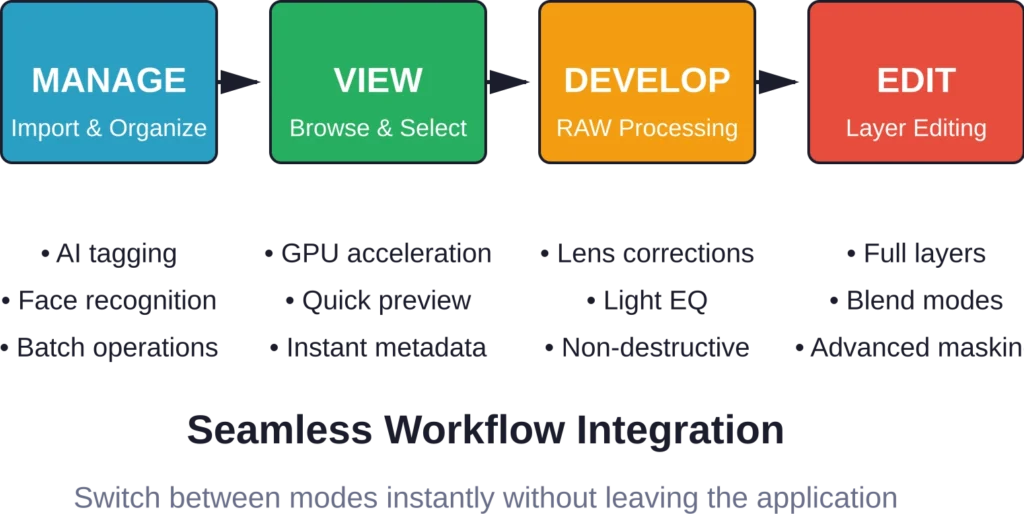
The software integrates four distinct operational modes within a single interface: Manage, View, Develop, and Edit. This structure mirrors a photographer’s actual workflow rather than forcing arbitrary divisions between tasks.
According to the official ACDSee website, Photo Studio Ultimate combines digital asset management, RAW photo editing, and layered editing software into one cohesive platform. That’s significant because most competitors force photographers to subscribe to multiple tools or jump between disconnected applications.
The Four-Mode Workflow Architecture
Manage mode handles the organizational heavy lifting. Import thousands of photos, tag them automatically with AI-powered keyword generation, apply facial recognition across your entire archive, and build searchable databases that actually make sense six months later.
View mode delivers blazing-fast image browsing with GPU acceleration. Scroll through RAW files as quickly as JPEGs, preview EXIFs instantly, and make quick selection decisions without waiting for thumbnails to generate.
Develop mode is where RAW processing happens. Non-destructive editing preserves original files while offering comprehensive adjustment tools, lens profile corrections, and camera-specific processing that respects the unique characteristics of different sensors.
Edit mode unleashes the creative firepower with full layer-based editing, blending modes, masking tools, and special effects. This is ACDSee’s answer to Photoshop, built directly into the same application that manages and develops your photos.
Digital Asset Management: The Foundation
Here’s the thing though—before editing matters, photographers need to find their photos. ACDSee built its reputation on digital asset management, and Ultimate 2026 continues that legacy with enhanced organizational tools.
The facial recognition system automatically detects faces during import and groups them by person. Train the system with a few examples, and watch as it categorizes decades of family photos or professional portrait sessions without manual tagging.
AI-powered keyword generation analyzes image content and suggests relevant tags. Landscapes get tagged with “mountain,” “sunset,” or “forest.” Sports photos pick up “action,” “athlete,” and specific sport types. The accuracy isn’t perfect, but it eliminates 80% of manual tagging work.
Metadata and Search Capabilities
ACDSee’s database architecture indexes EXIF data, keywords, categories, ratings, colors labels, and custom fields. Search across all these parameters simultaneously with Boolean operators and saved search presets.
Real talk: this matters for professional workflows. Find every photo shot with a specific lens at f/2.8 or wider, tagged as “portfolio quality,” edited in the last three months, and containing a specific client’s name. That level of granular search separates hobby software from professional tools.
The categorization system adds another organizational layer beyond keywords. Build hierarchical category structures—Events > Weddings > 2026 > Johnson Wedding—and assign images to multiple categories simultaneously.
RAW Processing and Develop Mode Tools
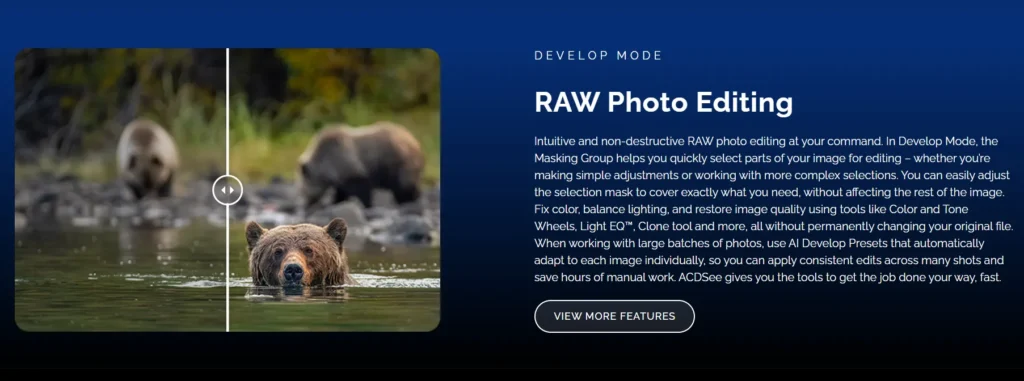
Develop mode is where ACDSee competes directly with Lightroom. The processing pipeline handles RAW files from hundreds of camera models with manufacturer-specific color profiles and demosaicing algorithms.
ACDSee Photo Studio Ultimate offers comparable RAW editing capabilities to Adobe’s solutions within a single interface targeted at beginners and enthusiasts. But some areas show weaknesses compared to top competitors.
The Light EQ tool stands out as ACDSee’s signature feature. Instead of traditional exposure and shadow sliders, Light EQ divides the tonal range into multiple zones with independent adjustment curves. Lift shadows in one zone while pulling highlights in another, creating sophisticated tonal manipulations without destroying image integrity.
Core Adjustment Tools
Exposure, white balance, contrast, highlights, shadows, clarity, and vibrance adjustments work as expected. Sliders respond smoothly, previews update in real-time, and adjustments stack non-destructively.
Lens correction applies profiles automatically based on EXIF data, correcting geometric distortion, chromatic aberration, and vignetting. The profile database covers thousands of lens and camera body combinations.
Color grading tools include HSL adjustments, split toning, color balance adjustments, and LUT application. Create custom color looks and save them as presets for consistent styling across photo series.
A PCMag UK review from 2024 noted that ACDSee’s chromatic aberration and noise reduction tools aren’t as effective as top competitors. Processing quality matters, and these weaknesses could impact final output for demanding professional work.
Layer-Based Editing: The Creative Powerhouse
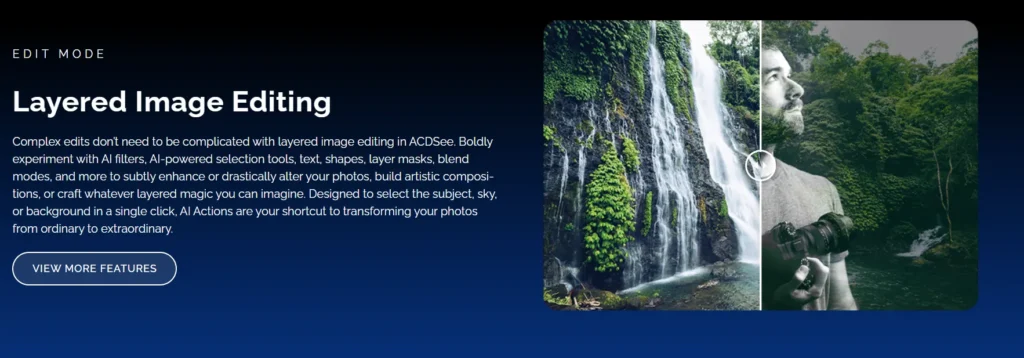
Edit mode transforms ACDSee from a solid photo editor into a legitimate Photoshop competitor. Full layer support includes image layers, adjustment layers, text layers, and object layers with independent opacity and blending mode controls.
This represents significant capability for an all-in-one photo suite. Most Lightroom alternatives stop at non-destructive RAW editing. ACDSee goes further by integrating destructive pixel editing and compositing tools in the same application.
Layer masks use selection tools, gradients, and brush painting to control which parts of each layer remain visible. Combine multiple exposures, blend textures, composite elements from different photos, or build complex multi-layer effects without exporting to a separate application.
Blending Modes and Effects
Blending modes control how layers interact: Multiply for darkening, Screen for lightening, Overlay for contrast, Soft Light for subtle blending. These work identically to Photoshop’s blending modes, making the transition straightforward for users familiar with Adobe’s tools.
Adjustment layers apply color and tonal corrections to underlying layers non-destructively. Stack multiple adjustments, toggle them on and off, adjust opacity, and modify settings at any point without permanently altering pixel data.
Special effects transform photos with artistic filters: pencil drawings, oil paintings, HDR looks, miniature tilt-shift effects, and Bob Ross-style painterly renderings. Some effects feel gimmicky, but they add creative options for specific projects.

Connect Image Review Workflows with FlyPix AI
ACDSee Photo Studio Ultimate is focused on photo editing, file management, and image organization. For teams working with satellite, drone, or aerial imagery, FlyPix AI adds a more specialized way to analyze geospatial images, detect objects, and extract useful information from visual data at scale.
FlyPix AI can help when image-based work needs more than manual review:
- Detecting objects and visible features in aerial or satellite images
- Segmenting areas such as land, vegetation, water, roads, or buildings
- Comparing imagery to monitor changes across locations
- Training custom AI models for specific visual detection tasks
Reach out to FlyPix AI to see how geospatial image analysis can fit into your image review process.
Performance and System Requirements
ACDSee Photo Studio Ultimate 2026 remains Windows-only software. Mac users need to look elsewhere—ACDSee offers Photo Studio for Mac, but it’s a different product with fewer features and no layer editing capabilities.
GPU acceleration powers both the viewing and editing engines. Modern graphics cards dramatically speed up RAW preview generation, Edit mode rendering, and filter application. Systems with dedicated GPUs show noticeably better performance than integrated graphics.
The software handles large photo libraries efficiently. Databases with 50,000+ images remain responsive during searches and browsing. Import speeds depend primarily on storage device performance rather than software bottlenecks.
Pricing Structure and Purchase Options
ACDSee offers both subscription and perpetual license options, addressing different user preferences. This flexibility distinguishes it from Adobe’s subscription-only model.
The subscription costs $8.90 per month or $89 per year for the Home Plan (verified across multiple sources), which includes Photo Studio Ultimate and additional features. The perpetual license costs $84.95 for a one-time purchase (on sale from $149.99).
Official pricing from ACDSee’s website shows the perpetual license includes free updates and technical support with installation on up to 5 devices per product (for subscription plans). Subscriptions add recording and video editing software, 200GB cloud storage, and exclusive tutorials.
Ultimate Pack details from PCMag UK mention three-device licenses and video software, though current official pricing should be verified. This bundle targets professional users managing multiple workstations.
| Purchase Type | Price | Device Installs | Key Benefits |
|---|---|---|---|
| Perpetual License | $84.95 | 1 device | One-time purchase, free updates, no recurring fees |
| Annual Subscription | $89/year | 5 devices | 200GB cloud storage, video tools, tutorials |
| Monthly Subscription | $8.90/month | 5 devices | Pay-as-you-go flexibility, same features as annual |
| Ultimate Pack | Pricing varies | 3 devices | Multi-license bundle with video editing software |
Comparison with Adobe Lightroom and Photoshop
The Adobe Photography Plan bundles Lightroom Classic, Lightroom (cloud), and Photoshop for $9.99 per month. That’s similar pricing to ACDSee’s subscription but requires ongoing payments with no perpetual option.
ACDSee consolidates functions that require two separate Adobe applications into one interface. Import, organize, develop, and edit all happen in Photo Studio Ultimate without switching between programs.
But Adobe’s tools offer more sophisticated processing in specific areas. Lightroom’s noise reduction, particularly with AI-powered Denoise, outperforms ACDSee’s implementation. Photoshop’s selection tools, content-aware fill, and layer manipulation remain more advanced than ACDSee’s Edit mode equivalents.
Ecosystem Integration
Adobe’s ecosystem extends far beyond photography—Premiere Pro, After Effects, Illustrator, InDesign. Creative professionals already invested in Adobe’s subscription gain workflow advantages from integrated file formats and shared cloud storage.
ACDSee operates as a standalone solution. No ecosystem lock-in, but also no integration with complementary creative tools. The recording and video editing software included with subscriptions doesn’t match Premiere Pro’s capabilities.
The short answer? ACDSee makes sense for photographers focused primarily on still image work who prefer ownership over subscription dependency. Adobe suits creative professionals needing deep integration across multiple disciplines.
ACDSee Product Line Context
Photo Studio Ultimate sits at the top of ACDSee’s product hierarchy. The company offers several tiers targeting different user segments.
According to official ACDSee pricing, Photo Studio Home ($44.95 as per official ACDSee pricing) provides digital asset management and photo editing without layer support. It targets enthusiastic amateurs managing growing collections.
Photo Studio Professional pricing not clearly specified in available source material adds advanced RAW editing and batch processing tools for working photographers but still lacks layer editing capabilities.
Gemstone Photo Editor pricing not specified in authoritative source material focuses purely on editing without the digital asset management components, positioning as a simple Photoshop alternative.
Only Photo Studio Ultimate bundles the complete feature set: advanced DAM, professional RAW processing, and layer-based editing.
Real-World Use Cases and Workflows
Wedding photographers managing thousands of images per event benefit from ACDSee’s organizational muscle combined with editing power. Import an entire wedding shoot, use AI tagging and facial recognition for initial sorting, rate and categorize keepers, batch-process the ceremony shots, then jump into layered editing for album spreads—all without leaving the application.
Landscape photographers appreciate the Light EQ tool for sophisticated tonal adjustments that traditional sliders can’t achieve. Combine multiple exposures using layer blending, apply graduated adjustments across specific tonal zones, and maintain natural-looking results that HDR processing often destroys.
Family photo archivists find value in the management tools. Scan decades of print photos, let facial recognition identify family members automatically, add contextual metadata about dates and locations, then use the search system to instantly find every photo of grandma at Christmas across fifty years.
Batch Processing Capabilities
Batch operations apply identical adjustments to hundreds or thousands of photos simultaneously. Develop mode adjustments sync across selected images, format conversions process in background queues, and watermarking stamps branding across entire portfolios.
This matters for professional volume workflows. Process an entire event shoot with consistent color grading, resize output for web galleries and print labs from a single master set, and add copyright watermarks automatically during export.
Interface Design and Learning Curve
The interface packs considerable density. Four operational modes, each with dozens of tools, panels, and controls, create visual complexity that intimidates newcomers.
But the organization follows logical patterns. Related tools group together, panels dock and undock for customization, and workspace presets save preferred layouts for different tasks.
The learning curve exists. Photographers transitioning from Lightroom face unfamiliar tool names, different panel locations, and alternative approaches to common tasks. ACDSee provides tutorials and documentation, but plan on investment time before reaching efficient proficiency.
What’s New in the 2026 Version
Based on official ACDSee sources, the 2026 release brings improvements across multiple areas.
Version updates typically include expanded camera RAW support for new models, performance optimizations, interface refinements, and incremental tool improvements rather than revolutionary feature additions.
Additionally, ACDSee Photo Studio Ultimate 2026 introduces an advanced machine learning-based AI Denoise tool to effectively remove pixelated noise while fully preserving sharp, natural details.
The annual versioning creates decision points for perpetual license owners: upgrade for new features at a discount, or continue using the current version indefinitely since the software doesn’t stop working when new versions are released.
Strengths and Limitations
ACDSee Photo Studio Ultimate excels at consolidated workflow efficiency. One application handles the entire photography pipeline from import to final output, eliminating context switching between separate management and editing tools.
The pricing model offers genuine alternatives to subscription dependency. Perpetual licensing means ownership—the software continues functioning regardless of ongoing payments, a significant consideration for cost-conscious photographers.
Installation on up to 5 devices per license (for subscription plans) accommodates photographers with desktop workstations, laptops, and backup systems without additional licensing costs.
System Requirements and Compatibility
ACDSee Photo Studio Ultimate 2026 runs on Windows 10 and Windows 11 operating systems. The software requires reasonably modern hardware for optimal performance but doesn’t demand cutting-edge specifications.
Dedicated GPUs strongly recommended rather than required. Integrated graphics work but significantly slow preview generation and Edit mode operations.
Storage speed impacts workflow more than processor power for most operations. Fast SSDs accelerate image browsing, database operations, and cache management compared to traditional hard drives.
RAW file format support covers hundreds of camera models from major manufacturers. New camera bodies receive profile updates through software updates, ensuring continued compatibility as equipment evolves.
Who Should Choose ACDSee Photo Studio Ultimate
Enthusiast and professional photographers on Windows systems who value consolidated workflows find strong advantages in Photo Studio Ultimate. The combined functionality eliminates separate subscription costs for management and editing tools while maintaining professional-grade capabilities.
Photographers prioritizing ownership and predictable costs benefit from perpetual licensing. Pay once, use indefinitely, upgrade when features justify the cost rather than facing forced subscription renewal.
Users with large existing photo archives appreciate the organizational power. Importing and tagging thousands of existing images, then maintaining searchable databases going forward, justifies the investment even before considering editing capabilities.
But creative professionals deeply integrated into Adobe’s broader ecosystem—using Premiere, After Effects, Illustrator alongside photography tools—lose workflow advantages by switching to ACDSee’s standalone approach.
Mac users can’t access Ultimate’s full feature set and must evaluate ACDSee’s separate Mac product or consider alternative solutions entirely.
Alternatives Worth Considering
Capture One provides professional-grade RAW processing with tethered shooting capabilities and exceptional color handling, though it lacks integrated digital asset management at ACDSee’s depth.
ON1 Photo RAW combines non-destructive editing with organizational tools in a single application, offering cross-platform support that ACDSee Ultimate doesn’t provide.
DxO PhotoLab focuses specifically on RAW processing quality with industry-leading noise reduction and lens correction, but operates as an editing specialist rather than complete workflow solution.
Adobe’s Photography Plan remains the industry standard despite subscription requirements, providing Lightroom’s organizational framework and Photoshop’s editing depth in familiar, widely-documented tools.
Frequently Asked Questions
No, ACDSee Photo Studio Ultimate 2026 is Windows-only software. ACDSee offers a separate product called Photo Studio for Mac, but it lacks layer editing capabilities and represents a different feature set. Mac users seeking ACDSee’s full functionality must run Windows through Boot Camp or virtualization, or consider alternative Mac-native photo editing solutions.
Yes, ACDSee Photo Studio Ultimate offers a perpetual license for $84.95 as a one-time purchase. This license includes installation on 1 device, free technical support, and free updates for the version purchased. Subscriptions are available at $8.90 per month or $89 per year, which add cloud storage and video editing tools, but the perpetual option remains available for users preferring ownership.
ACDSee provides more granular organizational tools including categories, hierarchical keyword structures, color labels, ratings, and custom database fields. Lightroom offers a streamlined organizational approach with collections, smart collections, and keywords. ACDSee’s facial recognition and AI tagging work comparably to Lightroom’s implementations. The key difference lies in ACDSee integrating layer-based editing capabilities that Lightroom lacks, consolidating functions that would require both Lightroom and Photoshop in Adobe’s ecosystem.
The perpetual license ($84.95) includes Photo Studio Ultimate software, installation on 1 device, free updates, and technical support. Subscriptions ($8.90/month or $89/year) add 200GB cloud storage, recording and video editing software, exclusive tutorials, and free upgrades to new versions as they release. Perpetual license owners receive updates for their purchased version but pay upgrade fees for major new versions.
ACDSee Photo Studio Ultimate supports RAW formats from hundreds of camera models across major manufacturers including Canon, Nikon, Sony, Fujifilm, Olympus, Panasonic, and others. The software includes manufacturer-specific color profiles and demosaicing algorithms. New camera models receive support through software updates. Check ACDSee’s official camera support list for specific model confirmation before purchasing.
ACDSee’s Edit mode provides genuine layer-based editing with image layers, adjustment layers, text layers, blending modes, and masking tools. It handles many common Photoshop workflows including compositing, text overlays, and multi-layer adjustments. However, Photoshop offers more sophisticated selection tools, content-aware capabilities, and advanced features that ACDSee doesn’t match. For photographers needing occasional layer work, ACDSee suffices. Graphic designers requiring Photoshop’s full toolset will find ACDSee limiting.
ACDSee’s database architecture scales to handle libraries exceeding 50,000 images while maintaining responsive search and browsing performance. The practical limit depends more on hardware specifications—particularly storage speed and available RAM—than software constraints. Photographers with multi-hundred-thousand image archives report functional performance, though database maintenance and optimization become more important at extreme scales.
Final Verdict: Is ACDSee Photo Studio Ultimate Worth It?
ACDSee Photo Studio Ultimate 2026 delivers on its core promise: complete photography workflow consolidation in a single application. The integration of professional digital asset management, capable RAW processing, and legitimate layer-based editing creates genuine value for photographers tired of juggling multiple tools.
The pricing structure respects different preferences. Perpetual licensing offers ownership and long-term cost predictability. Subscriptions remain affordable while adding cloud storage and video capabilities. Either approach costs less than comparable Adobe subscriptions over multi-year periods.
But compromises exist. Tool effectiveness lags behind specialized leaders in specific areas. The Windows-only limitation excludes entire user segments. Learning curve steepness challenges newcomers expecting immediate productivity.
For Windows-based photographers prioritizing consolidated workflows, strong organizational tools, and perpetual licensing options, ACDSee Photo Studio Ultimate represents a compelling Adobe alternative worth serious evaluation.
Check current pricing and feature details on ACDSee’s official website, where free trial versions allow hands-on testing before committing to purchase.