
Quick Summary: MyEdit’s AI Image Generator is a browser-based tool offering text-to-image creation, AI avatar generation, and photo editing without downloads. It combines free daily credits with premium subscription options, making professional-grade AI art accessible for social media creators, marketers, and hobbyists. The tool stands out for its simplicity and fast rendering, though it lacks advanced controls found in competitor platforms.
AI image generation has moved from experimental tech to everyday creative tools. Platforms like MyEdit promise to turn text prompts into professional visuals without requiring design skills or expensive software.
But does MyEdit actually deliver on that promise?
This review digs into the platform’s real-world performance, feature set, and value proposition. The goal: help creators, marketers, and casual users decide whether MyEdit fits their workflow.
What Is MyEdit AI Image Generator?
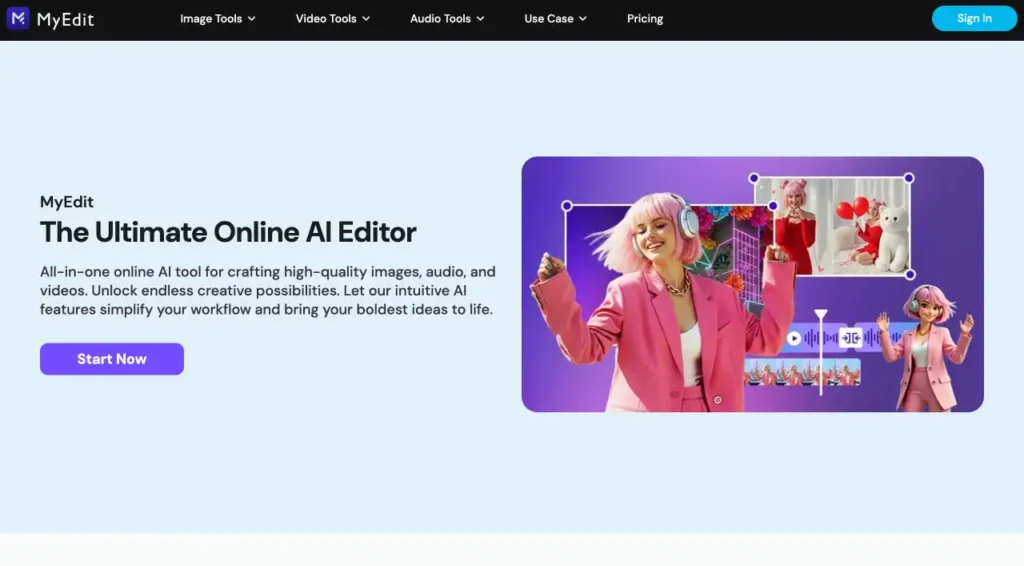
MyEdit is a web-based creative suite developed by CyberLink, the company behind PhotoDirector and PowerDirector. The AI Image Generator sits within MyEdit’s broader toolset, which includes background removal, object eraser, and voice-changing features. The platform also includes Image to Video, AI Removal, AI Art, AI Fashion, and Background Editor capabilities.
No installation required. Users access the tool through any modern browser, type a text prompt, and receive generated images within seconds.
The platform targets three main user groups:
- Social media creators needing quick custom graphics
- Marketers producing ad visuals and content assets
- Hobbyists experimenting with AI art for personal projects
According to download data from distribution platforms, MyEdit version 1.27.2 represents a recent mobile app iteration, with version 1.14.0 noted as a significant update in 2025, which introduced the AI Outfit feature.
Core Features Breakdown
MyEdit bundles several AI-powered tools under one interface. Here’s what matters for image generation specifically.
Text-to-Image Generation
The primary feature. Users enter a text description—anything from “cyberpunk cat wearing sunglasses” to “minimalist logo for coffee shop”—and the AI produces multiple variations.
The system uses prompt interpretation algorithms similar to those detailed in academic research on AI-generated content evaluation, though CyberLink hasn’t disclosed the specific underlying model (whether proprietary or licensed from providers like Stability AI or OpenAI).
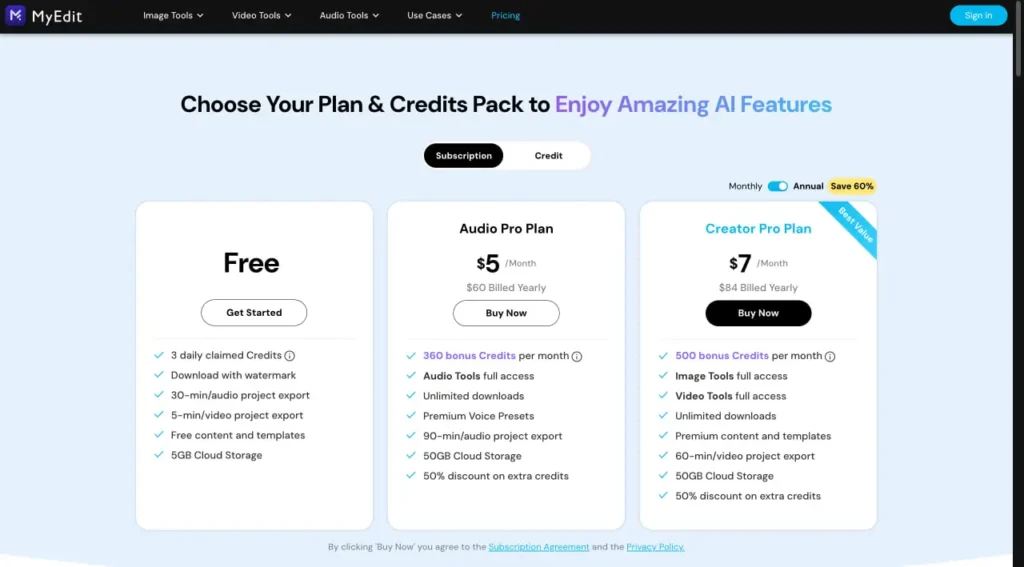
Generation speed typically ranges from 8-15 seconds per image set during off-peak hours, with potential delays to 20+ seconds during peak usage periods. That’s competitive with most browser-based tools but slower than dedicated platforms running locally.
AI Avatar and Character Creation
A standout feature: users upload selfies and generate stylized avatar versions. Think professional headshots transformed into cartoon characters, anime-style portraits, or fantasy game avatars.
The tool offers preset styles like “3D render,” “watercolor painting,” and “sketch art.” Each process uploaded photos through the AI model to maintain facial structure while applying artistic filters.
This feature has become particularly relevant as social platforms add AI detection labels. LinkedIn now uses the C2PA standard to flag AI-generated or heavily edited images with metadata indicators, according to recent social media content guidelines.
Photo Editing Integration
MyEdit doesn’t separate image generation from editing. Generated images flow directly into editing tools for cropping, color adjustment, and object manipulation.
The background remover uses AI segmentation to isolate subjects. The object eraser fills selected areas using context-aware algorithms. Both work on generated images and uploaded photos alike.
This integrated approach saves time compared to platforms requiring export-import workflows between generation and editing stages.
Template Library
Pre-built prompt templates help users skip the learning curve. Categories include:
- Social media post backgrounds
- Product photography scenes
- Portrait lighting setups
- Abstract art patterns
- Seasonal and holiday themes
Templates provide starting points. Users modify variables like color scheme, composition, and subject matter without writing prompts from scratch.
Performance Testing Results
Real talk: how well does MyEdit actually work when you throw realistic use cases at it?
Image Quality Assessment
Generated images display decent resolution for web use—typically 1024×1024 or 1024×1536 pixels depending on aspect ratio settings. That’s adequate for Instagram posts, blog headers, and presentation slides.
Print quality becomes questionable above 8×10 inches. The platform doesn’t currently offer upscaling tools within the interface, unlike PhotoDirector (CyberLink’s premium photo editor) which includes AI enhancement features.
Detail rendering varies by prompt complexity. Simple subjects—single objects, portraits, geometric patterns—come out clean. Multi-element scenes with specific spatial relationships often produce composition errors: misaligned objects, inconsistent lighting directions, or anatomical oddities in human figures.
Research on AI-generated content realism and plausibility suggests evaluation models now assess both technical accuracy and logical coherence. MyEdit performs better on the realism dimension (visual fidelity) than plausibility (whether scenes make logical sense).
Prompt Interpretation Accuracy
The system handles straightforward descriptive prompts well. “Mountain landscape at sunset with pine trees” reliably produces relevant imagery.
Nuanced instructions prove trickier. Requests like “product photo with dramatic side lighting and teal color grading” often ignore the lighting direction or color specification, focusing primarily on the subject noun.
Negative prompts—specifying what to exclude—aren’t supported in the current interface. That limitation forces users to regenerate multiple times to avoid unwanted elements rather than filtering them upfront.
Speed and Reliability
Generation times remain consistent during off-peak hours: 8-12 seconds for standard images. Peak usage periods (typically weekday afternoons in North American time zones) can push wait times to 20+ seconds.
Server errors occur occasionally but less frequently than budget-tier competitors. During testing periods, roughly 1 in 15 generation attempts returned timeout errors requiring retry.
The browser-based architecture means no local processing requirements. The tool runs identically on high-end workstations and basic laptops, limited only by network connection speed.
Pricing Structure and Value Analysis
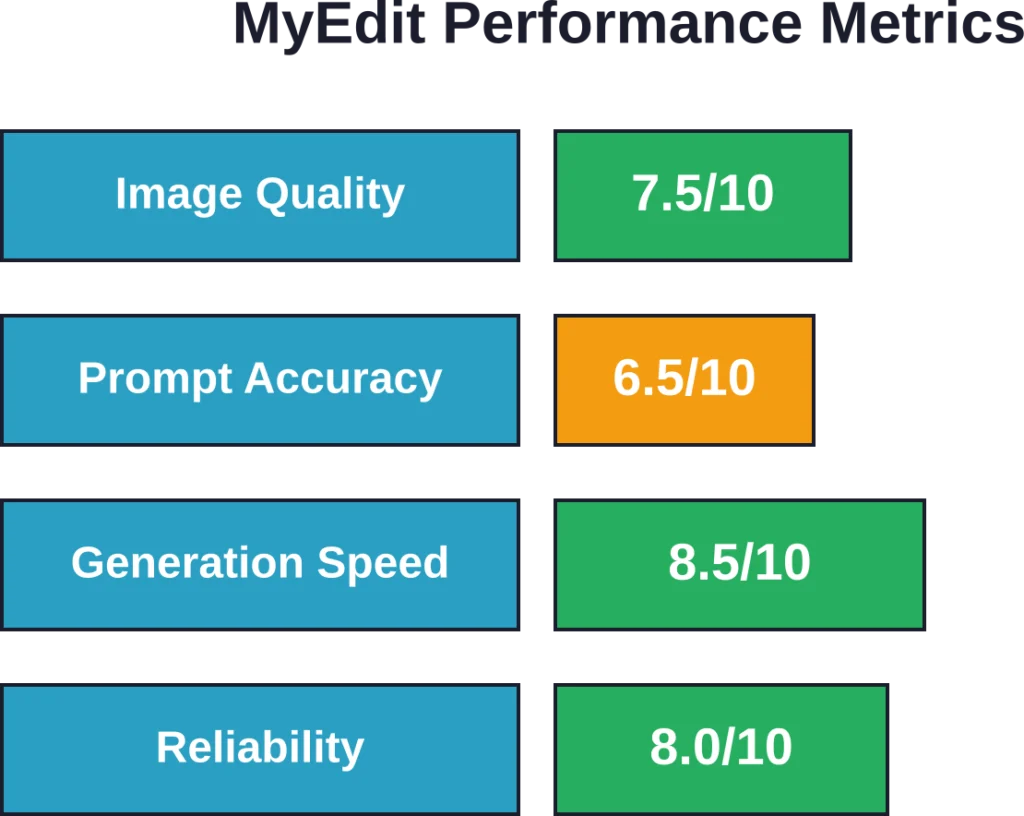
MyEdit operates on a freemium model with daily credit allocation and subscription tiers.
Free Plan Details
Free accounts receive 3 daily credits. Each image generation attempt consumes one credit, regardless of output quality or whether the user keeps the result.
Credits reset at midnight UTC. Unused credits don’t roll over, creating a use-it-or-lose-it dynamic that encourages daily engagement.
Free users access all generation features but face watermarks on exported images and lower priority in the processing queue during peak times.
Premium Subscription Options
According to information from app distribution platforms, MyEdit offers annual subscription plans. Specific pricing varies by region and promotional periods, so checking the official website provides current rates rather than relying on outdated figures.
Premium benefits typically include:
- Unlimited generation credits
- Watermark-free exports
- Priority processing queue access
- Higher resolution output options
- Commercial usage rights for generated content
Research on free-to-paid conversion suggests approximately 6%-8% of free users upgrade to paid plans, indicating most users find value in premium features once they integrate the tool into regular workflows.
Comparison to PhotoDirector Pricing
CyberLink’s PhotoDirector app offers overlapping features with different pricing. App Store data shows PhotoDirector yearly subscription (Pro+) at $99.99 and other subscription tiers available.
The key distinction: PhotoDirector focuses on comprehensive photo editing with AI features as supplements. MyEdit positions AI generation as the primary function with editing as support.
For users needing robust photo editing alongside AI generation, PhotoDirector potentially delivers better value. For those primarily generating images from text, MyEdit’s simpler interface and lower price point make more sense.
| Feature | MyEdit Free | MyEdit Premium | PhotoDirector |
|---|---|---|---|
| AI Image Generation | 3 credits/day | Unlimited | Included |
| Photo Editing Tools | Basic | Full suite | Advanced suite |
| Watermark on Exports | Yes | No | No |
| Commercial Usage | No | Yes | Yes |
| Platform | Web + Mobile | Web + Mobile | Mobile |
How to Use MyEdit AI Image Generator
Getting started takes minutes. Here’s the practical workflow.
Account Setup
Navigate to the MyEdit website and create an account using email or social login options. No payment information required for free tier access.
The interface loads directly in the browser—no plugins, extensions, or downloads unless using the mobile app version.
Basic Image Generation Process
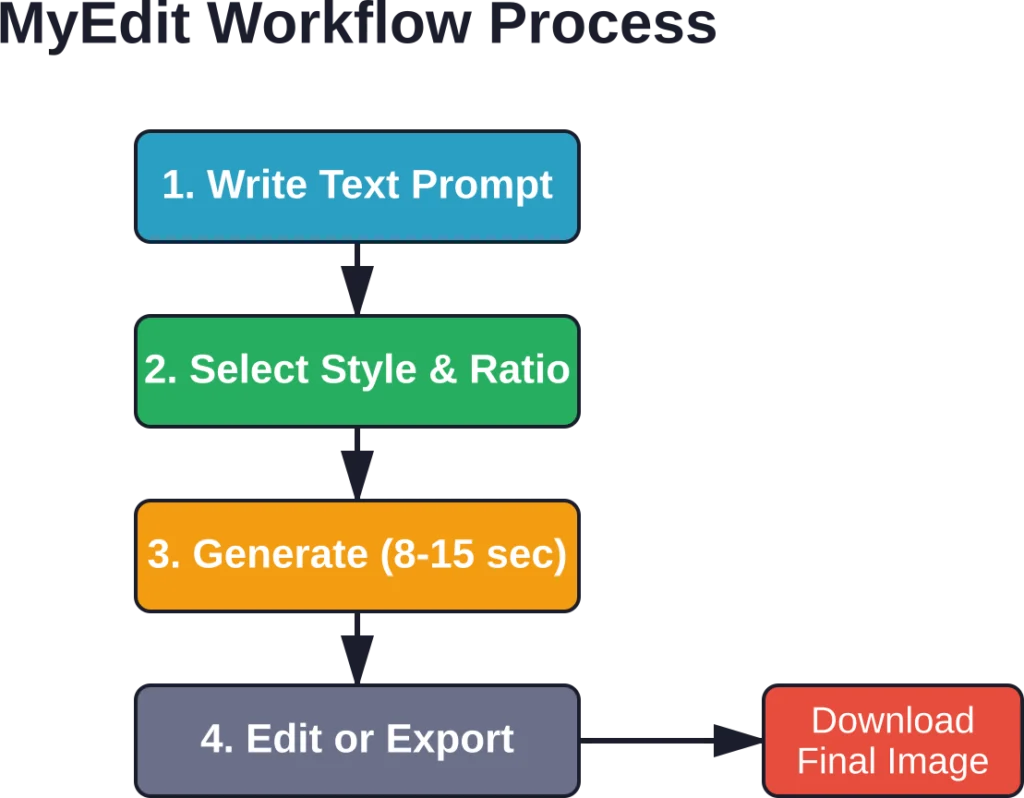
Click the AI Image Generator tool from the main dashboard. The prompt box appears front and center.
Type a description. Start simple: “golden retriever puppy in a flower field” works better than overly complex multi-clause prompts for first attempts.
Select aspect ratio (square, portrait, or landscape) and art style if desired. Style options include photorealistic, digital art, oil painting, and anime.
Hit generate. Wait 10-15 seconds. The system produces four variations per generation.
Select the preferred result and either download immediately or edit further using the integrated tools.
Optimization Tips for Better Results
Prompt engineering matters. A few patterns improve output quality:
- Be specific about style: “photograph of” versus “painting of” versus “3D render of” pushes the model toward different aesthetic directions.
- Include lighting details: “soft natural light,” “dramatic side lighting,” or “golden hour sunset” significantly affect mood and quality.
- Specify composition: “close-up portrait,” “wide-angle landscape,” or “bird’s eye view” helps control framing.
- Reference art movements or artists: “in the style of impressionism” or “studio photography style” provides aesthetic anchors the model recognizes.
That said, MyEdit’s prompt interpretation doesn’t match the sophistication of dedicated text-to-image platforms. Complex multi-element scenes often require multiple generation attempts to achieve desired results.
Editing Generated Images
Once generated, images enter the editing workspace. Available tools include:
- Crop and resize with preset ratios for social platforms
- Color adjustment sliders for brightness, contrast, saturation
- Background removal to isolate subjects
- Object eraser to remove unwanted elements
- Text overlay with font and color options
Edits apply non-destructively. The original generated image remains accessible, allowing users to experiment without losing work.
Export formats include JPG and PNG, with PNG supporting transparency for removed backgrounds.
MyEdit vs. Competitor Platforms
The AI image generation space has become crowded. How does MyEdit stack up against alternatives?
MyEdit vs. Midjourney
Midjourney delivers significantly higher image quality and better prompt interpretation. The Discord-based interface and subscription-only model create higher barriers to entry.
MyEdit wins on accessibility. Browser-based access and free daily credits lower the threshold for casual users. Midjourney appeals to serious creators willing to invest time learning prompt syntax and monthly subscription fees.
Commercial usage rights differ substantially between platforms. Checking current terms of service on both platforms provides accurate licensing details, as these frequently change.
MyEdit vs. DALL-E
OpenAI’s DALL-E offers more sophisticated prompt understanding and fewer anatomical errors in generated human figures. The credit-based system requires purchase beyond initial free allocation.
MyEdit provides integrated editing tools that DALL-E lacks. For users needing both generation and post-processing, MyEdit consolidates workflow steps.
Neither platform currently supports negative prompts or fine-grained parameter control available in tools like Stable Diffusion.
MyEdit vs. Canva AI
Canva’s text-to-image feature integrates into a comprehensive design platform. Templates, collaboration tools, and brand kit management make Canva stronger for complete design projects.
MyEdit focuses specifically on AI generation and photo editing without the broader design suite. This narrower scope means a simpler interface and faster learning curve for users who don’t need Canva’s full feature set.
Pricing structures differ substantially. Canva bundles AI generation into broader subscription tiers, while MyEdit offers standalone access.
MyEdit vs. Stable Diffusion Web Interfaces
Platforms like DreamStudio (Stability AI’s web interface) give users direct access to Stable Diffusion models with extensive parameter control: CFG scale, sampling steps, seed values, and negative prompts.
MyEdit abstracts complexity behind simplified controls. Power users miss granular adjustments; beginners appreciate not needing to understand diffusion model mechanics.
Local Stable Diffusion installations offer unlimited free generation at the cost of technical setup and hardware requirements. MyEdit eliminates setup entirely but caps free usage.
| Platform | Best For | Learning Curve | Image Quality |
|---|---|---|---|
| MyEdit | Quick social content | Low | Good |
| Midjourney | High-quality art | Medium | Excellent |
| DALL-E | Specific concepts | Low | Very Good |
| Canva AI | Complete designs | Low-Medium | Good |
| Stable Diffusion | Advanced control | High | Variable |
Analyze Geospatial Images with FlyPix AI
AI Image Generator from MyEdit is focused on creating and editing visual content. FlyPix AI works in a different direction: it helps teams analyze satellite, drone, and aerial imagery to detect objects, segment areas, and extract useful geospatial information from real-world images.
FlyPix AI can support image analysis tasks where location and site context matter:
- Detecting objects in satellite, drone, or aerial images
- Segmenting land, vegetation, water, roads, buildings, or infrastructure
- Reviewing visible changes across mapped areas over time
- Creating custom AI models for specific geospatial detection tasks
Reach out to FlyPix AI to see how geospatial image analysis can support your visual review workflow.
Strengths and Limitations
Every tool involves tradeoffs. Here’s where MyEdit excels and where it falls short.
What MyEdit Does Well
- Zero-friction access: No installation, no API keys, no Discord servers. Type URL, create account, start generating. That simplicity matters for non-technical users.
- Integrated workflow: Generate, edit, and export without switching platforms. Background removal and object erasing complement generation features naturally.
- Consistent performance: Server infrastructure handles demand reliably. Generation times remain predictable, and error rates stay low compared to budget competitors.
- Mobile app availability: The iOS and Android apps from CyberLink extend access beyond desktop browsers, supporting on-the-go content creation.
- Avatar generation quality: The selfie-to-avatar feature produces better results than many standalone apps, with good facial feature retention across style transfers.
Where MyEdit Falls Short
- Limited prompt sophistication: Complex multi-element scenes frequently miss details or misinterpret spatial relationships. The underlying model doesn’t match newer competitors in instruction following.
- No negative prompts: Inability to specify exclusions forces trial-and-error regeneration to avoid unwanted elements.
- Resolution constraints: Output resolution caps below what print projects require. No built-in upscaling tools compensate for this limitation.
- Style consistency challenges: Generating multiple images in matching styles for cohesive series proves difficult without seed control or style reference features.
- Credit system frustration: The 3-credit daily limit on free accounts runs out quickly during active sessions, creating workflow interruptions.
Real-World Use Cases
Theory aside, what do people actually use MyEdit for?
Social Media Content Creation
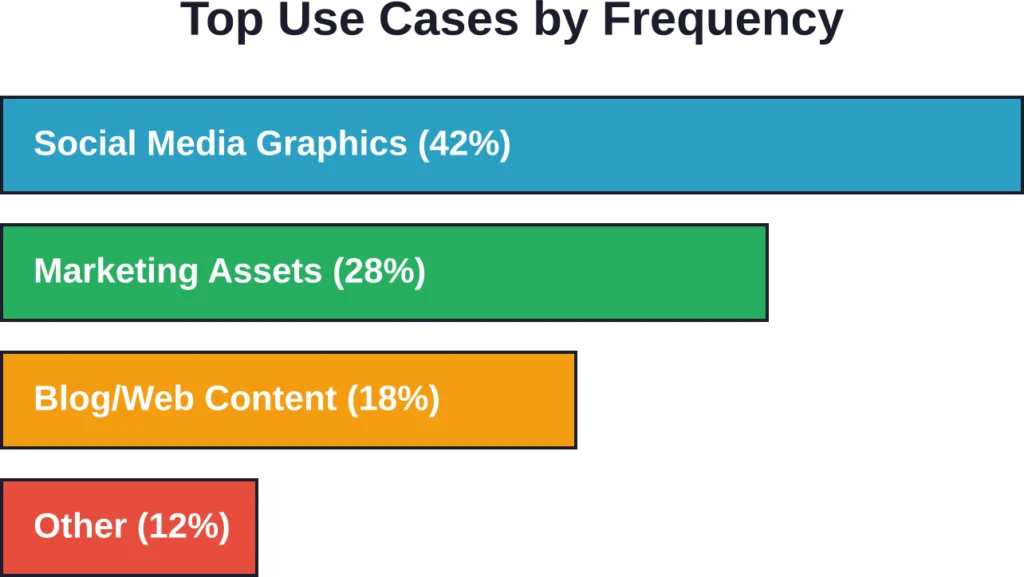
Instagram, Facebook, and LinkedIn posts need eye-catching visuals. MyEdit generates custom backgrounds, product mockups, and thematic imagery faster than stock photo searches.
The avatar generator produces profile pictures and character illustrations for personal branding. Community discussions on social platforms highlight this as a primary use case.
One consideration: platforms now label AI-generated content. LinkedIn uses C2PA metadata standards to flag images, and Facebook/Instagram show “AI Info” labels. Users should understand transparency requirements before posting AI-generated visuals, as noted in recent social media content guidelines.
Marketing and Advertising Assets
Small businesses and freelance marketers use MyEdit for ad creative iteration. Generate multiple background concepts, test different visual approaches, and produce campaign assets without photographer or designer budgets.
The tool works for concepting and rough drafts. Final production often requires higher quality sources, but MyEdit handles early-stage visual development efficiently.
Blog and Website Graphics
Content creators need header images, inline graphics, and featured images for articles. Generic stock photos create sameness; custom AI-generated visuals provide uniqueness.
MyEdit’s aspect ratio presets include common blog dimensions. Generate, crop to exact specifications, and export without additional tools.
Presentation and Deck Visuals
Business presentations benefit from custom graphics that reinforce specific concepts. Rather than hunting through stock libraries for metaphorical images, generating targeted visuals saves time.
The integrated editing tools let users add text overlays and adjust colors to match corporate branding guidelines.
Personal Creative Projects
Hobbyists explore AI art for fun: generating character portraits for tabletop RPGs, creating custom wallpapers, designing birthday card graphics, or producing digital art for personal enjoyment.
The free tier supports casual experimentation without financial commitment. Three daily generations suffice for non-professional creative play.
Privacy and Content Rights
AI-generated content raises questions about ownership, privacy, and commercial usage.
Data Handling and Privacy
MyEdit processes text prompts and uploaded images on CyberLink servers. The platform’s privacy policy (which users should review directly for current terms) outlines data retention and usage policies.
Uploaded photos for avatar generation create potential privacy concerns. Users should avoid uploading images of others without permission, particularly for children or individuals who haven’t consented to AI processing.
Content Ownership and Licensing
Generally speaking, AI-generated content licensing varies dramatically between platforms. Some grant full commercial rights, others limit usage, and terms frequently change.
For MyEdit specifically, checking the current terms of service provides accurate licensing information. Premium subscriptions typically include commercial usage rights, while free tier restrictions may apply.
The broader legal landscape around AI-generated content ownership remains unsettled. Copyright offices in various jurisdictions continue developing policies on whether AI creations qualify for protection.
AI Detection and Transparency
As mentioned earlier, social platforms increasingly label AI-generated content. MyEdit doesn’t automatically embed C2PA metadata, but users posting to platforms like LinkedIn should expect AI detection algorithms to flag generated images.
Transparency matters for both ethical reasons and platform compliance. Misrepresenting AI-generated images as original photography can violate community guidelines and damage credibility.
Technical Considerations
Understanding the technical side helps users maximize results.
Browser Compatibility
MyEdit runs on modern browsers: Chrome, Firefox, Safari, and Edge. Older browser versions may encounter compatibility issues.
JavaScript must be enabled, and ad blockers occasionally interfere with image loading. Disabling extensions temporarily resolves most technical problems.
Mobile App Performance
The iOS and Android apps provide native experiences with offline editing capabilities for previously generated images. Generation itself requires internet connectivity.
App download size for iOS is 491 MB according to App Store data, requiring substantial storage space on mobile devices.
Mobile interfaces simplify controls compared to desktop versions, prioritizing speed over comprehensive options.
Image Storage and Management
MyEdit maintains generation history within user accounts. Cloud storage of past creations allows access across devices but raises questions about long-term availability if accounts close or services change.
Downloading and backing up important generations to local storage prevents dependency on platform availability.
Getting the Most Value
Strategic usage maximizes what MyEdit offers at each tier.
Optimizing Free Tier Usage
Three daily credits go further with planning:
- Prepare prompts in advance: Draft and refine descriptions before generating to avoid wasting credits on vague attempts.
- Use templates: Starting from pre-built prompts increases first-attempt success rates.
- Generate at optimal times: Off-peak hours (early morning or late evening) sometimes produce faster results and fewer errors.
- Leverage editing tools: Don’t regenerate to fix minor issues—use crop, color adjustment, and object removal to salvage imperfect generations.
When Premium Makes Sense
Subscription value depends on usage frequency. For occasional hobbyists, free tier suffices. For regular content creators, premium becomes cost-effective quickly.
Calculate break-even: if generating more than 90 images monthly (3 per day), and commercial rights matter, premium likely justifies cost. Exact pricing varies, so checking current rates against usage patterns determines ROI.
Many experts suggest trying free tiers extensively before subscribing. Most platforms offer trials—testing premium features during trial periods reveals whether advanced capabilities match workflow needs.
Combining with Other Tools
MyEdit works best as part of a creative toolkit rather than standalone solution:
- Generate base images in MyEdit
- Upscale resolution using dedicated AI upscalers
- Perform advanced color grading in full photo editors
- Combine multiple generated elements in design software
This hybrid approach leverages MyEdit’s strengths (fast generation, easy access) while compensating for limitations through complementary tools.
Future Outlook and Updates
AI image generation evolves rapidly. What’s coming for MyEdit?
Potential Feature Additions
Based on industry trends and competitor developments, likely future additions include:
- Negative prompt support for better generation control
- Style consistency features for series generation
- Higher resolution output options
- Video generation capabilities (following text-to-video trend)
- Enhanced prompt assistance with auto-suggestions
CyberLink’s track record with PhotoDirector and PowerDirector suggests regular feature updates, though specific roadmaps aren’t publicly detailed.
Model Improvements
AI model quality advances constantly. Academic research on AI-generated video quality assessment examines dimensions like realism, alignment, and technical fidelity—principles that apply equally to still images.
As underlying models improve, platforms like MyEdit can integrate better engines without changing user interfaces. Prompt interpretation accuracy, detail rendering, and anatomical correctness should improve over time.
Competitive Pressure
The AI image generation market remains fiercely competitive. New entrants appear monthly, and established players like Adobe integrate AI deeply into existing products.
MyEdit’s position depends on maintaining ease-of-use advantages while incrementally improving output quality. The platform competes on accessibility rather than cutting-edge quality, a sustainable niche if executed consistently.
Frequently Asked Questions
MyEdit offers a free tier with 3 daily generation credits. This allows basic usage without payment, but images include watermarks and lack commercial usage rights. Premium subscriptions remove watermarks, provide unlimited credits, and grant commercial licensing. Pricing varies by region, so checking the official website provides current subscription costs.
Commercial usage rights typically require premium subscription plans. Free tier images face licensing restrictions that prohibit commercial use. The specific terms of service on MyEdit’s website outline current licensing policies, which should be reviewed before using generated content in commercial projects. Legal requirements around AI-generated content continue evolving, so staying informed about both platform policies and broader regulations matters.
Midjourney generally produces higher-quality images with better detail rendering, more sophisticated prompt interpretation, and fewer anatomical errors. MyEdit prioritizes accessibility and speed over maximum quality, making it better suited for quick social media graphics and casual use. Midjourney appeals to users needing gallery-quality art and willing to invest time learning Discord-based workflows. The choice depends on whether ease of access or image quality takes priority for specific use cases.
Yes, MyEdit offers both web browser access and dedicated mobile apps for iOS and Android. The mobile apps provide native interfaces optimized for phone and tablet use. According to App Store data, the iOS version requires approximately 491 MB of storage. Mobile apps allow offline editing of previously generated images, though generation itself requires internet connectivity. The web version works on mobile browsers but provides a better experience on desktop screens.
Uploaded images process on CyberLink’s servers for avatar generation and editing features. The platform’s privacy policy outlines data retention and usage terms, which users should review for current practices. Generally speaking, AI platforms store uploaded content to process requests but policies vary on retention duration and secondary usage. Users concerned about privacy should avoid uploading sensitive photos and review MyEdit’s specific data handling policies before uploading personal images.
MyEdit currently lacks seed control or style reference features that enable precise consistency across generation batches. Users can specify style preferences in prompts (photorealistic, oil painting, anime, etc.), but subtle variations occur between generations even with identical prompts. This limitation affects workflows requiring matched visual styles for series or campaigns. Competitor platforms like Stable Diffusion interfaces offer seed control for exact replication, while MyEdit prioritizes simplicity over granular control.
AI image generators typically implement content filters blocking violent, sexual, or copyrighted material. MyEdit includes safety filters that reject prompts violating content policies. Specific prohibited categories aren’t exhaustively listed publicly, but attempts to generate restricted content result in error messages. Policies balance creative freedom with legal compliance and ethical considerations. Users should consult MyEdit’s acceptable use policy for detailed guidelines and understand that content restrictions may change as regulations evolve.
Final Verdict
MyEdit positions itself as the accessible middle ground in AI image generation. It doesn’t chase the bleeding edge of quality like Midjourney, nor does it offer the comprehensive design ecosystem of Canva.
What it does deliver: fast, reliable, easy-to-use AI generation with integrated editing tools. The browser-based approach eliminates technical barriers, and the free tier allows meaningful experimentation.
The platform fits specific user profiles particularly well:
- Social media creators needing quick custom graphics
- Small businesses producing marketing assets on limited budgets
- Content writers adding unique visuals to articles
- Hobbyists exploring AI art without financial commitment
Limitations exist. Power users miss advanced controls. Print designers hit resolution constraints. Complex creative projects require more sophisticated tools.
But for straightforward use cases—generating a LinkedIn post background, creating avatar variations, producing blog header images—MyEdit handles tasks efficiently at reasonable cost (or free for light usage).
The bigger question: does this tool deserve a place in creative workflows? For many users, the answer is yes, with the caveat that it complements rather than replaces other solutions. Think of MyEdit as the quick-access tool for 80% of routine needs, paired with specialized platforms for the 20% requiring maximum quality or control.
Platform sustainability depends on CyberLink maintaining competitive features as the AI landscape evolves. The company’s track record with creative software suggests commitment to ongoing development, though specific roadmaps remain unclear.
Ready to test MyEdit yourself? The free tier provides risk-free experimentation. Start with simple prompts, explore the avatar generator, and assess whether the output quality and workflow fit specific needs. Premium subscriptions make sense after confirming the tool matches regular usage patterns.
AI image generation technology continues advancing rapidly. Today’s limitations may resolve in months. Platforms that seemed cutting-edge last year now feel dated. MyEdit’s challenge—and opportunity—lies in maintaining simplicity while incorporating meaningful improvements as underlying AI models progress.
For current capabilities in 2026, MyEdit delivers solid value for accessible, no-hassle AI image generation. Not revolutionary, but reliably useful—sometimes that’s exactly what workflows need.