

Quick Summary: Affinity Photo is a powerful, professional-grade raster graphics editor that serves as a robust alternative to Adobe Photoshop. Following its acquisition by Canva, the core software, which combines photo editing, vector design, and page layout tools, is now free. While it excels with a non-destructive workflow and comprehensive toolset, its advanced AI features require a paid Canva subscription, and it lacks the digital asset management capabilities of Adobe Lightroom.
The world of digital design has long been dominated by Adobe’s subscription-based Creative Cloud. But for years, a powerful contender has been gaining ground, offering professional-grade tools without the monthly fee. That contender is Affinity Photo. Now, following its acquisition by design giant Canva, the game has changed dramatically. The core Affinity software is now entirely free.
So, does this make Affinity Photo the undisputed champion for photographers and designers? Can a free photo editor truly replace the industry standard? This review examines the software’s features, performance, and new place in the creative landscape of 2026.
The Big Shift: What Does “Free” Really Mean?
In a landmark move in late 2025, Canva merged Affinity’s three previously separate applications—Photo, Designer, and Publisher—into a single, unified program called Affinity Studio, and made it free. This was a seismic shift from its previous one-time purchase model, which was already a major selling point against Adobe’s recurring subscription.
But there’s a catch. The core functionality, which is incredibly robust and covers the vast majority of photo editing, vector design, and page layout needs, is 100% free. However, the increasingly important suite of AI-powered tools requires a paid Canva subscription. These premium features include:
- Generative Fill and Expand
- AI Background Removal
- Image Upscaling (“Super-resolution”)
- Portrait Blur and Lighting Adjustments
- Automatic Photo Colorization
This “freemium” model is a strategic play. It makes professional design tools more accessible than ever while creating an upsell path for users who need cutting-edge, time-saving AI features. For many, the free version will be more than enough. For professionals relying on the latest tech, the Canva subscription (around $15/month as of early 2026) is still significantly cheaper than Adobe’s Creative Cloud All Apps plan.
Core Features: A Deep Dive into the Photo Persona
Affinity Photo operates using distinct workspaces called ‘Personas’. For photo editing, the primary workspace is the Photo Persona, which feels immediately familiar to anyone who has used a layer-based editor like Photoshop. It’s a powerhouse of tools designed for everything from basic adjustments to complex compositing.
Non-Destructive Workflow
One of Affinity Photo’s greatest strengths is its commitment to a non-destructive workflow. This means you can apply adjustments, filters, and effects without permanently altering your original image data. Key aspects include:
- Live Filter Layers: Apply effects like blurs, sharpening, and lighting as editable layers that can be tweaked, masked, or removed at any point.
- Adjustment Layers: Control exposure, curves, color balance, HSL, and more, all as separate layers. Affinity provides helpful thumbnail previews for each adjustment type.
- Non-Destructive RAW Develop: A game-changer introduced in Version 2, this allows users to re-process RAW files at any stage of the editing process, even after adding other layers and masks. This is akin to Photoshop’s Smart Objects and a huge win for flexibility.
Advanced Tools for Photographers
Affinity Photo isn’t just for basic edits. It’s packed with high-end features that cater to serious photographers:
| Feature | Description | Best For |
|---|---|---|
| HDR Merge | Combines multiple bracketed exposures into a single 32-bit high-dynamic-range image with incredible detail. | Landscape, real estate, and architectural photography. |
| Panorama Stitching | Seamlessly stitches multiple images together with advanced alignment and correction tools. | Creating expansive landscape or architectural shots. |
| Focus Stacking | Merges images taken at different focal distances to create a final shot with maximum depth of field. | Macro photography, product shots, and landscapes. |
| Advanced Masking | Includes luminosity range, hue range, and band-pass masks that update automatically with the image. | Making precise selections based on brightness, color, or edges. |
The software also has a powerful Liquify Persona for distortions and a dedicated Tone Mapping Persona for stylizing HDR images. These specialized workspaces keep the main interface clean while providing deep control when needed.

Connect Photo Workflows with FlyPix AI
Affinity Photo is mainly used for image editing, retouching, and design work. FlyPix AI serves a different purpose for teams working with geospatial imagery: it helps analyze satellite, drone, and aerial images to detect objects, segment areas, and review locations at scale.
FlyPix AI can support image-based work where location and site context matter:
- Detecting objects in drone, aerial, or satellite images
- Segmenting land, vegetation, water, buildings, roads, or other areas
- Comparing visual changes across mapped locations
- Creating custom AI models for specific image analysis tasks
Contact FlyPix AI to explore how geospatial image analysis can fit into your visual review process.
Affinity Photo vs. Photoshop: The 2026 Showdown
So, can Affinity Photo truly replace Photoshop? The answer depends entirely on your workflow. For core photo editing, retouching, and compositing, Affinity Photo is not just a viable alternative—it’s an equal. It handles layers, masks, brushes, and blend modes with professional precision. It even supports PSD files, though complex files with smart objects may not transfer perfectly.
Here’s a breakdown of where each software stands in 2026:
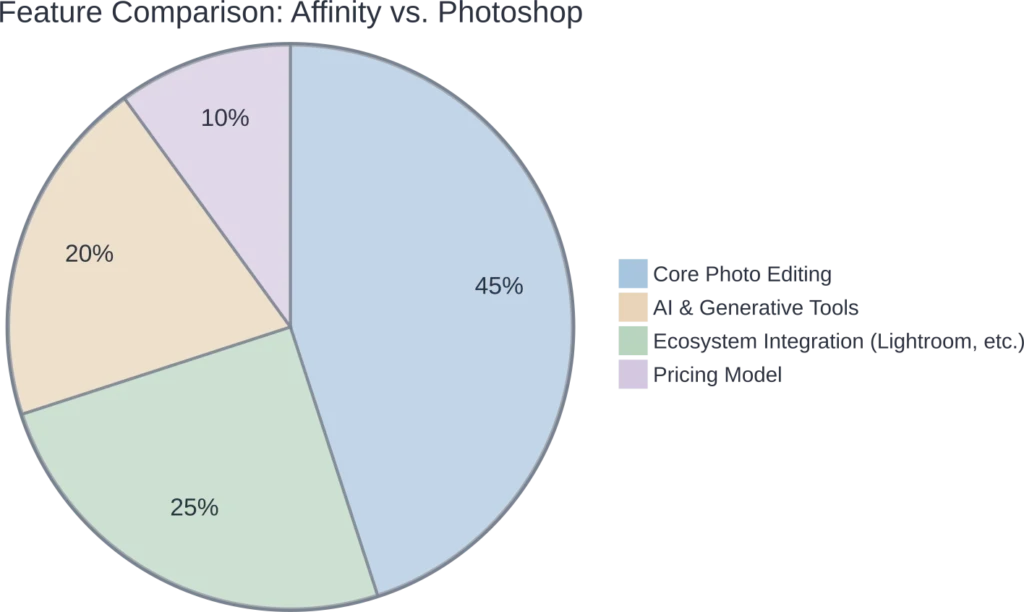
Where Affinity Photo Wins:
- Price: The core editor is free. This is an unbeatable advantage. Even with a Canva subscription for AI, it remains a fraction of Adobe’s cost.
- Performance: Affinity is widely regarded as being faster and more lightweight, with smooth panning and zooming at 60fps, even on older hardware.
- Ease of Use: While still a professional tool with a learning curve, its interface is often described as more streamlined and less cluttered than Photoshop’s. The Persona-based workflow helps focus the toolset on the task at hand.
Where Photoshop Still Leads:
- AI and Generative Features: Adobe’s Firefly AI is more mature and deeply integrated. Features like Generative Fill, while available in Affinity via Canva, are still considered the benchmark in Photoshop.
- Ecosystem Integration: This is Adobe’s trump card. The seamless workflow between Photoshop, Lightroom, and other Creative Cloud apps is something Affinity cannot match. If you rely on Lightroom for cataloging and RAW processing, switching is a major hurdle.
- Industry Standard & Plugins: Photoshop has been the industry leader for decades. This means more tutorials, a larger community, and a vast ecosystem of third-party plugins and scripts that don’t exist for Affinity.
Can Affinity Photo Replace Lightroom?
This is a common question, and the answer is a clear no. Affinity Photo is a pixel editor, designed to work intensively on one image at a time, much like Photoshop.
Lightroom, on the other hand, is a digital asset management (DAM) system and a RAW developer. It excels at:
- Importing, organizing, and culling thousands of photos.
- Applying presets and batch editing hundreds of images at once.
- Keyword tagging, rating, and managing a large photo library.
Affinity Photo has no cataloging or library management features. While its Develop Persona is powerful for processing individual RAW files, it’s not designed for the high-volume workflow of event or wedding photographers who rely on Lightroom. A more realistic approach is to use Affinity Photo as a replacement for Photoshop *alongside* a DAM tool, which could be Lightroom, Capture One, or another alternative.
Frequently Asked Questions (FAQ)
Yes, the core software suite, which combines photo editing, vector design, and page layout, is now completely free to download and use without restrictions. However, advanced AI features like generative fill and background removal require a paid Canva subscription.
Yes, Affinity Photo can open, edit, and export PSD files. While compatibility is generally very good for layers, masks, and adjustments, some advanced Photoshop features like Smart Objects may not be fully editable.
The free version has some machine-learning-assisted selection tools, like Select Subject. However, the more advanced generative AI tools (similar to Adobe Firefly) are only available through a paid Canva Premium subscription.
While Affinity Photo is a professional-grade tool, its interface is considered cleaner and more intuitive than Photoshop by many users. It has a learning curve, but it’s an excellent platform to grow with, especially since the core tools are free.
They are essentially the same thing now. After Canva acquired Serif (the original developers), the three separate Affinity apps (Photo, Designer, Publisher) were merged into a single free application, often referred to as Affinity by Canva or Affinity Studio.
Absolutely. The iPad version of Affinity Photo is highly regarded and contains nearly all the features of the desktop version, making it one of the most powerful mobile photo editors available.
No. Affinity Photo is a layer-based pixel editor for in-depth manipulation of single images. It does not have the photo management, cataloging, or batch processing capabilities that define Adobe Lightroom.
The Verdict for 2026
Affinity Photo in 2026 is an incredibly compelling piece of software. By making its professional-grade core editor free, Canva has thrown down the gauntlet to Adobe. It is a fast, powerful, and feature-rich tool that can absolutely replace Photoshop for a huge number of users, from hobbyists to professional designers and photographers who perform detailed, layer-based editing.
Its weakness remains its lack of an integrated ecosystem. It cannot replace Lightroom’s digital asset management, and its AI features, while capable, are a paid add-on and still chasing Adobe’s more mature implementation.
So, who should choose Affinity Photo?
- Budget-Conscious Creatives: The value is simply unbeatable.
- Photoshop Users Tired of Subscriptions: If your work is primarily layer-based editing and you don’t need deep integration with Lightroom, Affinity is a seamless switch.
- iPad Creators: The iPad version of Affinity Photo is praised for being a full-featured desktop-class editor, far more powerful than Adobe’s mobile offerings.
For those deeply embedded in the Adobe ecosystem, particularly professionals who rely on the Lightroom-to-Photoshop workflow for high-volume work, switching completely might be disruptive. But for everyone else, Affinity Photo isn’t just a good alternative anymore. It’s a top-tier photo editor in its own right, and the fact that it’s free makes it a choice that’s impossible to ignore.