

Quick Summary: Agisoft Metashape is a professional photogrammetry software that transforms digital photographs into accurate 3D models, point clouds, and spatial data. Available in Standard ($179) and Professional ($3,499) editions, it processes imagery from drones, cameras, and satellites to generate detailed reconstructions for GIS applications, cultural heritage documentation, and visual effects production.
Agisoft Metashape stands as one of the most powerful photogrammetry tools available today. This stand-alone software product performs photogrammetric processing of digital images and generates 3D spatial data used across industries—from cultural heritage documentation to visual effects production.
But what makes Metashape different from other photogrammetry solutions? And which edition fits specific project needs?
According to the official Agisoft website, Metashape handles everything from aerial drone imagery to close-range object scanning, satellite data, and even scanned historical photographs with fiducial marks. The software generates dense point clouds, 3D meshes, digital elevation models, and georeferenced orthomosaics.
What Agisoft Metashape Actually Does
Metashape converts overlapping photographs into precise 3D reconstructions through photogrammetric triangulation. The software analyzes shared visual points across images, estimates camera positions, and reconstructs digital models that can be measured, edited, and exported.
The core workflow remains straightforward: load photos, align them, build a dense point cloud, generate a mesh, and apply textures. Each step produces progressively refined outputs.
Real talk: this isn’t automatic push-button processing. Metashape gives professionals control over parameters at every stage. Academic research from Trinity College recommends 70% overlap between adjacent photos for optimal reconstruction results—a principle echoed across photogrammetry workflows.
Professional vs Standard Edition: What’s the Difference
Agisoft offers two distinct editions with different capabilities and price points. According to the official pricing page, Metashape Professional Edition costs $3,499 for a node-locked license, while Standard Edition runs $179.
Here’s the thing though—the pricing difference reflects significant feature gaps. Professional Edition unlocks advanced capabilities that Standard simply doesn’t include.
| Feature Category | Professional Edition | Standard Edition |
|---|---|---|
| Core photogrammetry workflow | ✓ | ✓ |
| Dense point cloud generation and editing | ✓ | ✓ |
| 4D/multispectral processing | ✓ | ✗ |
| LiDAR data support | ✓ | ✗ |
| Python scripting automation | ✓ | ✗ |
| Satellite imagery processing | ✓ | ✗ |
| Multi-camera system support | ✓ | Limited |
| Price (node-locked) | $3,499 | $179 |
Educational institutions get substantial discounts: $549 for Professional and $59 for Standard with educational licenses. The licenses aren’t time-limited—they include 12 months of technical support and free updates through version 2.x.x.
According to Reddit discussions in photogrammetry communities, some users report Standard Edition has about 90% of Professional capability for basic object reconstruction and mapping projects. But projects requiring automation, multispectral analysis, or large-scale datasets typically need Professional.
System Requirements and Performance Considerations
RAM determines the maximum project size Metashape can process on any machine. According to the official system requirements documentation, selecting a platform that allows sufficient RAM installation is critical for project success.
The software recommends a high-speed multi-core CPU (6+ cores, 3 GHz+) for optimal performance. Complex geometry reconstruction algorithms demand significant computational resources.
GPU acceleration matters. Metashape supports OpenCL and CUDA-compatible graphics cards for resource-intensive processing steps, dramatically speeding up dense cloud generation and mesh building.
Performance testing published on the official Agisoft forum reveals interesting platform differences. Benchmark results from forum users show Linux outperforms Windows on tested hardware configurations:
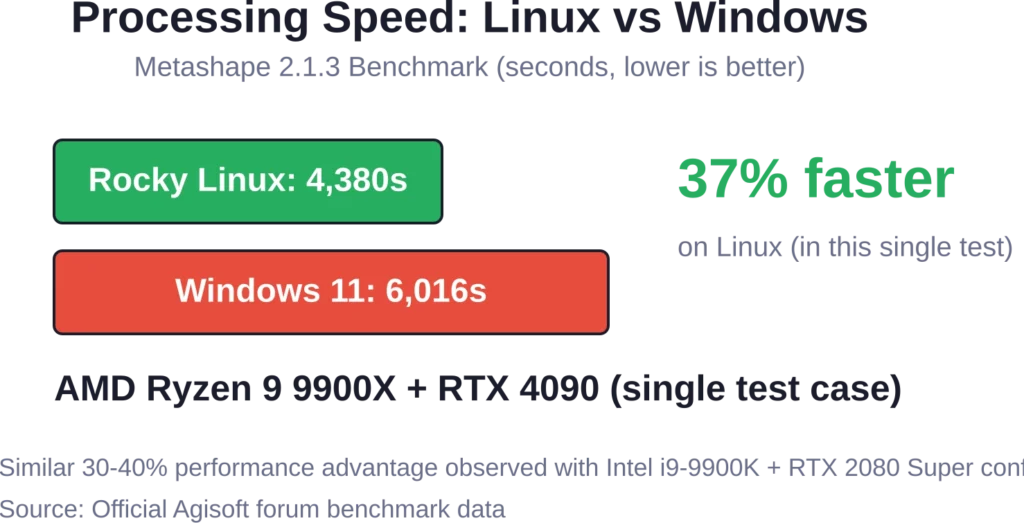
That said, Windows remains the more common platform for most Metashape users. The performance gap matters primarily for production environments processing large datasets repeatedly.
Typical Applications and Use Cases
Metashape serves diverse industries with different reconstruction needs. GIS professionals use it for topographic surveys and terrain modeling. Archaeologists document cultural heritage sites with millimeter precision. Visual effects studios create digital assets from real-world objects.
Drone mapping represents one of the most common applications. Research published through NCBI includes UAV photogrammetry studies with flights at 60m, 100m, and 120m altitudes with 70-80% overlap.
Close-range object scanning works equally well. Museums digitize artifacts. Manufacturers reverse-engineer parts. Researchers measure volumes and distances without physical contact.
The Professional Edition adds specialized capabilities like multispectral imagery processing for precision agriculture—NDVI analysis, crop health monitoring, and yield prediction workflows all run within Metashape.

Add FlyPix AI to 3D Mapping and Site Review Workflows
Agisoft Metashape is used for photogrammetry, 3D reconstruction, and processing images from drones or cameras. FlyPix AI can support the next step for teams that need to analyze geospatial imagery, detect visible objects, and extract site-level information from aerial or drone data.
FlyPix AI can help when mapping work needs object detection or area analysis:
- Detecting buildings, roads, equipment, vegetation, or other visible features
- Segmenting land, infrastructure, water, or site areas from imagery
- Comparing visual changes across mapped locations
- Creating custom AI models for specific geospatial detection tasks
Contact FlyPix AI to discuss how image-based geospatial analysis can support your mapping and site review workflow.
Data Processing and Output Formats
Metashape generates multiple output types from the same source imagery. Dense point clouds export in standard formats for compatibility with other software. Textured 3D meshes export as OBJ, PLY, FBX, or other common formats.
For GIS applications, the software generates georeferenced digital surface models (DSM) and digital terrain models (DTM). Orthomosaics export as GeoTIFF files with coordinate system information preserved.
The software supports EPSG registry coordinate systems including WGS84, UTM, and configurable vertical datums. Ground control points and check points enable precise georeferencing when GPS metadata alone isn’t sufficient.
Agisoft Cloud integration (for Professional users) adds online collaboration—site inspection, annotation, and documentation through web browsers without requiring local Metashape installations.
Learning Resources and Documentation
The official Metashape manual serves as the primary reference document. Published by Agisoft in PDF format, it covers workflows, parameter explanations, and technical specifications comprehensively.
Academic institutions provide supplementary guides. Dartmouth’s DREAM Studio offers photography tips: high overlap, fixed focal length lenses, and sufficient lighting for quality reconstructions. UNC’s guide walks through basic Structure-from-Motion principles alongside Metashape interface tutorials.
Community forums on the Agisoft website host discussions about parameter optimization, troubleshooting, and workflow efficiency. Python scripting examples demonstrate automation for repetitive processing tasks.
Frequently Asked Questions
Metashape is the current name—PhotoScan was rebranded to Metashape. According to the official licensing page, updates from PhotoScan to Metashape are completely free for licensed users. Metashape licenses remain compatible with earlier PhotoScan versions.
Metashape supports Windows, macOS, and Linux operating systems. Benchmark data shows Linux delivers 30-40% faster processing than Windows on identical hardware, though Windows remains the most popular platform.
RAM requirements scale with project size. According to official documentation, RAM availability typically limits the maximum processable project size. Small projects run on 16GB, medium projects need 32-64GB, and large aerial surveys may require 128GB or more.
Standard Edition does not support georeferenced orthomosaic and DEM/DSM generation, which are essential for professional drone mapping.
Processing time varies enormously based on image count, resolution, hardware, and quality settings. Small object scans (50-100 images) might process in 30 minutes. Large drone surveys (1,000+ images) can take 8-24 hours on workstation hardware.
Professional Edition supports thermal and multispectral imagery processing. Standard Edition handles standard RGB imagery only. Multispectral workflows enable vegetation analysis, NDVI calculation, and precision agriculture applications.
Metashape uses perpetual licensing—not time-limited subscriptions. According to official licensing information, licenses include 12 months of technical support and free updates through version 2.x.x. After that period, the software continues working but major version upgrades require payment.
Making the Right Choice
Agisoft Metashape delivers professional photogrammetry capabilities with proven accuracy across industries. The decision between Standard and Professional editions depends on specific project requirements—automation needs, data types, and output formats.
For basic 3D reconstruction, cultural heritage documentation, and standard mapping projects, Standard Edition at $179 provides solid value. Teams requiring advanced workflows, Python scripting, multispectral analysis, or LiDAR integration should consider Professional Edition despite the higher cost.
Ready to start? Download the demo version from the official Agisoft website to test workflows with actual project data before purchasing. The trial includes full functionality with processing limitations that demonstrate real-world performance on specific hardware configurations.