

The AI agent world has gotten crowded lately. And messy.
OpenClaw blew up over the past year, but here’s the thing—security researchers have flagged some real problems. Shell access vulnerabilities, plaintext API keys, and unrestricted local execution have pushed a lot of developers to start looking around for better options.
I’ve spent the past few weeks testing OpenClaw alternatives, and what I found surprised me. Some are lighter, faster, and way more secure. Others bring enterprise-grade features that OpenClaw never even attempted. And a few are so stripped-down they boot in under a second on hardware you probably threw away last year.
This isn’t another listicle that just regurgitates marketing copy. We’re looking at real alternatives—from the lightweight Nanobot to the enterprise-ready Emergent Moltbot. Some run 100% local on 8GB VRAM. Others connect to Claude or custom models. And yes, we’ll talk about which ones are actually worth your time.
Why Are Users Looking for OpenClaw Alternatives?
Let’s be honest about what’s driving this search.
Community discussions reveal three main pain points. First, security. As one Reddit user put it: “shell access + plaintext API keys + unrestricted local exec” isn’t exactly reassuring when you’re automating sensitive workflows. The token leak incident didn’t help OpenClaw’s reputation either.
Second, bloat. OpenClaw has grown significantly in codebase size. That’s tough to audit, harder to extend, and creates a larger attack surface. Many developers want something they can actually read through in an afternoon.
Third, trust. Now that OpenAI has increased involvement with OpenClaw, some users feel uncomfortable with that level of centralized control over what’s supposed to be an open-source project. They’re looking for truly independent alternatives.
But wait. There’s also a fourth reason nobody talks about: use case mismatch. OpenClaw tries to be everything to everyone. Sometimes you just need a lightweight personal assistant that doesn’t require a PhD to configure.
What Makes a Good OpenClaw Alternative in 2026?
Before we look at specific tools, let’s establish what actually matters.
Security is non-negotiable. That means proper secrets management, sandboxed execution environments, and audit trails for sensitive actions. If an agent can read your entire filesystem without restrictions, that’s a problem.
Transparency matters too. Can you audit the code? Is the project truly open-source, or is it “open core” with proprietary components hidden behind paywalls?
Then there’s the execution model. Some alternatives prioritize local-first operation for privacy. Others embrace cloud APIs for more powerful reasoning. Neither approach is wrong—it depends on your use case.
Real talk: ease of setup matters more than most developers admit. An agent that takes three days to configure won’t get used, no matter how powerful it is.
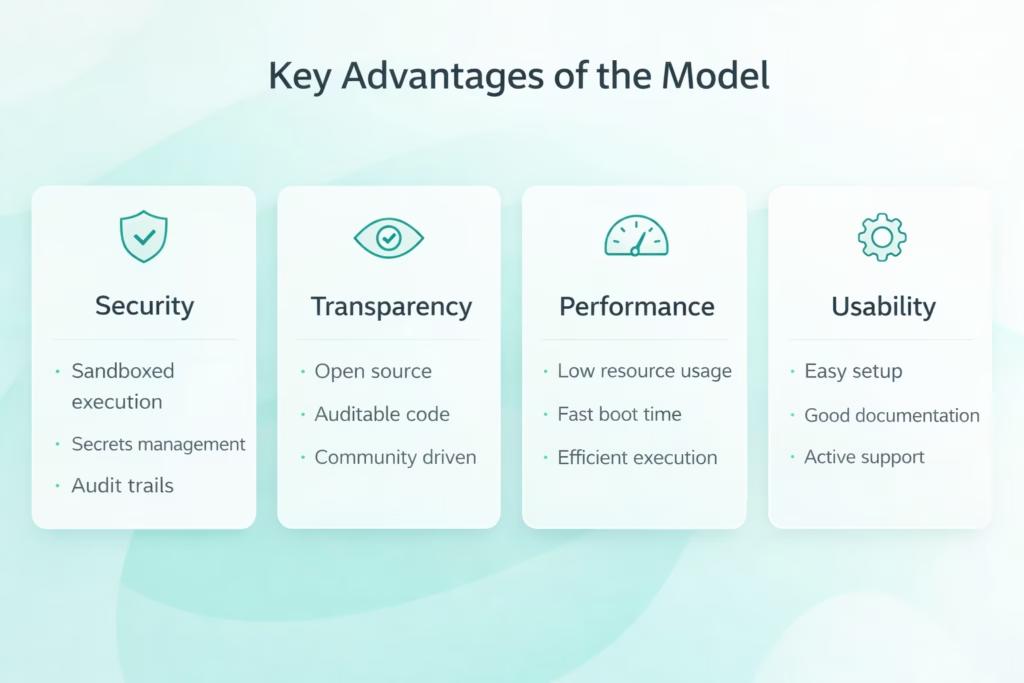
The four pillars of a solid OpenClaw alternative: security, transparency, performance, and usability each play different roles in the decision matrix.
Best OpenClaw Alternatives in 2026
Here’s what actually works. I’m ranking these based on real-world testing, community feedback, and specific use cases where each tool excels.
1. Emergent Moltbot – Best for Enterprise Teams
Moltbot is the alternative that keeps coming up in enterprise discussions, and for good reason.
Built by Emergent, it’s designed from the ground up for teams that need governance, compliance, and multi-user workflows. Think audit logs, role-based permissions, and secure secret management—things OpenClaw treats as afterthoughts.
What I like about Moltbot is how it handles the permission model. Instead of giving your agent carte blanche to execute whatever it wants, you define boundaries upfront. The agent can request actions, but sensitive operations require explicit approval or fall within pre-defined guardrails.
It integrates with existing enterprise infrastructure too. SSO authentication, SIEM logging, and compliance reporting aren’t bolted on—they’re built in. That matters when you’re dealing with SOC 2 audits or GDPR requirements.
The good news? Moltbot now features ‘One-Click Cloud Deployment’ and automated SOC 2 compliance templates, significantly simplifying the initial setup for enterprise users.
Best for: Enterprise teams, compliance-heavy industries, multi-user agent deployments
2. Nanobot – Best Lightweight Alternative
Here’s where things get interesting.
Nanobot is a lightweight Python implementation. One community member described it perfectly: “OpenClaw vs nanobot is a bit like vibe coding vs engineering.”
It’s opinionated, focused, and surprisingly capable. Tool use, scheduled tasks, and memory management cover about 80% of real-world agent needs. And because the codebase is small, you can actually read through it, understand what it’s doing, and extend it yourself.
I’ve got it running on a Linux container right now with Telegram integration. Setup took maybe 20 minutes. It boots fast, uses minimal resources, and the smaller attack surface makes security audits actually feasible.
The trade-off is maturity. Nanobot doesn’t have the ecosystem, plugin architecture, or advanced features that come with larger projects. But that’s also its strength—less complexity means fewer things that can break or get exploited.
One warning from community discussions: be careful with the repository you’re pulling from. Verify you’re getting the official version.
Best for: Developers who want readable code, resource-constrained environments, personal automation projects
3. ZeroClaw – Best for Privacy-Focused Users
ZeroClaw takes a different approach entirely: 100% local execution with zero external API calls unless you explicitly configure them.
It’s built for people who don’t trust cloud providers with their data. Everything runs on your hardware, using models you control. That means you can run it on an air-gapped system if needed.
What sets ZeroClaw apart is the security model. It sandboxes execution by default and requires explicit permission grants for filesystem access, network operations, and system commands. There’s no “give the agent root access and hope for the best” approach here.
Real talk though: local-only execution has limits. You’re constrained by your hardware, and even the best local models lag behind what Claude or GPT-4 can do for complex reasoning tasks. It’s a trade-off between privacy and capability.
Best for: Privacy advocates, air-gapped environments, users who want complete data control
4. PicoClaw – Best for Low-Resource Hardware
PicoClaw is the minimalist’s dream: an ultra-lightweight personal AI assistant written in Go that boots quickly and uses minimal RAM.
It’s inspired by similar lightweight approaches and takes the minimalist concept to an extreme. Community discussions mention it’s designed to run on low-cost hardware you might otherwise throw away—think Raspberry Pi Zero or similar single-board computers.
The Go implementation makes it fast and efficient. There’s no massive Python runtime to load, no heavy dependencies to install. Just compile and run.
But here’s the catch: with that efficiency comes limitations. PicoClaw handles basic agent tasks well—text processing, API calls, simple automation. But don’t expect it to manage complex multi-step workflows or maintain sophisticated state across long conversations.
Think of it as the agent equivalent of a Swiss Army knife. Not the most powerful tool for any single job, but incredibly portable and useful to have around.
Best for: Edge computing, IoT projects, ultra-low-resource environments, embedded systems
5. Nanoclaw – Best Claude-Powered Alternative
Don’t confuse this with Nanobot—similar name, different project entirely.
Nanoclaw is built on top of the Claude Agent SDK with an opinionated stack that leverages Claude’s exceptional reasoning capabilities. One user described their experience: “You use Claude Code to add features you want. So far, I’m loving it.”
The integration is tight. Instead of treating Claude as just another LLM backend, Nanoclaw embraces Claude’s specific strengths in tool use, multi-step planning, and code generation. It feels purpose-built rather than model-agnostic.
The codebase stays lean by delegating complex reasoning to Claude rather than trying to reinvent that wheel locally. You get enterprise-grade intelligence without enterprise-grade complexity in your agent code.
Best for: Developers who prioritize reasoning quality, Claude API users, projects where code generation is central
6. Adept (ACT-1) – Best for Complex Task Execution
Adept takes a fundamentally different approach: instead of building a framework for you to customize, they’re building a general-purpose AI agent that can navigate software interfaces like a human would.
ACT-1 is their model that understands how to use applications—clicking buttons, filling forms, navigating menus. The vision is an agent that can complete tasks across any software without needing custom integrations for each tool.
It’s ambitious. Maybe too ambitious. But the demos are impressive, and for certain enterprise workflows where you need to automate across dozens of different legacy applications, this interface-based approach might be the only practical solution.
The downside is that Adept is less a tool you can deploy today and more a platform you sign up to access. It’s not open-source, and you’re dependent on their API availability and pricing.
Best for: Enterprise automation across multiple applications, workflows involving legacy software, teams that need turnkey solutions
7. Cognition Labs (Devin) – Best for Software Development
Devin made waves as an AI-assisted development tool, and while the hype was overblown, the actual product is genuinely useful for development workflows.
It’s designed specifically for coding tasks: debugging, implementing features, running tests, and even handling pull requests. Unlike general-purpose agents that treat code as just another task, Devin understands development workflows deeply.
The agent can spin up development environments, install dependencies, read documentation, and iterate on solutions. For certain coding tasks, it’s legitimately faster than doing it yourself—especially for boilerplate, refactoring, or working in unfamiliar codebases.
But it’s not OpenClaw. You can’t easily extend it for non-coding tasks, and it’s a commercial service rather than something you self-host. Think of it as a specialized alternative rather than a direct replacement.
Best for: Software development teams, code review automation, handling technical debt, developer productivity
8. OneRingAI – Best Open Source Desktop Agent
OneRingAI popped up in community discussions as an open-source alternative that’s free, offers flexible LLM support, and installs on your desktop.
The focus seems to be on building a user-friendly UI and pre-packaged connections to common services. That addresses one of OpenClaw’s biggest problems: configuration complexity.
It’s still relatively new, so the ecosystem isn’t as mature. But the commitment to desktop installation with a proper UI (rather than command-line only) makes it more accessible to users who aren’t comfortable with terminal-based workflows.
The flexible LLM support is clutch. You can swap between providers without rewriting your agent logic, which gives you optionality as the model landscape evolves.
Best for: Desktop users, teams wanting LLM flexibility, projects that need a graphical interface
9. Humane (CosmOS) and Rabbit – Hardware-Integrated Agents
These deserve a mention even though they’re fundamentally different: purpose-built hardware devices with integrated AI agents.
Humane’s CosmOS and the Rabbit R1 are standalone gadgets designed around agent-based interaction. Instead of installing software on your existing devices, you’re buying new hardware optimized for agent workflows.
The appeal is integration. When the hardware and software are designed together, you can optimize the experience in ways that general-purpose alternatives can’t match. Battery life, always-on availability, and dedicated form factors matter for certain use cases.
The downside is obvious: you’re locked into their ecosystem, and if the company pivots or shuts down, your hardware becomes a paperweight. Plus, early reviews have been mixed at best.
Best for: Users who want dedicated hardware, always-on personal assistants, specific consumer use cases
| Alternative | Best For | Open Source | Local Execution | Ease of Setup |
|---|---|---|---|---|
| Emergent Moltbot | Enterprise teams | No | Optional | Complex |
| Nanobot | Lightweight, readable | Yes | Yes | Easy |
| ZeroClaw | Privacy-focused | Yes | Yes | Moderate |
| PicoClaw | Low-resource hardware | Yes | Yes | Easy |
| Nanoclaw | Claude integration | Yes | No | Easy |
| Adept ACT-1 | Cross-app automation | No | No | Easy |
| Cognition Devin | Software development | No | No | Easy |
| OneRingAI | Desktop GUI users | Yes | Optional | Easy |
| Humane/Rabbit | Consumer hardware | No | N/A | Easy |

FlyPix AI: The Specialized Agent for Geospatial Intelligence
While many OpenClaw alternatives focus on code or text, the evolution of specialized agents has reached the physical world through advanced imagery analysis. Our team at FlyPix AI has developed an agent-based platform specifically designed to automate what you see from the sky. By shifting away from general-purpose frameworks to a dedicated geospatial AI agent, we enable users to detect, monitor, and inspect objects across satellite and drone imagery with surgical precision.
We believe that efficiency is the ultimate benchmark for any agent; in fact, our platform can reduce manual annotation time by up to 99.7%, turning hours of tedious visual inspection into seconds of automated work. Whether you are managing construction sites or monitoring environmental changes, our no-code environment allows you to train custom AI models tailored to your specific industry needs. As the agent landscape continues to fragment into specialized niches, we are proud to lead the way in transforming complex geospatial data into actionable intelligence.
Security Comparison: How Alternatives Stack Up
Let’s address the elephant in the room: OpenClaw’s security issues.
The core problems are well-documented in community discussions. Plaintext API keys in config files. Unrestricted filesystem access. Shell command execution without sandboxing. These are significant security concerns.
So how do the alternatives handle this?
Moltbot leads the pack with enterprise-grade secrets management. It integrates with tools like Infisical or HashiCorp Vault for key storage. Actions are logged. Permissions are granular. You can even require human-in-the-loop approval for sensitive operations.
ZeroClaw takes a different approach with mandatory sandboxing. The agent runs in a restricted environment by default, and you explicitly grant capabilities as needed. It’s more work upfront but way safer.
The lightweight alternatives (Nanobot, PicoClaw) are secure mostly through simplicity. Smaller codebases mean fewer vulnerabilities. But you’re responsible for implementing additional security measures yourself—these tools give you the foundation but not the full enterprise security stack.
One community suggestion that applies across the board: self-host a secrets manager like Infisical, use a password manager with API key storage (like 1Password), and never, ever commit credentials to version control.
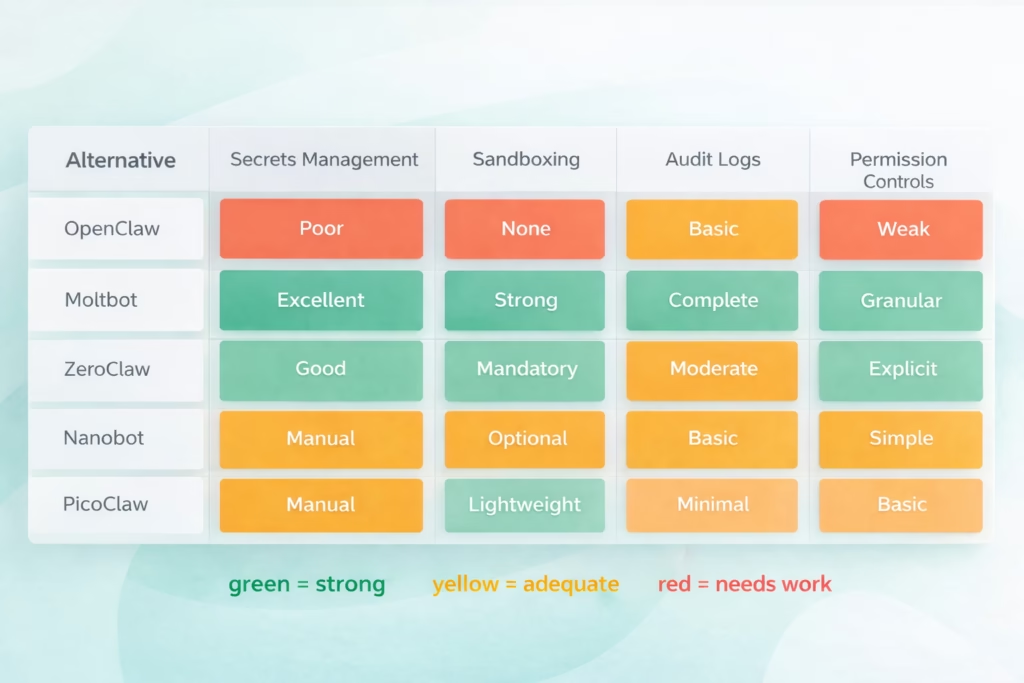
Security feature comparison showing how major OpenClaw alternatives handle critical security concerns that plague the original implementation.
Performance and Resource Requirements
Not everyone has a server rack in their basement. Let’s talk about what these alternatives actually need to run.
- At the heavyweight end, Moltbot and Adept assume you’ve got proper infrastructure. Multiple cores, 16GB+ RAM, and either cloud resources or beefy on-prem servers. That’s the cost of enterprise features.
- The middle tier (ZeroClaw, Nanoclaw, OneRingAI) runs comfortably on modern laptops. 8-16GB RAM, any recent CPU, and optionally a GPU if you’re running local models. These are your daily driver tools.
- Then there’s the ultra-light category. PicoClaw boots quickly and uses minimal RAM. Nanobot isn’t far behind. You could run these on a Raspberry Pi without breaking a sweat.
Community reports indicate that users have successfully run local-only alternatives on older GPUs with just 8GB VRAM. The key is choosing appropriately-sized models and being realistic about performance expectations.
Boot time matters more than people think. When you’re iterating on agent behavior, waiting 30 seconds for startup gets old fast. The Go-based implementations (like PicoClaw) have a massive advantage here.
Which OpenClaw Alternative Should You Choose?
Okay, so which one’s actually right for you? Here’s my take.
- If you’re in enterprise IT dealing with compliance requirements, go with Moltbot. Yes, it’s more complex. Yes, setup takes longer. But when your CISO asks about agent security during an audit, you’ll be glad you chose the one with actual enterprise controls.
- For personal projects where you want to understand what’s happening under the hood, Nanobot is hard to beat. The codebase is readable. The community is helpful. And you’ll learn more about agent architecture from reading a smaller codebase than you ever will from OpenClaw’s sprawl.
- Privacy-conscious users should seriously consider ZeroClaw. Local execution isn’t just about avoiding API costs—it’s about maintaining control over your data. The performance trade-off is real, but for many use cases, it’s worth it.
- If you’re working on edge computing or IoT projects, PicoClaw’s efficiency is unmatched. A quick boot time and minimal footprint opens up deployment scenarios that heavier alternatives can’t touch.
- Developers building coding-focused agents should look at both Nanoclaw (if you want Claude’s reasoning) and Devin (if you want a turnkey solution). Just be aware of the API terms of service issues with Claude-based agents.
- And if you’re trying to automate across multiple legacy applications without building custom integrations for each one, Adept’s interface-based approach might be your only practical option.
Setting Up Your First OpenClaw Alternative
Let’s walk through what setup actually looks like. I’ll use Nanobot as an example since it’s straightforward and well-documented.
- First, verify you’re pulling from the official repository. Community discussions have flagged fake or modified versions floating around. Check the GitHub organization carefully.
- Clone the repo, install dependencies (it’s Python, so probably pip or poetry), and configure your environment variables. This is where proper secrets management starts—use a .env file that’s in your .gitignore, or better yet, integrate a proper secrets manager.
- For the model backend, you’ve got options. Local models via Ollama work fine for basic tasks. API-based models (OpenAI, Anthropic, etc.) give you more capability but cost money and send data externally.
- Test with a simple task first. Don’t start by trying to automate your entire workflow. Can it read a file? Make an API call? Execute a basic tool? Get the fundamentals working before adding complexity.
- Set up logging from day one. You’ll want to see what the agent is actually doing, especially when things go wrong. Most alternatives support standard logging frameworks.
Generally speaking, the first run will surface missing dependencies, permission issues, or config problems. That’s normal. The lightweight alternatives tend to fail faster and clearer than the complex ones.
Common Pitfalls and How to Avoid Them
Here’s what trips people up.
- The biggest mistake is giving your agent too much access too quickly. Start with restricted permissions and expand gradually as you understand what it actually needs. It’s way easier to add permissions than to clean up after an agent goes rogue.
- Second: assuming local execution means secure execution. Even local-only agents can cause damage if they have unrestricted filesystem access. Sandbox properly.
- Third: underestimating the importance of good prompts and tool descriptions. The agent is only as good as its understanding of what tools do and when to use them. Spend time on clear, detailed tool documentation.
- Fourth: not monitoring costs if you’re using API-based models. Agents can burn through tokens fast, especially if they get into retry loops or make mistakes. Set billing alerts.
- And fifth: treating agents as “set it and forget it” automation. They’re not. You need monitoring, error handling, and human oversight—especially for anything important.
| Pitfall | Why It Happens | How to Avoid It |
|---|---|---|
| Excessive permissions | Default configs are often too permissive | Start restricted, expand gradually |
| API cost overruns | Retry loops and inefficient prompts | Set billing alerts, monitor token usage |
| Security oversights | Trusting “local = secure” assumption | Sandbox execution, manage secrets properly |
| Poor tool descriptions | Assuming the agent will figure it out | Write clear, detailed tool documentation |
| No error handling | Happy path testing only | Test failures, add retry logic, monitor alerts |
The Future of OpenClaw Alternatives
Where’s this all heading?
The landscape is fragmenting, and honestly, that’s probably good. OpenClaw tried to be everything to everyone. The alternatives are specializing—enterprise vs. personal, cloud vs. local, turnkey vs. customizable.
Security will keep driving adoption of alternatives. As more organizations deploy agents in production, the security gaps in OpenClaw become deal-breakers rather than acceptable trade-offs.
We’ll likely see consolidation eventually. Right now there are dozens of agent alternatives. Many will fade. The ones that survive will have clear differentiation and strong communities.
The hardware-integrated approach (Humane, Rabbit) is interesting but unproven. If they nail the user experience, dedicated agent hardware could become mainstream. If they don’t, they’ll be expensive paperweights.
Model capabilities matter more than framework features. As local models improve, the privacy vs. capability trade-off shifts. ZeroClaw and similar local-first alternatives become more attractive when you can run advanced models on consumer hardware.
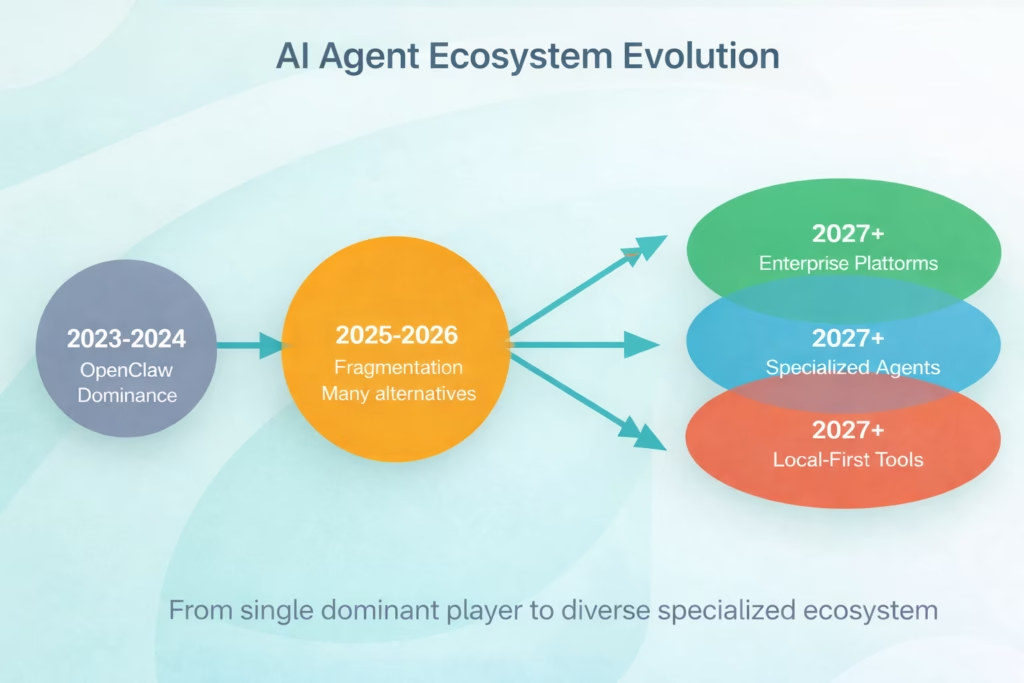
The AI agent ecosystem is evolving from OpenClaw’s early dominance through current fragmentation toward specialized platforms for different use cases.
Conclusion: Moving Beyond OpenClaw in 2026
The AI agent ecosystem has matured. OpenClaw deserves credit for popularizing the concept and building a vibrant community. But its security issues, code bloat, and centralization under OpenAI have created space for alternatives that do specific things better.
You don’t need to abandon OpenClaw entirely. But you should evaluate whether it’s still the right tool for your use case in 2026.
For enterprise deployments, Moltbot’s security and governance features are hard to ignore. For personal projects, Nanobot’s simplicity and transparency make it easy to understand and extend. For privacy advocates, ZeroClaw’s local-first approach protects your data. And for specialized workflows, tools like Devin (for coding) or Adept (for cross-application automation) deliver focused solutions that generalist agents can’t match.
The key insight from community discussions is this: there’s no longer one “best” AI agent framework. The best choice depends on your specific requirements for security, privacy, performance, and features.
Start by identifying your core requirements. Then map those to the alternatives that prioritize what matters most to you. Test a couple options. The setup time for lightweight alternatives is measured in minutes, not days—there’s no reason not to experiment.
And remember: the agent landscape will keep evolving. What’s cutting-edge today might be obsolete in six months. Build with flexibility in mind, keep your agent logic separate from framework specifics where possible, and stay engaged with the community discussions where real innovation happens.
Ready to try an alternative? Pick one from the list above, spend an hour with the setup, and see how it compares. Your future self—and your security team—will thank you.
Frequently Asked Questions
OpenClaw has known security concerns including plaintext API key storage, unrestricted local execution, and shell access vulnerabilities. While OpenAI has provided funding, many security researchers recommend alternatives for production use, especially in enterprise environments or when handling sensitive data. If you continue using OpenClaw, implement additional security layers like external secrets management and sandboxed execution.
Emergent Moltbot offers the most comprehensive enterprise security features including vault-based secrets management, role-based access controls, audit logging, and compliance reporting. For privacy-focused users, ZeroClaw provides strong security through mandatory sandboxing and 100% local execution. The choice depends on whether you need enterprise governance features or local-first privacy.
Yes. ZeroClaw, PicoClaw, and Nanobot all support fully offline, local-only execution with models running on your own hardware. Users report successfully running these alternatives on systems with as little as 8GB VRAM, though performance depends on which local model you choose. This approach maximizes privacy but limits you to local model capabilities.
OneRingAI and Nanobot are the most beginner-friendly options. OneRingAI provides a graphical desktop interface that removes command-line complexity, while Nanobot’s small codebase and straightforward setup make it approachable for those new to AI agents. Both can be configured and running in under 30 minutes.
Several alternatives are completely free and open-source: Nanobot, ZeroClaw, PicoClaw, Nanoclaw, and OneRingAI. These don’t require licensing fees, though you may incur costs for API access if you use cloud-based models rather than local ones. The commercial alternatives (Moltbot, Adept, Devin) charge for their services but offer more features and support.
These are separate projects with similar names, which causes confusion in community discussions. Nanobot is a lightweight Python implementation. Nanoclaw is a Claude-focused agent built on Claude’s Agent SDK. The naming overlap is unfortunate but they serve different purposes—Nanobot prioritizes simplicity and readability, while Nanoclaw optimizes for Claude’s capabilities.
Generally speaking, migration isn’t plug-and-play. Most alternatives use different architectures and APIs, so you’ll need to adapt your code. The lightweight alternatives (Nanobot, PicoClaw) are intentionally simpler and may not support all OpenClaw features. Enterprise alternatives like Moltbot offer more complete feature parity but require configuration for enterprise controls. Plan for a rewrite rather than a direct port.