

Image recognition sounds complex, but the core idea is surprisingly straightforward. A machine looks at images as data, learns patterns from examples, and uses that experience to recognize what it sees next time. The real work happens in how those examples are prepared, how the model learns from them, and how well that learning holds up outside a lab setting.
In this article, we’ll walk through how image recognition works in machine learning step by step. No heavy math, no buzzwords for the sake of it. Just a clear look at how images turn into signals, how models learn to interpret them, and why some systems perform well in real-world conditions while others fall apart.
What Image Recognition Really Means in Machine Learning
At its core, image recognition is about classification and identification. A system receives an image and answers questions like:
- What is in this image?
- Where is a specific object located?
- How many objects are present?
- Do these images belong to the same category?
In machine learning terms, image recognition is part of computer vision. Computer vision focuses on teaching machines to interpret visual data in a way that is useful for decision-making.
An important distinction to make early on is that machines do not see images the way humans do. A person sees a cat. A machine sees a grid of numbers. Everything that follows in image recognition exists to bridge that gap.
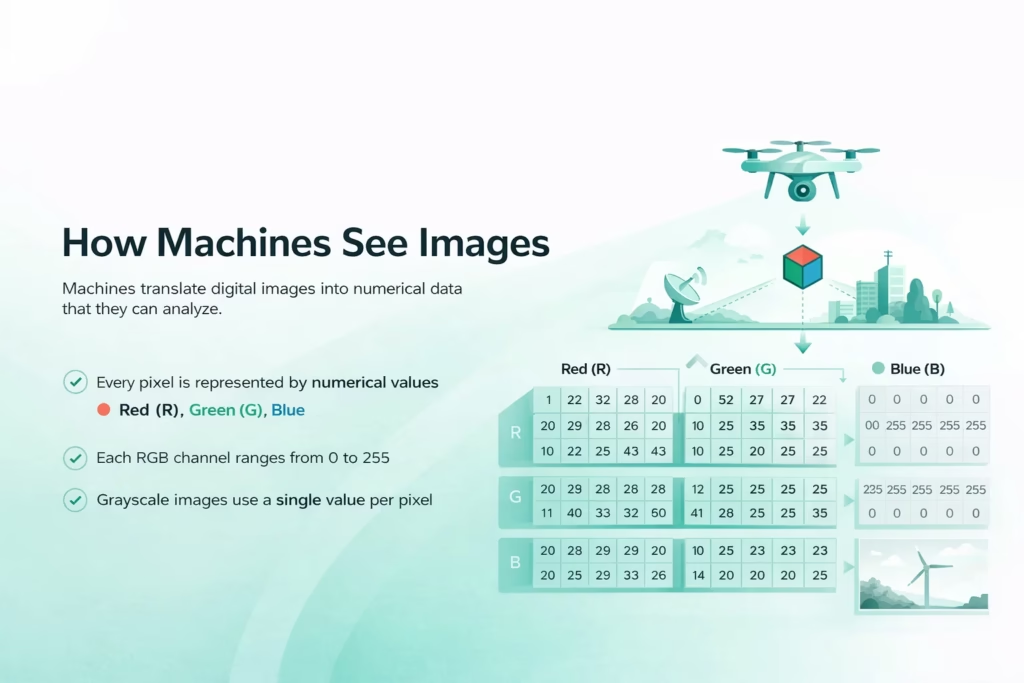
How Machines See Images
Before any learning happens, an image must be translated into a form a machine can work with. Digital images are made of pixels. Each pixel holds numerical values that describe color intensity.
In a standard RGB image, every pixel contains three values:
- Red
- Green
- Blue
Each value typically ranges from 0 to 255. A black pixel is represented by zeros. A white pixel uses the maximum values. A full image is simply a large matrix of these numbers.
Grayscale images simplify this by using a single value per pixel, which reduces complexity and is often enough for tasks that rely on shape or contrast rather than color.
At this stage, the image carries no meaning. It is just data. The entire job of image recognition is to learn which patterns in that data matter.
The Role of Data in Image Recognition
Good image recognition starts with good data. This is where many projects succeed or fail long before any model is trained. Even strong algorithms struggle when the underlying images do not reflect real operating conditions.
Data Collection
The dataset needs to reflect the conditions the model will face after deployment. Images captured in controlled environments rarely match real-world variability. Lighting changes. Angles shift. Objects overlap. Resolution varies.
A Useful Dataset Includes
- Different viewpoints
- Variations in lighting
- Realistic backgrounds
- Imperfect or noisy examples
If a model is trained only on clean, ideal images, it will likely perform poorly in practical settings where conditions are unpredictable.
Labeling and Annotation
For supervised learning, images must be labeled. Labels tell the model what it is supposed to learn. This can be as simple as assigning a category name or as detailed as defining exact object boundaries at the pixel level.
Common Annotation Types
- Image-level labels for classification
- Bounding boxes for object detection
- Pixel masks for segmentation
- Keypoints for pose estimation
Annotation quality matters more than volume. Inconsistent or inaccurate labels confuse the model and limit its ability to generalize beyond the training data.

How We Use Image Recognition in Geospatial Analysis at FlyPix AI
At FlyPix AI, we apply image recognition to real geospatial data, including satellite, aerial, and drone imagery. These datasets are complex and dense, which makes manual analysis slow and inconsistent. Machine learning allows us to detect, monitor, and inspect large areas accurately in a fraction of the time.
Our platform uses AI agents to identify and outline thousands of objects across complex scenes. Users can train custom models using their own annotations, without needing programming skills or deep AI expertise. This makes image recognition practical for everyday work, not just technical teams.
We focus heavily on speed and scale. Tasks that once took hours or days can now be completed in seconds, helping teams move from imagery to decisions faster. Construction, agriculture, port operations, forestry, infrastructure, and government projects all benefit from this approach.
For us, image recognition is about more than detection. It is about turning visual data into reliable insights that hold up in real-world conditions.
Preprocessing: Preparing Images for Learning
Raw images are rarely used as-is. Preprocessing improves consistency and helps models learn relevant patterns more efficiently by reducing unnecessary variation before training even begins.
This stage usually involves resizing images to a fixed shape so the model receives uniform input, normalizing pixel values to keep numerical ranges stable, converting color spaces when color information is not essential, reducing noise caused by sensors or compression, and cropping regions that do not contribute useful signal.
Normalization plays a particularly important role. By scaling pixel values to a consistent range, the model avoids numerical instability during training and converges more reliably.
Data augmentation is often applied alongside preprocessing. Techniques such as rotation, flipping, zooming, and brightness adjustment introduce controlled variation into the dataset without collecting new images. This helps reduce overfitting and improves how well the model handles real-world changes in perspective, lighting, and orientation.
Feature Extraction in Traditional Machine Learning
Before deep learning became dominant, image recognition relied heavily on manual feature extraction. Engineers defined which visual characteristics the model should focus on.
Typical handcrafted features include:
- Edges
- Corners
- Texture patterns
- Gradients
Methods such as Histogram of Oriented Gradients, Local Binary Patterns, and Bag of Features transformed images into fixed-length numerical vectors.
These approaches worked well for specific tasks but required strong domain expertise. They also struggled to adapt when visual conditions changed. Every new scenario demanded manual tuning.
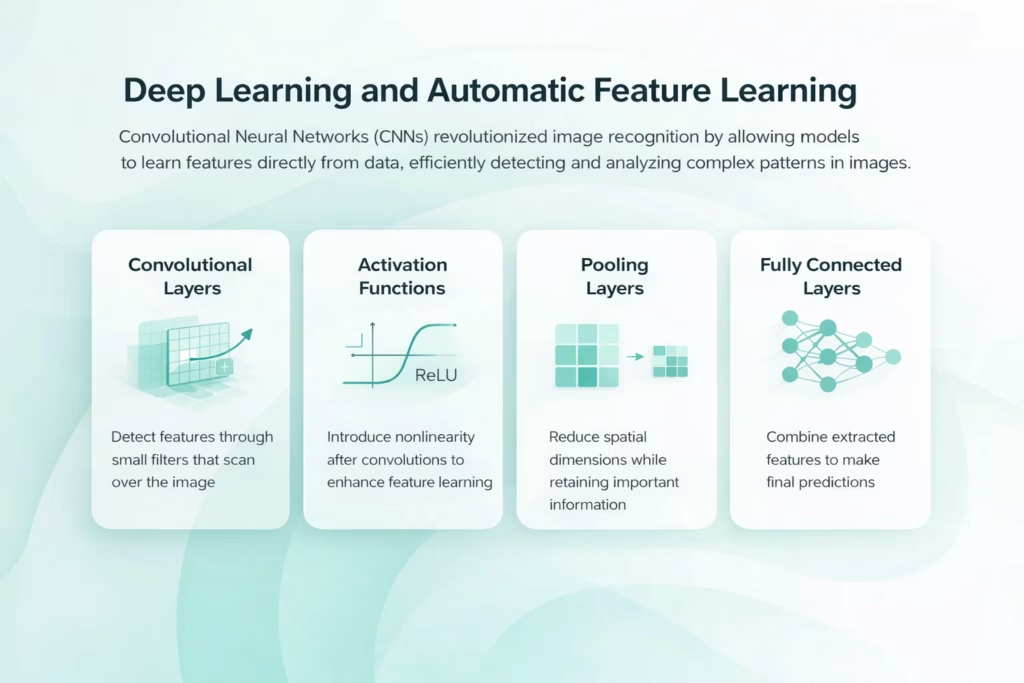
Deep Learning and Automatic Feature Learning
Deep learning changed image recognition by removing the need for handcrafted features. Instead of telling the model what to look for, engineers allow it to learn features directly from data. Convolutional Neural Networks, or CNNs, are the backbone of modern image recognition. They are designed to exploit the spatial structure of images.
Convolutional Layers
Convolutional layers apply small filters across an image. These filters respond to local patterns like edges or textures. Early layers detect simple shapes. Deeper layers combine these into more complex structures. This layered approach mirrors how humans process visual information, from simple lines to full objects.
Activation Functions
After each convolution, activation functions introduce nonlinearity. This allows the network to model complex relationships instead of simple linear patterns.
Pooling Layers
Pooling reduces spatial dimensions while retaining important features. This helps models handle small shifts or distortions in object position.
Fully Connected Layers
Toward the end of the network, extracted features are combined and evaluated to make predictions. These layers integrate information from across the image.
The Training Process Step by Step
Training an image recognition model is an iterative process. It involves repeated exposure to labeled data and gradual adjustment of internal parameters.
1. Forward Pass
The model processes an image and produces a prediction.
2. Loss Calculation
The prediction is compared to the true label. A loss function measures how wrong the prediction is.
3. Backpropagation
The model adjusts its internal weights to reduce error. This happens by propagating the loss backward through the network.
4. Optimization
An optimizer updates parameters based on gradients. Over many iterations, the model improves its accuracy. Training continues until performance stabilizes or reaches acceptable levels on validation data.
Object Detection and Image Segmentation
Image recognition is not limited to classification. In many real-world scenarios, simply knowing that an object exists in an image is not enough. Systems often need to understand where objects are located, how many there are, and how they relate to their surroundings. That need for spatial awareness is what drives object detection and image segmentation.
- Object detection identifies what the objects are and where they appear in the image. The model typically draws bounding boxes around items and assigns a class label to each box. Common model families include Faster R-CNN, SSD, and YOLO, and the choice often comes down to the speed vs accuracy trade-off.
- Image segmentation labels pixels rather than drawing rectangles, which makes boundaries much more precise. This is useful when shapes are irregular, objects overlap, or accuracy at the edges matters. Instance segmentation separates individual objects of the same class, while semantic segmentation labels regions by category across the entire image.
Supervised, Unsupervised, and Self-Supervised Learning
Most image recognition systems rely on supervised learning, but other approaches are increasingly important as data availability and project constraints change.
Unsupervised Learning
Unsupervised models discover patterns without labels. They cluster images based on similarity. This is useful when labeled data is scarce.
Self-Supervised Learning
Self-supervised methods create learning signals from the data itself. Tasks like predicting missing parts of an image allow models to learn useful representations with minimal labeling. These approaches are especially valuable for large-scale or specialized datasets.
Deployment and Real-World Constraints
A trained model is only useful if it performs reliably after deployment. This is where many image recognition systems begin to struggle, not because the model is poorly designed, but because real-world conditions rarely match the training environment.
Once deployed, models often face variations in image quality caused by different cameras, compression levels, or motion blur. Objects may appear in unfamiliar forms or contexts, and environmental factors such as lighting, weather, or background clutter can introduce patterns the model has never seen before. Hardware limitations also play a role, especially when models are expected to run on resource-constrained devices rather than powerful servers.
Image recognition systems may operate in the cloud or directly on devices at the edge. Cloud-based deployment offers greater computational capacity and easier updates, while edge deployment improves privacy, reduces latency, and allows systems to function without constant connectivity. The trade-off is limited processing power, which often requires smaller or optimized models.
To remain effective over time, deployed models need continuous monitoring. Performance can degrade as data distributions shift, making periodic retraining and adjustment necessary. Treating deployment as an ongoing process, rather than a final step, is essential for maintaining reliable image recognition in real-world conditions.
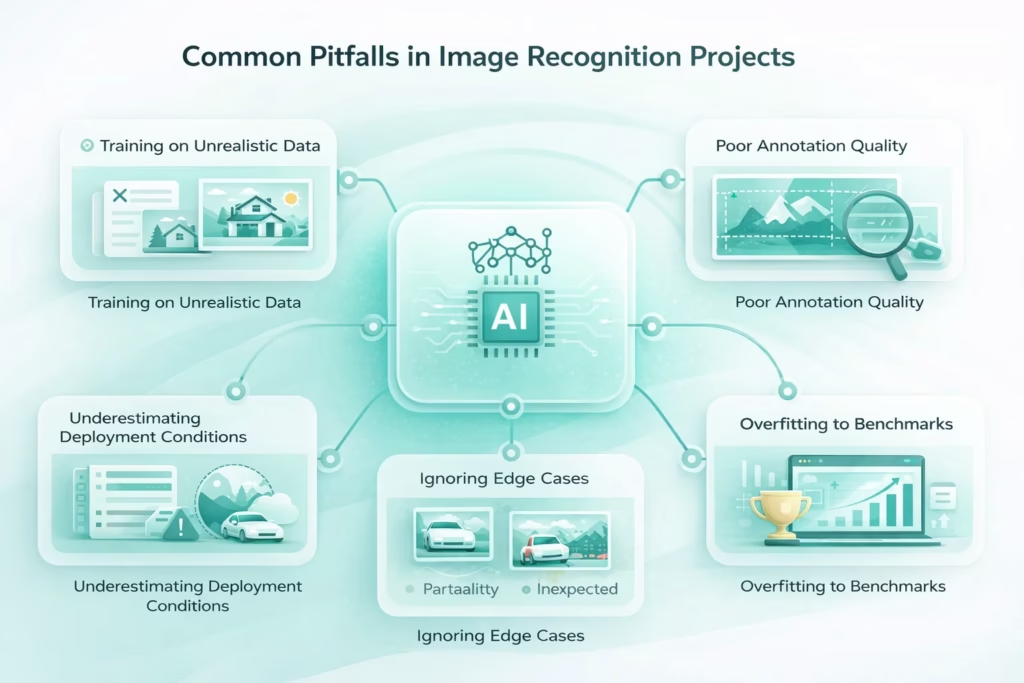
Common Pitfalls in Image Recognition Projects
Even well-designed image recognition systems can fail if a few recurring issues are overlooked. These problems tend to surface not during development, but after a model is exposed to real operating conditions.
- Training on unrealistic data. Models trained only on clean, well-lit, perfectly framed images often struggle in the real world. Camera noise, motion blur, shadows, and partial occlusion can significantly reduce accuracy if they are not represented in the training set.
- Poor annotation quality. Inconsistent labels, missing objects, or inaccurate boundaries introduce confusion during training. A smaller dataset with high-quality annotations usually outperforms a large dataset with sloppy labeling.
- Ignoring edge cases. Rare situations, unusual object appearances, or unexpected backgrounds are easy to overlook. These edge cases are often responsible for the most serious failures after deployment.
- Overfitting to benchmarks. Optimizing models to perform well on standard datasets can create a false sense of success. High benchmark scores do not always translate into reliable performance on custom or domain-specific data.
- Underestimating deployment conditions. Models behave differently once they are deployed. Changes in image resolution, hardware constraints, network latency, or environmental conditions can all impact performance.
Successful image recognition systems are built with continuous feedback loops, regular performance checks, and real-world testing. Treating deployment as an ongoing process rather than a final step makes the difference between a model that looks good on paper and one that works in practice.
Final Thoughts
Image recognition in machine learning is not magic. It is a structured process built on data, learning, and iteration. Machines do not understand images in the human sense. They learn associations between patterns and outcomes.
What makes image recognition powerful is not a single algorithm, but the system around it. Data quality. Training strategy. Evaluation discipline. And careful deployment.
When these pieces align, image recognition becomes a reliable tool rather than a fragile demo. And that is what makes it practical.
Frequently Asked Questions
Image recognition in machine learning is the process of teaching a system to identify and classify objects, patterns, or features in images. The model learns from labeled or unlabeled visual data and uses that experience to interpret new images it has not seen before.
Machines do not see images as objects or scenes. They process images as numerical data made up of pixel values. Image recognition models learn patterns within those numbers, such as edges, textures, and shapes, and associate them with known outcomes through training.
Image recognition usually refers to identifying what is present in an image, often at a high level. Object detection goes further by identifying individual objects and locating them within the image using bounding boxes. Detection adds spatial awareness that simple classification does not provide.
Object detection outlines objects using rectangular boxes, while image segmentation labels individual pixels. Segmentation allows more precise boundaries and is used when exact shapes or regions matter, such as in medical imaging or satellite analysis.
The model can only learn from the data it receives. Poor-quality images, inconsistent labels, or unrealistic training examples lead to weak performance. High-quality, well-annotated data usually has a greater impact than more complex model architectures.
The amount of data depends on the complexity of the task and the model being used. Simple classification tasks may require thousands of images, while more complex detection or segmentation tasks can require significantly more. Transfer learning and self-supervised approaches can reduce data requirements.