

OpenClaw is an open-source project that lets you set up your own AI agent – something that can actually do stuff on your computer instead of just chatting. It handles email, calendars, web browsing, messaging apps, integrations with Notion/Trello/GitHub and more. The code is free (MIT license), you can fork it, modify it, run it however you want. But the moment you start using it seriously, money starts flowing out – mostly for the server that keeps it alive 24/7 and for the AI model that does the thinking.
A lot of people see the 100k+ GitHub stars, viral demos, and think “free AI assistant”. Then they get the first bill and realize the software is free, but operating it definitely isn’t. This article pulls together what I’ve seen in deployment guides, user reports, Reddit threads, hosting comparisons and real usage numbers to give you a clear picture of the costs in early 2026.
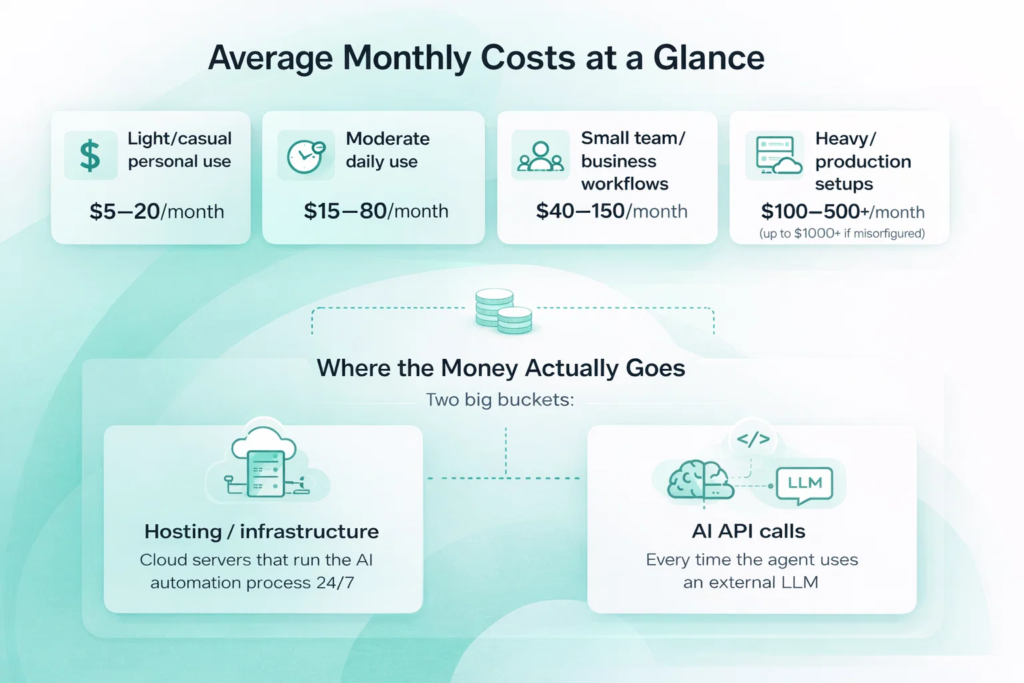
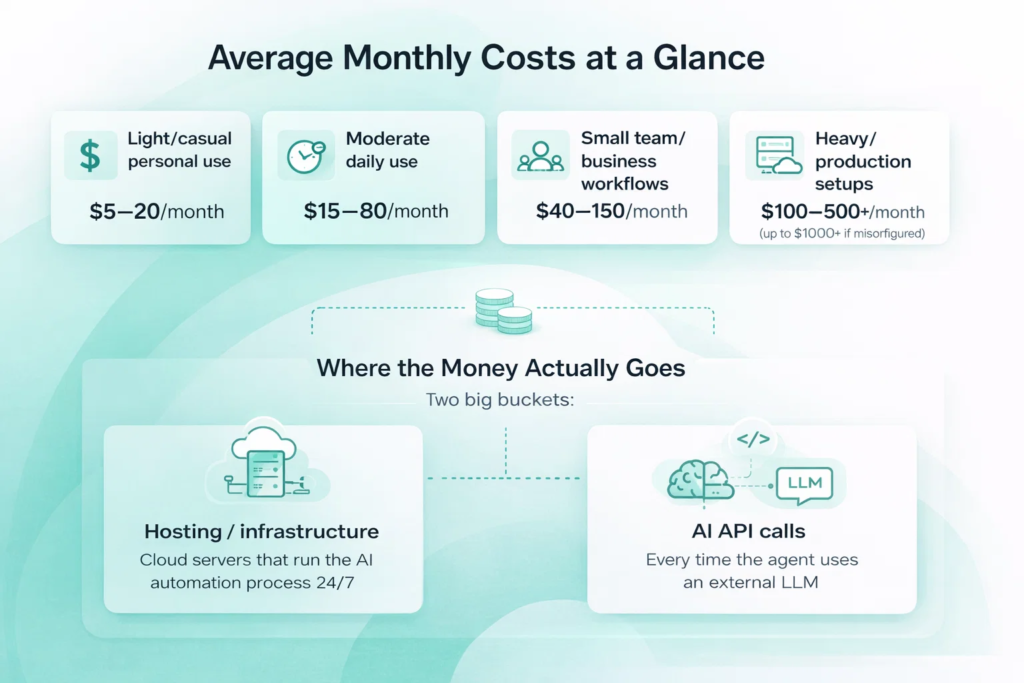
Average Monthly Costs at a Glance
Numbers reflect typical monthly totals that users are seeing in early 2026, based on deployment guides, community discussions, and hosting comparisons. They assume you’ve applied basic optimization – routing simple tasks to budget models, keeping context reasonable, and avoiding unnecessary calls. Without those steps, even light setups can cost noticeably more.
- Light/casual personal use: $5–20/month
- Moderate daily use: $15–80/month
- Small team/business workflows: $40–150/month
- Heavy/production setups: $100–500+/month (up to $1000+ if misconfigured)
Where the Money Actually Goes
There are two big buckets:
- Hosting / infrastructure: the machine or cloud server that runs the OpenClaw process non-stop so it can listen for messages, wake up on schedule, execute tasks.
- AI API calls: every time the agent needs to reason, plan, decide, read context or generate a response, it sends tokens to an external LLM (Claude, GPT, Gemini, etc.).
Everything else (storage for logs/memory, backups, monitoring) is usually small change – a few dollars at most.
Hosting is mostly predictable: you pick a plan and pay roughly the same each month. API costs are variable and can swing wildly depending on how much you use the agent, how big the context gets, and which model you choose.

FlyPix AI: Slashing OpenClaw Vision Costs for Geospatial Data
At FlyPix AI, we designed our platform to handle the heavy lifting of geospatial analysis so your general-purpose agents don’t have to. While OpenClaw is incredible for orchestrating workflows, using its vision capabilities to parse high-resolution satellite or drone imagery can quickly lead to the “runaway costs” mentioned above. Our specialized AI agents detect, outline, and classify objects in aerial imagery in seconds, saving up to 99.7% of the time required by manual methods. Whether you are monitoring crop health, construction progress, or infrastructure assets, you can train custom models directly in our interface without writing a single line of code.
By integrating our platform with your OpenClaw setup, you create a high-efficiency pipeline that protects your budget. FlyPix handles the complex, data-heavy image understanding locally or within our optimized cloud, and then passes only the essential text-based results to OpenClaw. This allows your agent to handle the administrative follow-up – like drafting reports, updating your CRM, or sending team alerts – using budget-friendly text models instead of expensive vision APIs. For professionals in agriculture, forestry, and urban planning, this combination offers the perfect balance of elite geospatial precision and sustainable operational costs.
Infrastructure and Hosting Expenses
Hosting OpenClaw requires a system that runs 24/7 to handle triggers and execute tasks. The framework is lightweight: basic setups need only 1–2 vCPU and 2–4 GB RAM. More complex use (multiple channels, browser automation, vision tasks) benefits from 4–8 GB RAM and extra cores.
| Option | Description & Specs | Monthly Cost | Pros & Cons / Notes |
| Local hardware | Existing PC, Mac Mini, NUC or Raspberry Pi | $0 recurring (after purchase) | One-time cost + electricity; drawbacks: outages, restarts, noise, heat; many users switch to cloud for reliability |
| Cloud free tiers | Oracle Cloud Always Free: up to 4 OCPU (~8 vCPU threads), 24 GB RAM, 200 GB storage | $0 | Upgrade to PAYG to avoid idle reclamation; other free tiers (AWS t4g.micro, GCP e2-micro, Azure B1s) are weaker and often insufficient for production |
| Paid VPS | Hetzner CAX11 (ARM, 2 vCPU / 4 GB / 40 GB NVMe); similar from Contabo, OVH, Linode, Vultr | $4–$12 | Hetzner very stable & popular at ~$4–5; good balance of price, performance and reliability |
| Mainstream clouds | AWS t4g.small, GCP e2-small, Azure B2s (2 vCPU / 2–4 GB) | $10–$15 | Robust but usually overkill for solo/personal OpenClaw setups; better for teams with existing accounts |
AI Model API Usage: The Main Variable Expense
OpenClaw has no built-in brain – it connects to external LLMs (Claude, GPT, Gemini, etc.) via API keys. Every task, decision, or even context refresh triggers an API call and burns tokens.
How the Pricing Works
- Input tokens: everything you send (prompt + history + context). Cheaper.
- Output tokens: the model’s reply. Usually 2–5× more expensive.
- Typical single interaction: 800–2000 input + 300–1000 output tokens.
More messages per day and more complex tasks = higher bill.
Model Tiers & Approximate Costs (USD per 1M tokens, early 2026)
- Budget (Haiku, Gemini Flash, GPT-4o-mini): $0.15–0.80 input / $0.60–4 output – good for ~80% of everyday tasks like classification, extraction, short replies.
- Mid-tier (Sonnet, GPT-4o): $2.50–5 input / $10–20 output – better reasoning when you actually need it.
- Premium (Opus, top GPTs): $5–15 input / $25+ output – reserve only for truly complex tasks.
- Vision models: much more expensive when sending screenshots (5–10× vs text parsing).
Factors That Drive Up or Reduce Costs
A few things really swing your monthly bill one way or the other. Here’s what tends to matter most in real deployments.
Model Selection
Model choice is by far the biggest lever. Hammering premium models (Sonnet, Opus, GPT-4 class) on every little task is the quickest path to a painful bill. Most people get 70–90% of their workload done perfectly well with budget options like Haiku, Gemini Flash, or GPT-4o-mini. Routing intelligently – cheap models for classification, extraction, short summaries; expensive ones only for complex reasoning – often slashes API spend by 70–90% without noticeable quality drop on routine stuff.
Prompt Caching
Prompt caching (when the provider supports it) is a quiet lifesaver. Structure your prompts so the fixed instructions and system role come first, then the variable user input. Many providers discount cached input tokens by 75–90% for a short window. High-frequency skills like email triage or calendar checks can drop their recurring cost dramatically this way.
Vision Usage
Vision usage eats tokens fast. Sending full screenshots to vision models is 5–10× more expensive than parsing accessibility trees or HTML. OpenClaw supports the cheaper path in many cases – switching to it wherever possible cuts vision-related costs hard.
Parallel Tasks and Batch Jobs
Parallel tasks and batch jobs multiply calls quickly. If ten automations fire at once, you’re paying ten times the tokens. Keep concurrency low unless the workflow genuinely needs it.
Heartbeat and Proactive Polling Frequency
Heartbeat and proactive polling frequency is a classic money pit. Checking email/calendar/notifications every 5 minutes instead of every 1–2 hours (or better – making it event-driven) can turn a $10/month setup into $80+. Dial this back aggressively.
Monitoring, Alerts, and Spending Caps
Monitoring, alerts, and spending caps are non-negotiable. Every major provider lets you set hard monthly limits and get emails at 50/75/90% of budget. Without them, one misconfigured loop can quietly rack up hundreds before you log in.
Idle and Forgotten Automations
Idle and forgotten automations quietly drain 10–30% of many people’s spend. Old test skills, abandoned experiments, or “I’ll fix this later” workflows keep waking up and calling the API. A quick audit every few weeks usually finds money you’re throwing away.
Log and Memory File Growth
Log and memory file growth sneaks up slowly. Conversation transcripts, memory JSONs, and debug logs accumulate. Storage is cheap, but 20–50 GB over half a year adds $2–5/month you didn’t budget. Archive or delete old stuff periodically.
Realistic Monthly Totals People Actually Pay
Based on real user reports from forums, Reddit, dev blogs, and hosting tutorials, here are the typical monthly costs people actually pay for OpenClaw (hosting + API combined):
- Light Personal Use: Few commands per day, basic tasks like email triage, calendar checks, simple web search, using a budget model. Total: $3–15.
- Moderate Daily Assistant: Handles inbox processing, drafting replies, booking meetings, social media posting; 20–80 interactions per day, mixed models. Total: $15–60
- Small Team / Business Workflows: Lead routing, content generation, CRM syncing, support triage for a small team or side project. Total: $40–120
- Heavy / Always-On Setup: Multiple messaging channels, proactive monitoring, browser automation, 1000+ calls per day. Total: $100–400+
- Extreme (Runaway Loops): Misconfigured heartbeats, unmonitored agents, infinite loops or unchecked parallel workflows. Total: $1,000–3,600+
Strategies for Cost Optimization
Effective management involves deliberate choices across setup and operation. Here are the most effective ways to keep spending low, based on what actually works for real users.
1. Smart Model Routing
Use the cheapest model that still works well for each task. Route 70–90% of work to budget options (Haiku, Gemini Flash, GPT-4o-mini) for classification, extraction, summaries, simple replies. Reserve mid-tier or premium models only for complex reasoning or high-stakes decisions. Tiered routing in config can cut API spend by 60–85%.
2. Prompt Caching
Structure prompts so static instructions and system role come first, variable input last. Many providers discount cached tokens by 75–90%. High-frequency skills (email triage, calendar checks) benefit the most.
3. Minimize Vision Usage
Vision calls cost 5–10× more than text parsing. Prefer accessibility tree or HTML extraction over screenshots whenever possible. Use vision only when layout or visual details are essential.
4. Control Heartbeat & Polling
Avoid frequent checks (e.g. every 5–15 min). Set heartbeats to hourly or make them event-driven. Frequent polling sends full context repeatedly and multiplies costs fast.
5. Set Limits & Alerts
In every provider dashboard, set hard monthly spending caps and alerts at 50/75/90%. Use separate API keys per workflow to track which automation drives costs. Check usage weekly at first.
6. Start Small, Scale Slowly
Launch one automation, monitor 3–7 days, then add more. Test new skills with budget models first. Gradual scaling prevents over-provisioning.
7. Audit Regularly
Every 2–4 weeks review active workflows and disable/delete unused ones. Idle/test automations often eat 10–30% of spend quietly.
8. Consider Local Models
If you have GPU hardware, run smaller local models (Llama 3.1 8B, Phi-3 mini). Zero API fees, but trade-offs in speed and capability.
Quick wins: switch most tasks to budget models, reduce heartbeat frequency, set spending caps, prune inactive workflows. These steps alone often halve the bill.
Bottom Line
OpenClaw can be very cheap if you treat it like a tool instead of a magic genie – pick budget models for routine work, watch usage daily for the first month, set limits, prune dead code. Most solo users who aren’t doing crazy browser farms or 24/7 monitoring live comfortably under $30/month. Once you cross into business-critical or heavy automation territory, $50–$150 becomes normal.
If you configure it poorly (large context + frequent heartbeats + premium model + no alerts), you can burn hundreds very quickly. The framework is powerful, but it’s not free lunch.
FAQ
The software yes. Running it – no, unless you stay inside free hosting tiers and free API limits.
AI API tokens, especially if you use premium models or have large/repeated context.
Possible with Oracle free tier + Google Gemini free daily quota, but limited messages/day and some risk of account issues.
For personal use 2–4 GB RAM / 2–4 vCPU is plenty. Most people over-provision at first.
Yes – screenshots are expensive. Use accessibility parsing when you can.
You can get surprise $100–$500 bills from runaway loops or too-frequent polling. Alerts and spending caps prevent most disasters.
If you already have decent GPU hardware – yes, zero API cost. For most people the hassle and upfront money aren’t worth it compared to $10–$30/month cloud + API.