

Running OpenClaw is like giving someone the keys to your digital house. That someone happens to be an AI agent with system-level access, and not everyone knocking is friendly.
If you’re self-hosting OpenClaw—formerly known as Moltbot and Clawdbot before that—you’ve probably noticed the security conversations getting louder. There’s good reason. Early 2026 brought documented CVEs, including references to remote code execution vulnerabilities that work even on localhost-bound instances. Community discussions reveal concerns about exposed OpenClaw instances, and researchers have documented malicious skills circulating in the wild.
Here’s the thing though: OpenClaw isn’t inherently dangerous. It’s powerful. And powerful tools need proper guardrails.
The Real Threat Model
Let’s talk about what you’re actually protecting against. OpenClaw operates as an autonomous agent with the ability to execute commands, read files, and interact with your system. That’s by design—it’s what makes the tool useful.
The security risks break down into three categories:
- Direct compromise: Attackers gaining access through exposed gateways, weak authentication, or known vulnerabilities
- Prompt injection: Malicious instructions embedded in content the agent processes, causing it to execute unintended actions
- Supply chain attacks: Compromised skills, plugins, or extensions that contain malicious code
According to research published on arXiv in February 2026, AI agents operating in social environments face unique security challenges around sociality illusions and multi-agent interactions. OpenClaw’s always-on nature amplifies these concerns.
Community member feedback confirms what security researchers have been saying: “You need to use it on a system you don’t care about,” or “Do it on an isolated machine with access to accounts that are isolated from your regular accounts.”
Deployment Isolation: Your First Line of Defense
Don’t run OpenClaw on your daily driver. Just don’t.
One Reddit user put it plainly: “Running openClaw directly in your main machine can be a bit dangerous. I’d suggest you to avoid it unless if its your throwaway computer.”
You’ve got three solid isolation approaches:
Virtual Machine Route
A VM gives you complete isolation. Download QEMU or use Windows Hyper-V (built into Windows 10/11 Pro). Install a minimal Linux distribution, set up OpenClaw there, and you’ve created a security boundary.
One user shared their Mac setup: “I run it from a separate user account with rules denying access to certain hosts on the private network.” On Ubuntu, they use iptables filtering that only allows certain ports to the OpenClaw instance.
VPS Deployment
A VPS from providers like DigitalOcean or Hetzner puts OpenClaw on someone else’s hardware. Bind it to localhost, disable password authentication, configure UFW firewall, and access it through Tailscale or SSH tunnel.
Multiple community members report cloud provider deployments working reliably. The separation from your personal data is worth the minimal complexity.
Dedicated Hardware
An old laptop or Mac Mini dedicated to OpenClaw provides physical isolation. Combine it with Tailscale for secure remote access, and you’ve got a local AI assistant that can’t touch your primary systems.
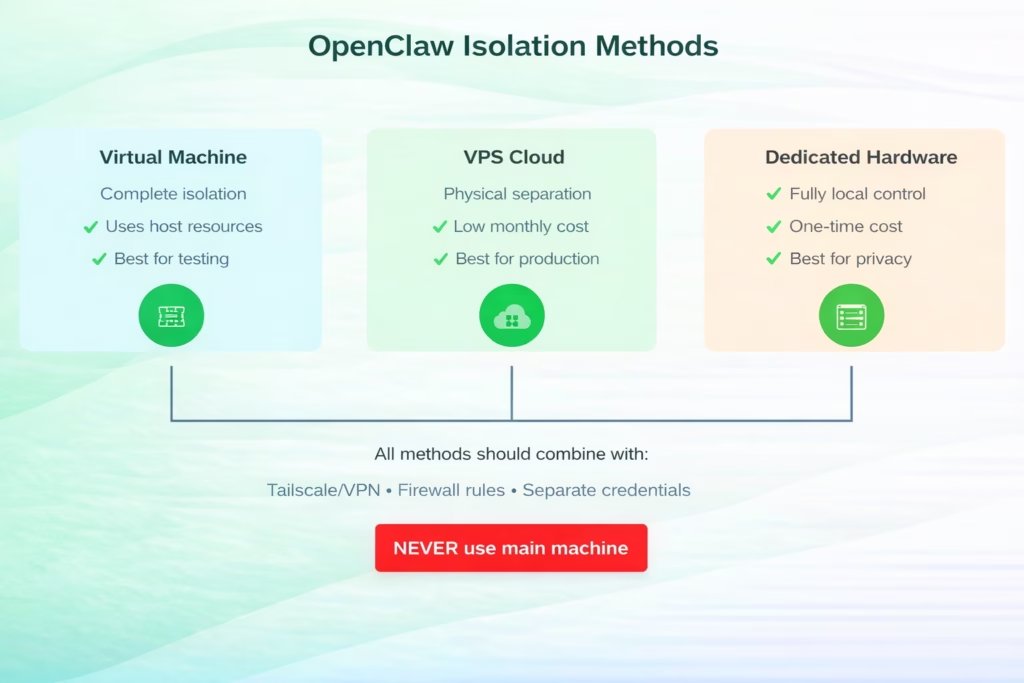
Three isolation approaches for OpenClaw deployment, ranked by security effectiveness and use case
Tool Restriction and Sandboxing
OpenClaw ships with powerful “skills”—essentially tools the agent can invoke. Some are benign. Others are dangerous in the wrong hands (or prompts).
The node execution tool (system.run) lets OpenClaw execute arbitrary system commands. File access tools can read sensitive data. Browser control can interact with authenticated sessions. Network tools can exfiltrate data.
Here’s what you must configure:
Disable Dangerous Default Tools
In your OpenClaw configuration, explicitly disable or restrict:
- Shell execution (system.run, exec, shell)
- Unrestricted file access (limit to specific directories)
- Network tools that don’t have a specific use case
- Browser automation in authenticated contexts
Security best practices for AI agent deployments recommend implementing allowlist-based tool access rather than blocklist. Only enable tools your specific use case requires.
Configure Tool-Level Permissions
OpenClaw supports a command authorization model. Think of it as sudo for your AI agent. Critical operations should require explicit approval or be disabled entirely.
Community feedback suggests workspace isolation works well: one user runs ClamAV to scan anything the agent touches, creating a second layer of protection.
Authentication and Access Control
Community discussions indicate that many OpenClaw instances lack adequate authentication. Don’t be one of them.
Gateway Authentication
If you’re exposing OpenClaw through a web interface, put authentication in front of it. Period.
Options include:
- Reverse proxy with HTTP basic auth (nginx, Caddy)
- OAuth2 proxy for SSO integration
- Tailscale authentication for mesh VPN access
Never expose the OpenClaw control UI over HTTP without authentication. Security guidance explicitly warns against insecure configurations that disable authentication.
Session Isolation
If multiple users interact with your OpenClaw instance, enable session isolation. Without it, one user’s prompts can access another user’s context, credentials, and data.
The DM access model supports pairing, allowlist, open, or disabled modes. For multi-user deployments, use pairing or allowlist. Never run in open mode on an internet-facing instance.
The Prompt Injection Problem
This is where things get tricky. Prompt injection attacks embed malicious instructions in content your agent processes—emails, web pages, files, messages.
Real talk: there’s no perfect defense. But you can make it harder.
Input Validation
Security testing has found that input validation can catch basic injection attempts. It’s not foolproof, but it raises the bar.
Configure content filters that strip or escape suspicious patterns before they reach the language model. Rate limiting also reduces brute-force injection attempts.
Privilege Minimization
The less your agent can do, the less damage an injection can cause. This circles back to tool restrictions—if the agent can’t execute shell commands, injection attempts targeting that capability fail.
One community member advocated for “access control before intelligence.” Limit capabilities first, then add intelligence within those bounds.
| Attack Vector | Risk Level | Effective Mitigation | Implementation Difficulty |
|---|---|---|---|
| Exposed gateway (no auth) | Critical | Reverse proxy + auth | Low |
| Prompt injection | High | Tool restrictions + input validation | Medium |
| Remote code execution vulnerabilities | Critical | Update to latest version | Low |
| Malicious skills | High | Audit all skills, allowlist only | Medium |
| Credential exposure | High | Separate accounts, secret management | Medium |
| Data exfiltration | High | Network restrictions, audit logging | High |
Private Model Configuration
Here’s an uncomfortable truth: if you’re using Groq, GPT, Claude, or Gemini APIs with OpenClaw, you’re not keeping your data local. Those providers see every prompt your agent sends.
For true privacy, run local models through Ollama. It’s slower. It’s less capable. But it’s actually private.
A security-hardened setup combines:
- Ollama running locally or on your VPS
- Models like Llama 2, Mistral, or CodeLlama
- No external API calls
Community users have noted performance tradeoffs with larger models, but for many use cases, a local 7B or 13B model handles tasks fine without sending data externally.
Audit Logging and Monitoring
You can’t secure what you can’t see. Enable comprehensive logging.
OpenClaw stores session logs on disk by default. Sessions are saved to JSON and JSONL files in the directory ~/.openclaw/agents/<agentId>/sessions/ by default.
Configure your deployment to:
- Log all tool invocations with timestamps
- Record command execution attempts (successful and failed)
- Track file access patterns
- Monitor network connections
Structured logging and telemetry components in security playbooks provide comprehensive audit trails. Route logs to a separate system so compromise of the OpenClaw instance doesn’t compromise your audit trail.
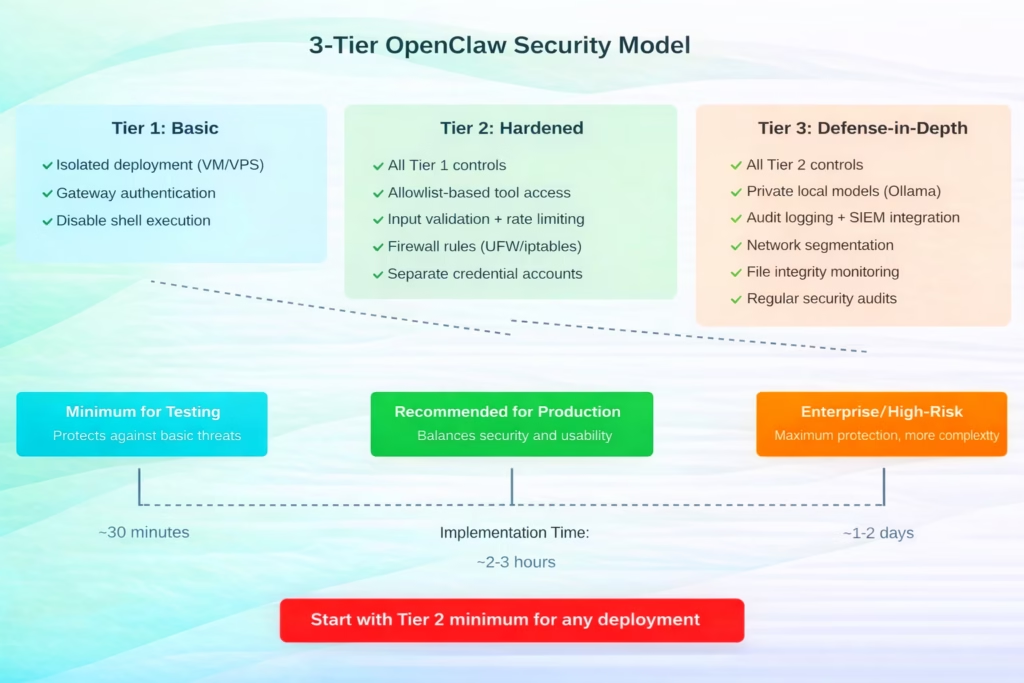
Recommended security tiers for OpenClaw deployment based on risk tolerance and use case
Hardened Baseline in 60 Seconds
If you’re already running OpenClaw and need to secure it right now, here’s the absolute minimum:
- Stop the OpenClaw service
- Edit your config file to disable system.run and shell tools
- Set up a reverse proxy with authentication (nginx + basic auth)
- Restart OpenClaw bound to localhost only
- Access through the authenticated proxy
That’s not perfect, but it closes the most obvious holes. You can layer on additional security from there.
Keeping Current with CVEs
CISA published vulnerability summaries for the weeks of January 26 and February 2, 2026.
Staying current with security vulnerabilities requires:
- Subscribing to the OpenClaw security advisories on GitHub
- Monitoring the CISA vulnerability database
- Joining community security discussions
- Running regular updates (test in staging first)
Documented vulnerabilities represent discovered security issues. Treat updates as critical, not optional.
What Actually Stops Attacks
Security testing has shown that layered controls are more effective than single mechanisms. Rate limiting can reduce brute-force attempts. Input validation can catch basic injections. But no single control solves everything.
The effective approach layers multiple controls. An attacker needs to bypass isolation AND tool restrictions AND authentication AND input validation. Each layer raises the difficulty.
One security principle notes: “You will never be able to stop attacks in a totally stochastically programmed environment.” That’s probably true. But you can make attacks expensive enough that attackers move to easier targets.
Credential Storage and Secret Management
OpenClaw needs credentials to interact with services on your behalf. Don’t hardcode them in config files.
Use environment variables or a proper secret management system. If your OpenClaw instance gets compromised, you don’t want your AWS keys, database passwords, and API tokens included in the breach.
Create separate accounts with minimal privileges for OpenClaw’s use. If the agent needs to send emails, create an email account just for that. Don’t hand over your personal Gmail credentials.
Docker Considerations
Running OpenClaw in Docker adds a container-level security boundary. But don’t assume Docker alone protects you.
Configure your Docker deployment with:
- Non-root user inside the container
- Read-only filesystem where possible
- Dropped capabilities (–cap-drop=ALL, add back only what’s needed)
- Network isolation (custom bridge network, not host mode)
Security playbooks on GitHub include Docker-specific hardening configurations. Use them.
Community Security Resources
The OpenClaw ecosystem includes several security-focused projects:
- openclaw-security-playbook: Production-ready security configurations
- openclaw-detect: Threat detection tooling
- openclaw-shield: Input validation and filtering
- clawguard: Runtime monitoring and protection
These represent community efforts to address security concerns. Evaluate them for your deployment.

Automated Visual Monitoring with FlyPix AI
While securing a local autonomous agent like OpenClaw requires significant technical overhead, our team believes that high-stakes automation should be both powerful and inherently sandboxed. When it comes to analyzing the physical world through satellite and drone imagery, we’ve developed FlyPix AI to act as a specialized agent that automates object detection and change monitoring without compromising your local system’s integrity. By shifting the “intelligence” of geospatial analysis to our secure, cloud-based platform, you can detect thousands of objects in seconds—saving up to 99.7% of the time usually spent on manual annotation—while keeping your primary infrastructure completely isolated from the processing load.
Our platform serves as a vital guardrail for professionals in construction, agriculture, and government who need real-world insights without the risks associated with self-hosted AI scripts. Whether you are tracking infrastructure changes or identifying anomalies across vast landscapes, our no-code interface allows you to train custom models and visualize results through intuitive dashboards. Instead of worrying about the “lethal trifecta” of local agent vulnerabilities, you can leverage our pre-built tools to gain precise, actionable data from the sky with just a few clicks.
Moving Forward
OpenClaw represents a powerful capability—autonomous AI agents with real-world access. That power demands respect.
Security isn’t a checklist you complete once. It’s an ongoing practice. New vulnerabilities will emerge. Attack techniques will evolve. Your security posture needs to adapt.
Start with the fundamentals: isolate your deployment, restrict dangerous tools, implement authentication, and enable logging. Build from there based on your specific risk profile.
The community is actively working on security tooling and documentation. Engage with it. Share what works (and what doesn’t). We’re all figuring this out together.
And remember: if something feels too permissive, it probably is. Trust that instinct. The flexibility to do anything includes the flexibility to do damage. Design accordingly.
FAQ
No. OpenClaw has system-level access and should run on isolated hardware—a VM, VPS, or dedicated device. Community consensus strongly advises against running it on your daily driver machine.
Layer defenses: restrict tool access, implement input validation, use rate limiting, and minimize agent privileges. There’s no perfect defense, but these controls make attacks significantly harder.
If privacy is critical, use local models through Ollama. Cloud APIs (GPT, Claude, Gemini) see all your prompts. Local models are slower and less capable but keep data on your infrastructure.
Start with Tier 2: isolated deployment, gateway authentication, disabled shell execution, allowlist-based tool access, firewall rules, and separate credentials. This balances security with reasonable implementation effort.
Check for updates weekly. Apply security patches immediately after testing in a non-production environment. New vulnerabilities regularly emerge—staying current is essential.
Only with robust authentication, HTTPS, rate limiting, and comprehensive monitoring. Community reports indicate many instances are exposed with inadequate protection. If you must expose it, treat it as a critical security risk.
Stop the service immediately. Review audit logs for suspicious activity. Change credentials for any accounts the agent accessed. Rebuild in an isolated environment with proper security controls before restarting.