

The AI agent landscape shifted when OpenAI released ChatGPT Agent in July 2025. According to OpenAI’s announcement, this new capability allows ChatGPT to “think and act, proactively choosing from a toolbox of agentic skills to complete tasks for you.” But there’s another player that’s been generating serious buzz in developer communities: OpenClaw.
Here’s the thing though—these two products are fundamentally different animals. One runs in your browser and handles everything through OpenAI’s infrastructure. The other lives on your machine, requires some technical know-how, and gives you complete control over what happens with your data.
I’ve spent the last two weeks using both. And honestly? The choice isn’t as obvious as the marketing suggests.
Both Called “AI Agents,” But That’s Where the Similarity Ends
Let’s clear something up right away. When OpenAI talks about ChatGPT Agent, they’re describing an enhanced version of ChatGPT that can actually execute tasks. It can make bookings, research topics, and create presentations—all while you guide it through conversation.
OpenClaw is different. It’s described as a framework that runs locally on your machine. One community discussion noted it uses a queue-based system that “keeps things serial by default instead of the async mess most agent systems turn into.”
Translation? OpenClaw isn’t a product you subscribe to. It’s infrastructure you deploy yourself.
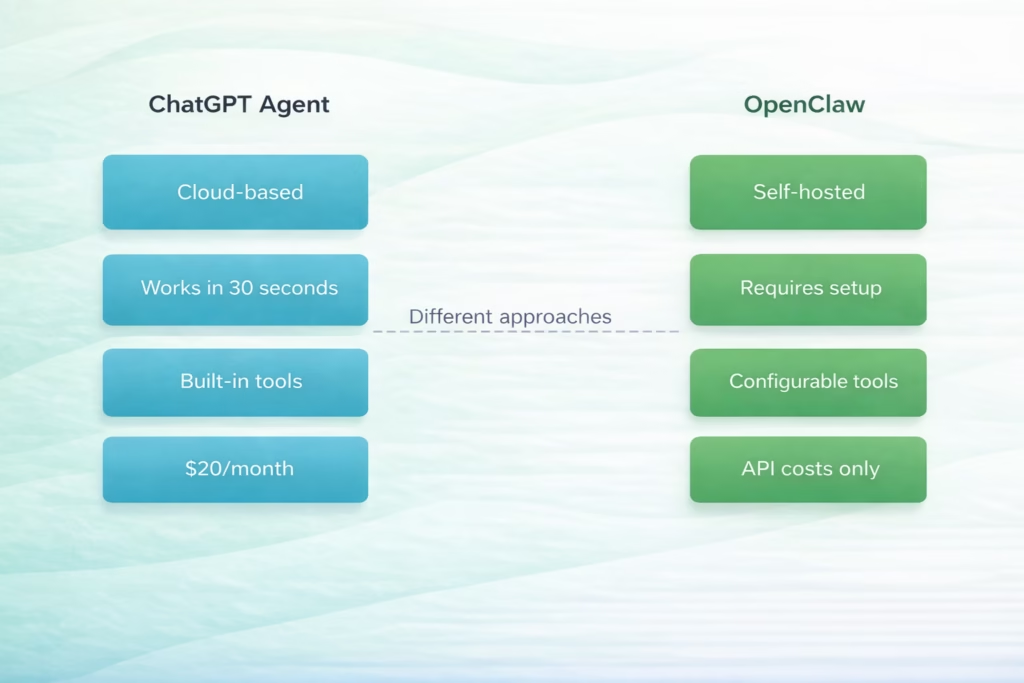
Core architectural differences between ChatGPT Agent and OpenClaw
Where Your Data Actually Goes
This is where things get interesting. And honestly, it’s the deciding factor for a lot of people.
ChatGPT Agent processes everything in OpenAI’s cloud. When you ask it to research competitors, analyze documents, or book appointments, that data travels through OpenAI’s servers. For most consumer use cases, that’s fine. OpenAI has solid privacy policies.
But OpenClaw runs on your machine. Completely. One user who switched from ChatGPT noted: “I was hitting the same wall with ChatGPT having zero memory between sessions, like I’d explain my project structure then come back the next day and it’s like meeting a new person.” While newer “memory” features allow for some persistent information, the default behavior is that context is limited to the current chat’s active tokens.
Real talk: if you’re handling proprietary code, confidential client data, or anything that can’t leave your infrastructure, OpenClaw is the only viable option here. ChatGPT Agent, no matter how good it gets, can’t solve the fundamental issue that your data leaves your control.
That said, OpenClaw’s privacy advantage comes with a caveat—you’re responsible for securing it. Community discussions raised legitimate concerns about running agents with network access without proper safeguards.
What ChatGPT Agent Actually Does Better
Let me be clear about something: ChatGPT Agent is ridiculously easy to use. You’re already in ChatGPT. You already know how to use it. OpenAI just gave it the ability to actually execute tasks instead of just describing how to do them.
According to OpenAI’s July 2025 announcement, ChatGPT Agent can “proactively choose from a toolbox of agentic skills” to complete complex, multi-step tasks. It can research topics, make reservations, create presentations, and handle workflows that used to require multiple tools.
The killer feature? Speed to first value. You don’t install anything. You don’t configure API keys. You don’t troubleshoot dependencies. You just… ask it to do something, and it does it.
For non-technical users, this isn’t even a competition. ChatGPT Agent wins by default.
The Built-in Tool Advantage
ChatGPT Agent comes with tools already integrated. Web browsing, code execution, image generation, data analysis—it’s all there. You don’t need to connect anything or write configuration files.
OpenClaw requires you to define tools, set up integrations, and configure how the agent accesses external services. That flexibility is powerful, but it’s also work.
What OpenClaw Actually Unlocks
Now, here’s where OpenClaw starts to look compelling. It’s not about individual tasks—it’s about persistence and autonomy.
One user who made the switch described it this way: “With ChatGPT I’m the one doing the work. I open the app, type a prompt, wait for a response, copy/paste. With OpenClaw running locally, I define a task once and it just… runs. In the background. For hours if needed.”
This is the actual difference. ChatGPT Agent is reactive. You ask, it responds. OpenClaw can run continuously, maintaining context across sessions, executing long-running tasks, and actually operating as an autonomous agent rather than an enhanced chatbot.
OpenAI’s documentation on building agents emphasizes that “large language models are becoming increasingly capable of handling complex, multi-step tasks.” OpenClaw takes that capability and removes the requirement that you babysit every step.
The Markdown Files That Change Everything
OpenClaw uses configuration files to define agent behavior. These files define your agent’s personality, capabilities, tools, and memory structure.
Sound technical? It is. But it also means you can version control your agent configuration and customize behavior in ways ChatGPT Agent doesn’t allow. Community repositories have emerged with ready-to-use configurations for specific use cases.
| Feature | ChatGPT Agent | OpenClaw |
|---|---|---|
| Setup time | 0 minutes | 30-60 minutes |
| Hosting | Cloud (OpenAI) | Local machine |
| Memory persistence | Session-based | Continuous |
| Data privacy | Processes in cloud | Stays local |
| Customization | Limited | Full control |
| Tool integration | Pre-built only | Custom tools |
| Cost structure | $20/month flat | API usage only |
| Technical skill required | None | Moderate to high |
The Model Choice Affects OpenClaw More Than You Expect
Here’s something that doesn’t get talked about enough: OpenClaw’s performance is directly tied to which model you point it at.
ChatGPT Agent uses whatever model OpenAI decides to use. You don’t choose. You don’t configure. It just works with whatever’s behind the scenes.
OpenClaw lets you choose. OpenAI’s API, Anthropic’s Claude, local models, or services like OpenRouter that provide access to multiple models. Different models have different strengths—some prioritize speed while others prioritize code quality and reasoning.
This flexibility is powerful. But it also means you need to understand the tradeoffs between different models. OpenAI’s documentation on their in-house data agent indicates they use specialized components for reliability—configuration you’d need to figure out yourself with OpenClaw.
What You’ll Actually Spend Per Month
Let’s talk money. ChatGPT Plus costs $20/month, but advanced agentic tasks involving ‘Agent Mode’ or heavy use of the ‘Operator’ capabilities may be subject to stricter dynamic limits or require the Pro tier ($200/month) for unrestricted access. Fixed cost, unlimited usage within rate limits.
OpenClaw itself is free—it’s open source. But you pay for the API calls it makes. How much depends entirely on your usage pattern and which model you choose.
Light usage? Maybe $5-10/month. Heavy usage with GPT-4 or Claude? Could easily hit $50-100/month. Community discussions confirm that ChatGPT subscriptions and the OpenAI API are separate products with different billing structures.
The cost equation also includes your hardware. OpenClaw needs somewhere to run. Your laptop works for testing, but serious usage often means a dedicated server, which adds infrastructure costs.
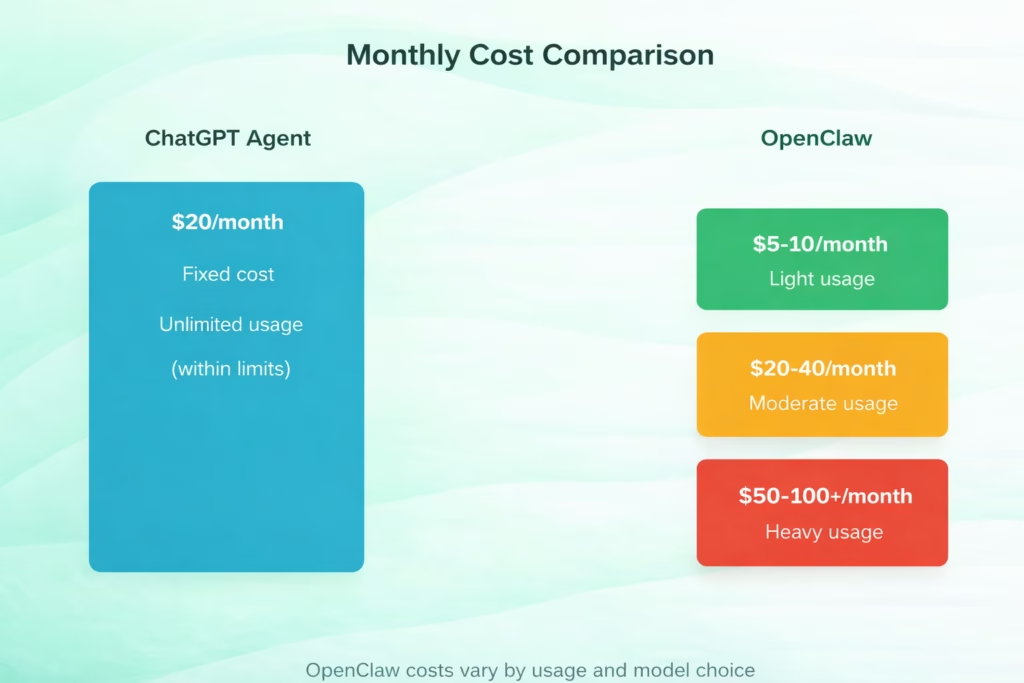
Cost structure comparison: ChatGPT Agent flat fee vs OpenClaw variable API costs
The Tradeoffs Nobody Mentions
Look, both options have limitations that marketing doesn’t emphasize.
ChatGPT Agent resets context periodically. Yes, it has memory features, but it’s fundamentally session-based. When you close the chat, you lose the working context. Community discussions reveal this frustration: users report having to re-explain project structures every session.
OpenClaw maintains persistent memory through its architecture, but it also requires maintenance and configuration. One community member called it “a pain to setup and fragile.”
Security is another concern. ChatGPT Agent runs in OpenAI’s sandboxed environment. OpenClaw runs with whatever permissions you give it on your local machine. If you configure it poorly or give it access to sensitive APIs, the risks are real. Technical discussions highlight that security requires careful configuration of permissions and access controls.
The Accessibility Trade-off
OpenClaw offers advanced browser automation capabilities, which can be more reliable than simpler approaches. But it also means you’re debugging configuration when things break, reading logs, and troubleshooting API connections.
ChatGPT Agent just… works. Or when it doesn’t, you refresh the page. The accessibility difference is real: one empowers developers, the other empowers everyone.
Who Should Actually Choose OpenClaw
After two weeks of real-world testing, here’s my honest take on who benefits from OpenClaw:
- Developers who need persistent automation: If you’re running tasks that span hours or days, OpenClaw’s continuous operation makes sense.
- Teams with strict privacy requirements: Financial services, healthcare, legal—anywhere data can’t leave your infrastructure.
- People who want full customization: If you’re willing to invest time in configuration for exactly the behavior you need.
- Cost-conscious heavy users: If you’d spend more than $20/month on ChatGPT but can optimize API calls with OpenClaw.
But honestly? Most people don’t need OpenClaw. The setup complexity, maintenance burden, and technical requirements aren’t worth it unless you have specific needs that ChatGPT Agent can’t meet.
Who Should Stick With ChatGPT Agent
ChatGPT Agent makes sense for:
- Non-technical users: If you don’t want to learn CLI tools or debug configuration files, this is your only real option.
- Quick, varied tasks: Research, writing, analysis, brainstorming—ChatGPT Agent handles these brilliantly.
- Teams already using ChatGPT: If you’re paying for Plus anyway, the agent capabilities are included.
- People who value reliability: OpenAI’s infrastructure is robust. You’re not debugging why your local agent stopped responding at 2 AM.
The short answer? If you’re reading this article to decide whether to switch from ChatGPT to OpenClaw, you probably shouldn’t. The people who benefit from OpenClaw already know why they need it.
These Products Are Converging (Sort Of)
Here’s what’s interesting about 2026: the gap between these approaches is narrowing from both directions.
OpenAI is making ChatGPT more agentic. Their documentation on building agents emphasizes autonomous operation, tool use, and multi-step reasoning. Features like memory and persistent context are improving.
Meanwhile, OpenClaw and similar frameworks are getting easier to use. Pre-built configurations, better documentation, and simpler deployment options are emerging. Community discussions note that “the hard part isn’t writing the agent, it’s treating instructions as executable tasks with checks, state, and side effects.”
But they’re still fundamentally different products. One is a consumer service. The other is developer infrastructure.
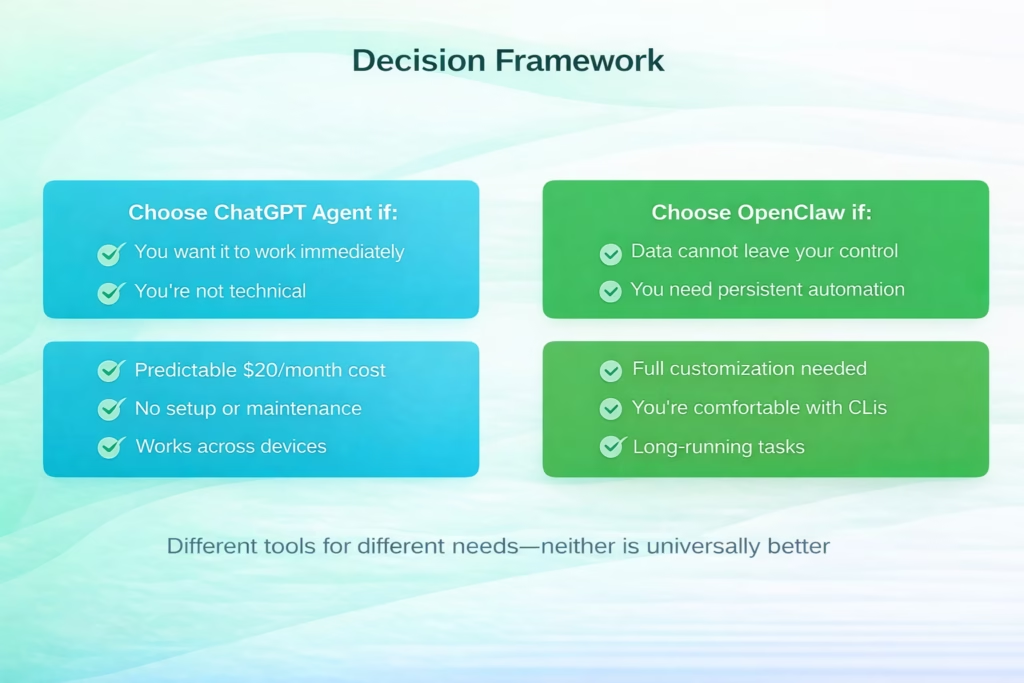
When to choose each AI agent based on your requirements
My Actual Recommendation After Two Weeks
I’m still using both. That probably tells you everything.
ChatGPT Agent is my default for 90% of tasks. Research, writing assistance, quick automation, brainstorming—it handles all of this without friction. I don’t want to maintain infrastructure for these use cases.
But I have OpenClaw running for specific workflows where persistence and privacy matter. Code analysis that references proprietary repositories. Long-running data processing tasks. Automation that needs to operate overnight without my involvement.
The question isn’t “which is better?” It’s “which solves your specific problem?” And for most people reading this, ChatGPT Agent is the honest answer.
OpenClaw is powerful. It’s well-architected. It offers capabilities ChatGPT Agent can’t match. But it requires technical skill, ongoing maintenance, and a clear use case that justifies the complexity.

High-Precision Geospatial Automation with FlyPix AI
While general-purpose tools like OpenClaw offer great flexibility for text and code, certain specialized industries require AI agents designed for high-stakes visual data. At FlyPix AI, we have developed a platform that brings agentic automation to the world of satellite, aerial, and drone imagery. Our team understands that manual image analysis is a massive bottleneck; that’s why our system is designed to identify and outline complex objects in dense scenes automatically. Whether you are in construction, agriculture, or port operations, our technology allows you to automate what you see from the sky, reducing manual annotation time by up to 99.7%.
We believe that the power of AI agents should be accessible to everyone, not just developers. Unlike frameworks that require deep technical configuration, our platform enables you to train custom AI models and perform individual geospatial analysis without any programming knowledge. By integrating the speed of cloud computing with specialized foundation models, we help teams move from raw imagery to actionable insights in minutes. If your workflow involves monitoring large-scale infrastructure or land-use changes, our specialized AI agents provide a level of precision and scale that general LLM agents simply aren’t built to handle.
The Bottom Line
ChatGPT Agent and OpenClaw represent two valid approaches to AI agents in 2026. One prioritizes accessibility and ease of use. The other prioritizes control and customization.
OpenAI’s research on building agents indicates the field is rapidly evolving toward more capable autonomous systems. Both products are part of that evolution, just approaching it from different directions.
Start with ChatGPT Agent. It’s the practical choice for most people. You can be productive in 30 seconds, the cost is predictable, and OpenAI handles all the complexity.
Consider OpenClaw only if you have specific needs that ChatGPT Agent can’t meet: strict privacy requirements, persistent long-running tasks, full customization control, or workflows that require continuous autonomous operation.
The AI agent space will continue to evolve. But in 2026, the choice between these two is less about which is objectively better and more about matching the tool to your actual requirements. Choose based on your workflow, not the hype.
Ready to get started? If you’re going with ChatGPT Agent, you probably already have access through your ChatGPT Plus subscription. If you’re ready for OpenClaw’s complexity and capabilities, head to GitHub and prepare for a learning curve—but also for capabilities that hosted solutions can’t provide.
Frequently Asked Questions
No. ChatGPT subscriptions and the OpenAI API are separate products with different pricing structures. OpenClaw requires API keys and bills based on usage, not the flat monthly subscription that ChatGPT Plus uses.
The OpenClaw framework itself is open source and free, but you’ll pay for the API calls it makes to language models like GPT-4 or Claude. Depending on usage, this could range from $5-10/month for light usage to $50-100+ for heavy usage.
OpenClaw is more private because it runs entirely on your local machine—your data never leaves your infrastructure. ChatGPT Agent processes everything in OpenAI’s cloud, which means your data travels through their servers.
ChatGPT Agent has memory features but operates on a session-based model. OpenClaw maintains persistent memory through its architecture, which means it can maintain context across sessions more reliably.
OpenClaw requires moderate to high technical skill. You’ll need to be comfortable with command-line interfaces, configuring API keys, editing configuration files, and troubleshooting when things break. Expect 30-60 minutes minimum for initial setup.
Yes. OpenClaw supports multiple model providers including OpenAI, Anthropic’s Claude, and services like OpenRouter that provide access to various models. This flexibility lets you choose the best model for your specific tasks and budget.
Yes. OpenClaw runs with whatever permissions you give it on your machine. If configured poorly or given access to sensitive APIs without proper guardrails, it can pose security risks. ChatGPT Agent runs in OpenAI’s sandboxed environment, which provides more inherent security boundaries.