

People often group OpenClaw and Claude Code together. They get labeled as AI agents, automation tools, developer assistants – all technically true, but a bit misleading. They weren’t designed to compete with each other. They operate in different layers.
OpenClaw sits in your communication flow. It deals with inboxes, reminders, cross-platform messages, the small operational details that shape your day. Claude Code primarily operates as a CLI tool in the terminal. It helps you write, refactor, and debug real code. If you’re deciding between them – or wondering whether you need both – the distinction isn’t just about features. It’s about what kind of work you’re actually trying to improve.
Different Foundations, Different Jobs
OpenClaw starts from communication. That’s its home base. It plugs into Telegram, Slack, Discord, even iMessage, and reacts when something actually happens – a message comes in, a reminder is due, an update needs to be pushed. It coordinates things quietly across platforms. Schedules, follow-ups, small operational nudges. Once it’s configured properly, you stop thinking about it. It runs in the background, almost like an extra team member who doesn’t need supervision.
Claude Code is built for a completely different environment. It lives where developers work – primarily in the terminal as a CLI tool, with official integrations and extensions for VS Code, JetBrains IDEs (IntelliJ, PyCharm, etc.), Cursor, Xcode, a standalone desktop app, and browser-based sessions. You give it a clear prompt, and it moves. It can refactor code, run tests, review changes, interact with GitHub or Jira. But it doesn’t stay on in the background watching your systems. It waits for direction. When you call it, it focuses, executes, and gets out of the way.
They’re not trying to replace each other. OpenClaw won’t troubleshoot your backend service. Claude Code won’t sort your Slack messages or remind you about a meeting. And that’s the point. Each one operates in its own layer. When used together, they don’t clash – they complement. One keeps communication structured. The other keeps development moving.

FlyPix AI Approach to AI Agents: Built for Scale, Designed for Integration
At FlyPix AI, we work with AI systems that operate on large-scale visual data – satellite imagery, drone footage, geospatial layers. These environments are demanding. Data is heavy, noisy, and constantly updating. In that context, automation has to be stable, predictable, and tightly connected to existing workflows. There is no room for fragile logic or experimental behavior.
That’s why discussions around tools like OpenClaw and Claude Code matter to us. They operate in different layers – communication and development – but the expectations are similar. Agents should retain context, respond without friction, and support real work rather than distract from it.
If you would like to stay connected, you can also find us on LinkedIn. Whether you are building workflows in code or extracting insight from geospatial data, the principle remains consistent. Automation should fit naturally into your environment – and then get out of the way.
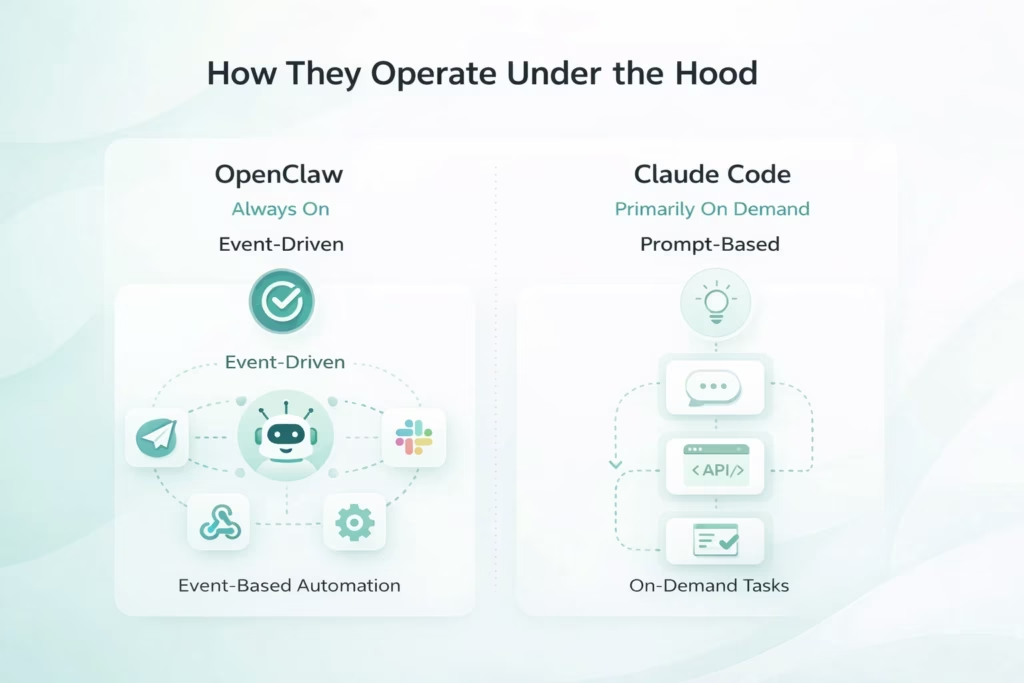
How They Operate Under the Hood
When people compare OpenClaw and Claude Code, they usually look at features first. Integrations, tools, capabilities. But the real difference shows up deeper – in how they run, how they’re triggered, and how they exist inside your workflow. That architectural layer changes everything.
OpenClaw: Always On, Event-Driven
OpenClaw is built to stay running. Once it’s installed, it doesn’t wait for you to “open” it. It operates in the background, listening across Telegram, Slack, WhatsApp, even iMessage. It reacts to events as they happen.
- A message lands.
- A calendar update syncs.
- A webhook fires from another system.
That event kicks off the internal routing logic. The system decides which agent handles the task, pulls the relevant memory, selects a skill, and executes whatever is needed – maybe an API call, maybe a drafted reply, maybe a direct action.
You don’t manually trigger every interaction. It feels more like a layer woven into your workflow. Quiet, persistent, steady. Not flashy. Just present.
Claude Code: Primarily On Demand, Prompt-Based
Claude Code is the opposite in terms of presence. It doesn’t sit there watching your repository. It doesn’t monitor events. You typically start a session when you need help, provide a prompt, and it executes the task.
However, it also supports background/long-running tasks (kick them off and check back later via the web interface), agent teams (multiple agents working in parallel autonomously), and sub-agents that coordinate and execute plans across sessions without constant user input.
Where You Actually Feel the Difference
In daily use, this becomes obvious pretty quickly. OpenClaw blends into your day. It nudges you, routes things, reacts automatically. Sometimes you forget it’s even running – until it saves you from missing something. Claude Code feels sharper. You reach for it when you need concentrated help inside a codebase. It enters, executes, exits.
One supports ongoing coordination across platforms. The other accelerates hands-on development work. Same broad category. Very different operational models.
Extending Capabilities: Skills and Plugin Systems
Both OpenClaw and Claude Code can be extended. That’s where things get interesting. But the way they approach extensibility is very different. One leans into control and flexibility. The other prioritizes speed and a smooth developer experience.
OpenClaw: Flexible, Powerful – and Hands-On
OpenClaw uses first-class tools and plugins for extensibility (often registered via configuration or api.registerTool), with older standalone TypeScript-based skills (folders and manifests) now supplemented by simpler, built-in mechanisms. These Skills can react to chat events, call APIs, trigger cron jobs, or coordinate workflows across external tools.
What OpenClaw Skills allow you to do:
- Build exactly what you need: You define the logic. You structure it the way you want. You connect it to whichever services matter in your environment.
- Integrate deeply with external platforms: GitHub, Notion, Home Assistant, calendars, custom APIs – if there’s an endpoint, you can wire it in.
- Keep logic modular: Each Skill runs independently, which makes long-term maintenance and versioning easier to manage.
But there’s a trade-off:
- Manual setup is part of the process: API keys, environment variables, access scopes – you configure everything yourself.
- No built-in safety rails: If you want testing, validation, or guardrails, you’ll need to build them in.
- A higher technical barrier: Comfort with file structures, deployment workflows, and TypeScript helps. A lot.
OpenClaw gives you room to architect the system the way you want. It doesn’t simplify the complexity – it gives you control over it.
Claude Code: Lightweight, Fast, Embedded in the Dev Loop
Claude Code takes a more streamlined approach. Skills and custom behaviors are created via markdown files like CLAUDE.md (for project standards), slash commands (/review-pr etc.), agent instructions, MCP connectors, sub-agents, and hooks – there is no standard .claude/skills/ folder or YAML-based SKILL.md system.
What Claude Code Skills offer:
- Create Skills quickly: Describe the behavior, and the CLI helps generate the logic.
- Test without leaving your terminal: Built-in testing flows make iteration immediate.
- Trigger actions based on project events: File changes, commands, or predefined rules can activate a Skill automatically.
- Deep integration with development tools: Read, edit, bash, git, test-runner – everything works natively within the environment.
Why it feels fast:
- No heavy setup: You’re not wiring folders or configs manually.
- Tight iteration cycle: Change, test, adjust – all inside the same CLI session.
- Developer-first assumptions: It assumes you’re building software and keeps the workflow clean and contained.
Where the Philosophies Split
OpenClaw emphasizes full-system automation and environmental control. You can build almost anything, but you’ll need to understand the infrastructure you’re shaping. Claude Code emphasizes velocity and clarity inside a codebase. It reduces setup friction so you can focus on writing and shipping.
If you want complete control over how automation behaves across your systems, OpenClaw gives you that space. If your goal is to move quickly inside a development loop without managing scaffolding or infrastructure, Claude Code is easier to operate. And in practice, some teams use both – Claude Code to build tools, OpenClaw to run and orchestrate them. It’s not a strict choice. It depends on what layer of work you’re optimizing.
Memory and Context Handling
Memory may seem minor, but it greatly affects how these tools feel in daily use. OpenClaw is built for long-term continuity: it uses vector databases like LanceDB to remember context across channels, days, and interactions – messages from last week, casual reminders, timezone preferences – making it ideal for ongoing, multi-platform workflows.
Claude Code keeps memory tighter and project-bound: it reads standards from CLAUDE.md at session start, supports persistent notes via a /memories directory (with full CRUD via memory tool), and maintains conversation history in IDE extensions and JSONL storage. Memory stays contained within the project – switch repositories or close the session, and you start fresh. This is usually an advantage in development, preventing context from one codebase from leaking into another.
The difference is intentional: OpenClaw prioritizes remembering people and recurring activity over time, while Claude Code enforces clean boundaries within a single environment. Both approaches are valid – they simply solve different problems.
Security Trade-Offs
OpenClaw is self-hosted, giving you full control over where it runs, configuration, and data flow. This flexibility is powerful, but it puts responsibility on you: managing API keys, updates, access restrictions, and preventing exposure of sensitive data. Misconfigured or publicly accessible instances have led to real vulnerabilities in the past – careful setup is essential.
Claude Code runs locally with optional sandboxing (added in 2025) to isolate filesystem and network access and minimize permission prompts. Without sandbox mode, it can access files and commands broadly when authorized, but scoped permissions and auto-allow rules help contain risk. Nothing runs until you start a session, and the platform handles much of the underlying security, so you avoid maintaining servers or monitoring endpoints.
The core trade-off is control vs. simplicity: OpenClaw offers more freedom but demands active oversight; Claude Code reduces exposure and configuration risks by design, keeping the attack surface smaller.
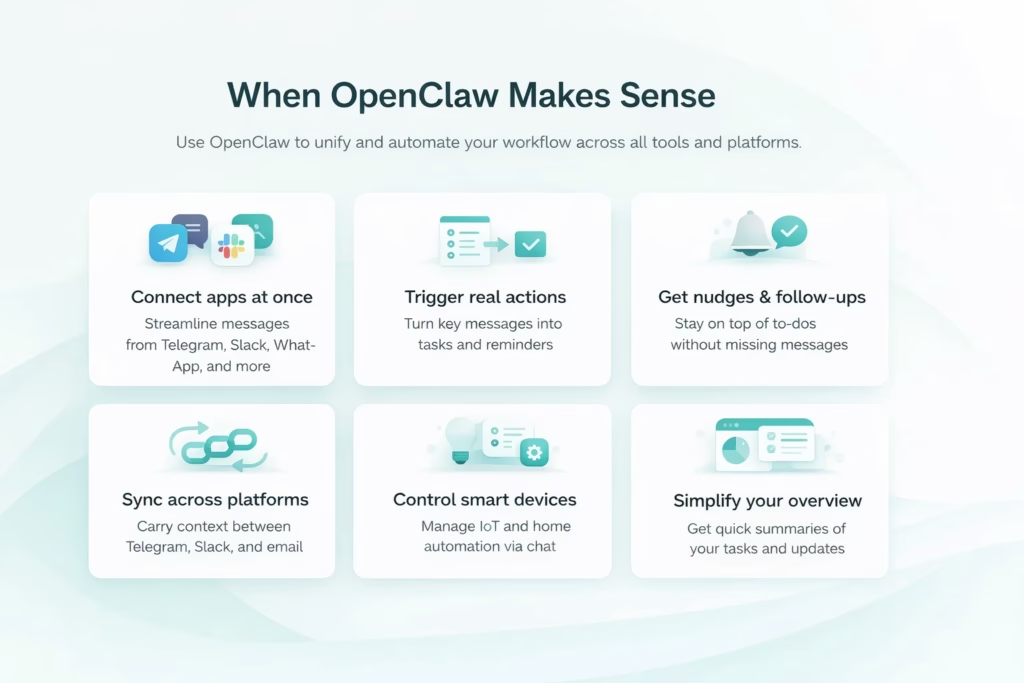
When OpenClaw Makes Sense
OpenClaw really starts to shine when your day feels scattered. Messages here, tasks there, quick decisions buried in chats you forgot to revisit. If you’re constantly jumping between tools and platforms, it helps pull that activity into one operational layer instead of five separate tabs. Use OpenClaw if you:
- Move between Telegram, Slack, WhatsApp, and more: Instead of checking each app separately, OpenClaw connects to them at once and lets one system coordinate the flow. Conversations don’t feel isolated anymore.
- Want messages to trigger real actions: You can define patterns or keywords that automatically turn into tasks, updates, or reminders. A message doesn’t just sit there. It leads somewhere.
- Need help with follow-ups and nudges: It can monitor to-dos, track incoming messages, and surface the ones that matter before they go stale. That quiet reminder you didn’t know you needed.
- Prefer not to repeat yourself across platforms: Say something in one channel, and OpenClaw can carry that context forward. You don’t have to restate the same details again and again.
- Use smart home or IoT tools: Lights, thermostats, calendar triggers, custom scripts – all controllable through chat if you wire it correctly.
- Don’t want to live inside dashboards: Instead of opening five different panels, you can just ask for a summary. Inbox overview. Status update. Quick scan. One message, clear picture.
If your workflow feels fragmented, OpenClaw doesn’t add another layer. It connects the ones you already have. And once it’s running properly, it stays in the background – steady, consistent, not demanding attention every five minutes.
When Claude Code Is the Better Fit
Claude Code makes the most sense if your day revolves around code. Not just writing a few lines here and there, but actively building, testing, breaking things, fixing them, and moving on to the next task without losing momentum. It’s not designed to manage chats or reminders. It stays focused on development work, and that focus is exactly why it works. You’ll likely want Claude Code if you:
- Build or refactor code regularly: You can describe a function or a system in plain language, and Claude will scaffold the structure, organize the logic, and generate the code in a way that’s actually usable.
- Run tests and fix what breaks: It can execute test suites, trace errors back to the source, and walk through potential fixes step by step. You’re not guessing where the issue lives.
- Debug unfamiliar or messy codebases: Drop it into a project you didn’t write, and it can help map the structure, highlight weak spots, and untangle logic that doesn’t quite make sense.
- Automate git workflows and version control: Creating pull requests, drafting commit messages, managing branches – it keeps that flow moving without pulling you out of context.
- Connect your stack through MCP tools: It integrates with tools like Jira, Notion, file systems, and databases, which means it can work inside your actual development environment, not outside of it.
- Switch between languages and environments: Python, TypeScript, CSS, backend services – it adapts quickly without forcing you to reconfigure everything every time you change focus.
Claude Code works best when your priority is shipping solid code with less friction. It doesn’t try to cover every possible use case. It stays in its lane and helps you finish what you started. And when you’re deep in development mode, that kind of focus matters.
Using Both: A Practical Hybrid Setup
Many teams don’t treat OpenClaw and Claude Code as alternatives. They use them together because the roles are clearly separated. OpenClaw handles the communication layer – alerts, reminders, routing messages, triggering workflows across platforms. Claude Code stays inside the development environment, ready to write, refactor, test, or debug whenever hands-on execution is required.
In practice, the split feels natural. You might ask OpenClaw in Telegram to summarize incoming requests or flag urgent updates. Then switch to Claude Code to adjust the script that processes those requests or improve the logic behind a feature. Once the code is updated, OpenClaw can monitor the output and send a status message to Slack automatically. No extra coordination layer is needed.
They’re not solving the same problem, and that’s exactly why the combination works. One keeps systems connected and responsive. The other builds and improves what runs inside them. Together, they create a workflow that stays structured without slowing development down.
Conclusion
OpenClaw and Claude Code are built for different layers of work. OpenClaw sits in the communication flow, turning messages into structured actions across tools and platforms. It’s useful when the friction lives in coordination – scattered tasks, manual follow-ups, disconnected systems. Its strength is orchestration, not deep coding.
Claude Code operates closer to the codebase itself. It helps developers write, refactor, and debug inside their environment with more speed and focus. If the slowdown is technical and sits inside the software, Claude Code makes more sense. The decision isn’t about which tool is better. It’s about where the actual bottleneck is.
FAQ
OpenClaw is a self-hosted AI agent focused on messaging and automation across chat platforms and services. Claude Code is a developer tool that runs in a terminal or IDE to help write, debug, and manage code.
Not in the same way. OpenClaw can execute scripts or interact with systems if configured, but it is not built for deep codebase exploration or structured development workflows. Claude Code is purpose-built for that environment.
No. Claude Code runs on demand. You start a session when you need help, and it stops when you are done. OpenClaw runs continuously in the background and reacts to events as they happen.
Claude Code is safer out of the box because it runs locally in a sandboxed environment with scoped permissions. OpenClaw gives you more control but requires proper setup and security management.