

Here’s the thing that trips up most developers: they assume OpenClaw and Cursor are competing products. They’re not.
I’ve spent the last two months testing both tools extensively, and the reality is more nuanced than the YouTube thumbnails suggest. Cursor is an excellent AI code editor. OpenClaw (originally called Clawdbot, then Moltbot) is an autonomous agent that runs on your machine and can execute tasks across your entire system. Comparing them is like asking whether you need a car or a house—the answer depends entirely on what problem you’re solving.
But let’s dig into the specifics, because there’s real money and productivity on the line here.
The Fundamental Difference: IDE vs Agent
According to Cursor’s official documentation, Cursor is “built to make you extraordinarily productive” as an AI-enhanced code editor. It’s essentially a fork of VS Code with Claude Code integration, autocomplete on steroids, and chat-driven refactoring. You write code, Cursor suggests completions, you accept or reject them.
OpenClaw operates at a completely different level of abstraction. Based on the GitHub repository “awesome-openclaw-skills”,, OpenClaw is a framework for autonomous task execution. It can browse the web, manipulate files, run terminal commands, and orchestrate multi-step workflows without constant human supervision.
Community discussions on Reddit highlight this distinction repeatedly. As one developer put it: “Cursor is great if you already know what you’re doing and want to do very fast targeted development. A story to add a new API endpoint, or to add a new button on a website.” Meanwhile, OpenClaw users describe it as “ambient infrastructure—the value compounds over weeks as it learns your patterns.”
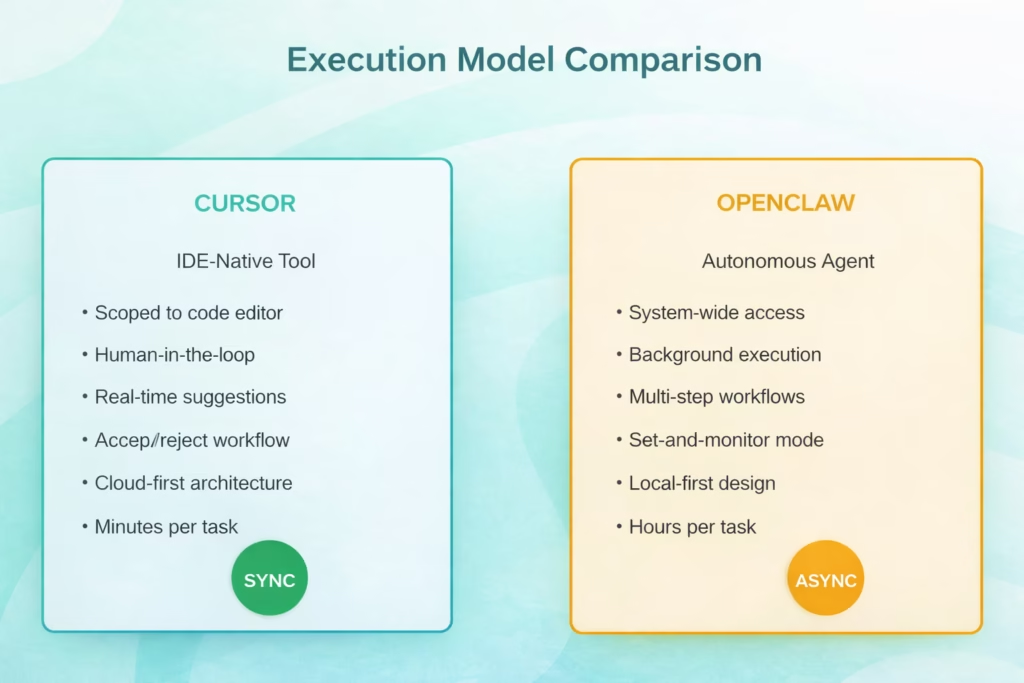
Cursor operates synchronously within your IDE, while OpenClaw runs autonomously as a background agent
Privacy and Data Residency: Where Your Code Actually Lives
This is where things get real for enterprise developers.
Cursor sends your code and prompts to cloud providers—primarily Anthropic for Claude models and OpenAI for GPT models. According to the Models documentation on Cursor’s site, you’re choosing between various frontier models from OpenAI, Anthropic, and Google. Your code traverses their infrastructure.
OpenClaw takes the opposite approach. It runs entirely on your local machine. The GitHub repository documentation emphasizes this repeatedly—your data never leaves your computer unless you explicitly configure external API calls. For developers working with proprietary codebases or under strict compliance requirements, this isn’t a nice-to-have. It’s a dealbreaker.
Real talk from Reddit: “I would not give it access to the amount of personal data many people do give. May be one day :–)” This sentiment appeared across multiple community discussions about both tools, but it applies differently. With Cursor, you’re trusting Anthropic and OpenAI’s security. With OpenClaw, you’re trusting your own machine’s security posture.
Setup Complexity: The Installation Reality Check
Cursor wins this category by a landslide. Download the installer, sign in with your email, and you’re writing AI-assisted code in under five minutes. The learning curve is minimal if you’ve used VS Code before—because Cursor essentially is VS Code with superpowers.
OpenClaw? Not so much. One Reddit user described the experience: “Took me longer to repair my drives and flash Ubuntu on it (2 hours) than it did to install OpenClaw (20 min).” That’s actually one of the more optimistic reports.
Generally speaking, expect to spend 30-60 minutes on your first OpenClaw installation. You’ll need to configure Python environments, set up API keys for the LLM providers you want to use, define skills (OpenClaw’s term for task capabilities), and test your first workflows. The documentation has improved significantly since the early Clawdbot days, but this is not a “click and go” experience.
The payoff? Once configured, OpenClaw runs 24/7 in the background. Cursor requires you to have the editor open and be actively coding.
Feature Deep Dive: What Each Tool Actually Does Well
Where Cursor Excels
Cursor’s strength is in-context code generation and refactoring. The Cursor Learn documentation details several killer features:
- Tab completion: Context-aware autocomplete that understands your entire codebase, not just the current file
- Chat-driven edits: Describe what you want to change, and Cursor applies diffs directly
- Codebase indexing: Ask questions about your project structure, and get accurate answers
- Multi-file editing: Make coordinated changes across dozens of files in one operation
Many practitioners report that AI coding assistants like Cursor significantly boost developer productivity, with users frequently noting completion improvements for routine coding tasks. The key phrase there is “routine coding tasks.” Cursor doesn’t write your architecture. It accelerates implementation.
Where OpenClaw Shines
The “awesome-openclaw-skills” repository on GitHub showcases over 100 community-contributed skills. These aren’t just code completions—they’re full task automations:
- Browser automation for testing and scraping
- File system organization and cleanup
- API interaction and data pipeline orchestration
- Calendar management and scheduling
- Research compilation from multiple sources
One developer reported: “The cursor comparison is the right framing. cursor is a scoped tool for a defined task, openclaw is more like ambient infrastructure—the value compounds over weeks as it learns your patterns.”
But here’s the catch: OpenClaw’s autonomy is both its superpower and its liability. Multiple Reddit threads warn about security concerns. “As a case study: yes, for how to go viral with crazy insecure software. Malware folks must be pleased,” wrote one security-conscious developer.
| Feature | Cursor | OpenClaw |
|---|---|---|
| Primary Use Case | Code editing and generation | Task automation and orchestration |
| Execution Model | Synchronous, human-approved | Asynchronous, autonomous |
| Data Location | Cloud-based processing | Local machine only |
| Setup Time | 5 minutes | 30-60 minutes |
| Learning Curve | Low (if familiar with VS Code) | Medium-high |
| Best For | Active coding sessions | Background task automation |
| System Access | Editor-scoped | System-wide |
Pricing Reality in 2026
The Hobby (Free) plan includes limited Tab completions and, notably, a limited number of Agent requests. The Pro plan costs $20/month and offers unlimited Tab completions. For heavier workloads, Cursor 2026 introduced the Pro+ ($60/mo) and Ultra ($200/mo) tiers, providing 3x and 20x usage limits respectively for frontier models.
OpenClaw’s costs are trickier to calculate. The software itself is MIT-licensed and free.
But you’re paying for:
- API calls to whatever LLM providers you configure (Claude, GPT-4, local models, etc.)
- Compute resources to run it 24/7
- Your time to maintain and monitor it
Multiple Reddit users reported spending $50-200/month on API costs alone when running OpenClaw heavily. One blunt assessment: “People burning $2,000 a month to check their calendar and ‘organize files’. SMH.”
The total cost of ownership for OpenClaw only makes sense if you’re automating tasks worth more than what you’re spending. For hobbyists experimenting, it can get expensive fast.
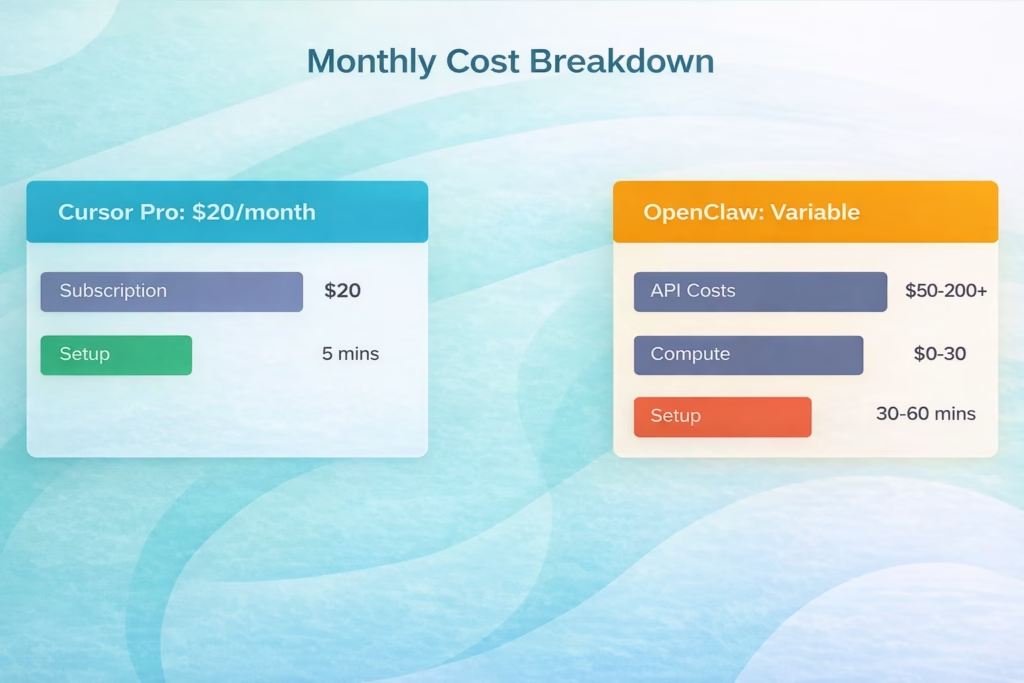
Cursor offers predictable pricing, while OpenClaw costs vary based on usage intensity and LLM provider choices
Real Developer Workflows: How People Actually Use Both
The smartest developers I’ve seen don’t choose between OpenClaw and Cursor. They use both strategically.
Here’s a workflow described in a Reddit deep-dive: “I maintain both of them. Cursor is great if you already know what you’re doing and want to do very fast targeted development. A story to add a new API endpoint, or to add a new button on a website.” The same developer uses OpenClaw for overnight research compilation, test automation across multiple environments, and documentation generation from code comments.
Another common pattern: developers use Cursor during active coding hours (9 AM to 6 PM) and leave OpenClaw running overnight to handle batch operations, dependency updates, and automated testing across multiple branches.
But wait. This assumes you have the budget and patience for both. Most solo developers and small teams should pick one initially.
Which Tool Should You Actually Choose?
Choose Cursor if:
- You spend most of your day writing and refactoring code
- You want immediate productivity gains with minimal setup
- You’re comfortable with cloud-based AI assistance
- You need reliable, predictable behavior
- You’re working on team projects where consistency matters
Choose OpenClaw if:
- You need system-wide task automation beyond code editing
- Privacy and local execution are non-negotiable
- You have time to configure and maintain the system
- You’re comfortable with some instability and iteration
- You want to build custom workflows and skills
Choose both if you’re a senior developer or small team that can justify the combined cost and wants IDE-level assistance plus autonomous task orchestration.
From community discussions, it’s clear that OpenClaw isn’t replacing Cursor for most developers. As one user summarized: “It’s too unpolished for mass adoption. It feels like open-source Google Assistant, which honestly… nothing special. For regular users it is too complex to setup, for devs… why not just write a script?”
The Hype vs Reality Check
Let’s address the elephant in the room: the marketing around both tools significantly overpromises.
Cursor’s claim to be “the best way to code with AI” is marketing speak. It’s excellent for many developers, but “best” depends entirely on your workflow, language ecosystem, and team dynamics. GitHub Copilot remains deeply integrated with Microsoft’s ecosystem. JetBrains AI Assistant has advantages for Kotlin and IntelliJ users. Windsurf and other emerging tools have their own strengths.
OpenClaw’s hype has reached almost absurd levels on social media. One Reddit user nailed it: “This community won’t be impressed because it’s already aware of the potential of AI agents. The hype is because it enabled non-devs to grasp the same thing.” The tool showcases what’s possible with autonomous agents, but the gap between possibility and practical utility remains wide for most use cases.
Research on multi-turn code generation shows that even state-of-the-art models experience challenges when moving from single-turn to multi-turn coding scenarios. This directly impacts tools like OpenClaw that rely on autonomous multi-step execution.
Security Considerations You Can’t Ignore
Both tools present security considerations, just different ones.
With Cursor, you’re trusting that Anthropic and OpenAI handle your code securely during processing. Both companies have enterprise agreements and compliance certifications, but your code does leave your machine. For open-source projects, this is usually fine. For proprietary enterprise code, you’ll need to review your organization’s data handling policies.
OpenClaw’s security model is almost inverted. Your code stays local, but you’re giving an AI agent permission to execute arbitrary commands on your system. Multiple security researchers have flagged this as concerning. One Reddit comment summarized the risk: “I’ve built my own wrapper assistant around Claude Code and APIs, and I’d definitely not want to have a more well-known version with security holes doing much of anything important in my life.”
If you’re using OpenClaw, run it on a dedicated machine or VM, not your primary development workstation with access to production credentials.
The Tools You Should Also Consider
The OpenClaw vs Cursor framing misses other strong contenders in the 2026 AI coding landscape:
- GitHub Copilot: A widely deployed AI coding assistant with deep GitHub integration and competitive pricing. GitHub has documented its coding agent capabilities for autonomous workflows.
- Windsurf: Gaining traction as a privacy-focused alternative with local model support and team collaboration features.
- Aider: A CLI-focused AI coding assistant that pairs well with any editor. Multiple Reddit users recommended it as a middle ground between Cursor’s GUI convenience and OpenClaw’s automation capabilities.
- Claude Code (standalone): Anthropic’s direct API access for Claude models, which several developers prefer over using Claude through Cursor’s interface for cost and control reasons.
| Tool | Primary Strength | Best User Type |
|---|---|---|
| Cursor | In-IDE AI assistance | Developers wanting VS Code + AI |
| OpenClaw | Autonomous task automation | Advanced users needing orchestration |
| GitHub Copilot | GitHub integration | Teams already on GitHub |
| Windsurf | Privacy-first design | Security-conscious developers |
| Aider | CLI flexibility | Terminal-native workflows |

Scaling Automation with FlyPix AI
While tools like OpenClaw focus on general system-wide orchestration, we see the true power of autonomous agents when they are applied to specialized, high-intensity data fields. Our team at FlyPix AI has applied this principle to geospatial analysis, developing AI agents that can detect, monitor, and inspect objects in satellite and drone imagery at a scale that was previously impossible. By moving beyond simple scripts to dedicated AI-driven automation, we’ve helped over 10,000 users reduce their manual annotation time by up to 99.7%, turning hours of tedious visual inspection into seconds of precise data generation.
We believe that the future of productivity lies in these “domain-specific” agents. Just as you might use Cursor for code or OpenClaw for system tasks, our platform allows industries like construction and agriculture to train custom AI models without any programming knowledge. Whether it’s land-use classification or infrastructure maintenance, we provide the ambient infrastructure necessary to transform raw aerial data into actionable insights, ensuring that the autonomy of AI is matched by professional-grade precision.
My Honest Take After 60 Days
I’ve been rotating between Cursor, OpenClaw, and Aider for two months now. Here’s what actually stuck:
Cursor is my daily driver for active development. The autocomplete alone saves me 30-40 minutes per day. The chat interface handles refactoring that used to require careful find-and-replace operations. I’ve hit the rate limits exactly twice, both times because I was stress-testing the tool rather than normal use.
OpenClaw runs on an old Mac Mini under my desk, but I’ve scaled back what I ask it to do. The browser automation skills are genuinely impressive for research compilation. The file organization capabilities saved me during a recent project cleanup. But I stopped using it for anything that touches production environments after one too many “interesting” decisions it made autonomously.
The setup time investment for OpenClaw only paid off because I treat it as a hobby project and learning experience. If I were purely optimizing for productivity per dollar spent, Cursor wins easily.
The Bottom Line
So, OpenClaw vs Cursor—which one wins?
It’s the wrong question. These tools solve different problems for different moments in your workflow.
- If you’re a developer who spends most of your time in a code editor actually writing software, Cursor delivers immediate, measurable productivity gains with minimal friction. It’s an excellent choice for most developers in 2026.
- If you’re an advanced user who needs autonomous task orchestration, values local execution for privacy reasons, and has the patience to configure a more complex system, OpenClaw opens capabilities that IDE-native tools simply can’t match.
The smartest approach? Start with Cursor. Master it for three months. If you find yourself wishing for autonomous background execution of repetitive multi-step tasks, then explore OpenClaw. But don’t fall for the hype that you need both immediately, or that one is universally “better” than the other.
They’re different tools for different jobs. Choose based on your actual workflow, not YouTube thumbnails.
Ready to level up your AI-assisted development? Start with a free Cursor trial and see if the productivity gains match the hype. Your future self will thank you—or at least finish that sprint on time.
Frequently Asked Questions
Not really. OpenClaw isn’t designed to be a code editor or provide real-time completions while you type. It’s an autonomous agent for longer-running tasks. Developers who’ve tried to use OpenClaw as their primary coding tool report frustration with the async nature and lack of immediate feedback. Cursor’s synchronous, in-editor assistance is better suited for active development.
Most security experts recommend against it. OpenClaw has system-wide execution permissions, and while the code is open-source, the autonomous nature means you’re trusting the AI models to make safe decisions. Run it on a dedicated machine, VM, or container with limited access to sensitive credentials and production systems. Community discussions consistently emphasize this caution.
Yes. Cursor supports all languages that VS Code supports, since it’s built on the same foundation. The AI assistance quality varies by language—it’s strongest for Python, JavaScript, TypeScript, and Go, where training data is abundant. Less common languages get decent syntax help but weaker architectural suggestions.
Absolutely. OpenClaw connects directly to Anthropic’s API, so you can subscribe to Claude Pro or pay per API call without involving Cursor at all. Many developers find this more cost-effective if they’re primarily using Claude models, since you get more usage per dollar going direct to Anthropic versus through Cursor’s tier limits.
GitHub Copilot offers a coding agent feature that operates as an autonomous assistant within the GitHub ecosystem. It’s more polished and stable than OpenClaw but also more limited in scope—it can’t control your browser or manipulate arbitrary system files like OpenClaw can. The trade-off is safety versus flexibility.
Start with Cursor. The interface is familiar if you’ve used any modern code editor, and the AI features surface gradually as you learn them. You can be productive on day one. OpenClaw requires understanding concepts like skills, task orchestration, and AI agent behavior—expect a week of experimentation before it clicks.
Yes, and many senior developers do exactly this. Use Cursor for active coding sessions and OpenClaw for background tasks like automated testing, documentation generation, or overnight research. They don’t conflict since they operate at different system levels. Just be mindful of combined API costs—you can easily spend $100+ monthly running both heavily.