

The AI agent space exploded in late 2025, and two names keep dominating every conversation: OpenClaw and Manus AI. But here’s the thing—they’re solving completely different problems.
OpenClaw is described as gaining significant adoption in the AI community. Manus AI, a China-Singapore startup now owned by Meta, and highlighted by research from the United Nations University (c3.unu.edu), emerged as what they call “a significant player in the AI landscape” for its fully autonomous capabilities.
I’ve spent the last month testing both. And the confusion is real. Community discussions show people asking the same question over and over: “What’s actually different here?”
One Reddit user nailed it: “Manus feels like the most non config instantly useable agent but expensive as hell.”
That’s basically the whole story. But let’s break down what that actually means for your workflow and your wallet.
What Each Platform Actually Does
Before we compare anything, you need to understand what you’re comparing. Because calling both of these “AI agents” is like calling a bicycle and a car both “transportation.” Technically true, but missing the point.
OpenClaw: The Open-Source Framework
OpenClaw isn’t a product you subscribe to. It’s an open-source agent framework that gives AI complete access to your computer. We’re talking full system control—file access, application launching, code execution, the whole deal.
Think of it as MCP (Model Context Protocol) for your entire machine. You’re essentially handing Claude or GPT the keys to your car and saying “drive wherever you need to go.”
The setup requires technical chops. You’ll need to configure local environments, manage API keys, and understand how to troubleshoot when things break. And they will break.
But that control? That’s the whole point. You can customize everything, integrate any tool, and pay only for the API calls you actually use.
Manus AI: The Cloud-Based Solution
Manus AI takes the opposite approach. According to research from the United Nations University, Manus represents “a leap forward in AI technology” with its fully autonomous capabilities and advanced performance metrics.
Everything runs in the cloud. You control it through Telegram messages. No local setup, no technical configuration, no API key management. You just… start using it.
The tradeoff? You’re paying for that convenience. And you’re trusting Manus with your data in their cloud infrastructure.
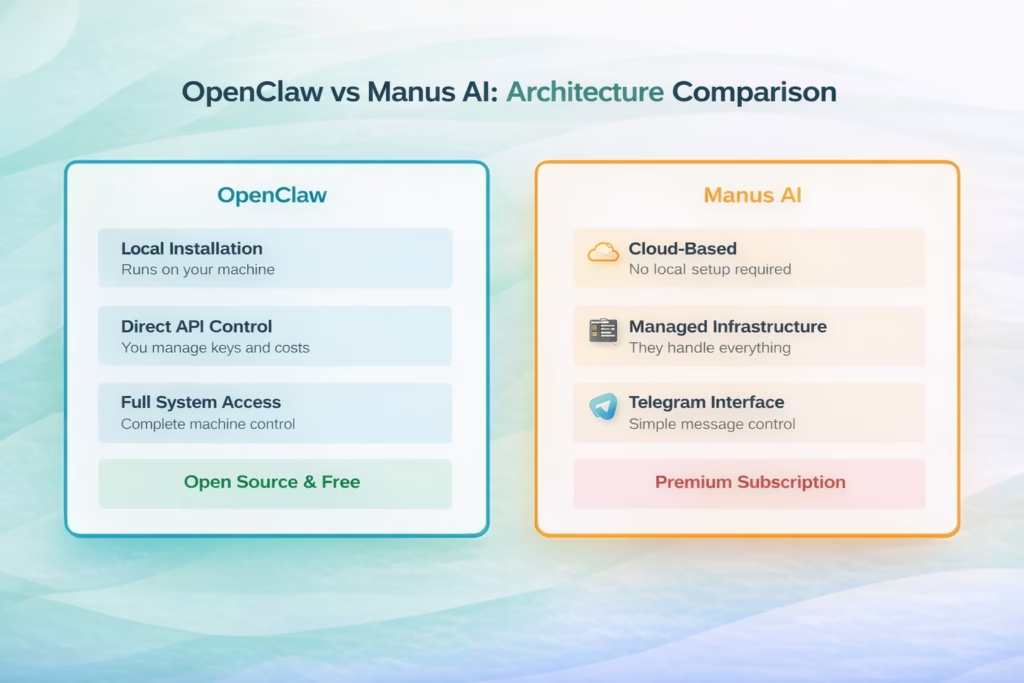
The fundamental architectural difference between OpenClaw’s local-first approach and Manus AI’s cloud-based model
Pricing: Where Things Get Interesting
This is where most people make their decision. And honestly, it’s complicated.
OpenClaw Costs
The framework itself is free. Open source. No subscription.
But you’ll pay for API calls to Claude, GPT, or whatever model you’re using. How much? That depends entirely on your usage.
Developers report varying costs based on usage, ranging from modest amounts for light use to higher costs for heavy usage. You have complete transparency and control over spending.
The hidden cost? Your time. Setup takes hours if you’re technical, days if you’re not. Maintenance is ongoing. One community member spent “a morning on a deep dive” just trying to understand if they needed it.
Manus AI Costs
Manus uses a credit system. You buy credits, they get consumed as you use the service.
Multiple users describe the costs as significant. One noted it can be challenging to maintain affordably due to credit consumption.
The exact pricing isn’t transparent in the way OpenClaw’s pay-per-API-call model is. You’re buying convenience, but you’re paying a premium for it.
For iPhone users or non-technical folks, that premium might be worth it. For developers comfortable with APIs, it probably isn’t.
| Cost Factor | OpenClaw | Manus AI |
|---|---|---|
| Base Access | Free (open source) | Credit-based subscription |
| API Costs | Varies by usage (you control) | Included in credits |
| Setup Time | Hours to days | Under 5 minutes |
| Maintenance | Ongoing technical work | Zero maintenance |
| Best For | Technical users, high volume | Non-technical, convenience-focused |
Setup and User Experience
Let’s be real about what “setup” actually means with each platform.
Getting OpenClaw Running
You’ll need to install the framework locally, configure your environment, connect your API keys, set permissions, and test your configuration. If something breaks (it will), you’re troubleshooting it yourself.
The community describes it as “technical and not easy to work with.” Another user noted: “I’m doing all this stuff better already, and if I’m not, I could do it better.”
But once it’s running? The power is incredible. You have an always-on agent with complete system access. It can read files, write code, execute commands, and chain complex tasks together.
Getting Manus AI Running
Open Telegram. Start a conversation. Done.
Seriously, that’s it. One user confirmed: “Manus Agent is easy setup, has amazing research / content / production capabilities.”
You control everything through simple messages. No technical knowledge required. No local installation. No API key management.
The limitation? You’re working within Manus’s interface and capabilities. You can’t customize the underlying framework or integrate tools they don’t support.
Security: The Elephant in the Room
Now we need to talk about the uncomfortable part. Because both of these tools have serious security implications.
OpenClaw Security Concerns
One community member raised concerns about potential security risks: “What sets it apart is the marketing and potential security considerations.”
OpenClaw gives AI complete access to your machine. File system, applications, terminal—everything. Concerns have been raised about potential credential exposure risk given the extensive access.
The concern is legitimate. You’re giving an AI model unrestricted control. If the model makes a mistake or gets confused, it can do real damage.
That said, everything runs locally. Your data stays on your machine. You control the API keys and can monitor exactly what’s happening.
Manus AI Security Concerns
With Manus, you’re trusting a third-party cloud service with your data and tasks. Everything you ask Manus to do runs on their infrastructure.
For some use cases, that’s fine. For sensitive business data or personal information, it’s a dealbreaker.
One user specifically chose Manus because they “work off of my iPhone,” accepting the cloud-based architecture as necessary for mobile access.
The advantage? Manus handles security updates, infrastructure maintenance, and system stability. You’re not responsible for securing a local AI with system access.
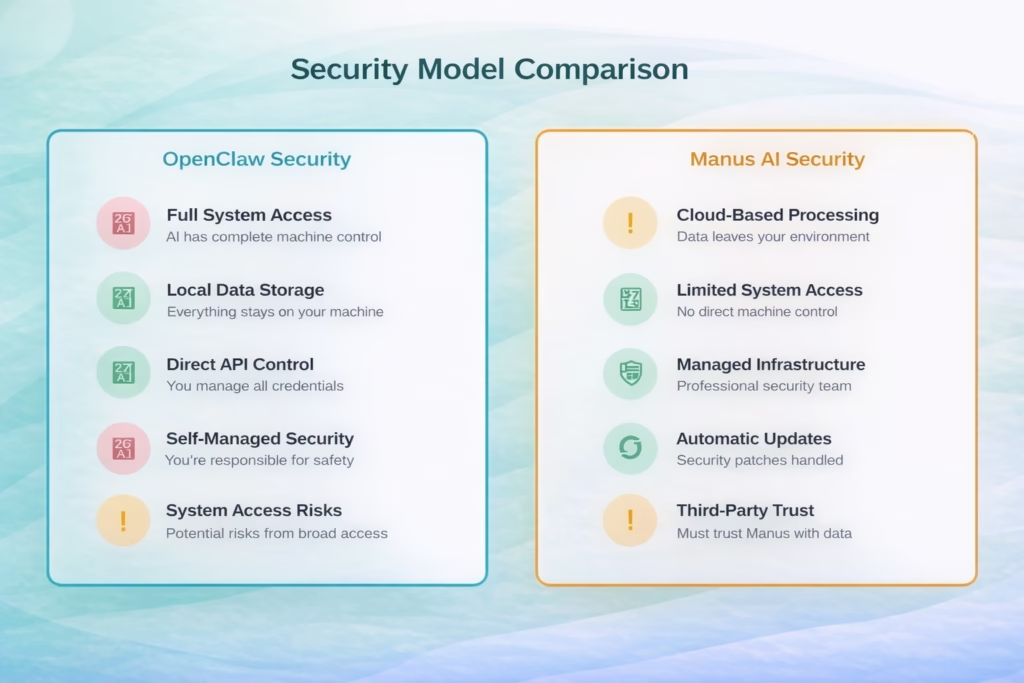
The security tradeoffs between local control (OpenClaw) and managed infrastructure (Manus AI)
Performance and Capabilities
How do they actually perform when you put them to work?
OpenClaw in Action
OpenClaw excels at complex, multi-step workflows that require deep system integration. Code generation, file manipulation, application automation—anything that benefits from direct system access.
Research on AI agents documents how frameworks like OpenClaw enable sophisticated autonomous operations through direct system access.
But it’s not plug-and-play. One user described using Manus to analyze OpenClaw: “Manus autonomously researched the entire project, covering aspects such as its architecture.” The irony? They needed another AI agent just to understand OpenClaw.
Manus AI in Action
According to the United Nations University research, Manus demonstrates “advanced capabilities and impressive performance metrics” in autonomous operation.
Users report particularly strong performance in research, content creation, and production tasks. One noted: “Manus Agent is easy setup, has amazing research / content / production capabilities.”
The Telegram interface means you can work from anywhere, on any device. That’s powerful for mobile workflows or teams that need cross-platform access.
But you’re limited to what Manus supports. Can’t integrate a custom tool? You’re out of luck. Need specific model parameters? Not available.
When to Choose OpenClaw
Choose OpenClaw if you:
- Have technical expertise to handle setup and maintenance
- Need complete customization and control
- Want to minimize long-term costs with heavy usage
- Require specific integrations or workflows
- Prefer keeping data local and private
- Can accept the time investment in setup
- Want to integrate cutting-edge models or features
Real talk: OpenClaw is for developers and power users. If you’re comfortable with GitHub, APIs, and terminal commands, it’s probably your best bet.
When to Choose Manus AI
Choose Manus AI if you:
- Need something working in the next five minutes
- Lack technical setup expertise
- Work primarily from mobile devices
- Value convenience over customization
- Have budget for premium tools
- Don’t want to manage infrastructure
- Need cross-platform accessibility
Manus is for people who want AI assistance without becoming AI infrastructure managers. That’s not a weakness—it’s a legitimate use case.
The Real Difference: Philosophy
Here’s what most comparisons miss. This isn’t really about features or pricing.
OpenClaw represents the “give users maximum power and let them figure it out” philosophy. It’s the Linux of AI agents. Powerful, customizable, and demanding.
Manus AI represents the “handle everything so users can focus on work” philosophy. It’s the Apple of AI agents. Polished, limited, and convenient.
One community member captured a perspective on the AI community divide: “Hype + No safeguards is all the current pack of brain atrophied yololets need to allow Claude to hold the wheel in every aspect of their lives.”
This highlights a real division in the AI community between power users and convenience users.
The Competition: Where Do Others Fit?
Both OpenClaw and Manus AI compete in a crowded space. Kimi Agent and similar tools offer different approaches to automation without the full agent paradigm. Tools like n8n offer different approaches to automation without the full agent paradigm.
The two-tier structure is clear: open-source frameworks (like OpenClaw) versus managed services (like Manus).
OpenClaw has gained significant adoption and support in the AI community, with many developers choosing it for its open-source approach and customization capabilities.
| Feature | OpenClaw | Manus AI | Winner |
|---|---|---|---|
| Setup Time | Hours to days | Under 5 minutes | Manus AI |
| Customization | Unlimited | Limited to platform | OpenClaw |
| Cost (Heavy Use) | Varies by usage | Premium credits | OpenClaw |
| Mobile Access | Desktop only | Full mobile support | Manus AI |
| Data Privacy | Fully local | Cloud-based | OpenClaw |
| Maintenance | Self-managed | Zero maintenance | Manus AI |
| System Integration | Complete access | Limited scope | OpenClaw |
| Learning Curve | Steep | Minimal | Manus AI |
Community Perspectives
The community is split, and that tells you everything.
Technical users lean toward OpenClaw despite its complexity. One developer spent a morning evaluating and concluded: “I’m doing all this stuff better already.”
Non-technical users or those prioritizing speed prefer Manus despite the cost. The instant usability matters more than customization.
And there’s frustration on both sides. One user questioned: “What exactly is the shift here? Is it UX, architecture, control layer, distribution?” The confusion is real because these tools solve different problems.
Another perspective notes the significant marketing around both tools in the AI space.

High-Precision Geospatial Analysis with FlyPix AI
As we navigate the trade-offs between local control and cloud convenience in 2026, our team has recognized that the most effective AI agents are those built for specialized, high-stakes environments. While general-purpose agents handle text and code, FlyPix AI has revolutionized how we process the physical world from above. By leveraging an intuitive, no-code interface, we enable professionals across construction and agriculture to automate the analysis of satellite and drone imagery with staggering efficiency. Our platform isn’t just about identifying objects; it’s an autonomous powerhouse capable of reducing manual annotation time by up to 99.7%, turning hours of tedious observation into seconds of actionable insight.
Whether you are monitoring multi-site construction progress or tracking crop health across thousands of hectares, we believe that advanced technology should be accessible to everyone, not just those with deep technical expertise. Our platform supports a vast array of data sources—from standard aerial photos to complex multispectral and LiDAR data—allowing you to train custom AI models that fit your specific industry needs. By removing the technical barriers to entry, we ensure that your team can focus on making informed, data-driven decisions while our AI agents handle the heavy lifting of geospatial inspection and anomaly detection at scale.
Making Your Decision
So which should you choose? Look, there’s no universal answer.
If you’re technical and cost-sensitive, OpenClaw makes sense. You’ll invest time upfront but gain control and lower long-term costs.
If you’re non-technical or value time over money, Manus AI delivers immediate value without the learning curve.
What I’ve found after testing both: most people overestimate their technical tolerance. They start with OpenClaw, get frustrated with setup, and either give up or switch to Manus.
Conversely, power users trying Manus quickly feel constrained by the limitations and switch to OpenClaw for control.
The best approach? Be honest about your technical comfort level and budget. If you’re reading GitHub documentation for fun, try OpenClaw. If you just want something working, try Manus.
Both tools represent legitimate approaches to AI automation in 2026. The question isn’t which is better—it’s which better matches your needs, skills, and workflow.
And maybe that’s the real insight here. The AI agent space has matured enough to support multiple valid approaches. You don’t have to pick the “winner.” You just have to pick what works for you.
Frequently Asked Questions
Yes, the OpenClaw framework is open source and free to use. However, you’ll pay for API calls to the AI models (Claude, GPT, etc.) that power the agent. Depending on usage, costs will vary. There’s no subscription to OpenClaw itself.
Manus AI is cloud-based and accessed primarily through Telegram, so it works from any device with the Telegram app—desktop, mobile, or web. Everything runs on Manus’s servers, not your local machine.
It depends on your threat model. OpenClaw keeps all data local but gives AI complete system access, creating potential risks. Manus stores and processes data in the cloud, requiring trust in their infrastructure. For highly sensitive data, OpenClaw’s local approach is generally preferred, assuming proper security configuration.
OpenClaw has gained significant community adoption and is widely used. Community feedback indicates other tools may have various stability considerations. OpenClaw’s adoption suggests strong ongoing development.
For basic coding assistance, yes. Users report Manus performs well for code generation and review. However, for complex development workflows requiring deep system integration, file manipulation, and execution control, OpenClaw’s direct system access provides capabilities Manus can’t match.
You’re paying for managed infrastructure, zero setup, cross-platform access, and maintained support. OpenClaw’s lower cost comes from self-managed infrastructure and technical setup requirements. It’s a classic convenience premium.
OpenClaw continues to develop as an open-source project with significant community adoption. The framework is actively maintained and widely used by developers.