

AI tools launch every week. Most fade into the background. OpenClaw didn’t. Within days of its release, developers were installing it, testing it, arguing about it, and starring it on GitHub at a pace that’s hard to ignore.
At its core, OpenClaw is not another chatbot. It’s a self-hosted AI agent that runs on yourown machine and can actually do things for you. Not just answer questions, but read files, execute commands, automate workflows, and connect to the apps you already use. That shift from “assistant” to “operator” is what’s driving both the excitement and the concern around it.
What Is OpenClaw in Plain Terms?
OpenClaw is an open-source AI agent that runs continuously on your own machine. It acts as a bridge between a language model and your real digital environment – your files, your browser, your apps. Instead of just generating answers, it can execute commands, run scripts, modify documents, automate browser actions, and connect to messaging platforms like Slack or WhatsApp.
The key difference is control. You are not only asking for information. You are allowing it to act. It can store long-term preferences, remember context, and handle tasks across sessions without starting from zero each time. That changes the experience from simple conversation to delegated work.
After a few early name changes, OpenClaw quickly gained attention and thousands of GitHub stars. Developers reacted to it because it felt practical and powerful. Not just another chatbot, but something closer to an always-on AI operator.

FlyPix AI: Precision Automation for Geospatial Systems
At FlyPix AI, we treat AI agents as operators, not chat features. We use them to turn satellite, aerial, and drone imagery into practical outputs for detection, monitoring, and inspection workflows. OpenClaw fits into the same broader shift: AI stops being something you talk to and starts being something that runs tasks for you.
Our platform focuses on automating geospatial image analysis and letting teams train custom AI models using user-defined annotations. Different industries need different outputs, so flexibility matters. We work across areas like construction, agriculture, port operations, infrastructure maintenance, forestry, government, and ecotechnology, where speed and precision tend to matter more than novelty.
If you want to follow updates and announcements from our team, we share them on LinkedIn as well. In a space where AI is moving fast, we try to keep the focus on one thing: automation that holds up in real workflows, not just in demos.
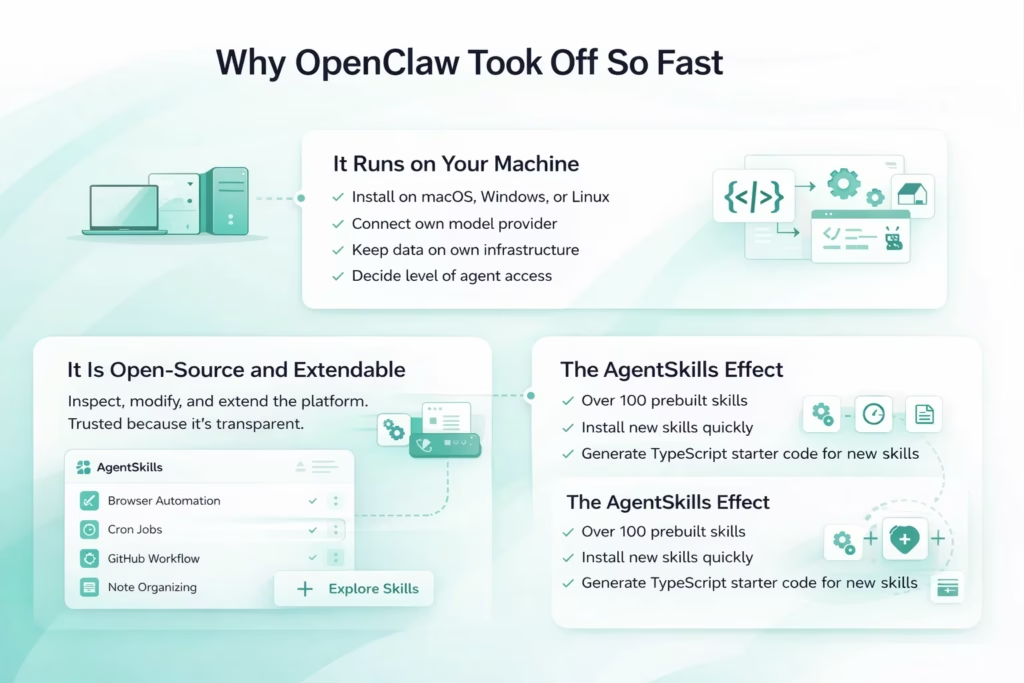
Why OpenClaw Took Off So Fast
Most AI projects build traction over months. OpenClaw did it in days. The jump in GitHub stars was not slow and steady – it was a spike. That kind of momentum usually means one thing: people tried it and immediately saw what it could do. This was not another chatbot demo. It looked like action. And that difference mattered.
It Runs on Your Machine
One of the biggest drivers of adoption was simple – it runs locally. No closed platform. No locked interface. Developers liked that they could:
- Install it directly on macOS, Windows, or Linux
- Connect their own model provider
- Keep data on their own infrastructure
- Decide how much access the agent gets
There is something powerful about running AI on your own system. It feels controllable. Immediate. Not abstracted behind layers of someone else’s dashboard.
It Is Open-Source and Extendable
OpenClaw did not arrive as a finished product. It arrived as a framework. Because it is open-source, developers could inspect it, modify it, and build on top of it. That transparency built trust quickly. At the same time, it made experimentation easy.
The AgentSkills Effect
The skills system fueled rapid adoption. OpenClaw supports over 100 preconfigured AgentSkills from the ClawHub registry and community (exact count varies by version and updates).
You can install new skills quickly from the registry. If a capability is missing, ask OpenClaw to generate TypeScript code, manifest suggestions, and folder structure for a new skill – but you must manually create files, install dependencies, and register it via config or web UI. This extensibility keeps the system dynamic and adaptable. Examples include:
- Summarizing unread emails and drafting replies (with email skill)
- Monitoring GitHub issues and triggering workflows (with GitHub skill)
- Filling forms in a browser (with browser automation skill)
- Organizing notes across apps (with API/note skills)
- Running scheduled overnight jobs (with cron skill)
Prebuilt skills + code-generation assistance turn OpenClaw into a flexible, expandable platform.
It Feels Like Action, Not Chat
There is also a psychological layer here. Developers have used AI copilots for a while now. They are useful, but they stay inside a chat box. OpenClaw crossed that boundary.
From Conversation to Execution
Instead of suggesting what you should do, it can actually do it.
- Execute shell commands
- Modify files
- Trigger webhooks
- Navigate web pages
- Operate continuously in the background
When people saw demos of it negotiating a car purchase, coordinating grocery orders, or managing repositories overnight, the reaction was immediate. It did not feel experimental. It felt like the next logical step in automation. And that is why it spread so fast. It showed what happens when AI stops talking and starts operating.
How OpenClaw Works Behind the Scenes
At first glance, OpenClaw feels straightforward. You send a message, it responds and takes action. Underneath, though, there is a layered system that connects AI reasoning to real execution. It operates as a local gateway between three elements – a language model, your machine, and the external apps you use daily. That structure is what allows it to move from conversation to actual task completion.
1. The Agent Runtime
OpenClaw runs as a persistent Node.js service on macOS, Windows, or Linux. Once launched, it stays active in the background and listens for incoming messages from connected platforms like Slack, WhatsApp, or Discord. When you send a request, it does more than generate text. It interprets your intent, selects the appropriate tools, and executes the required actions.
Behind the scenes, the runtime manages message routing, decides which skills to trigger, executes commands or scripts, and updates memory when needed. The model handles reasoning. The runtime handles execution. That division keeps the system organized and predictable, even when tasks become complex.
2. The Skills System
The skills layer makes OpenClaw highly flexible. It supports over 100 preconfigured AgentSkills from the ClawHub registry and community – enabling shell commands, file operations, browser control (via Playwright/Puppeteer), webhooks, API integrations, and more – but most advanced features require explicit installation.
You can add new skills quickly from the registry. If something is missing, ask OpenClaw to generate TypeScript code, manifest suggestions, and structure for a new skill – then manually create files, install dependencies, and register it via config or web UI. This extensibility keeps the system dynamic and adaptable to your needs.
3. Persistent Memory
Unlike traditional chat sessions that reset after each interaction, OpenClaw stores persistent memory locally as plain Markdown files (source of truth: daily logs memory/YYYY-MM-DD.md + curated MEMORY.md), chunked and indexed into SQLite (with embeddings via sqlite-vec for hybrid BM25.
Over time, it builds a profile of your preferences and workflow patterns. It can remember your email tone, preferred meeting times, automation rules, and recurring instructions. Because the memory is stored locally, you can review or adjust it. That transparency gives you control while still benefiting from long-term context. The experience shifts from repeated prompting to refined collaboration.
4. Access Levels and Control
OpenClaw supports opt-in sandboxing (via config: sandbox.mode = ‘on’, often Docker/container-based with read-only workspace or limited exec), limiting filesystem/shell access and reducing risk; without sandbox, it has full system access when permissions allow – sandbox is not default or always-on.
Full system access allows deeper automation, including broader file access and more powerful command execution. The difference is not small. It defines how much autonomy you give the agent. More access unlocks more capability, but it also requires more responsibility. That balance is part of what makes OpenClaw powerful and demanding at the same time.
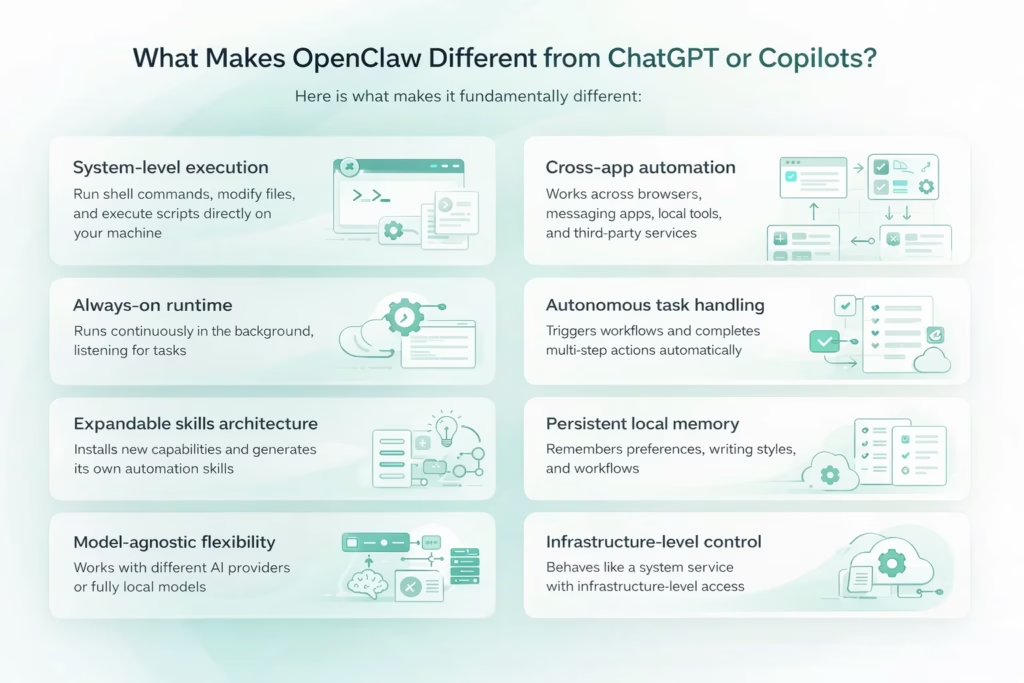
What Makes OpenClaw Different from ChatGPT or Copilots?
OpenClaw stands apart not because it sounds smarter, but because it operates differently. Its distinction comes down to how it connects AI reasoning with real system-level action. Here is what makes it fundamentally different:
- System-level execution: It can run shell commands, modify files, and execute scripts directly on your machine without staying confined to a chat interface.
- Cross-app automation: It works across messaging apps, browsers, local tools, and third-party services instead of operating inside a single window.
- Always-on runtime: It runs continuously in the background and listens for tasks rather than waiting for you to open a tab and type a prompt.
- Autonomous task handling: It can trigger workflows and complete multi-step actions without requiring approval after every small step.
- Expandable skills architecture: It installs new capabilities and can generate its own automation skills when a required function does not yet exist.
- Persistent local memory: It remembers preferences, writing styles, and workflow patterns across sessions to reduce repetition.
- Model-agnostic flexibility: It works with different AI providers or fully local models depending on your infrastructure choices.
- Infrastructure-level control: It behaves more like a system service than a consumer chat application, giving you deeper access and greater responsibility.
Security and Privacy Considerations
OpenClaw gives you a lot of power, and with that power comes responsibility. Because it can access files, run scripts, and connect to apps across your system, any misstep in configuration can expose sensitive data. API keys, passwords, or personal documents could be at risk if the agent is given more access than necessary or if instances are left exposed online. The flexibility that makes it so appealing also makes it critical to be cautious from the start.
Running OpenClaw in sandbox mode helps, but it does not eliminate all risks. Even limited access requires attention to how data is stored and handled. Persistent memory is useful for workflow continuity, but it also means that sensitive information can accumulate over time if not monitored. Regularly reviewing memory files and carefully managing permissions can help mitigate potential exposure.
Another factor is the skill ecosystem. Prebuilt or user-generated AgentSkills expand capabilities quickly, but they can also introduce vulnerabilities if not vetted. Treat every new skill like adding a new tool to a workshop – you need to know what it does and what it touches. Keeping security in mind while experimenting ensures OpenClaw remains a productivity boost rather than a source of headaches.
Real Use Cases That Go Beyond Demos
It is easy to dismiss AI agents as hype until they start solving real problems. OpenClaw moved beyond the demo phase when users began applying it to everyday workflows. The impact becomes visible in small, repeated tasks that normally drain time and attention.
Developer Workflows – Less Monitoring, More Focus
For developers, OpenClaw acts as an operational layer around the codebase. It can monitor repositories, track new issues, trigger builds, review logs, and schedule maintenance scripts without constant supervision. Instead of manually checking dashboards throughout the day, you delegate the monitoring layer. The result is simple. Fewer interruptions. More uninterrupted build time. It works quietly in the background while projects continue moving forward.
Personal Productivity – One Layer Above Your Apps
Productivity tools are powerful, but they are scattered. Notes, tasks, reminders, messages. OpenClaw connects them into a coordinated flow. It can summarize long conversations, consolidate tasks, sync reminders, and turn unstructured chat into clear action steps. Over time, with persistent memory, it adapts to your patterns. You stop repeating instructions. It starts anticipating structure.
Web Automation – Eliminating Repetitive Clicks
Many digital tasks are repetitive rather than complex. Filling forms, navigating websites, copying structured data. OpenClaw can control a browser session and repeat these actions consistently once configured. This removes the friction of manual input. Hours lost to small repetitive steps begin to disappear.
Smart Home and IoT – Coordinated Control
When integrated with connected devices, OpenClaw expands beyond software. It can trigger routines, manage lighting systems, and automate home workflows. At that point, it is not just responding to commands. It is coordinating environments. That shift from reactive assistant to active operator is where its real capability becomes clear.
Conclusion
OpenClaw is one of those projects that makes the current AI shift feel real. Not because it writes better sentences than the next tool, but because it changes the shape of the interaction. It runs locally, stays on, connects to your apps, and can actually execute work instead of stopping at advice. For developers and automation-minded teams, that is the appeal. It feels like moving from “ask and copy-paste” to “delegate and supervise.”
At the same time, the power is the point and the risk. The moment an agent can read files, run scripts, and touch your accounts, configuration stops being optional. Permissions, sandboxing, and skill hygiene matter. OpenClaw can be genuinely useful, but it rewards careful setup and punishes casual experimentation. If you treat it as a capable operator inside a controlled environment, it becomes a glimpse of what personal automation is heading toward.
FAQ
OpenClaw is an open-source AI agent that runs as a long-lived service on your machine. It connects a language model to your local files, browser, and apps, so it can execute tasks like automation, scripting, and workflow routing rather than only generating text.
No. ChatGPT is primarily a conversational assistant. OpenClaw is closer to an agent runtime that can take actions on your system, interact with external services, and keep running in the background. It is built for execution, not just conversation.
It helps a lot. You do not need to be a security engineer, but you should be comfortable with setup steps, permissions, and basic operational hygiene. If you are not technical, it is easy to overgrant access or misconfigure things in a way that creates risk.
OpenClaw can store persistent memory locally, often in Markdown files. That can be a benefit because it keeps context across sessions, but it also means you should be mindful about what information you allow it to retain and where credentials or tokens are stored.
AgentSkills are modular capabilities that extend what OpenClaw can do. They can enable things like shell execution, file operations, browser automation, and API integrations. Skills make OpenClaw flexible, but they also introduce risk if you install unvetted or malicious extensions.