

Image recognition software is one of those technologies most people use every day without really thinking about it. It’s what lets your phone sort photos by faces, helps retailers manage shelves automatically, and allows engineers to pull real insights from drone or satellite images.
At its core, image recognition is about teaching computers to understand visual information in a useful way. Not just seeing pixels, but recognizing what’s actually in an image and turning that into structured data you can act on. Over the last decade, improvements in AI and machine learning have pushed this technology from research labs into real-world operations, where speed, accuracy, and scale actually matter.
In this article, we’ll break down what image recognition software really is, how it works behind the scenes, and why so many industries are now building it directly into their daily workflows.

What Image Recognition Software Actually Means
Image recognition software is a branch of artificial intelligence that allows computers to identify and interpret objects, text, people, or patterns within digital images or video frames. It sits inside the broader field of computer vision, which focuses on teaching machines to extract useful information from visual data.
Unlike basic image processing, which might adjust brightness or detect edges, image recognition focuses on understanding content. For example, it can tell the difference between a suitcase and a backpack, identify a logo on a package, or detect multiple items inside a single photo.
At its core, image recognition answers questions like:
- What objects are in this image?
- Where are they located?
- What category do they belong to?
- How confident is the system in that result?
The output is not just a label. It is structured data that software systems can search, compare, filter, and act on.

Image Recognition, Built for Real-World Geospatial Work at FlyPix AI
At FlyPix AI, image recognition is the core of how we help teams work faster and smarter with visual data. We built our platform to remove the friction that comes with manual image review and turn aerial, satellite, and drone imagery into clear, usable insights.
Our approach is simple: focus on results, not complexity. We use advanced AI agents to detect and classify objects in complex scenes quickly and reliably, even at scale. Whether the task is infrastructure inspection, environmental monitoring, or large-area analysis, our goal is to help you move from raw imagery to decisions without delay.
We also believe powerful tools should be easy to use. That’s why we let users train and adapt AI models without deep technical knowledge. You define what matters in your images, and our system handles the rest. Integration matters too, so we’ve designed FlyPix AI to plug into existing GIS tools and workflows rather than replace them.
In the end, what drives us is practical impact. We want image recognition to feel less like advanced technology and more like a natural part of how your team works every day.
Why Computers Need to Be Taught to See
Humans recognize objects almost instantly because we have years of visual experience. We do not think about pixels or colors. We see patterns and context.
Computers see images very differently. A digital image is nothing more than a grid of pixels. Each pixel contains numerical values representing color and brightness. Without training, a computer has no idea that a group of pixels represents a shoe, a car, or a face.
Image recognition software bridges this gap by teaching machines how visual patterns relate to real-world objects. This learning process does not happen once. It is repeated thousands or millions of times using labeled examples until the system starts recognizing patterns on its own.
The Core Tasks Image Recognition Performs
Image recognition software typically performs several key tasks. Each serves a different purpose and level of precision.
Detection
Detection identifies the presence and location of an object in an image. For example, detecting that a car appears in the lower left corner of a frame.
Segmentation
Segmentation goes further by outlining objects down to the pixel level. This is useful in cases where precise boundaries matter, such as medical imaging, autonomous navigation, or land-use analysis.
Classification
Classification assigns an image or object to a category. For instance, identifying whether an image contains footwear, electronics, or food.
Tagging
Tagging recognizes multiple elements within an image and assigns descriptive labels. This is widely used in ecommerce, media libraries, and search systems.
Many real-world systems combine all four tasks, depending on accuracy and speed requirements.
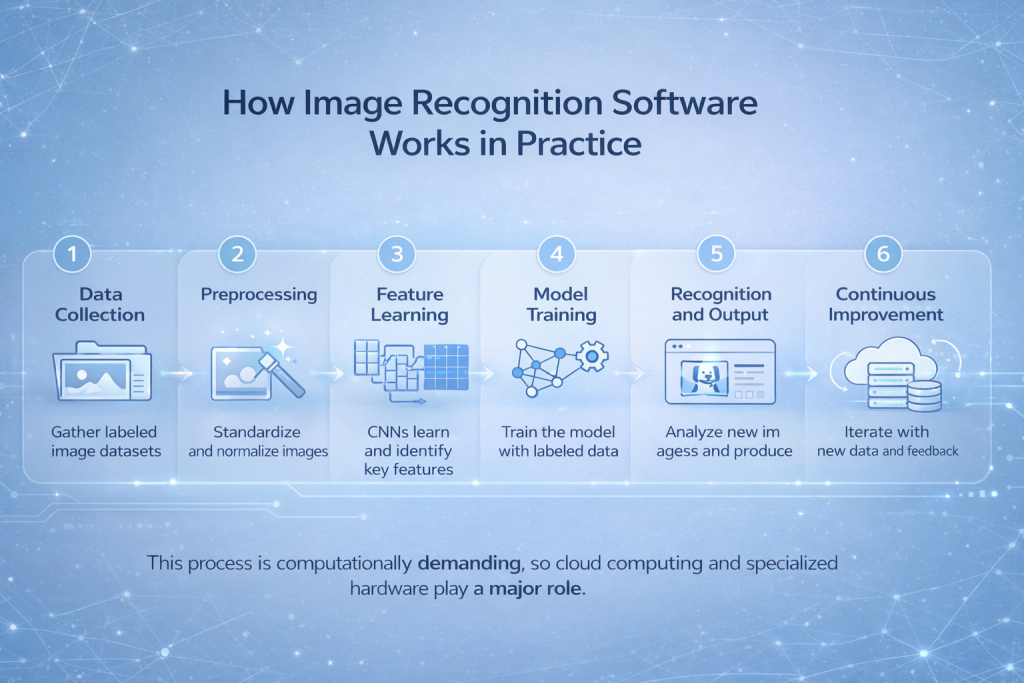
How Image Recognition Software Works in Practice
While implementations vary, most image recognition systems follow a similar workflow.
1. Data Collection
The process starts with large sets of images. These images are labeled by humans or semi-automated tools. Labels might include object names, locations, colors, or brands.
2. Preprocessing
Images are standardized to improve consistency. This can include resizing, normalization, or slight variations to help models handle real-world conditions like lighting changes or camera angles.
3. Feature Learning
Instead of being told what to look for, modern systems learn features automatically. Convolutional neural networks analyze pixel patterns and gradually learn which combinations matter.
4. Model Training
The system is trained by comparing its predictions to known labels. Errors are corrected repeatedly until accuracy improves.
5. Recognition and Output
Once trained, the model analyzes new images and produces structured outputs such as labels, confidence scores, and object locations.
6. Continuous Improvement
Many systems keep learning over time. New data, corrections, and feedback improve accuracy and reduce bias.
This process is computationally demanding, which is why cloud computing and specialized hardware play a major role.
Why Accuracy Alone Is Not Enough
Accuracy matters, but it is not the only measure of success. In real business environments, image recognition software must also be fast, reliable, and easy to integrate.
An image recognition system that delivers perfect results but takes minutes to respond is often less useful than one that delivers slightly lower accuracy in seconds. This trade-off is especially visible in operational settings like logistics, security, or customer service.
Practical systems balance speed, cost, and accuracy based on real needs.
Real-World Use Cases Across Industries
Image recognition is not a single-market technology. Its value comes from adaptability.
Healthcare
Medical imaging is one of the most impactful applications. Image recognition software assists doctors by highlighting abnormalities in scans, prioritizing cases, and reducing diagnostic time. Since most medical data is visual, automation helps clinicians focus on decisions rather than screening.
Retail and Ecommerce
Retailers use image recognition for visual search, automatic product tagging, shelf monitoring, and fraud detection. Customers can upload photos to find similar products, while retailers maintain accurate catalogs with less manual effort.
Manufacturing
In manufacturing, image recognition inspects products for defects, monitors assembly lines, and tracks inventory. These systems operate continuously, reducing human fatigue and improving consistency.
Automotive and Mobility
Autonomous vehicles rely heavily on image recognition to identify pedestrians, traffic signs, road markings, and obstacles. Even non-autonomous systems use it for driver assistance and safety monitoring.
Agriculture and Environmental Monitoring
Farmers and analysts use image recognition to assess crop health, detect disease, monitor deforestation, and analyze land use from drone or satellite imagery.
Security and Surveillance
Facial recognition and object detection help manage access control, crowd monitoring, and incident investigation. This area also raises important ethical and privacy questions.
Lost Property and Asset Management
Image recognition automates the identification and cataloging of found items. Instead of manually describing objects, staff upload photos and let the system generate searchable records. This dramatically improves recovery rates and reduces errors.

Why Businesses Are Adopting Image Recognition Faster Now
Image recognition is not new, but its adoption has accelerated sharply in recent years. This shift is not driven by hype. It is driven by a set of practical changes that make the technology easier to deploy and easier to justify.
Several trends explain why more businesses are moving in this direction:
- Better AI models that require less manual tuning. Modern image recognition models are far more robust than earlier generations. They can handle variation in lighting, angles, and image quality without constant retraining. This reduces the need for large in-house AI teams and lowers the barrier to entry for non-technical organizations.
- Affordable cloud infrastructure. High-performance computing is no longer limited to companies with their own data centers. Cloud platforms make it possible to process large volumes of images on demand, scale up during peak workloads, and control costs without long-term hardware commitments.
- Improved camera quality and availability. Cameras are everywhere now, from smartphones and drones to factory lines and public spaces. Higher resolution and better sensors mean image recognition systems receive cleaner input, which directly improves accuracy and reliability.
- Growing pressure to automate repetitive work. Many image-based tasks are slow, repetitive, and prone to human error. Businesses face rising labor costs and limited staff availability, making automation less of a choice and more of a necessity.
- Better integration with existing software systems. Image recognition tools no longer operate in isolation. They integrate with databases, inventory systems, customer platforms, and analytics tools, allowing visual data to flow directly into operational decisions.
What once required large research teams and custom-built infrastructure is now accessible through ready-made platforms and APIs. For many organizations, the question is no longer whether image recognition is viable, but where it makes the most sense to apply it.
Practical Value Beyond Automation
Image recognition does more than replace manual labor. It creates new capabilities.
- It makes visual data searchable.
- It enables real-time decision-making.
- It connects images to business systems.
- It reduces errors caused by fatigue or inconsistency.
In many cases, the real value comes from combining image recognition with other tools like databases, analytics platforms, or language models.
Challenges and Limitations to Be Aware Of
Despite its growing adoption and technical maturity, image recognition software is not a plug-and-play solution. Like any technology that operates at scale, it comes with limitations that need to be understood upfront.
- Data bias. Image recognition models learn from the data they are trained on. If that data lacks diversity or reflects narrow conditions, the system may struggle when exposed to new environments, lighting, cultures, or object variations. This can lead to inconsistent results and, in some cases, unfair or misleading outcomes.
- Privacy concerns. Applications involving people, especially facial recognition, raise serious questions around consent, surveillance, and data protection. Misuse or weak governance can damage trust and expose organizations to legal and reputational risk.
- Integration complexity. Deploying image recognition into real workflows takes more than technical setup. It requires alignment with existing systems, clear ownership of outputs, staff training, and ongoing monitoring to ensure the results are actually usable.
- Cost management. Processing images at high volume can become expensive, particularly when using cloud-based infrastructure. Without careful planning, costs can grow quickly through data storage, compute usage, and model retraining.
Understanding these limitations early helps organizations set realistic expectations and deploy image recognition systems in a way that is responsible, sustainable, and aligned with real business needs.
Choosing the Right Image Recognition Solution
When evaluating image recognition software, buyers should consider:
- Accuracy for their specific use case
- Scalability under real workloads
- Customization options
- Integration with existing tools
- Data security and compliance
- Vendor support and update frequency
There is no universal best solution. The right choice depends on context.
The Direction Image Recognition Is Heading
Image recognition software continues to evolve. Edge computing enables processing directly on devices, reducing latency. Multimodal systems combine images with text and sensor data. Regulation and transparency are becoming more important as adoption grows.
What remains constant is the demand for systems that turn visual information into something useful.
Final Thoughts
Image recognition software works because it solves a real problem. Humans generate enormous amounts of visual data, but we cannot process it at scale. Machines can, once they are taught how to see.
The technology succeeds when it stays practical. When it saves time, reduces errors, and fits into real workflows. Not when it tries to impress.
As tools improve and use cases expand, image recognition will continue to fade into the background, quietly doing its job. And that is usually the sign that a technology has truly arrived.
Frequently Asked Questions
Image recognition software helps computers understand what is shown in an image. Instead of just processing pixels, it identifies objects, patterns, text, or people and turns visual information into structured data that systems can analyze or act on.
Not exactly. Computer vision is the broader field focused on helping machines interpret visual data. Image recognition is a specific part of it, centered on identifying and classifying what appears in images or video frames.
Accuracy depends on several factors, including image quality, training data, and the specific task. Modern systems can achieve very high accuracy in controlled environments, but real-world conditions like poor lighting or unusual angles can still affect results.
Most image recognition models perform best when trained on large and diverse datasets. However, newer approaches and pretrained models reduce the amount of custom data required, especially for common object types or well-defined use cases.
Yes. Many systems are designed for real-time or near-real-time processing, especially in applications like surveillance, manufacturing inspection, and autonomous navigation. Performance depends on computing resources and system design.